Data Migration for IT Service Companies: From Ticket Count to Full Scope
Let's start with something most teams don't think about until it's too late: your service desk isn't a tool. It's the information of every client relationship you've got. So when you decide to switch ITSM platforms, all of that history has to make the trip with you.
Help Desk Migration moves agents, maps your ticket, contact, and company history cleanly, providing you with the complete ITSM data integrity.
No credit card required Fast setup

Trusted by 60,000+ companies


Data Migration Scope: Seven Record Sets, One Project
Before mapping out your data migration, inventory all record types within your support platform. Review your current data to decide what to migrate, then compare your source and target systems to build a precise field-mapping plan in advance.
| Record set | What it includes | What to watch in a move |
|---|---|---|
| Help desk and service desk data | Cases, tickets, conversations, statuses, tags, custom fields | This drives the volume for the whole project. Scope it first. |
| ITSM records | Incidents, service requests, change records, problem records, SLA policies, approval chains, configuration items | Three of these seven types typically need remapping or a rebuild, not a direct transfer |
| Knowledge base | Articles, categories, folders, internal vs. public visibility, article attachments | Visibility settings don't always map to an equivalent in the target platform |
| Client and contact data | Companies, contacts, sites, organisation hierarchy, agent and group structure | Group structure often needs remapping when the target platform models teams differently |
| Media and attachments | Inline images, file attachments | Attachment volume can stretch your migration window more than ticket count does |
| Email history | Inbound and outbound threads tied to tickets, header preservation | Header preservation depends on what the source platform actually stores, not just what it displays |
| Call logs and recordings | Telephony records and recording links attached to tickets | Usually a link to a telephony system, not a stored recording. You migrate the reference, not the audio. |
Footnote: coverage per record set depends on what the source platform exposes and what the target models.
Walked in here thinking about tickets alone? Everybody does. Once you see the full list, the scope of ITSM records gets a lot clearer, fast. Take a typical project: a move into Ivanti, or into ServiceNow.
Want the deeper cut on one specific platform? Check the Freshservice migration or Jira Service Management migration pages for how a single record set behaves inside that target.
The knowledge base migration page covers article structure and visibility on its own. Still shopping platforms before you're anywhere near a migration? Start with the guide to help desk software for IT companies.
One thing worth flagging clearly: "data migration" also covers two projects this page doesn't touch. Database and application migration moves the systems behind your business, not the service desk. Endpoint or tenant migration moves devices and user accounts, not cases or tickets. Both real. Neither one needs the playbook below.
Supported ITSM Migration Integrations
Accelo
Atera
Atlas
Autotask PSA
BMCHelixITSM
BoldDesk
Chatwoot
ConnectWise
Crisp
CSV
Custify
Deskpro
DevRev
Dixa
Document360
Drift
Dynamics 365
eDesk
eGain
Enchant
Forumbee
FreeScout
Freshchat
Freshdesk
Freshservice
Front
FyneDesk
Gladly
Glassix
Gleap
GLPI
Gmail
Google Docs
Gorgias
Groove
Halo Service Solutions
HappyFox
Harmony
HelpCrunch
HelpDesk
HelpDocs
Helpjuice
Help Scout
HelpShift
HelpSpot
HubSpot Service Hub
InstantDocs
Intercom
Ivanti
Jira Service Management
Jitbit HelpDesk
Kayako
Kayako Classic
KnowledgeOwl
Kundo
Kustomer
Lansweeper
Live Agent
LiveChat
Manage Engine
Mayday
Missive
NinjaOne
Odoo Helpdesk
Oracle Service Cloud (RightNow)
osTicket
((OTRS)) Community Edition
Outlook
Paligo
Plain
Planhat
Pylon
Reamaze
Request Tracker
Respond.io
Richpanel
Salesforce Service Cloud
ServiceDesk Plus
ServiceNow
SherpaDesk
Siit
SmarterTrack
SolarWinds Service Desk
SolarWinds Web Help Desk
SparrowDesk
Spiceworks
Spiceworks Cloud
SQLite
SuperOps
SupportBee
SupportPal
Syncro
SysAid
SysAid (Cloud)
Tawk.to
TeamSupport
TeamworkDesk
Thena
Thulium
Tidio
TOPdesk
Trengo
Unthread
Vitally
Vivantio
Zammad
Zendesk
Znuny
Zoho Desk
Zoho Mail
Check the name for typos or leave us a message.
The Record Types That Move Cleanly, and the Three That Rarely Do
Not all record types migrate equally. Core ITSM records like tickets and attachments transfer with near-perfect fidelity, but operational logic—specifically SLAs, approval chains, and configuration item (CI) relationships—cannot simply be moved. Successful migration plans must account for the custom remapping and rebuilding required for these three platform-dependent assets.
| Record type | Typical pattern | Condition |
|---|---|---|
| Incidents | Moves directly | Core ticket structure typically maps one to one between platforms |
| Service requests | Moves directly | Same structural pattern as incidents in most target schemas |
| Change records | Moves directly | Structurally similar to tickets in most ITSM platforms |
| Problem records | Moves directly | Structurally similar to tickets in most ITSM platforms |
| Custom fields | Moves directly, conditional on schema match | Fidelity depends on the target schema having an equivalent field |
| Attachments | Moves directly | File-level transfer, generally untouched |
| SLA policies | Needs remapping | Manually rebuild your SLA targets (such as first response and resolution time
limits) in the target system before the main data transfer. You can also preserve historical SLA metrics as static, read-only data on individual tickets through customization. |
| Approval chains | Usually rebuilt in the target | The platform computes approval logic and status itself rather than storing them as a portable record |
| Configuration items | Needs remapping | CI relationships depend on how the target CMDB models assets and dependencies |
Why do only three record types cause trouble? Because SLA policies and approval chains were never "data" in the first place. They're logic. The target platform recalculates SLA clocks and approval states through its own escalation rules and its own workflow engine. You can't just lift a number off one platform and nail it to another and expect it to still mean the same thing. Configuration items hit a similar wall from a different angle: CI relationships depend on how the target CMDB structures assets and dependencies, and that structure rarely matches the source platform's, field for field.
Incidents, service requests, change records, and problem records don't have this problem. They're mostly flat records: a status, a description, some custom fields, some attachments. Preserve the structure, remap the fields where the schema doesn't line up, and they cross over without much fuss.
Customer Story

e-Core moved a client from Zendesk to Jira Service Management
Zendesk to Jira Service Management Migration
Tickets, contacts, agents, companies, attachments, notes: every bit of it came across clean. Then the team hit the one thing that didn't. Every ticket's Organization assignment kept scrambling itself after the move, and they had to build something custom just to hold it in place.
So they split the job into two passes: closed tickets first, the rest second. That's the pattern across ITSM migrations, over and over. Most of a service desk's structure survives the trip intact. The exceptions are the part worth planning around before cutover, not scrambling to fix after.
Testing catches these three exceptions while they're still cheap to fix. Audit your own record types against this matrix before you scope the project. Not after.
How Data Migration for IT Service Companies Actually Runs
Migrating your IT service desk with Help Desk Migration follows five clear steps in the self-service Migration Wizard.
Connect your platforms
Connect your source and target platforms inside the Migration Wizard. Enter access credentials for both ITSM tools, and Help Desk Migration authenticates each connection. No installation or scripts are required. The wizard reads both schemas and lists every record type available for transfer.
Select your data
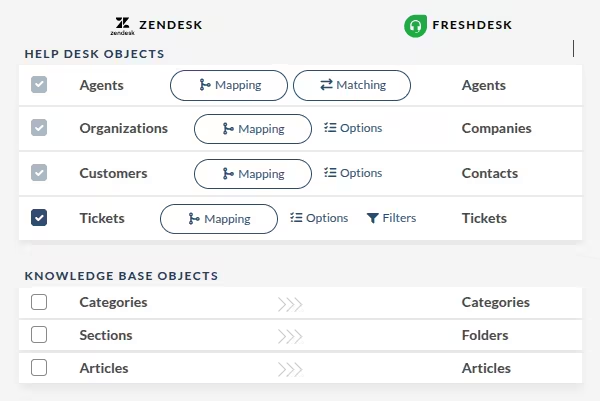
Choose which record sets to migrate: incidents, agents, tickets, tasks, and knowledge base articles. Migrate everything or scope the transfer to a defined subset — the wizard moves exactly what you select and nothing more. This is where you set the boundaries of the project before a single record leaves the source.
Map your fields
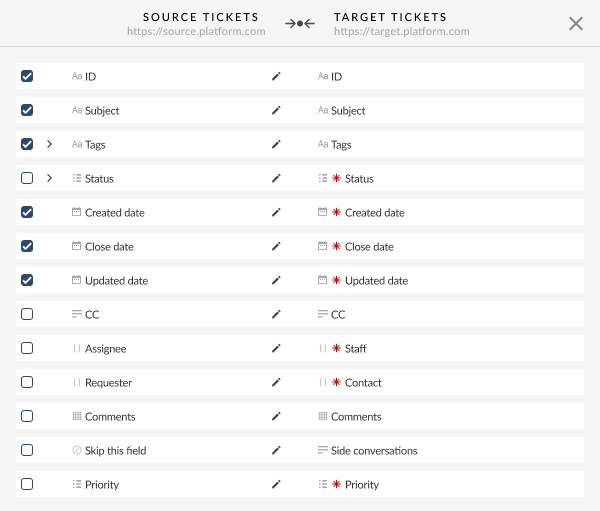
Map your fields across schemas that don't match. Align ticket statuses, priorities, request types, agents, and custom fields between source and target so nothing lands in the wrong place. The wizard suggests default mappings automatically, and you adjust anything that needs bespoke handling. This step protects referential integrity once records move at volume.
Run a Demo Migration
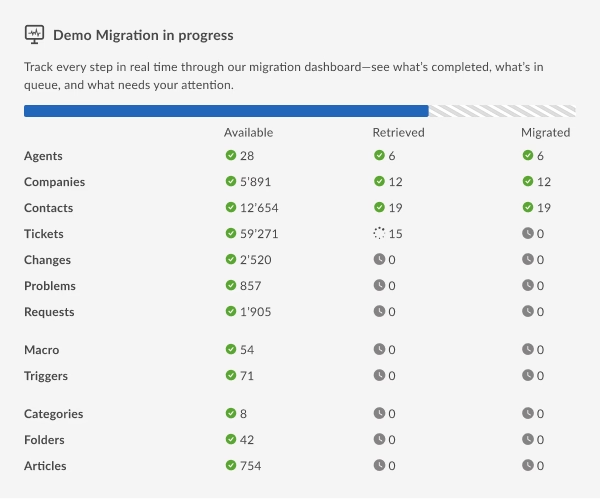
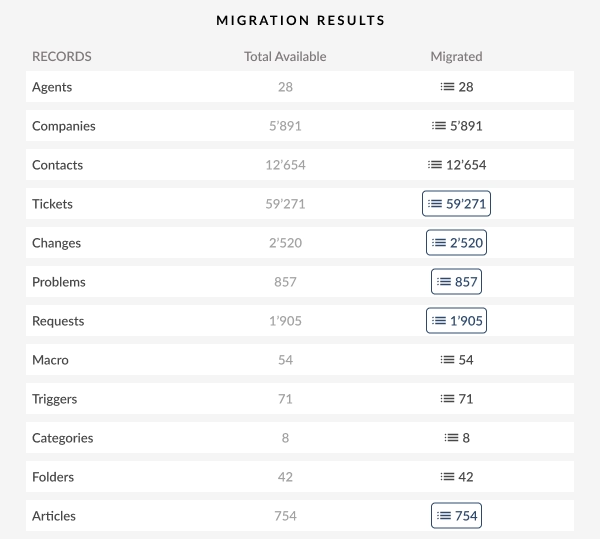
Run a free Demo Migration before committing to anything. The wizard transfers a small batch of records so you can check field mapping, attachments, and relationships on the target platform. Review the results, download the reports, and confirm everything mapped correctly. Adjust and re-run the Demo as many times as you need.
Launch the Full Migration
Launch the Full Migration once the Demo looks right. Help Desk Migration transfers every selected record set to the target platform with zero downtime, so your team keeps working through the process. Run a Delta Migration afterward to move any tickets created during the transfer, then complete your cutover with nothing left behind.
What the Migration Costs and How Long It Runs
Cost and timeline both come down to the same four variables:
Record volume
How many tickets, incidents, and related records you're moving
Custom field depth
How much mapping work each field needs
Number of source instances
One desk consolidating into one, or several consolidating into one
API availability
Whether your source platform exposes one, or whether you need a custom field path like Hexagon Software Group did
On Help Desk Migration's Standard plan, a basic migration with no pre-built customization runs $100 for 1,000 records, but 10,000 records under those same conditions runs $514, nowhere near ten times the price. The bigger the migration, the less you pay per record, and custom field depth moves that number harder than volume ever will.
Successful ITSM Data Migration Case Studies

A cross-ecosystem ITSM move
e-Core, an Atlassian consulting and application outsourcing company based in Porto Alegre, Brazil, needed to migrate one of its clients from Zendesk to Jira Service Desk. The client's database was large, and they wanted to keep every bit of it, not start fresh. Help Desk Migration split the transfer into two passes: closed tickets first, then the remaining volume, and built a custom fix so every ticket carried the correct Organization assignment after landing. Everything else came across clean: tickets, contacts, agents, companies, attachments, notes. e-Core ran multiple test migrations before committing to the full transfer, which is exactly the validate step this whole page circling back to. Their tech lead confirmed the necessary data arrived intact in Jira Service Desk.
e-Core's migration story
Short window, Zendesk consolidation, a partner's instance as the source
Lenovo Private Cloud Solution needed to move a significant volume of tickets from a partner's Zendesk instance into its own, fast, for a division based in Bucharest, Romania. Instead of a fully managed engagement, the team went self-service with the Migration Wizard and moved the ticket volume between instances in a short window. Speed wasn't the whole story, though. Lenovo needed that historical data preserved for future reference, and the operations manager later called out the account team's follow-up throughout the process.
Lenovo Private Cloud Solution's migration story
A legacy source with no API
Hexagon Software Group, a UK developer of specialist property and financial management software, needed off ReadyDesk and onto Freshdesk without an API connection on the source side. Help Desk Migration built a custom migration path covering both the help desk data and the knowledge base. Preserving that call history mattered more than it sounds like it should. Hexagon's revenue leans heavily on professional services, not just software licenses, and the client's senior consultant later pointed out that the migrated history gave the team a searchable record they could pull up on demand instead of starting from zero.
Hexagon Software Group's migration storyThree different shapes of the problem right here: a cross-ecosystem platform move, a squeeze on both record volume and timeline, and a legacy source with no API. Between the three, they cover a good chunk of what your own migration is probably going to look like. Call it data migration for IT service providers, call it ITSM migration. It doesn't matter. The job's the same either way. Move the record. Not just the ticket.
Before you scope the project: map your own record types
Here's the deal: the matrix above is Help Desk Migration's pattern, built from real projects, not a guess. But it's not your pattern yet. Grab it. Plug in your own platform pair. Walk into that scoping call already knowing where you'll hit friction, instead of finding out three weeks in when it's expensive to fix.
| Record type | General pattern | Confirmed for your platform pair? | Needs remapping? | Owner |
|---|---|---|---|---|
| Incidents | Moves directly | Yes (API supported) | Standard status & priority mapping | Service Desk Lead |
| Service requests | Moves directly | Yes (API supported) | Request catalog item mapping | Service Desk Lead |
| Change records | Moves directly | Yes (Schema match) | Risk, type & reason field mapping | Change Manager |
| Problem records | Moves directly | Yes (Schema match) | Root cause & linked incident relations | Problem Manager |
| Custom fields | Moves directly, conditional on schema match | Audit required | Create matching custom fields in target | ITSM Admin |
| Attachments | Moves directly | Yes (Direct file transfer) | No (Preserve inline & file attachments) | Migration Lead |
| SLA policies | Needs remapping | Rebuild in target | Recreate targets; historical metrics via custom fields | Service Delivery Manager |
| Approval chains | Usually rebuilt in the target | Rebuild in target | Configure workflow engine in target system | ITSM Process Owner |
| Configuration items | Needs remapping | Model dependent | Align asset models & CI dependency hierarchy | Asset / CMDB Admin |
Fill this out. Bring it to your Free Demo Migration. That's the difference between showing up with a guess and showing up with a plan, and it's how you de-risk the scoping conversation before it starts.
FAQs: Data Migration for IT Service Companies
ITSM migration means moving the records inside an IT service management platform, incidents, service requests, change records, problem records, SLA policies, approval chains, and configuration items, from one platform to another. It's different from a general help desk migration because the platform computes several of these record types on the fly instead of storing them, so you typically remap them rather than transfer directly. You'll hit this whenever you replatform to ServiceNow or a competing ITSM tool.
Most sources land on the same four: storage migration, database migration, application migration, and cloud migration. Storage moves data between physical or virtual storage systems. Database moves it between database platforms. Application moves it as part of swapping one software system for another. Cloud moves it into cloud infrastructure. None of these four centers on the service desk. Check Help Desk Migration's own process for the service desk version instead.
It depends on your record volume, your custom field depth, how many source instances you're consolidating, and whether your source platform exposes an API. Here's the twist: a small ticket volume with deep custom-field logic can cost more than a large, simple one, because mapping work drives price harder than ticket count does. See current pricing details.
It depends on your source platform, your target platform, and how much of the job needs a managed hand versus a self-service pass. For service desk and ITSM moves specifically, Help Desk Migration brings first-party project data across 100+ supported platforms, which sets it apart from a general-purpose ETL tool built for databases or applications. Compare delivery modes on the Help Desk Migration services page.
It usually means moving incidents, requests, change records, and configuration items into ServiceNow from another platform, or out of ServiceNow into a different one. ServiceNow computes SLA and approval state internally, so migrating into or out of it usually means remapping those record types rather than transferring them as is. See the ServiceNow migration page for platform-specific detail.
Under the ITIL framework: service strategy, service design, service transition, service operation, and continual service improvement. A platform migration typically falls inside service transition, since it changes how you deliver existing services without necessarily changing the strategy behind them. AI-assist features in the target platform increasingly touch this stage too. See AI in ITSM for what that means for your migrated history.
No single provider wins this for every IT services company. It comes down to record volume, platform pair, and API availability on your source side. Help Desk Migration has run IT services data migration projects of varying sizes, with 60.000+ completed migrations across its history. Compare Help Desk Migration's customers against your own industry and platform pair before you decide.
It depends on the specific ITSM platforms involved and the record types in scope. Help Desk Migration works across ServiceNow, Jira Service Management, Freshservice, Zendesk, SysAid, Ivanti, and ManageEngine ServiceDesk Plus, among others. Review published case studies for ITSM-specific migrations close to your own platform pair before you choose a provider.
People often call these the 7 Rs. They come out of cloud infrastructure migration: rehost, replatform, repurchase, refactor, retire, retain, and relocate. They describe how you move applications and workloads into the cloud, not how you move service desk records between platforms. A service desk migration is its own project, with its own record types and its own sequencing. See how Help Desk Migration handles that instead.
ITSM, IT service management, covers the practices you use to design, deliver, and support IT services: incident management, change management, request fulfillment, and more. It runs on a dedicated platform, like Jira Service Management, where those processes live as structured records. See migrating to Jira Service Management for how that record set moves between platforms.

Ready to Migrate Your ITSM Service Desk?
Run a free Demo migration to test your actual data on the target platform. No staging environment, no dummy data. Your real records, in the right place, ready to inspect.
Schedule a migration consultation
No credit card required SOC 2 certified 40,000+ migrations completed