Move your tickets, companies, and more from Vitally – easily
Elevate your Vitally data transfer by our developed data migration service. Undergo smooth data movement—whether extracting or consolidating your Vitally data, all without disruption. Experience the data migration process easily with a zero-cost Demo.

Lead the way in industry security
The data transfer tool offers encoded dialogues, secured servers, and leading authorization approaches across all levels
Built to bring value and save time
The automated data migration tool excludes workflow drops or inconveniences for your customers and agents
Transparent and scalable pricing
The trusted data replication tool delivers a balanced mix of feature + cost balance through its reasonable pricing policy


Discover Vitally data extract software features and capabilities
Automated data import tool
Data migration tool assists you in shifting data no coding, downtime, or pulling you from work.
Enterprise-level security
Help Desk Migration addresses security compliance needs and regulatory standards.
Data mapping to fine-tuned
Migrate the standard and custom fields during the Vitally migration to maintain the data mode unaltered.
Handle customer service interruption during Vitally migration
Keep flowing your processes routinely during the data transfer with our Delta option.
Devoted support service unit
Seeking assistance in Vitally data import? Our support team is only a click away.
Custom demo with selected data
Export up to 20 chosen record IDs (both tickets and KB articles) without cost.
Get movement planning done
Our agents develop careful import planning to streamline the help desk data shift.
Embrace your Vitally movement with a Concierge Migration
Entrust the planning, mapping, and preparing Full transfer to our team—we’ll take care of it perfectly for you!
Tailored data transfer
Let’s delve into platform you intent to move data from and any other business specifications you may have.
Data migration timeline: 1-2 weeks
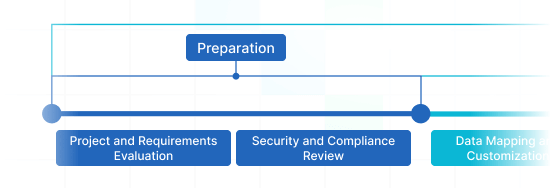
Preparation
Project and Requirements Evaluation
Initiate your transmit by reviewing Source records, operations, and applications. Evaluate data cleaning and field mapping to the Target. Formulate a migration strategy, involving the timeline and user coaching.
Security and Compliance Review
Verify data complies with safety regulations. Configure permissions and access controls to safeguard the transfer.
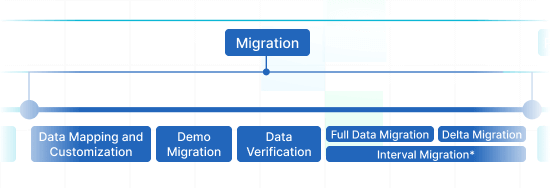
Migration
Data Mapping and Customization
Align data fields amongst your Source and Target. Define in-built custom options from the set or request particular customization for the data replication.
Demo Migration
Perform a trial Demo to view how the transfer service functions. Check results and adjust mapping as needed.
Data Verification
Review all moved data in the Target is precise, complete, and adequately structured.
Full Data Migration
Replicate all chosen data, covering tickets, contacts, attachments, and associated records.
Delta Migration
Catch any fresh or updated data that altered during the Full data replication.
Interval Migration*
Data transition can be halted and continued to match your outline, with no service disruption. You can stop up to five times for five days each, arranged by our sales team during operating hours.
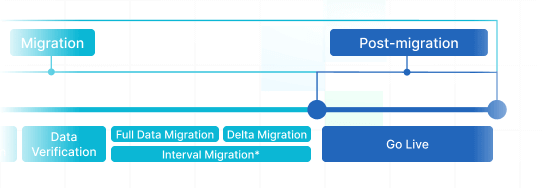
Post-Migration Phase
Go Live
Deploy the Target for all reps. Deactivate the Source if necessary and protect data backups.
-
 Having a smooth transition from Oracle Cloud to Zendesk. Amazing support and technical advice. Delivery was made according to the original project schedule. No extra charges than what was quoted.
 -
 The customer support team were kind, professional, and efficient throughout the entire process. We changed dates of our migration on them twice, and they rolled with the punches. Great customer service.
 -
 Did exactly what they advertised. They imported over 160,000 tickets for us from Desk.com to Zendesk. Quick support, good value and fairly priced.


Why transfer with Help Desk Migration?
-
No downtime
Shift data without interruption - ensure workflows operational and serve customers without hassle. -
Increased efficiency
Easily migrate data and set up standard and tailored fields with the out-of-box Migration Wizard. -
Organized ticket transmiting
The Migration Wizard transfers tickets and all related records, preserving the data structure unchanged on the Target. -
Personalized support
Our support reps is available to support you by means of chat, email, or phone. -
Thorough import strategy
Managers will create a comprehensive plan for data import, securing a smooth process and protected data. -
Custom options available
Pick automated options or seek personalization, and we'll guarantee your data is preserved.
Discover the ideal modification set for Vitally data migration
-
Enhanced data movement
Refine your migration workflow by personalizing how data objects are migrated
-
Comprehensive data filtering Bestseller
Filter your data with advanced options and benefit from the criteria-based data selection
-
Smooth integration data migration
Effortlessly shift integration information by migrating linked record IDs, URLs and more
-
Enriching moved data
Elevate migrated data by integrating additional data such as ticket tags, legacy IDs, and more
What is the Vitally data integration price?
The price breakdown for your Vitally integrating lies in a few key aspects: the number of entities you want to migrate, the complexity of migration specifications, and any adjustments or features in play. Go for a Free Demo movement to test-drive the Migration Wizard's workflow and discover the pricing for your Vitally data integration.
Vitally Export
Get the best out of our automated migration software for exporting Vitally data – no coding required, yielding excellent results in less time. Leverage secure, rich features to streamline your Vitally data export journey.
| Vitally objects | Zendesk objects | |
|---|---|---|
| Help desk | ||
| Admins | Agents | |
| Accounts | Organizations | |
| Users | Customers | |
| Conversations | Tickets | |
Vitally data export app
Forward-looking customer support operations refer to an effective Vitally data export. Our team has crafted full-featured Vitally export solution to make easier this vital extraction process.
Our Vitally data exporter helps to handle the complexities shifting data to Vitally securely. You can execute a Vitally CSV export or replicate from any other help desk, service desk, ITSM in a couple clicks. Say goodbye to copy/paste and hello to a more efficient data extraction workflow.
Use built-in customizations in a click
Enhance your exported tickets with tags, move inline images, accelerate data extraction by skipping attachments, seamlessly transfer content translations, call-recordings, and other functionalities.
Demo prior to acquisition
Test-drive Help Desk Migration for Vitally extractions in a free Demo. This data movement process goes as the Full migration, allowing you to tune everything accordingly.
Remarkable customer service
Help Desk Migration's support squad is ever-ready to help you in Vitally shift setup, and find the efficient solution. Check out our support service plans for more personalized data transfer experience.
Discover how Vitally data transfer works
Help Desk Migration handles data migration within mere hours or days, depending on the volume of records. With our Migration Wizard and a step-by-step on-screen guide to transferring data from helpdesks, databases, or shared inboxes automating the replication into CSV files or alternative help desk platforms.
Connect platforms
Connect your source and target system
Map and match data
Specify how your Vitally data should be replicated
Test-drive
Set a free Demo to assess the import tool and results
Full Data Migration
Initiate or plan your Vitally import
All-Packed Vitally data import in a few clicks
Replicate your Vitally data without trouble from what really matters—serving your customers’ inquiries.