Zero Downtime Glassix Data Migration Services
Your Glassix data transfer begins with the refined support service data migration platform. The automated data transfer can’t be simpler—either you want to import, extract or consolidate your Glassix data without downtime. Try out the data migration steps in a no charge Demo.

Lead the way in industry security
The data transfer tool offers encoded dialogues, secured servers, and leading authorization approaches across all levels
Built to bring value and save time
The automated data migration tool excludes workflow drops or inconveniences for your customers and agents
Transparent and scalable pricing
The trusted data replication tool delivers a balanced mix of feature + cost balance through its reasonable pricing policy


Discover Glassix data movement tool functions and capabilities
Automated data import service
Data transfer tool assists you in move data no coding, causing downtime, or pulling you from work.
Enterprise-level defense
Help Desk Migration meets security compliance and regulatory standards.
Data integration to keep everything finely adjusted
Shift the required and custom fields during the Glassix migration to preserve the data structure unmodified.
Overcome delay in during Glassix movement
Keep flowing your service as usual during the data transfer with our Delta option.
Professional customer service unit
Need help in Glassix data transfer? Our support team is in one click.
Custom demo with selected data
Transfer up to 20 chosen record IDs (20 tickets and 20 KB articles) without cost.
Get movement planning done
Our reps offer detailed import planning to simplify the help desk data shift.
Embrace your Glassix transfer with a Concierge Migration
Entrust the planning, mapping, and setting up Full transfer to our team—we’ll take care of it skillfully for you!
Exclusive data movement
Let’s converse about platform you intent to transfer data from and any other business needs you would like to address.
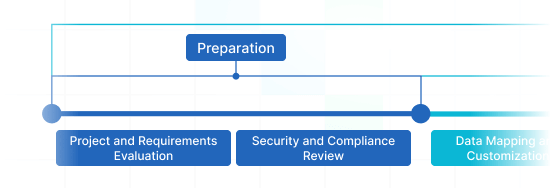
Data migration timeline: 1-2 weeks
Preparation
Project and Requirements Evaluation
Initiate your migration by reviewing Source data, procedures, and applications. Review data filtering and field mapping to the Target. Create a migration strategy, that consists of the outline and reps training.
Security and Compliance Review
Make sure data adheres to safety regulations. Establish permissions and access controls to safeguard the movement.
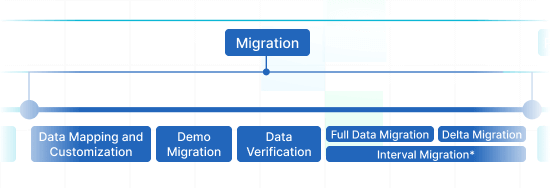
Migration
Data Mapping and Customization
Match records fields amongst the Source and Target. Handpick in-built custom capabilities from the list or request distinct tailored adjustments for the record transfer.
Demo Migration
Carry out a free test Demo to see how the transition solution performs. Verify results and adjust settings as necessary.
Data Verification
Confirm all transferred data in the Target is correct, complete, and adequately formatted.
Full Data Migration
Replicate all required data, including tickets, contacts, attachments, and correlated records.
Delta Migration
Catch any newest or updated data that altered for the duration of the Full data replication.
Interval Migration*
Data transition can be interrupted and resumed to accommodate your outline, with no service disruption. You can pause up to five times for five days each, adjusted by our sales team during work hours.
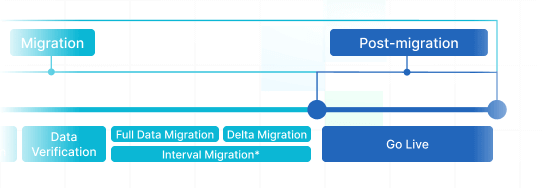
Post-Migration Phase
Go Live
Present the Target for all users. Deactivate the Source if necessary and secure data backups.
-
 Having a smooth transition from Oracle Cloud to Zendesk. Amazing support and technical advice. Delivery was made according to the original project schedule. No extra charges than what was quoted.
 -
 The customer support team were kind, professional, and efficient throughout the entire process. We changed dates of our migration on them twice, and they rolled with the punches. Great customer service.
 -
 Did exactly what they advertised. They imported over 160,000 tickets for us from Desk.com to Zendesk. Quick support, good value and fairly priced.


Why transfer with Help Desk Migration?
-
No downtime
Move records without disruption - maintain workflows efficient and aid customers seamlessly. -
Increased efficiency
Quickly move data and set up standard and tailored fields with the smart Migration Wizard. -
Seamless ticket retrieval
The Migration Wizard migrates tickets and all linked records, maintaining the data structure consistent on the Target. -
Expert support
Our support crew is ready to guide you through chat, email, or phone. -
Effective migration planning
Managers will formulate a comprehensive plan for data import, guaranteeing a efficient process and reliable records. -
Custom options available
Opt for pre-designed options or seek personalization, and we'll make sure your data is on point.
Discover the matching customization suite for Glassix data migration
-
Enhanced data migration
Refine your migration workflow by personalizing how data objects are migrated
-
Comprehensive data sorting Bestseller
Filter your data with advanced options leveraging criteria-based sorting to get maximum benefits
-
Smooth migrate the integrated information
Effortlessly import integration details by migrating linked record IDs, URLs and more
-
Enriching shifted data
Elevate migrated data by weaving in additional elements such as ticket tags, legacy IDs, and more
What is the Glassix data replication price tag?
The price breakdown for your Glassix migrating hinges on several crucial aspects: the volume of records you want to transfer, the complexity of migration requirements, and any adjustments or features in play. Run a Free Demo migration to test-drive the Migration Wizard's performance and figure out the pricing tag for your Glassix data integration.
Glassix Export
Get the best out of our automated transfer tool for extracting Glassix data – no coding required, yielding excellent results quickly and effortlessly. Leverage secure, rich features to simplify your Glassix data export journey.
| Glassix objects | Zendesk objects | |
|---|---|---|
| Help desk | ||
| Users | Agents | |
| Contacts | Customers | |
| Tickets | Tickets | |
Glassix data export app
Well-structured customer service operations rely on an effective Glassix data export. Our team has engineered comprehensive Glassix export app to unravel this vital transfer process.
Our Glassix data exporter assets in extracting data to Glassix securely. You can setup a Glassix CSV export or shift from any other help desk, service desk, ITSM in several clicks. Say goodbye to copy/paste and hello to a more efficient data export workflow.
Use out-of-the-box customizations in a click
Upgrade your exported tickets with tags, shift inline images, accelerate data extraction by excluding attachments, seamlessly move content translations, call-recordings, and more.
Try before you buy
Test-drive Help Desk Migration for Glassix extractions in a free Demo. This data extraction process mirrors the Full migration, enabling you to tune everything accordingly.
Remarkable support service
Help Desk Migration's support squad is always prepared to help you in Glassix extraction setup, and find the efficient solution. Explore our support service plans for more personalized data replication experience.
Discover how Glassix data import works
Help Desk Migration handles data replication within a few hours or days, depending on the record load. It comes with a Migration Wizard and a step-by-step on-screen guide to shifting data from help desk tools, databases, or shared inboxes and replicating it into CSV files or other help desk tools automatically.
Connect platforms
Connect your source and target solution
Map and match data
Specify how your Glassix data should be imported
Test-drive
Go for a free Demo to inspect the import tool and outcomes
Full Data Migration
Begin or timetable your Glassix import
Automate your Glassix data migration
Migrate your Glassix data with no trouble from what really matters—resolving your customers’ inquiries.