NinjaOne Migration: Move Tickets, Contacts, and Articles to Any Help Desk
NinjaOne runs a NinjaOne helpdesk module on top of its RMM platform, and it handles basic tickets fine, until your team outgrows it. Migrating off NinjaOne should never force you to abandon your operational history. A NinjaOne file transfer via Help Desk Migration means your tickets, your contacts, and every knowledge base article move automatically, without a single afternoon lost to CSV files.
No credit card required Free demo takes minutes SOC2 & GDPR compliant
Interactive Migration Calculator
Adjust sliders to estimate your migration time and cost savings
Estimates based on 60,000+ successful migrations. Actual results may vary.
The companies who bet everything on this migration going right


How does NinjaOne ticketing data export work?
Connect platforms
Enter read-only, encrypted credentials for NinjaOne and your target platform. The Migration Wizard never stores your login information, and it never needs write access to look around.
Map fields
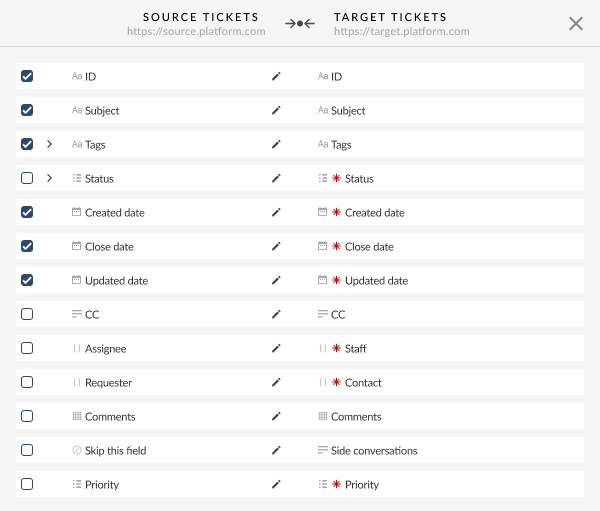
Match NinjaOne tickets, contacts, and knowledge base fields to their counterparts. The Migration Wizard proposes a default mapping automatically. You can adjust manually wherever a target platform has no direct match.
Run Demo
Migrate a sample of your real NinjaOne records for free. It's not a mockup environment. It's the same engine that runs your Full migration, working on actual tickets.
Review results
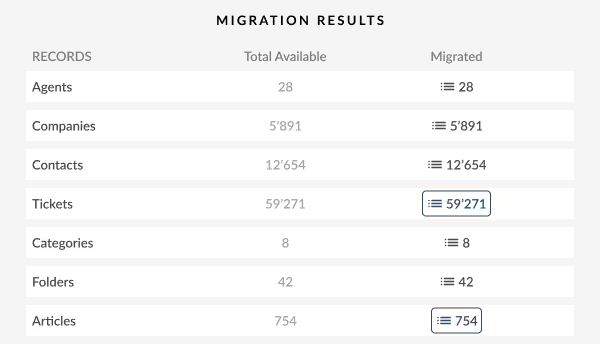
Check the migrated records in your target platform. If something looks off, tell us, and we'll adjust the mapping and run it again.
Launch migration
Run the Full migration while your team keeps working in NinjaOne. Delta migration will move anything created or changed after the migration started, so nothing gets left behind.
What NinjaOne data migrates
NinjaOne's ticketing module holds four core record types: technicians, organizations, contacts, and tickets, plus a knowledge base made up of folders and documents. During NinjaOne ticketing data export via Help Desk Migration, you move every one of them, along with the comments, notes, and attachments tied to each ticket.
Technicians (agents)
Full Names, Email Addresses, Internal Roles, User Statuses, Department Assignments.
Contacts and end-users (customers)
First & Last Names, Primary & Secondary Email Addresses.
Companies (organizations)
Company Names, Account Manager Associations.
Tickets
Unique Ticket IDs, Subject/Title Lines, Full Description Text, Ticket Statuses (New, Open, Waiting, Resolved, Closed), Priority Attributes, Ticket Types/Categories, Creation Timestamps, Assigned Technicians, Requesting Contacts.
Ticket elements and history
Public Customer Comments, Private Agent Notes, Embedded Inline Images, Ticket Tags, Custom Fields, Linked Parent/Child Issues.
Knowledge base (articles)
Article Titles, Rich Text/HTML Article Content, Category and Folder Structures, File Attachments.
What this migration doesn't touch
Help Desk Migration moves the ticketing side of your NinjaOne account: tickets, contacts, organizations, and your knowledge base. Your NinjaOne RMM setup keeps running exactly as it does today. Endpoint monitoring, patch management, remote access, and your automation scripts stay right where they are.
That separation matters because most NinjaOne customers never want to leave NinjaOne entirely. They want a dedicated help desk for support work while NinjaOne keeps managing devices. Migrating your ticketing data doesn't require closing your NinjaOne account or changing anything about how you monitor your fleet.
- • Tickets & Histories
- • Contacts & Users
- • Companies / Orgs
- • Knowledge Base
- • Endpoint Monitoring
- • Patch Management
- • Remote Access
- • Automation Scripts
Migrate off NinjaOne data to these platforms
We support fully automated NinjaOne data export workflows to all leading customer support, service desks, and ITSM platforms:
Still deciding where to land? Our NinjaOne alternatives guide compares the options first.
What are the most popular NinjaOne migration routes?
Our migration service supports dozens of platforms. These six routes cover most of the teams leaving the NinjaOne ticketing module.
| You are | Route | Why teams take it |
|---|---|---|
| An MSP | NinjaOne to Halo ITSM | Halo builds its data model around MSP billing, so time entries and linked tickets land cleanly. Technicians never switch tools to invoice a client for an hour they just logged. |
| A support team | NinjaOne to Zendesk | NinjaOne's ticketing module is a sidecar bolted onto an RMM platform. Zendesk brings automation rules, SLA policies, and reporting the sidecar never had room for. |
| Internal IT | NinjaOne to Freshservice | Incident, problem, and change management as separate governed processes, not one flat queue. The most common path for a formal ITIL practice running alongside device management. |
| An Atlassian shop | NinjaOne to Jira Service Management | Tickets sit beside the projects and code your developers touch daily. Jira Assets then tracks the same devices NinjaOne's RMM side already watches, so device data stops living in two systems. |
| Enterprise support | NinjaOne to Salesforce Service Cloud | Ticket records fold in next to sales pipelines, multichannel routing, and full client history. When support and sales share a customer record, running tickets elsewhere splits that record in two. |
| Regulated IT | NinjaOne to ServiceNow | Strict ITIL governance, service catalogs split across departments, and CMDB asset mapping that goes deeper than a flat device list. Shows up most where audits and change control aren't optional extras. |
Professional and Concierge migration services
While our automated self-service tool handles standard migrations, enterprise environments often require dedicated project manager oversight and tailored data transformations.
Custom migration services
If your organization requires specialized data transformations, custom database cleansing, or filtered entity transfers (such as migrating only specific client organizations or filtering out closed tickets prior to a specific date), our tech team builds custom processing modules tailored precisely to your criteria.
Full-service Concierge options
Hand off your entire NinjaOne migration project to our senior technical specialists. With our Concierge service, an assigned project manager takes total ownership of your data transition:
- Discovery and planning: We analyze your NinjaOne workspace structure, audit custom fields, evaluate target platform settings, and produce your project plan.
- Setup and mapping: Our engineers configure API connections, build custom field mapping profiles, and set up entity filtering rules.
- Staging and validation: We execute dry-run migrations in staging environments, performing rigorous field-level QA audits to ensure total data fidelity.
- Off-hours cutover: We execute your production migration and final Delta Sync during nights or weekends to ensure zero disruption for your support staff.
Zero downtime, with Delta and Interval migration
Switching service desk platforms should never require shutting down customer support or locking technicians out of their queues. Delta Migration keeps operations continuous throughout the entire NinjaOne file transfer.
Full Migration
- The Migration Wizard transfers your historical NinjaOne data to the target platform.
- Technicians keep resolving new incoming tickets inside NinjaOne.
Incremental Delta Synchronization
- Delta Sync scans NinjaOne for records created or updated during Phase 1.
- The engine transfers only new tickets, updated statuses, and new agent notes.
Final Cutover
- Reroute incoming support email channels to the target desk.
- Technicians log into the target platform with zero missing records.
Run the primary migration
Launch the main data migration while your support staff keeps working inside NinjaOne as usual.
Keep support running
Incoming emails, new ticket submissions, technician responses, and status changes all proceed normally in NinjaOne while historical data transfers in the background.
Run an incremental Delta Sync
Once the primary migration finishes, schedule your cutover and launch a Delta Sync. It scans NinjaOne for new tickets, updated statuses, fresh notes, and newly added time entries, then transfers those updates.
Complete the cutover
Reroute your support channels to the new help desk. Your team takes over without losing a single customer message or creating gaps in service records.
Interval migration: run the transfer on your schedule, not ours
Pause it for the workday, resume it at night, and it picks up exactly where it left off.
That flexibility matters most for MSPs and IT teams with no quiet hours to spare. Pause before the morning ticket rush, let it run overnight, pause again before your team logs in. Split it across a few evenings, or run it straight through a weekend. Either way, the migration never competes with your technicians for API capacity.
Delta and Interval also work together: schedule the bulk across several nights with Interval, then run one final Delta Sync at cutover to catch everything created in between.
A three-night transfer
What is the NinjaOne data transfer cost?
The cost depends on what actually drives the number.
A few thousand tickets with no extras costs a lot less than 50,000 tickets carrying call recordings, time entries, and custom field mapping. A flat rate before seeing your data is just a guess.
The price per record isn't linear
The more you migrate, the less you pay per ticket. Spread across more records, that fixed cost splits into smaller pieces — so the more you migrate, the less you pay per ticket.
Run a free Demo first. It's the real Migration Wizard working on a real sample of your NinjaOne records, so you get an accurate cost before committing to anything.
Why choose Help Desk Migration over alternatives or manual migration?
Attempting to export NinjaOne data manually, or relying on basic CSV file imports, exposes your organization to technical failure, data corruption, and significant labor costs.
| Risk | Manual API Scripts | Generic CSV Imports |
Help Desk Migration
|
|---|---|---|---|
| API limits | ✕ Fails on rate limits | — |
Managed rate throttling
|
| Media | ✕ Strips inline images | ✕ Converts rich text to plain |
Converts and relinks media
|
| Setup | ✕ Weeks of custom code | ✕ Detaches call and time records |
Automated migration tool
|
| Progress | ✕ No live visibility | ✕ Loses original timestamps |
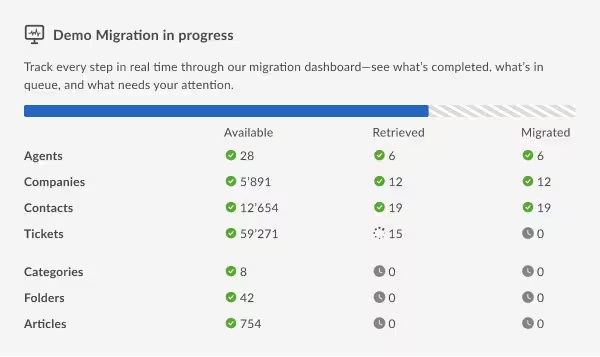
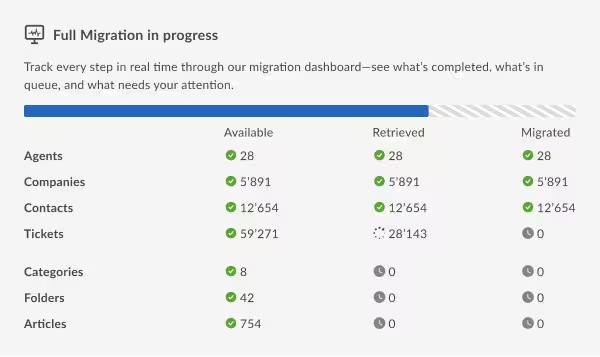
Live dashboard and validation
|
| Data integrity | ✕ High risk of orphan records | ✕ Creates duplicate entries |
Automated deduplication
|
Shortcomings of custom API scripts
Building an in-house ETL script against the NinjaOne REST API requires software development expertise and deep familiarity with source/target database schemas.
- Rate-limit throttling: NinjaOne enforces strict rate limits on API endpoints (/api/v2/ticketing/ticket). Custom scripts that make unthrottled calls face instant rate limiting, leading to timed-out execution runs and incomplete data extracts.
- Pagination complexity: Extracting thousands of ticket records requires navigating deeply nested pagination loops. A single uncaught API exception during page iteration forces developers to restart the extraction process from scratch.
- Token authentication handling: Long-running migration scripts must constantly manage OAuth token refreshes and handle silent API disconnects without dropping records during execution.
Risks of CSV export/import
Attempting a manual CSV NinjaOne file transfer destroys the structural context that makes your help desk operational:
- Lost relational links: Flat spreadsheets cannot preserve the complex web linking contacts to companies, tickets to time entries, or tickets to parent issues.
- Broken attachment paths: CSV files store file names as plain text strings. They cannot store physical file payloads, inline screenshot images, or linked audio recordings.
- Corrupted rich text formatting: HTML formatting, code blocks, bullet points, and hyperlinked text inside ticket descriptions get stripped or converted into unreadable plain text strings during CSV conversions.
Help Desk Migration service
Help Desk Migration eliminates these technical risks entirely. Our cloud architecture manages API rate limits dynamically, transforms nested data structures into target-native schemas, converts media attachments automatically, and maintains verified audit logs across every phase of your NinjaOne data export.
- SOC2 and GDPR compliant. Full policy and audit detail lives in our Trust Center, not a sales conversation.
- Zero downtime, backed by Delta migration. After your full migration completes, Delta migration catches any ticket created or updated in NinjaOne while it ran, so your new platform stays current with no duplicates and no gaps.
- A dedicated support team. Reach us by chat, email, or phone, not a support ticket queue.
- A concierge option. Hand off planning, field mapping, and prep work entirely, and our team runs the migration for you.
NinjaOne Migration FAQ
Yes. The migration service extracts the media file links associated with your NinjaOne tickets and imports them directly into your target platform. They attach securely to target ticket records as playable, downloadable MP3 media attachments.
You decide how contact data transfers. You can choose to migrate your complete NinjaOne customer directory, or enable our built-in setting to "Migrate only contacts related to tickets." This setting automatically screens out orphan, inactive, or unassociated contacts, keeping your target user directory clean and focused.
The Migration Wizard automatically detects all custom ticket fields configured inside your NinjaOne helpdesk workspace. During setup, you map those custom fields, whether text lines, numbers, checkboxes, date pickers, or dropdown lists, directly to corresponding native or custom attributes in your target platform.
Our migration platform includes automated API rate-limit management. If NinjaOne or your target platform throttles API requests during extraction or writing, the Migration Wizard automatically pauses execution, applies an exponential backoff algorithm, and resumes data processing safely once rate limits reset. That way, it prevents script crashes or lost records.
It depends on how much you're carrying: how many tickets, contacts, and articles, and how many of the sixteen customization options you switch on. A smaller account with a few thousand tickets moves faster than one with years of history behind it.
Your NinjaOne account stays active and untouched the whole time we're working. We don't delete, archive, or change anything in your source account, so if something looks off in the new platform, the original ticket is still sitting in NinjaOne to check against.
Once you've confirmed everything landed right, whether you keep the ticketing module running, scale it back, or shut it off entirely is up to you. Most MSPs and IT teams keep NinjaOne running for what it does best, RMM, and just stop sending new tickets through its ticketing side.
Custom fields migrate along with the rest of your ticket and contact data, wherever your target platform has an equivalent field to receive them. If a custom field doesn't have a direct match, we flag it during the mapping stage of your free demo, so you can decide whether to map it manually, drop it, or store it as a note instead.
Yes. MSPs running separate NinjaOne instances for different regions or business units can combine them into a single target platform, or keep them separate, depending on how you want your new help desk organized. Mention this during your scoping call, so your project manager can plan the mapping accordingly.

Move your NinjaOne help desk without rebuilding it
Reduce the cost, complexity, and risk of custom API scripting or manual CSV data exports. Test your NinjaOne migration today using our free, automated demo.
No credit card required Complete setup in under 5 minutes