Richpanel Migration: Move Your Customer Service Data Out of Richpanel
Move tickets and contacts out of Richpanel into the customer service platform of your choice. Help Desk Migration automates the transfer, so your team keeps working while data moves in the background.
Interactive Migration Calculator
Adjust sliders to estimate your migration time and cost savings
Estimates based on 60,000+ successful migrations. Actual results may vary.
5 Steps to Migrate Your Richpanel Data
Help Desk Migration moves your data out of Richpanel through a guided, five-step process built for accuracy and speed. You connect Richpanel and your new platform, map the records you need, and run a free demo migration before committing to anything. Once you approve the results, the full migration runs automatically, and a final validation pass confirms every ticket and contact landed exactly where it should.
Connect Richpanel as Your Source Platform
Give Help Desk Migration secure, read-only API access to Richpanel and your destination platform. Richpanel works as a source only, so this connection is one-directional — your Richpanel account stays untouched throughout.
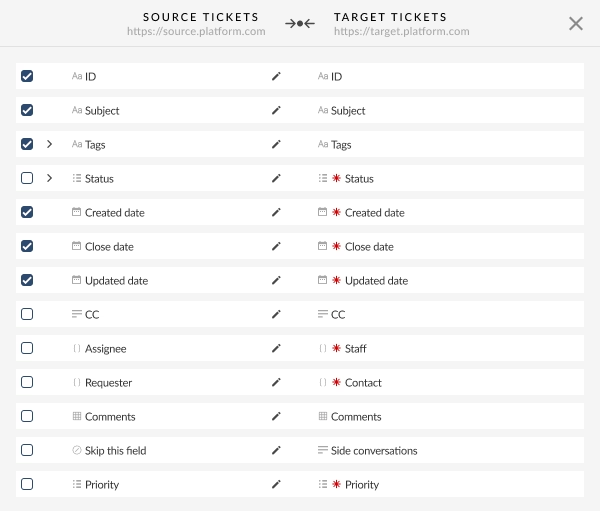
Choose required records and go through field mapping
Select the entities you want to move — tickets or contacts — and Help Desk Migration automatically maps standard fields to your destination platform. You review and adjust the mapping before anything moves.
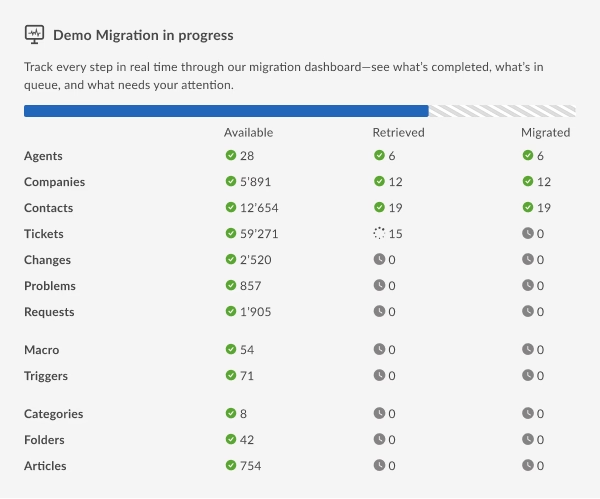
Choose additional options and run a Free Demo Migration
Prioritize your newest tickets, hand-pick specific records for your demo, or keep inline images embedded. Then run the demo against a sample of your real Richpanel data — no cost, no risk, no obligation.
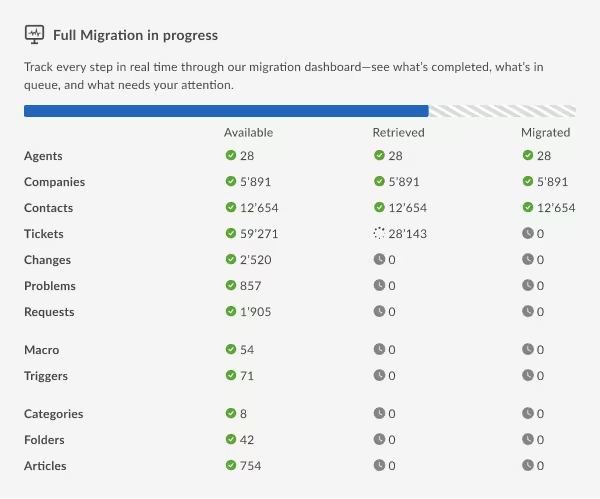
Launch Your Full Migration
Once the demo results look right, schedule and launch the full migration. Help Desk Migration transfers every ticket and contact on your timeline, with progress visible throughout. Your Richpanel account and new platform both stay live the entire time.
Validate results and go live
After migration, Help Desk Migration runs a validation pass comparing record counts and key fields between Richpanel and your new platform. Spot-check records yourself, then flip your team over whenever you're ready.
What Data You Can Migrate From Richpanel
Tickets & Conversation History
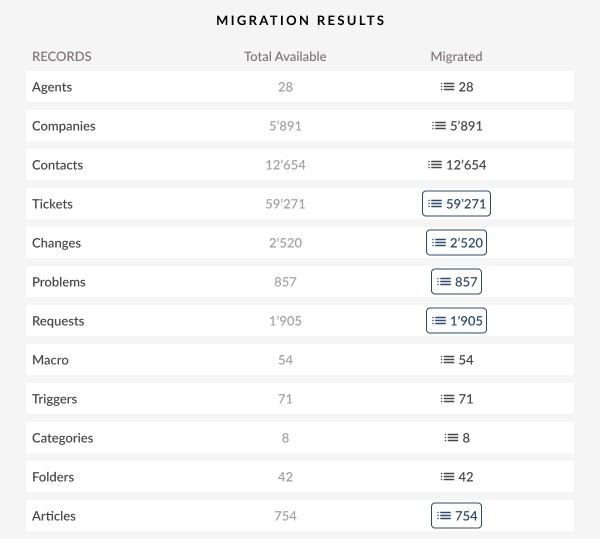
Tickets migrate with their full history — requester, assignee, group, attachments, comments, tags, and created, updated, and closed dates. Richpanel's API doesn't expose company or custom fields on tickets, and doesn't expose CC or first response time, so those attributes aren't part of the transfer.
Contacts
Contacts migrate with tags, custom fields, and phone numbers intact, so the people behind every ticket stay connected in your new platform.
Richpanel doesn't support Company records, Knowledge Base, or ITSM objects through Help Desk Migration, and — since it's source-only — none of its data can be migrated back in.
Richpanel's AI Features and What Your Migration Needs to Preserve
Richpanel positions itself as AI customer service software built to resolve tickets automatically, using historical conversation data to handle repetitive requests. Those features depend on complete ticket data — missing tags or stripped comment threads limit what the system can learn from past interactions.
Help Desk Migration preserves full ticket and contact data during migration, so whatever platform you're moving your Richpanel data into, it arrives structured and ready to support automation or reporting from day one.
Advanced Options for Larger Richpanel Migrations
Delta Migration
Richpanel keeps generating new tickets while you're planning your move. Delta Migration lets you run a second, smaller pass after the main migration that transfers only what changed since the first run.
What is Delta Migration?Interval Migration
If you're not ready to fully cut over yet, Interval Migration repeats the transfer from Richpanel on a schedule you choose — daily, weekly, or another cadence.
What is Interval Migration?Customizations
Every Richpanel setup is a little different. When out-of-the-box mapping doesn't cover an edge case, the Help Desk Migration team builds a custom migration script tailored to your specific data structure.
How can I customize my migration?Platforms You Can Migrate Your Richpanel Data Into
Help Desk Migration moves Richpanel data into 40+ platforms, including Zendesk, Freshdesk, Gorgias, and HubSpot Service Hub. Since Richpanel works as a source only, this is a one-way move — pick the platform that fits your team, and your tickets and contacts transfer into it.
Accelo
Atera
Atlas
Autotask PSA
BMCHelixITSM
BoldDesk
Chatwoot
ConnectWise
Crisp
CSV
Custify
Deskpro
DevRev
Dixa
Document360
Drift
Dynamics 365
eDesk
eGain
Enchant
Forumbee
FreeScout
Freshchat
Freshdesk
Freshservice
Front
FyneDesk
Gladly
Glassix
Gleap
GLPI
Gmail
Google Docs
Gorgias
Groove
Halo Service Solutions
HappyFox
Harmony
HelpCrunch
HelpDesk
HelpDocs
Helpjuice
Help Scout
HelpShift
HelpSpot
HubSpot Service Hub
InstantDocs
Intercom
Ivanti
Jira Service Management
Jitbit HelpDesk
Kayako
Kayako Classic
KnowledgeOwl
Kundo
Kustomer
Lansweeper
Live Agent
LiveChat
Manage Engine
Mayday
Missive
NinjaOne
Odoo Helpdesk
Oracle Service Cloud (RightNow)
osTicket
((OTRS)) Community Edition
Outlook
Paligo
Plain
Planhat
Pylon
Reamaze
Request Tracker
Respond.io
Richpanel
Salesforce Service Cloud
ServiceDesk Plus
ServiceNow
SherpaDesk
Siit
SmarterTrack
SolarWinds Service Desk
SolarWinds Web Help Desk
SparrowDesk
Spiceworks
Spiceworks Cloud
SQLite
SuperOps
SupportBee
SupportPal
Syncro
SysAid
SysAid (Cloud)
Tawk.to
TeamSupport
TeamworkDesk
Thena
Thulium
Tidio
TOPdesk
Trengo
Unthread
Vitally
Vivantio
Zammad
Zendesk
Znuny
Zoho Desk
Zoho Mail
Check the name for typos or leave us a message.

Richpanel Security Migration
GDPR-compliant
Your data privacy matters. Help Desk Migration fully follows GDPR guidelines, so every step of your Richpanel export meets rigorous European data protection standards, giving you and your customers peace of mind.
SOC 2 Type II, SOC 3 certified
You can be confident that your Richpanel migration is in safe hands. Help Desk Migration's SOC 2 Type II, SOC 3 certification means that their security practices are independently audited and meet top industry standards for handling sensitive information.
Encrypted during transit and storage
Your data is protected by strong encryption from the moment it leaves Richpanel until it safely arrives in your new platform. This keeps your information secure both in transit and at rest.
No third-party access
Your data stays private throughout the migration. No third parties ever see or handle your information — only trusted Help Desk Migration professionals manage your transfer.

Why Teams Trust Help Desk Migration to Move On From Richpanel
Ecommerce support teams pick Help Desk Migration because switching platforms shouldn't mean losing ticket and customer history. Instead of exporting spreadsheets and rebuilding tickets by hand, you get automated field mapping, a free demo migration to test accuracy first, and a dedicated team behind 50,000+ completed migrations.
Richpanel Migration FAQs
Richpanel is an AI-powered customer service platform, often used by ecommerce brands, that automates ticket resolution across channels.
No. Richpanel is supported as a source platform only — Help Desk Migration can move your data out of Richpanel into another supported platform, but it doesn't support importing data into Richpanel.
Help Desk Migration supports 40+ destination platforms, including Zendesk, Freshdesk, Gorgias, and HubSpot Service Hub.
No. Richpanel's data model doesn't expose a company entity through its API, so Help Desk Migration moves tickets and contacts only.
Requester, assignee, group, attachments, comments, tags, and created/updated/closed dates all transfer. Richpanel's API doesn't expose company or custom fields on tickets, or CC and first response time.
Migration time depends on your data volume — ticket count and attachments are the main factors. Most migrations complete within a few days.
Yes. Help Desk Migration is GDPR-compliant and SOC 2 Type II / SOC 3 certified, encrypts data in transit and at rest, and never grants third parties access to your information.
Yes. It stays fully live and usable throughout the migration, so your team keeps working without interruption.
Yes. Every Richpanel migration includes a free demo migration that transfers a sample of your real data first, so you can check field mapping and accuracy before running the full transfer.
No. Help Desk Migration is a no-code, self-service tool — you connect both platforms, select what to migrate, and review field mapping through a guided interface.