Enchant Migration: Move Your Data Out of Enchant to a New Platform
Move tickets and contacts out of Enchant into the help desk platform of your choice. Help Desk Migration automates the transfer, so your team keeps working while data moves in the background.
Interactive Migration Calculator
Adjust sliders to estimate your migration time and cost savings
Estimates based on 60,000+ successful migrations. Actual results may vary.
5 Steps to Migrate Your Enchant Data
Help Desk Migration moves your data out of Enchant through a guided, five-step process built for accuracy and speed. You connect Enchant and your new platform, map the records you need, and run a free demo migration before committing to anything. Once you approve the results, the full migration runs automatically, and a final validation pass confirms every ticket and contact landed exactly where it should.
Connect Enchant as Your Source Platform
Give Help Desk Migration secure, read-only API access to Enchant and your destination platform. Enchant works as a source only, so this connection is one-directional — your Enchant account stays untouched throughout.
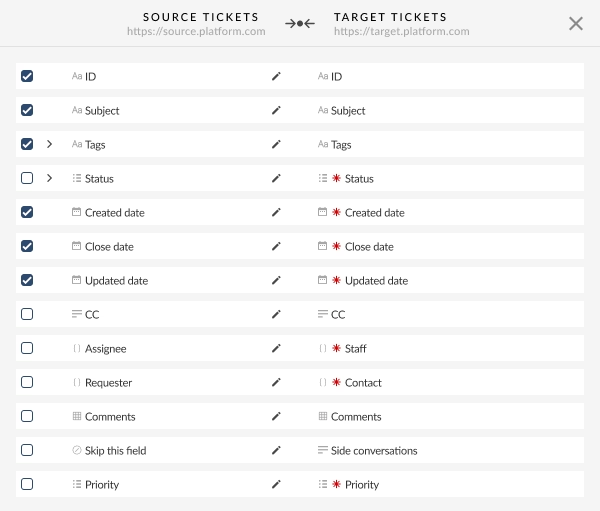
Choose required records and go through field mapping
Select the entities you want to move — tickets or contacts — and Help Desk Migration automatically maps standard fields to your destination platform. You review and adjust the mapping before anything moves.
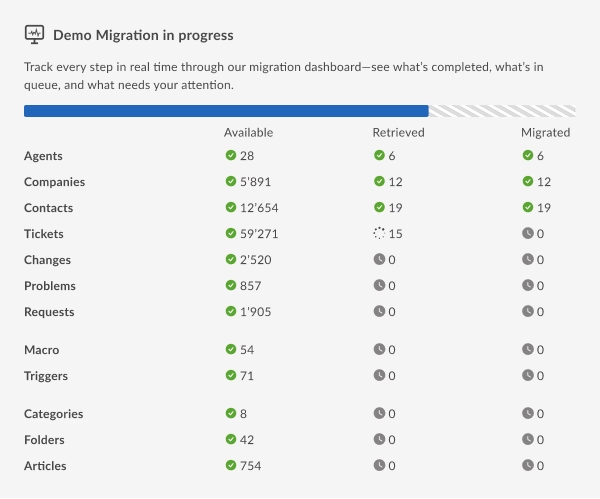
Choose additional options and run a Free Demo Migration
Hand-pick specific tickets for your demo, or keep inline images embedded in ticket descriptions. Then run the demo against a sample of your real Enchant data — no cost, no risk, no obligation.
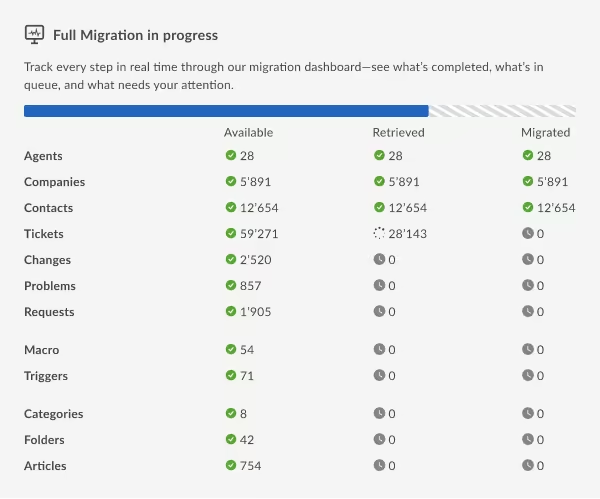
Launch Your Full Migration
Once the demo results look right, schedule and launch the full migration. Help Desk Migration transfers every ticket and contact on your timeline, with progress visible throughout. Your Enchant account and new platform both stay live the entire time.
Validate results and go live
After migration, Help Desk Migration runs a validation pass comparing record counts and key fields between Enchant and your new platform. Spot-check records yourself, then flip your team over whenever you're ready.
What Data You Can Migrate From Enchant
Tickets & Conversation History
Tickets migrate with their full history — requesters, assignees, comments, and inline images, along with created and updated dates. Enchant's API doesn't expose company, group, or tags fields on tickets, so those attributes aren't part of the transfer.
Contacts
Contacts migrate with phone numbers and notes intact, though Enchant's API doesn't expose tags or custom fields on contact records.
Enchant doesn't support Company records, Knowledge Base, or ITSM objects through Help Desk Migration, and — since it's source-only — none of its data can be migrated back in.
Advanced Options for Larger Enchant Migrations
Delta Migration
Enchant keeps generating new tickets while you're planning your move. Delta Migration lets you run a second, smaller pass after the main migration that transfers only what changed since the first run.
What is Delta Migration?Interval Migration
If you're not ready to fully cut over yet, Interval Migration repeats the transfer from Enchant on a schedule you choose — daily, weekly, or another cadence.
What is Interval Migration?Customizations
Every Enchant setup is a little different. When out-of-the-box mapping doesn't cover an edge case, the Help Desk Migration team builds a custom migration script tailored to your specific data structure.
How can I customize my migration?
Why Teams Trust Help Desk Migration to Move On From Enchant
Companies pick Help Desk Migration because it removes the manual work and risk of switching platforms. Instead of exporting spreadsheets and rebuilding tickets by hand, you get automated field mapping, a free demo migration to test accuracy first, and a dedicated team that has handled 50,000+ migrations. Your Enchant data moves out cleanly, formatted correctly, with support available throughout.
Platforms You Can Migrate Your Enchant Data Into
Help Desk Migration moves Enchant data into 40+ platforms, including Zendesk, Freshdesk, and HubSpot Service Hub. Since Enchant works as a source only, this is a one-way move — pick the platform that fits your team, and your tickets and contacts transfer into it.
Autotask PSA
ConnectWise
CSV
Deskpro
Dixa
Document360
Dynamics 365
eDesk
FreeScout
Freshchat
Freshdesk
Freshservice
Front
FyneDesk
Gleap
Gorgias
Groove
Halo Service Solutions
Harmony
HelpDesk
HelpDocs
Helpjuice
Help Scout
HelpSpot
HubSpot Service Hub
Intercom
Ivanti
Jira Service Management
Jitbit HelpDesk
Kayako
KnowledgeOwl
Kustomer
Live Agent
Missive
Odoo Helpdesk
osTicket
Pylon
Reamaze
Salesforce Service Cloud
ServiceDesk Plus
ServiceNow
SherpaDesk
SolarWinds Service Desk
SparrowDesk
Spiceworks Cloud
SQLite
SuperOps
SupportPal
Syncro
SysAid (Cloud)
TeamSupport
TeamworkDesk
Trengo
Vivantio
Zammad
Zendesk
Zoho Desk
Check the name for typos or leave us a message.
No credit card required Fast setup

Enchant Security Migration
GDPR-compliant
Your data privacy matters. Help Desk Migration fully follows GDPR guidelines, so every step of your Enchant export meets rigorous European data protection standards, giving you and your customers peace of mind.
SOC 2 Type II, SOC 3 certified
You can be confident that your Enchant migration is in safe hands. Help Desk Migration's SOC 2 Type II, SOC 3 certification means that their security practices are independently audited and meet top industry standards for handling sensitive information.
Encrypted during transit and storage
Your data is protected by strong encryption from the moment it leaves Enchant until it safely arrives in your new platform. This keeps your information secure both in transit and at rest.
No third-party access
Your data stays private throughout the migration. No third parties ever see or handle your information — only trusted Help Desk Migration professionals manage your transfer.
Enchant Migration FAQs
Enchant is a shared inbox and helpdesk platform built for small teams to manage customer email and tickets collaboratively.
No. Enchant is supported as a source platform only — Help Desk Migration can move your data out of Enchant into another supported platform, but it doesn't support importing data into Enchant.
Help Desk Migration supports 40+ destination platforms, including Zendesk, Freshdesk, and HubSpot Service Hub.
No. Enchant's data model doesn't expose a company entity through its API, so Help Desk Migration moves tickets and contacts only.
Ticket content, comments, inline images, and created/updated dates all transfer. Enchant's API doesn't expose company, group, or tag fields on tickets, so those don't carry over.
Enchant's API doesn't expose custom fields on tickets or contacts, so Help Desk Migration migrates the standard fields that are available.
Migration time depends on your data volume — ticket count is the main factor. Most migrations complete within a few days.
Yes. Help Desk Migration is GDPR-compliant and SOC 2 Type II / SOC 3 certified, encrypts data in transit and at rest, and never grants third parties access to your information.
Yes. It stays fully live and usable throughout the migration, so your team keeps working without interruption.
No. Help Desk Migration is a no-code, self-service tool — you connect both platforms, select what to migrate, and review field mapping through a guided interface.