Migrate from Siit with full security
Level up your Siit data transfer with the automated data migration software. Effortless data migration—import, extract, or merge your Siit data with zero downtime. Test-drive the hassle-free data migration process with our zero-cost Demo.

Lead the way in industry security
The data transfer tool offers encoded dialogues, secured servers, and leading authorization approaches across all levels
Built to bring value and save time
The automated data migration tool excludes workflow drops or inconveniences for your customers and agents
Transparent and scalable pricing
The trusted data replication tool delivers a balanced mix of feature + cost balance through its reasonable pricing policy


Discover Siit data extract service functions and capabilities
Automated data import tool
Data migration software helps you in moving data no coding, causing downtime, or disruption to your team.
Enterprise-level security
Help Desk Migration fulfills security compliance and regulatory standards.
Data mapping to fine-tuned all aspects
Migrate the standard and custom fields during the Siit replication to preserve the data mode unaltered.
Tackle customer service delay during Siit movement
Keep your operations flowing with ease as data shifts, thanks to our Delta option.
Devoted support service crew
Require help in Siit data transfer? Our support team is in a single click.
Hand-pick data for a custom demo
Export up to 20 preferred record IDs (20 tickets and 20 KB articles) free of charge.
Let us handle your migration planning
Our reps develop step-by-step migration planning to simplify the help desk data shift.
Embrace your Siit movement with a Concierge Migration
Entrust the planning, mapping, and preparing Full movement to our team—we’ll handle it skillfully for you!
Tailored data transfer
Let’s delve into platform you aim to transfer data from and any other business specifications you would like to address.
Data migration timeline: 1-2 weeks
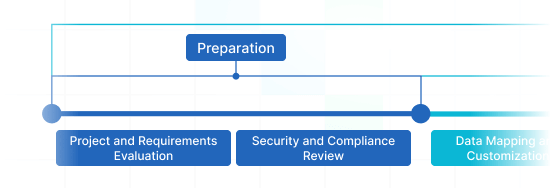
Preparation
Project and Requirements Evaluation
Initiate your transmit by determining Source data, procedures, and applications. Examine data cleansing and field mapping to the Target. Formulate a migration scenario, that consists of the agenda and agent training.
Security and Compliance Review
Verify data complies with security requirements. Establish permissions and access controls to safeguard the replication.
Migration
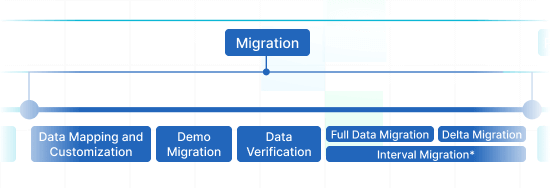
Data Mapping and Customization
Align data fields among the Source and Target. Opt for in-built custom capabilities from the menu or request certain tailored adjustments for the data transfer.
Demo Migration
Set up a trial Demo to check how the movement solution functions. Spot outcomes and change mapping as necessary.
Data Verification
Confirm all moved records in the Target is correct, complete, and adequately organized.
Full Data Migration
Replicate all chosen records, embracing tickets, contacts, attachments, and associated records.
Delta Migration
Catch any fresh or updated records that changed for the duration of the Full data replication.
Interval Migration*
Data transition can be halted and restarted to suit your timeline, with no service disruption. You can halt up to five instances for five days each, managed by our sales team during operating hours.
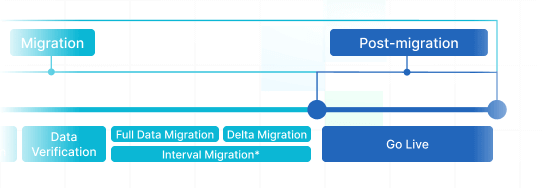
Post-Migration Phase
Go Live
Deploy the Target for all reps. Turn off the Source if needed and protect data backups.
-
 Having a smooth transition from Oracle Cloud to Zendesk. Amazing support and technical advice. Delivery was made according to the original project schedule. No extra charges than what was quoted.
 -
 The customer support team were kind, professional, and efficient throughout the entire process. We changed dates of our migration on them twice, and they rolled with the punches. Great customer service.
 -
 Did exactly what they advertised. They imported over 160,000 tickets for us from Desk.com to Zendesk. Quick support, good value and fairly priced.


Why transfer with Help Desk Migration?
-
No downtime
Move data seamlessly - maintain workflows operational and assist customers without hassle. -
Increased efficiency
Easily migrate data and arrange default and personalized fields with the intelligent Migration Wizard. -
Organized ticket transmiting
The Migration Wizard replicates tickets and all related data, maintaining the data structure unchanged on the Target. -
Personalized support
Our support reps is available to assist you through chat, email, or phone. -
Thorough import framework
Managers will create a well-defined plan for data import, guaranteeing a efficient process and protected records. -
Custom options available
Opt for automated options or inquire about customization, and we'll guarantee your data is correct.
Discover the ideal adjustment suite for Siit data migration
-
Enhanced data movement
Elevate your migration process by personalizing how data objects are migrated
-
Comprehensive data filtering Bestseller
Filter your data with advanced options leveraging criteria-based sorting to reap maximum rewards
-
Smooth integration data migration
Effortlessly shift integration information encompassing linked record IDs, URLs and beyond
-
Enriching shifted data
Elevate migrated data by integrating supplementary records such as ticket tags, legacy IDs, and more
What is the Siit data replication price?
The price breakdown for your Siit integrating depends on several crucial aspects: the amount of data you want to move, the complexity of movement requirements, and any modifications or options in play. Run a Free Demo replication to test-drive the Migration Wizard's performance and discover the pricing tag for your Siit data integration.
Siit Export
Optimize your Siit data extraction with our automated transfer tool, achieving outstanding results swiftly – no coding necessary. Employ secure, robust features to streamline your Siit data export process painlessly.
| Siit objects | Zendesk objects | |
|---|---|---|
| Help desk | ||
| Users (Admins) | Agents | |
| Departments | Organizations | |
| Users | Customers | |
| Request | Tickets | |
| Knowledge Base | ||
| Top-level categories | Categories | |
| Categories | Sections | |
| Articles | Articles | |
Siit data export app
Forward-looking customer support operations turn to an efficient Siit data export. Our team has created comprehensive Siit extraction tool to make easier this vital extraction process.
Our Siit data exporter helps to handle the complexities moving data to Siit automatedly. You can setup a Siit CSV export or replicate from any other help desk, service desk, ITSM in several clicks. Forget about the copy/paste and hello to an improved data extraction workflow.
Use built-in customizations in a click
Enhance your extracted tickets with tags, transfer inline images, accelerate data extraction by excluding attachments, smoothly shift content translations, call-recordings, and other functionalities.
Test-run before purchase
Test-drive Help Desk Migration for Siit extractions in a free Demo. This data movement process mimics the Full migration, enabling you to tune everything accordingly.
Remarkable customer service
Help Desk Migration's support squad is ever-ready to assist you in Siit extraction setup, and find the suitable solution. Discover our support service packages for more personalized data movement experience.
Discover how Siit data transfer works
Help Desk Migration manages data transfer within mere hours or days, depending on the volume of records. It comes with a Migration Wizard and a step-by-step guide on-screen to migrating data from help desk platforms, databases, or shared inboxes automating the replication into CSV files or alternative helpdesks.
Connect platforms
Connect your source and target system
Map and match data
Specify how your Siit data should be replicated
Test-drive
Go for a free Demo to assess the replication tool and outcomes
Full Data Migration
Initiate or plan your Siit replication
Automate your Siit data movement
Migrate your Siit data without confusion from what really matters—resolving your customers’ inquiries.