Zammad Migration: Move Tickets, Customers & Knowledge Base To or From Zammad
Whether Zammad is where you're headed or where you're leaving, Help Desk Migration transfers tickets, customers, and knowledge base articles between it and your other platform with formatting and history intact — and without pulling your team away from active work.
No credit card required Fast setup
Interactive Migration Calculator
Adjust sliders to estimate your migration time and cost savings
Estimates based on 60,000+ successful migrations. Actual results may vary.
5 Steps to a Zammad Migration
A migration into or out of Zammad runs through five checkpoints designed to catch problems before they reach your live system — not after.
Connect Zammad and Your Other Platform
Read-only API access is granted to Zammad and whichever platform is on the other end of the move. This step takes minutes, doesn't touch either live environment, and credentials aren't retained any longer than the setup requires.
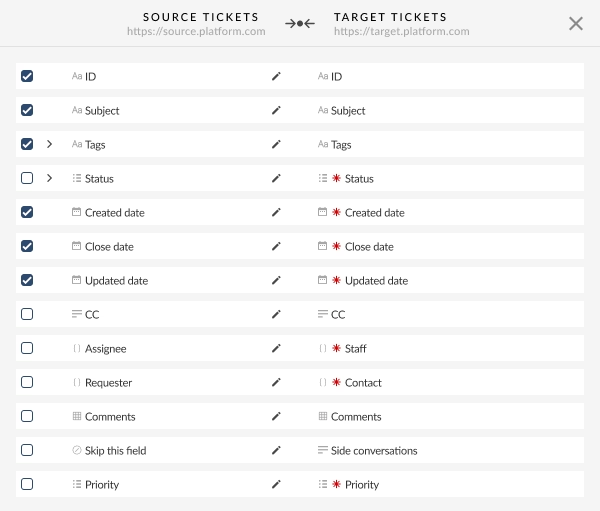
Select Records and Confirm Field Mapping
Choose what's moving — tickets, customers, organizations, knowledge base articles — and Help Desk Migration proposes a field mapping covering both standard and custom fields. Review it before anything runs, so statuses, priorities, and custom field values end up where they belong in Zammad rather than showing up blank.
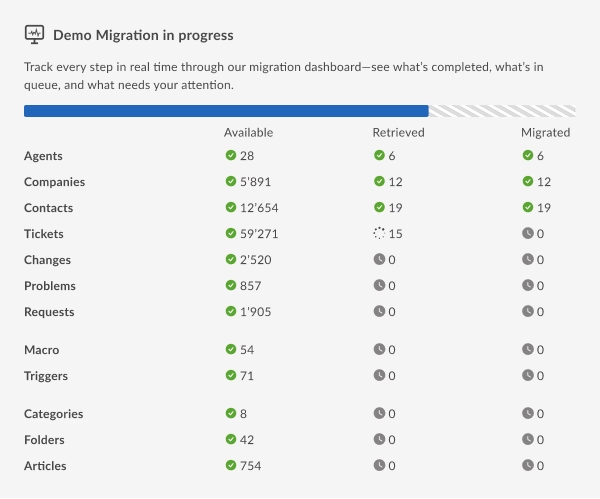
Set Options and Run a Free Demo
Add a tag to migrated tickets, skip attachments to save time, or leave both defaults in place — then launch a free demo that moves a sample of your actual data into Zammad. This step costs nothing and commits you to nothing.
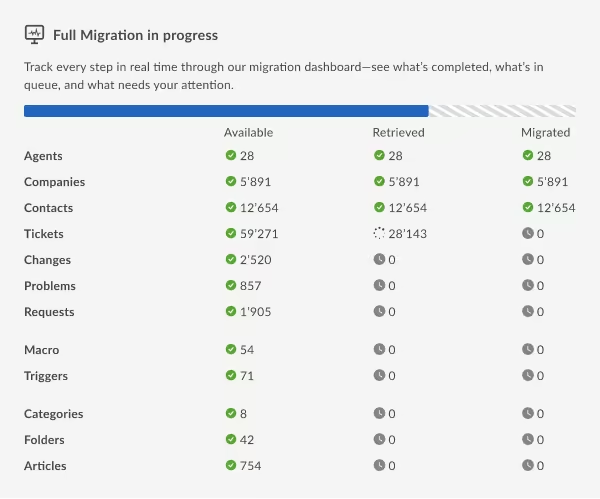
Launch the Full Migration
With the demo confirmed, schedule the complete run. Every ticket, customer, organization, and article transfers on your timeline, visible in progress the whole way, while your Zammad instance or source platform keeps functioning normally so agents aren't blocked.
Validate and Go Live
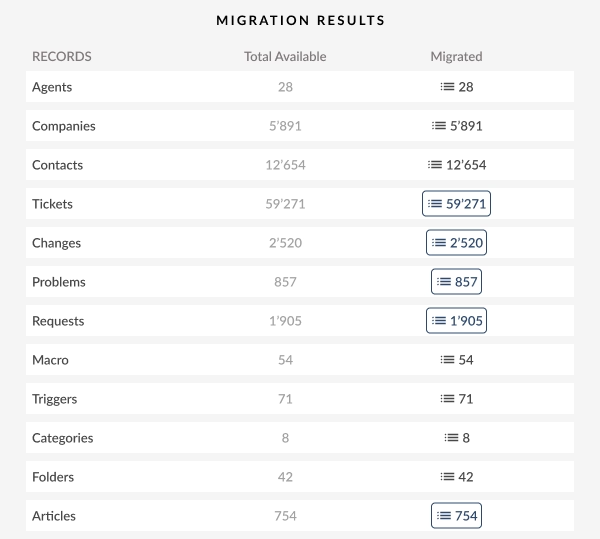
Once migration finishes, record counts and key fields get checked against both systems. Spot-check whatever matters to you in Zammad, then switch your team over at whatever pace feels right — the source platform stays untouched the entire time, so there's no pressure to rush.
What Moves To or From Zammad
Tickets and Conversation History
Requesters, assignees, groups, attachments, comments, tags, custom fields, CC recipients, and created/updated/closed dates all travel with every ticket.
Customers and Organizations
These come across with their existing relationships preserved, so the people and companies tied to each ticket stay linked once everything lands in Zammad.
Knowledge Base Articles and Categories
Categories and articles bring inline images, attachments, tags, and their full folder structure with them — no rebuilding your help center from scratch.
Zammad's AI Features and What Migration Needs to Preserve
Zammad markets itself as AI-powered — automated ticket routing, suggested replies, and reporting across the queue. None of that works well on thin data: vague statuses and missing custom fields give automation little to learn from. Help Desk Migration keeps full conversation threads, timestamps, and resolution notes intact instead of collapsing them into summaries, so whichever direction you're migrating, the platform on the receiving end has real historical data to work with from day one.
Advanced Options for Larger Zammad Migrations
Complex scenario? Non-standard timeline? Help Desk Migration goes beyond the standard flow with Delta Migration, Interval Migration, and Customizations — advanced options built around your data, not the other way around.
Delta Migration
Zammad doesn't pause ticket creation just because a migration is underway. A follow-up Delta Migration pass, run after the main transfer, picks up only what's new or changed since then — so nothing from the transition window gets duplicated or dropped.
What is Delta Migration?Interval Migration
For teams shifting to Zammad gradually rather than all at once, a recurring schedule — daily, weekly, whatever fits — keeps both platforms in sync until the whole team has moved over.
What is Interval Migration?Customizations
Custom fields, unique layouts, and non-standard workflows mean no two Zammad setups look quite alike. Where the default mapping misses an edge case, Help Desk Migration builds a script tailored to that specific data structure instead of dropping or misplacing the record.
How can I customize my migration?Zammad Migration Resources
Zammad Migration Guides
Step-by-step instructions covering the full path from connecting Zammad through running the migration.
Zammad vs. osTicket, OTRS & Other Migration Routes
Zammad connects to 40+ platforms in either direction through Help Desk Migration. The most common routes are osTicket, OTRS, Zendesk, FreeScout, and plain CSV imports for teams leaving spreadsheets behind — and the same paths run in reverse for teams moving away from Zammad.
Accelo
Atera
Atlas
Autotask PSA
BMCHelixITSM
BoldDesk
Chatwoot
ConnectWise
Crisp
CSV
Custify
Deskpro
DevRev
Dixa
Document360
Drift
Dynamics 365
eDesk
eGain
Enchant
Forumbee
FreeScout
Freshchat
Freshdesk
Freshservice
Front
FyneDesk
Gladly
Glassix
Gleap
GLPI
Gmail
Google Docs
Gorgias
Groove
Halo Service Solutions
HappyFox
Harmony
HelpCrunch
HelpDesk
HelpDocs
Helpjuice
Help Scout
HelpShift
HelpSpot
HubSpot Service Hub
InstantDocs
Intercom
Ivanti
Jira Service Management
Jitbit HelpDesk
Kayako
Kayako Classic
KnowledgeOwl
Kundo
Kustomer
Lansweeper
Live Agent
LiveChat
Manage Engine
Mayday
Missive
NinjaOne
Odoo Helpdesk
Oracle Service Cloud (RightNow)
osTicket
((OTRS)) Community Edition
Outlook
Paligo
Plain
Planhat
Pylon
Reamaze
Request Tracker
Respond.io
Richpanel
Salesforce Service Cloud
ServiceDesk Plus
ServiceNow
SherpaDesk
Siit
SmarterTrack
SolarWinds Service Desk
SolarWinds Web Help Desk
SparrowDesk
Spiceworks
Spiceworks Cloud
SQLite
SuperOps
SupportBee
SupportPal
Syncro
SysAid
SysAid (Cloud)
Tawk.to
TeamSupport
TeamworkDesk
Thena
Thulium
Tidio
TOPdesk
Trengo
Unthread
Vitally
Vivantio
Zammad
Zendesk
Znuny
Zoho Desk
Zoho Mail
Check the name for typos or leave us a message.
No credit card required Fast setup

Is Your Zammad Migration Secure?
GDPR-compliant
Every step of a Zammad import runs under GDPR guidelines, meeting European data protection standards rather than a minimum baseline.
SOC 2 Type II, SOC 3 certified
Security practices behind the migration are independently audited against SOC 2 Type II and SOC 3 standards, not simply self-reported.
Encrypted during transit and storage
Data is encrypted from the moment it leaves the old help desk until it's written into Zammad — protected both in motion and at rest.
No third-party access
Only Help Desk Migration's own team ever handles your data. No outside party gets access at any stage.
What Sets Help Desk Migration Apart for Zammad Users
Switching help desks by hand means exporting spreadsheets and rebuilding tickets one at a time — and that's where mistakes creep in. Help Desk Migration replaces that with automated field mapping, a free demo to confirm accuracy up front, and a team behind 50,000+ completed migrations. Zammad data arrives formatted correctly, with support on hand throughout.
| Capability |
Help Desk Migration
|
Native import tools | DIY / custom API | Other migration services |
|---|---|---|---|---|
| Setup effort |
Guided, no code
|
Manual CSV prep | Requires developers | Usually self-serve |
| Data types |
Tickets, conversations, customers, organizations, agents, knowledge base, attachments, and custom fields
|
Limited core entities only | Whatever you script | Tickets and contacts; knowledge base varies |
| Field mapping |
90% of automated mapped fields
|
Manual column matching | Hand-coded | Often limited customization |
| Test before you commit |
Free Demo Migration on real data
|
None | Build your own sandbox | Some offer a trial run |
| Downtime |
Zero downtime
|
Manual gaps and duplicates | Depends on your script | Varies |
| Supported platforms |
40+ platforms
|
Single platform | Whatever you build | Fewer platforms |
| Security |
SOC 2 Type II certified
|
Your own file handling | Your responsibility | Varies |
| Support |
Migration experts through go-live
|
Self-serve | None | Varies |
Zammad Migration FAQs
An open-source helpdesk platform, self-hosted or cloud-based, used to manage tickets, customers, organizations, and a knowledge base in one place — marketed as AI-powered with built-in automation.
Help Desk Migration supports 40+ platforms for Zammad, including osTicket, OTRS, Zendesk, FreeScout, and CSV imports. If a platform isn't listed, the team can confirm support directly.
Yes — tickets, customers, and knowledge base articles all transfer, and a free demo migration lets you confirm mapping accuracy before committing to the full run.
Both are open-source helpdesks, so the core entities — tickets, customers, organizations, knowledge base — map cleanly between them, and Help Desk Migration handles that mapping automatically in either direction.
Not really. Whether Zammad is self-hosted or run as managed cloud, Help Desk Migration connects through its API the same way, so the process doesn't change based on hosting.
Yes — content, comments, tags, custom fields, timestamps, CC recipients, and groups all carry over, so support history stays searchable in Zammad.
It depends on data volume across tickets, attachments, and custom fields; most runs finish within a few days, and the free demo gives a clearer estimate for your specific dataset.
Yes — GDPR compliance, SOC 2 Type II / SOC 3 certification, encryption in transit and at rest, and no third-party access apply throughout.
Yes. Zammad works as both source and target, so tickets, customers, organizations, and the knowledge base can move out to another platform whenever priorities shift.
No — it's a self-service, no-code process. Connect both platforms, choose what to migrate, and review field mapping through the guided interface; no API knowledge required.

Ready to move tickets, customers & knowledge base to or from Zammad?
The free Demo migration moves a real sample of your data to or from Zammad. No staging environment, no dummy data. Your actual records, in the right place, ready to inspect.
Schedule a migration consultation →
No credit card required SOC 2 certified 50,000+ migrations completed