SparrowDesk Migration: Import, Export, and Merge Data Seamlessly
SparrowDesk data migration doesn't have to be complicated. Help Desk Migration makes it easy to transfer tickets, contacts, knowledge base articles, custom fields, and other supported records automatically while maintaining data integrity throughout the process.
Whether you're moving from SparrowDesk to another platform, migrating data into SparrowDesk, or consolidating multiple support systems, our automated migration solution helps you complete the transition efficiently, securely, and with zero disruption to your daily operations.
Interactive Migration Calculator
Adjust sliders to estimate your migration time and cost savings
Estimates based on 60,000+ successful migrations. Actual results may vary.
What data can be migrated to and from SparrowDesk
Help Desk Migration supports the transfer of core SparrowDesk records, helping teams move their customer support data quickly and accurately between platforms.
SparrowDesk data objects supported by
Help Desk Migration
Companies
Agents
Contacts
Tickets
Categories
Folders
Knowledge Base Articles
Note: Supported data objects may vary depending on the source and target platforms involved in your migration. Run a free Demo Migration to verify how your SparrowDesk data will be transferred.
What data is not migrated (and why)
While Help Desk Migration transfers the most important SparrowDesk records, some data may not be available for migration due to API limitations, platform-specific functionality, or differences between source and target systems.
Examples of data that may not be migrated include:
- System settings and account configurations
- User passwords and authentication settings
- Automation rules, workflows, and business logic
- Third-party app integrations and marketplace extensions
- Platform-specific analytics, reports, and dashboards
- Data objects not exposed through the SparrowDesk API
Import Data to SparrowDesk
Moving your support data into SparrowDesk is simple with Help Desk Migration. Our automated migration solution transfers your records from help desk and customer service platforms while preserving data integrity and minimizing manual work.
No credit card required Fast setup
Which Help Desks Can Be Migrated To and From SparrowDesk?
Help Desk Migration supports migrations between SparrowDesk and 100+ platforms. Popular migration sources and destinations include:
Accelo
Atera
Atlas
Autotask PSA
BMCHelixITSM
BoldDesk
Chatwoot
ConnectWise
Crisp
CSV
Custify
Deskpro
DevRev
Dixa
Document360
Drift
Dynamics 365
eDesk
eGain
Enchant
Forumbee
FreeScout
Freshdesk
Freshservice
Front
Gladly
Glassix
Gleap
GLPI
Gmail
Google Docs
Gorgias
Groove
Halo Service Solutions
HappyFox
Harmony
HelpCrunch
HelpDesk
HelpDocs
Helpjuice
Help Scout
HelpShift
HelpSpot
HubSpot Service Hub
InstantDocs
Intercom
Ivanti
Jira Service Management
Jitbit HelpDesk
Kayako
Kayako Classic
KnowledgeOwl
Kundo
Kustomer
Lansweeper
Live Agent
LiveChat
Manage Engine
Mayday
Missive
NinjaOne
Odoo Helpdesk
Oracle Service Cloud (RightNow)
osTicket
((OTRS)) Community Edition
Outlook
Paligo
Plain
Planhat
Pylon
Reamaze
Request Tracker
Respond.io
Richpanel
Salesforce Service Cloud
ServiceDesk Plus
ServiceNow
SherpaDesk
Siit
SmarterTrack
SolarWinds Service Desk
SolarWinds Web Help Desk
SparrowDesk
Spiceworks
Spiceworks Cloud
SQLite
SuperOps
SupportBee
SupportPal
Syncro
SysAid
Tawk.to
TeamSupport
TeamworkDesk
Thena
Thulium
Tidio
TOPdesk
Trengo
Unthread
Vitally
Vivantio
Zammad
Zendesk
Zoho Desk
Zoho Mail
Check the name for typos or leave us a message.
Merge SparrowDesk Accounts
Organizations often end up with multiple SparrowDesk instances after mergers, acquisitions, departmental expansion, or regional growth. Consolidating these environments into a single SparrowDesk account can simplify support operations and create a unified customer service experience.
When Does Merging SparrowDesk Instances Make Sense?
Merging SparrowDesk accounts can be beneficial when:
- Multiple teams are using separate SparrowDesk instances and need centralized management.
- Your company has completed a merger or acquisition and wants to unify customer support operations.
- Different departments maintain separate help desks that should share customer data and workflows.
- Regional or brand-specific SparrowDesk accounts need to be consolidated into a single workspace.
- You want to reduce administrative overhead and eliminate duplicate records.
- Support teams need a complete view of customer interactions across the organization.
Benefits of Consolidated SparrowDesk Account Management
Combining multiple SparrowDesk instances into one environment can provide several advantages:
- Centralized customer data — Keep tickets, contacts, companies, and knowledge base content in a single location.
- Improved agent productivity — Give support teams access to all relevant customer information without switching between accounts.
- Simplified administration — Manage users, permissions, and support processes from one platform.
- Consistent customer experience — Standardize support workflows, response procedures, and knowledge resources.
- Reduced duplication — Eliminate redundant records and fragmented customer histories.
- Better reporting and visibility — Analyze support performance across the entire organization from a unified dataset.
With Help Desk Migration, organizations can consolidate supported SparrowDesk records efficiently while preserving critical relationships between migrated data.
How Long Does SparrowDesk Migration Take?
The duration of a SparrowDesk migration depends on several factors, including the volume of data, the complexity of your environment, and any customization requirements. While smaller migrations may be completed within hours, larger projects often require additional time for planning, testing, validation, and final verification.
Preparation Phase (Project Evaluation, Security Review)
Every successful migration starts with proper preparation. During this phase, teams:
- Evaluate the source and target platforms
- Review the volume and types of data to be migrated
- Identify migration requirements and potential limitations
- Complete security and compliance reviews
- Define timelines, responsibilities, and success criteria
Thorough planning helps minimize risks and ensures the migration proceeds smoothly.
Migration Phase (Data Mapping, Demo Migration, Full Migration)
The migration process typically includes several key steps:
- Data Mapping – Match data objects and fields between SparrowDesk and the destination platform.
- Demo Migration – Transfer a sample dataset to validate mappings and confirm expected results.
- Full Migration – Migrate all selected records, such as tickets, contacts, companies, agents, categories, folders, and knowledge base articles.
before the full transfer helps identify issues early and provides confidence in the migration outcome.
Delta Migration and Interval Migration for Zero Downtime
Support operations often continue while a migration is in progress. To ensure no recent updates are missed, Help Desk Migration offers:
- Delta Migration – Transfers tickets and other records created or updated after the initial migration.
- Interval Migration – Migrates data generated during a specific time period between migration runs.
These options help keep the destination platform synchronized with the latest SparrowDesk data and support a transition with minimal operational disruption.
Post-Migration Phase (Verification, Go Live)
After the migration is complete, teams should verify that all data has been transferred correctly and is accessible in the new environment.
Typical post-migration activities include:
- Reviewing migrated records and data relationships
- Verifying ticket counts and knowledge base content
- Testing user access and permissions
- Confirming workflows and processes function as expected
- Performing final stakeholder approval
Once verification is complete, your team can confidently go live and begin working from the new or consolidated support environment.
Migrating AI-Powered Support: What Happens to Your SparrowDesk AI Setup?
When migrating to or from SparrowDesk, use a migration approach designed for AI-powered support with clean, high-quality data before the full migration.
With Help Desk Migration, you can migrate your data in two stages. The first stage transfers only the data required to train SparrowDesk Zoona AI, including high-quality resolved tickets, their associated contacts, and knowledge base articles, before the remaining historical data is migrated.
This allows Zoona AI to index relevant content and learn from accurate historical interactions before your team goes live. After validating AI performance and ensuring it delivers reliable responses, the tool migrates the remaining historical data, including older tickets, contacts, companies, and attachments.
The approach gives you immediate access to a fully functional AI assistant while preserving your complete support history. As a result, Zoona AI is ready to provide accurate recommendations and responses from day one, without waiting for the entire historical migration to finish.
Handling Omnichannel Conversations (WhatsApp, Email, Slack, Live Chat)
SparrowDesk may centralize customer interactions across multiple channels, including WhatsApp, email, Slack, and live chat. During migration:
- Conversation records from supported channels (e.g., tickets, messages, and chat transcripts) can be migrated as part of the ticketing data.
- Historical communication context is preserved where supported, ensuring agents retain visibility into past customer interactions.
- Channel-specific configurations (routing rules, integrations, and API connections) are not migrated and must be reconnected in the target platform.
- Live communication channels remain active in SparrowDesk until cutover, after which they must be reconfigured in the new system.
This ensures continuity of customer history, even though real-time channel integrations are rebuilt on the destination platform.
Why Migrate with Help Desk Migration?
Help Desk Migration simplifies SparrowDesk data transfers by automating the migration process from start to finish. Whether you're moving data to SparrowDesk, migrating away from it, or consolidating multiple support systems, our solution helps reduce manual effort and migration risks.
Automated Migration — No Coding Requireds
You don't need technical expertise or custom scripts to migrate your data. The Migration Wizard guides you through the entire process:
Connect
Connect your source and target platforms.
Choose data
Select the data you want to migrate.
Configure
Configure mappings and migration options.
Migrate
Launch the migration with just a few clicks.
This automated approach saves time and helps ensure data consistency throughout the transfer.
Additional Automated Migration Options
Help Desk Migration provides flexible configuration options that help you tailor the migration process to your specific requirements.
Contact Migration Options:
-
Update Existing Records on Target
Match and update existing contacts in the target platform instead of creating duplicates.
Ticket Migration Options:
-
Migrate Inline Images as Attachments
Transfer inline images from ticket conversations and store them as attachments in the destination platform. -
Skip Attachments
Exclude ticket attachments from the migration to reduce migration time and storage usage. -
Select Records for Demo
Choose a representative sample of tickets to evaluate migration results before running the Full Migration. -
Migrate the Newest Records First
Prioritize recently created or updated tickets, allowing teams to validate the most relevant data early in the migration process.
Free Demo Migration Before You Commit
Test your migration before moving all of your data.
A free Demo Migration transfers a sample of your records, allowing you to:
- Validate data mappings
- Review migrated tickets, contacts, and knowledge base content
- Identify potential issues before the full migration
- Gain confidence in the migration outcome
Once you're satisfied with the results, you can proceed with the Full Migration.

No credit card required
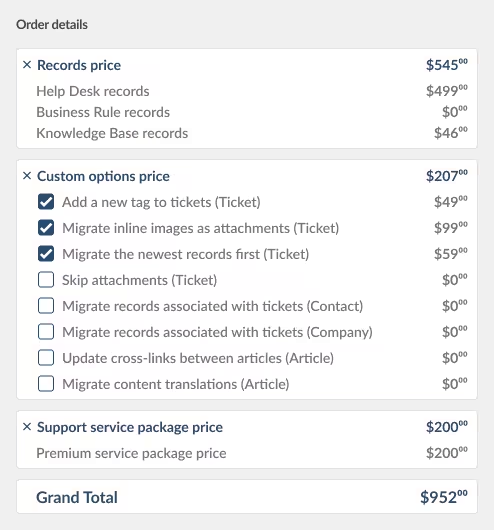
Predictable, Transparent Pricing
With Help Desk Migration, you know the migration cost before you start.
Instant pricing estimates based on your data volume.
No hidden fees or surprise charges.
Pay only for the records you migrate.
Free Demo Migration included.
This transparent pricing model helps teams plan migration projects with confidence and stay within budget.

Security and compliance for your data migration
Your Data Stays Secure During SparrowDesk Migration
Security is a top priority throughout every SparrowDesk migration. Help Desk Migration is designed to move customer data in a controlled, encrypted, and auditable environment, helping ensure information remains protected at every stage of the process.
Compliance and Certifications
Help Desk Migration maintains strong security and compliance standards to safeguard customer data during migration.
SOC 2 Type II and Type III compliance assures customers that their data is handled with the utmost care and adds a robust layer of security to Help Desk Migration’s already comprehensive security measures.
Data Access Controls
To further protect your SparrowDesk data during migration, strict access controls are enforced:
- Data is transferred through encrypted channels
- Only authorized migration processes can access connected accounts
- Credentials are used strictly for migration purposes and are not retained longer than necessary
- Access is limited to the specific datasets selected for migration
- Migration activity runs in isolated, secure environments
This approach ensures that your data remains protected, controlled, and accessible only to intended systems throughout the migration process.
Companies that trusted Help Desk Migration


FAQ About SparrowDesk Migration

Start your SparrowDesk migration today!
Whether you’re moving to a new platform, creating backups, or consolidating data, Help Desk Migration handles all the technical work smoothly — so you can keep working without interruptions.