GLPI Data Migration: Secure, Automated & No-Code
GLPI ITSM data migration doesn’t have to be complex. The Help Desk Migration tool lets you seamlessly transfer tickets and users to your new ITSM platform — securely, efficiently, and with complete control at every step.
Whether you’re switching platforms, consolidating ITSM systems, or upgrading your support stack, our solution ensures a smooth, risk-free transition from GLPI ITSM.
Interactive Migration Calculator
Adjust sliders to estimate your migration time and cost savings
Estimates based on 60,000+ successful migrations. Actual results may vary.
Supported Connections – GLPI ITSM Alternatives
Accelo
Atera
Atlas
Autotask PSA
BMCHelixITSM
BoldDesk
Chatwoot
ConnectWise
Crisp
CSV
Custify
Deskpro
DevRev
Dixa
Document360
Drift
Dynamics 365
eDesk
eGain
Enchant
Forumbee
FreeScout
Freshdesk
Freshservice
Front
Gladly
Glassix
Gleap
GLPI
Gmail
Google Docs
Gorgias
Groove
Halo Service Solutions
HappyFox
Harmony
HelpCrunch
HelpDesk
HelpDocs
Helpjuice
Help Scout
HelpShift
HelpSpot
HubSpot Service Hub
InstantDocs
Intercom
Ivanti
Jira Service Management
Jitbit HelpDesk
Kayako
Kayako Classic
KnowledgeOwl
Kundo
Kustomer
Lansweeper
Live Agent
LiveChat
Manage Engine
Mayday
Missive
NinjaOne
Odoo Helpdesk
Oracle Service Cloud (RightNow)
osTicket
((OTRS)) Community Edition
Outlook
Paligo
Plain
Planhat
Pylon
Reamaze
Request Tracker
Respond.io
Richpanel
Salesforce Service Cloud
ServiceDesk Plus
ServiceNow
SherpaDesk
Siit
SmarterTrack
SolarWinds Service Desk
SolarWinds Web Help Desk
SparrowDesk
Spiceworks
Spiceworks Cloud
SQLite
SuperOps
SupportBee
SupportPal
Syncro
SysAid
Tawk.to
TeamSupport
TeamworkDesk
Thena
Thulium
Tidio
TOPdesk
Trengo
Unthread
Vitally
Vivantio
Zammad
Zendesk
Zoho Desk
Zoho Mail
Check the name for typos or leave us a message.
No credit card required Fast setup
How Automated GLPI ITSM Data Migration Works
Automated migration from GLPI ITSM is handled through the Help Desk Migration Wizard. The process is structured, predictable, and fully auditable — so you always know what happens to your data.
Connect
Securely connect GLPI ITSM (source) and your target help desk via API:
- Encrypted authorization for all credentials
- No scripts or manual exports required
- Connection setup completed in minutes
Map Data
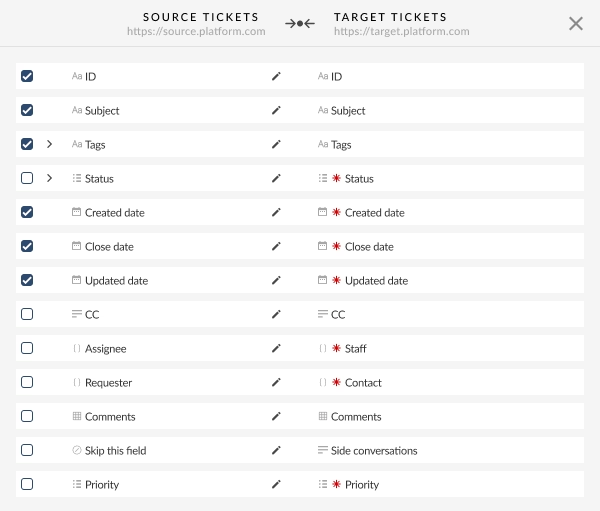
Select exactly what data you want to migrate from GLPI ITSM. Automatic data mapping aligns your source fields with the target help desk:
- Ticket fields and statuses
- Users (agents)
- Attachments and comments
- Changes
- Problems
- Knowledgebase
You can also fine-tune field mappings, agent assignments, and workflows to match the destination system.
How to migrate GLPI ITSM agents
Agents are matched to existing users in your target platform to preserve ticket ownership, even for inactive or retired users.
- Required for a Free Demo Migration
- Missing agents can be created in the Migration Wizard
- Manual addition is possible if the target API doesn’t support automatic creation
Demo Run
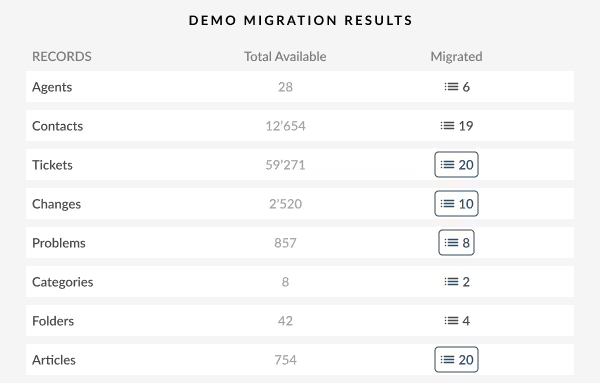
Run a Demo Migration to transfer a sample of GLPI ITSM data. Preview tickets, comments, attachments, and custom fields to see exactly how your data will appear in the target platform.
Why it matters: Validate data accuracy and structure before the full migration — no surprises after go-live.
Review Demo Results
Check your migrated data using built-in validation tools and logs:
- Review tickets
- Confirm field mappings and statuses
- Identify edge cases or inconsistencies
- Adjust filters or mappings if needed
Benefit: Full transparency and control before committing to the full migration.
Go Live
Launch the full GLPI ITSM data migration with zero business downtime:
- All selected data is migrated in one run
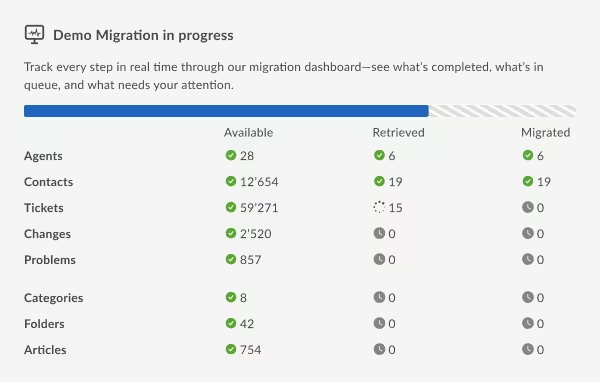
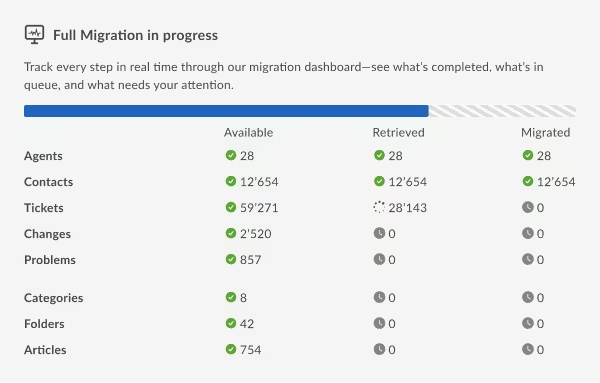
- Progress monitored in real time
- Your team continues working in GLPI ITSM during migration
After completion, your GLPI ITSM data is fully available in the new platform: accurate, structured, and ready for everyday operations.
Additional GLPI ITSM Migration Options for Zero Business Downtime
Delta Migration
Keep your GLPI ITSM instance fully operational while ensuring all records stay up to date. Delta Migration available on The Premium Support Plan ensures nothing is lost after cutover. It captures all new updates, replies, and changes so your team can keep working seamlessly.
Safe, Simple, Reliable
- No broken conversations: Updates go to the right tickets.
- No confusion: Newly created or updated data is synced; errors can be fixed with remigration.
- Ready for real cutovers: Continuous coverage, clean histories, confident go-live.
Interval Migration
Move your GLPI ITSM data in manageable batches on a schedule that suits your business. Whether during off-hours, nights, or weekends, Interval Migration allows your team to keep using the platform while data is migrated in the background. This method is ideal for large datasets or time-sensitive migrations, ensuring a smooth, seamless transition without disrupting daily operations.`
What is Interval Migration?GLPI ITSM Migration FAQ
- Tickets and full ticket histories
- Users and agents
- Comments and attachments
- Statuses, priorities, and custom fields
- Changes
- Problems
- Knowledgebase

Start your GLPI ITSM migration today!
Whether you’re moving to a new platform, creating backups, or consolidating data, Help Desk Migration handles all the technical work smoothly — so you can keep working without interruptions.