Migration to FyneDesk Made Simple — No Lost History, No Downtime
FyneDesk is an AI-powered help desk and ITSM platform for support teams, IT departments, and internal service operations. It centralizes tickets, a customer-facing portal, a knowledge base, and asset management within a single workspace.
Help Desk Migration securely moves tickets, users, knowledge base content, and other data to or from FyneDesk with no business disruption.
No credit card required Fast setup
How long will your migration take?
Looks like you have a lot of data! Let’s map out the perfect migration plan together so your data moves seamlessly to your new platform with zero hassle.
What Data Can You Migrate to FyneDesk?
Before you migrate a single record, you need to know exactly what's coming with you. Tickets, knowledge base articles, user accounts, custom fields — every piece of your support history matters, and none of it should be left behind just because you're switching platforms. Here's exactly what transfers to FyneDesk.
Tickets & Conversations
Preserve your customer support history, including ticket statuses, priorities, assignments, and conversation threads.
Contacts & Users
Transfer customer names, email addresses, phone numbers, and other available profile information.
Companies & Accounts
Migrate organizations and business accounts associated with your customer contacts.
Knowledge Base
Bring across articles, FAQs, and help center content, helping preserve the information available to your support team and FyneDesk's AI-powered features.
Agents & Teams
Transfer available agent and team information to help recreate your support structure and routing setup in FyneDesk.
How to Migrate to FyneDesk Step by Step
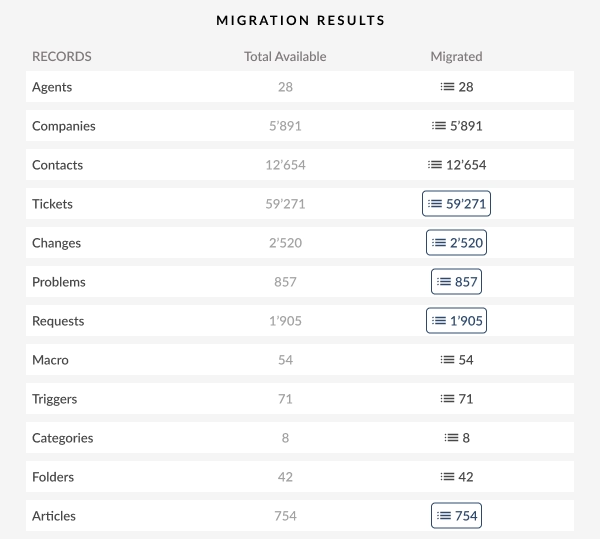
Migrating to FyneDesk follows five clear stages: connect your platforms, map your data, run a free demo, complete and verify the full migration, then catch new records with Delta Migration. The transfer runs in the background via the Migration Wizard — no scripts, no manual exports — so your team keeps working uninterrupted while progress is tracked in real time. Each step builds confidence: no surprises, no downtime, full visibility throughout.
Connect Your Source & Target Platforms
Securely connect your source platform and FyneDesk via API:
- Encrypted authorization for all credentials
- No scripts or manual exports required
- Connection setup completed in minutes
Choose the Records & Map the Data
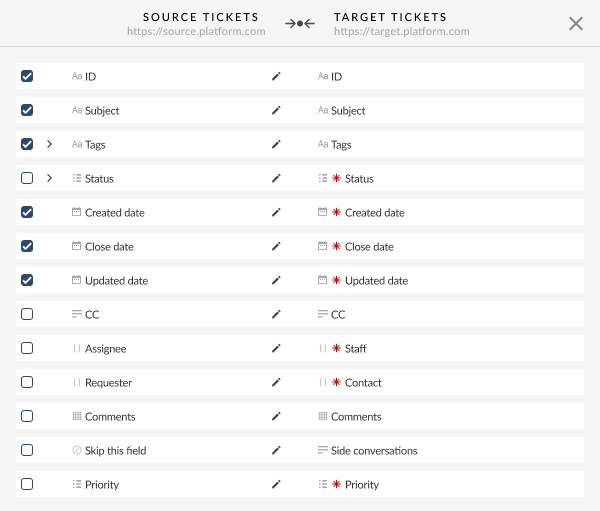
Data mapping is where you control exactly how your records translate from your old platform into FyneDesk — matching fields, preserving relationships, and catching mismatches before anything goes live. By default, data is roughly 95% mapped between your FyneDesk instance and source platform.
- Select your entities. Choose the record types you want to migrate, such as agents, contacts, companies, tickets, and other supported entities.
- Match agents first. Map source agents to their corresponding FyneDesk accounts to preserve ticket ownership and assignments.
- Review contacts and companies. Make sure contacts are linked to the correct companies so customer relationships and conversation history remain intact.
- Check tickets and other entities. Verify that ticket fields, statuses, and additional record types are mapped to the appropriate FyneDesk equivalents.
- Adjust the mapping. With around 95% of fields mapped automatically, focus on edge cases such as custom fields, tags, and properties that don't have a direct match.
- Select out-of-the-box options. Enable any migration settings you need, such as tagging migrated tickets, skipping attachments, or updating cross-links.
The result: your ticket history, custom fields, and the relationships between agents, contacts, and companies land in FyneDesk exactly where they belong — no reconstructing context after the fact.
Run a Free Demo Migration
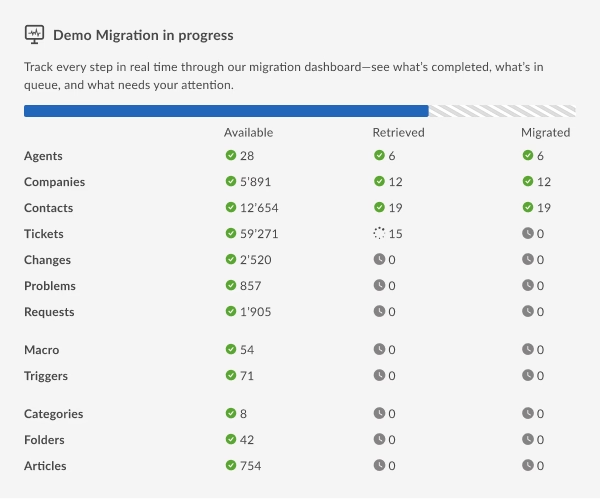
Run a Free Demo Migration to transfer a sample of your data to FyneDesk. Preview tickets, comments, attachments, custom fields, and other supported records to see exactly how your data will appear in the new platform.
Why it matters: Validate data accuracy, relationships, and structure before the full migration — no surprises after go-live.
Full Migration and Verification
Launch the full migration after reviewing your Demo results:
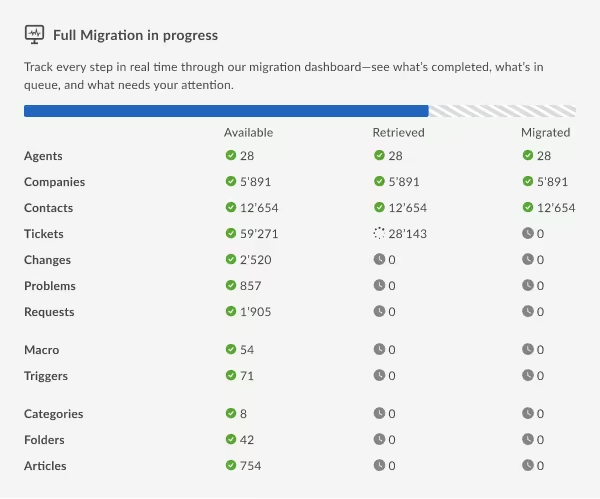
- Progress is monitored in real time
- Your team can continue working in the source platform during migration
After completion, verify your FyneDesk data:
- Review migrated tickets and records
- Confirm field mappings and statuses
- Check users, attachments, and relationships
- Identify and resolve any inconsistencies
Benefit: Your data is fully available in FyneDesk, accurate, structured, and ready for everyday operations.
Delta Migration
You can run a Delta Migration to transfer records created or updated in the source platform after the initial migration:
- Captures new and updated records
- Prevents duplicate data
- Helps keep FyneDesk up to date before or after go-live
- Minimizes the need for manual data entry
This is especially useful when your team continues working in the source platform during the migration period.
Automated Migration vs. CSV Import vs. Engineer-Led Migration
Not all migration paths are equal, and the right one depends less on how much data you have and more on how connected that data is.
| Feature / Metric | Raw CSV Export/Import |
Automated Help Desk Migration
|
Bespoke Engineer-Led |
|---|---|---|---|
| Threading & Comments | Order often lost or requires manual fixes |
Preserved via automated mapping
|
Fully preserved / custom mapped |
| Attachments & Inline Images | Frequently skipped or exported separately |
Preserved and re-linked automatically
|
Handled via custom scripts |
| Timestamps | Often overwritten with import-time dates |
Original creation/update dates preserved
|
Original creation/update dates preserved |
| Cross-Links & Relational IDs | High risk of broken agent/ticket/requester links |
Maintained via ID-based mapping
|
Maintained via custom logic |
| Self-Serve Transparency | Direct, but manual and error-prone |
High: direct field mapping & immediate visibility
|
Low: managed behind the scenes by engineers |
| Pre-Migration Testing | Manual trial and error |
Free demo migration with real sample data
|
Requires custom staging test runs |
| Time to Launch | Immediate start, slow execution/cleanup |
Rapid self-serve rollout
|
High: dedicated planning and build phases |
| Total Cost | Low upfront / high hidden manual effort |
Balanced: priced by number of records
|
High: expensive dedicated engineering hours |
Where automated tools with expert support fit best
This is the middle ground, and where most migrations land:
You get most of the fidelity of a bespoke migration, with the transparency and control of doing it yourself.
The Features That Make Complex Migrations Simple
For complex or large-scale migrations, flexibility matters as much as data accuracy. These features help you minimize downtime, keep data up to date, and fit the migration around your team's schedule.
Delta migration
Lets teams keep working in their source help desk after the initial Full Migration. It automatically transfers tickets and articles created or updated afterward, while preventing duplicates by replacing outdated records with the latest versions.
Note: Delta Migration can't be tested separately during the Demo and is available only on the Signature support package.
What is Delta MigrationInterval migration
Lets you pause and resume the Full Migration around your business schedule. You can start during off-hours, pause when agents need access, and resume later without losing progress. You can pause up to five times, with each pause lasting up to five days.
What is Interval MigrationMigration Paths for FyneDesk
With Help Desk Migration, you can migrate your support data to or from FyneDesk and more than 100 other help desk, ITSM, and customer service platforms. Whether you're moving your historical data into FyneDesk or transferring it to another system, you can preserve valuable support records throughout the transition.
Accelo
Atera
Atlas
Autotask PSA
BMCHelixITSM
BoldDesk
Chatwoot
ConnectWise
Crisp
CSV
Custify
Deskpro
DevRev
Dixa
Document360
Drift
Dynamics 365
eDesk
eGain
Enchant
Forumbee
FreeScout
Freshchat
Freshdesk
Freshservice
Front
FyneDesk
Gladly
Glassix
Gleap
GLPI
Gmail
Google Docs
Gorgias
Groove
Halo Service Solutions
HappyFox
Harmony
HelpCrunch
HelpDesk
HelpDocs
Helpjuice
Help Scout
HelpShift
HelpSpot
HubSpot Service Hub
InstantDocs
Intercom
Ivanti
Jira Service Management
Jitbit HelpDesk
Kayako
Kayako Classic
KnowledgeOwl
Kundo
Kustomer
Lansweeper
Live Agent
LiveChat
Manage Engine
Mayday
Missive
NinjaOne
Odoo Helpdesk
Oracle Service Cloud (RightNow)
osTicket
((OTRS)) Community Edition
Outlook
Paligo
Plain
Planhat
Pylon
Reamaze
Request Tracker
Respond.io
Richpanel
Salesforce Service Cloud
ServiceDesk Plus
ServiceNow
SherpaDesk
Siit
SmarterTrack
SolarWinds Service Desk
SolarWinds Web Help Desk
SparrowDesk
Spiceworks
Spiceworks Cloud
SQLite
SuperOps
SupportBee
SupportPal
Syncro
SysAid
SysAid (Cloud)
Tawk.to
TeamSupport
TeamworkDesk
Thena
Thulium
Tidio
TOPdesk
Trengo
Unthread
Vitally
Vivantio
Zammad
Zendesk
Zoho Desk
Zoho Mail
Check the name for typos or leave us a message.
No credit card required Fast setup
How Much Does FyneDesk Migration Cost?
Migrating to FyneDesk with Help Desk Migration is priced by volume, not a flat fee. Pricing is not linear: the more you migrate, the less you pay per record.
All your records
Only substantial records count.
Attachments, comments & notes are free.
Support Package
Pick your support level, from free Essential to Enterprise.
Out-of-the-Box Options
1-click enhancements like side conversations or cross-link updates. Toggle them if needed.
Customizations
Request specific non-standard data migration settings.
Migration cost
Your personalized quote, broken down by data type.
Example: a basic migration with no custom options on the Essential plan.
On the FyneDesk side: the free tier supports up to three agents permanently (not a trial). Paid Pro and Business tiers add the customer portal, live chat, workflow automations, and higher AI usage limits. Your migration is a one-time payment, not a per-agent fee.
See your exact price before you pay anything
The Free Demo Migration moves 20 tickets and 20 knowledge base articles so you can check field mapping and accuracy. Then the Migration Wizard counts your records and gives you an itemized Full Migration price.
Just want a ballpark? Get a rough estimate →
Is My Data Safe During Migration?
Help Desk Migration protects your customer and business data before, during, and after migration.

SOC 2 Type II
Security controls are regularly evaluated against established standards for protecting customer data.

GDPR Compliance
We follow GDPR requirements when processing and transferring personal data.

HIPAA Compliance
Protected health information is handled according to HIPAA safeguards.

PCI DSS Compliance
Payment card data is protected under PCI DSS standards.
Encryption in Transit and at Rest: Your data is encrypted both while being transferred and while securely stored.
Hosted on AWS: Migrations run on Amazon Web Services infrastructure.
Why Migrate to FyneDesk
A modern, AI-included help desk without per-agent pricing creep.
No per-agent pricing creep
Ticketing, customer portal, knowledge base, email-to-ticket, routing, and asset tracking are included from the free plan.
AI built in
AI-drafted replies come with every plan, with higher credit limits on Pro and Business.
Room to grow
Pro and Business add webhooks, full API access, workflow automation, and live chat.
No custom development
Help Desk Migration handles data transfer and field mapping from your current help desk.
FAQ
Most self-serve migrations to FyneDesk complete within hours once field mapping is confirmed. Timing depends on your record volume and how much customization you enable. Larger datasets can use Interval Migration to pause and resume around business hours, so the process fits your schedule instead of forcing one long, high-risk cutover window.
Yes. Knowledge base content — both articles and their category structure — is a standard entity that Help Desk Migration supports. Categories and sections carry over alongside tickets and users, so your KB doesn't land in FyneDesk as a flat, unsorted dump of articles that agents and end users then have to reorganize.
Cost depends on your source platform, total record volume, and how much customization you enable, such as tagging. Pricing scales by number of records rather than a flat fee, and larger migrations cost less per record. Run a free demo first to get an estimate broken down by data type.
Yes. A Free Demo Migration transfers a small sample of your real data — typically around 20 tickets and articles — so you can preview how it lands in FyneDesk. Use it to validate field mapping, check relationships between records, and catch potential issues before running the full migration.
Yes. Data is encrypted both in transit and at rest throughout the process, limiting exposure during transfer and storage. Help Desk Migration also follows GDPR-aligned data handling practices and maintains SOC 2 Type II and SOC 3 compliance, meaning its security controls are independently and regularly evaluated against established industry standards.
No. You can connect your source platform and FyneDesk, configure your migration, and map fields directly through the Migration Wizard without hiring outside help. If your setup includes complex requirements or unusual edge cases, migration experts are available for guidance — without requiring a paid consulting engagement or dedicated project team.
No. Your team can keep working in the source platform while migration runs in the background, with progress tracked in real time. Afterward, Delta Migration catches any records created or updated during that window, so nothing gets missed and there's no need to freeze tickets during the transition.
No. Migration only moves historical data — tickets, contacts, articles — into FyneDesk; it doesn't draw on the AI credits included with your plan. Those credits apply solely to ongoing AI usage, such as ticket summaries and drafted replies, so a large migration won't reduce what's available for your team afterward.
Help Desk Migration supports moves from most major help desks and ITSM tools, including Zendesk, Freshdesk, Zoho Desk, HubSpot Service Hub, and Jira Service Management, among others. New source connectors are added regularly, so if your current platform isn't listed, it's worth checking directly rather than assuming it's unsupported.

FyneDesk Migration
Help Desk Migration securely moves tickets, users, knowledge base content, and other data to or from FyneDesk with no business disruption.
Schedule a migration consultation
No credit card required SOC 2 certified 60,000+ migrations