Atera Migration: Move Your Data Out of Atera to a New Platform
An Atera migration with Help Desk Migration moves tickets, contacts, companies, and staff records out of Atera and into another help desk or service management platform. Atera is supported as a source only, so data moves out of Atera. You can test the transfer on your own tickets in a free demo migration.
No credit card required Fast setup
Interactive Migration Calculator
Adjust sliders to estimate your migration time and cost savings
Estimates based on 60,000+ successful migrations. Actual results may vary.
Atera migration at a glance
What an Atera migration with Help Desk Migration covers, based on the records Atera exposes through its API:
| Question | Answer |
|---|---|
| Direction | Out of Atera only (Atera is a source platform) |
| Records that migrate | Tickets, contacts, companies, staff |
| Ticket details that migrate | Requesters, assignees, companies, groups, comments, attachments, custom fields, created / updated / closed dates |
| Free test | Demo migration with up to 20 tickets you choose |
| Typical project length | 1-2 weeks including preparation and validation |
| Security | SOC 2 Type II, SOC 3, GDPR-compliant, encryption in transit and at rest |
How an Atera migration works in five steps
An Atera migration runs in five steps: connect, map, test, migrate, and validate. The data transfer itself usually takes from a few hours to a few days depending on record volume, and a full project, including preparation and a validation window, is typically planned at 1-2 weeks. Both Atera and the new platform stay live throughout, so agents keep working while records move in the background.
Connect Atera as the source platform
Connect Atera and your destination platform to Help Desk Migration with API credentials. Because Atera is a source-only platform, the connection is one-directional: the migration copies records out of Atera, and the records in Atera stay where they are. Setup takes minutes.
Select records and map fields
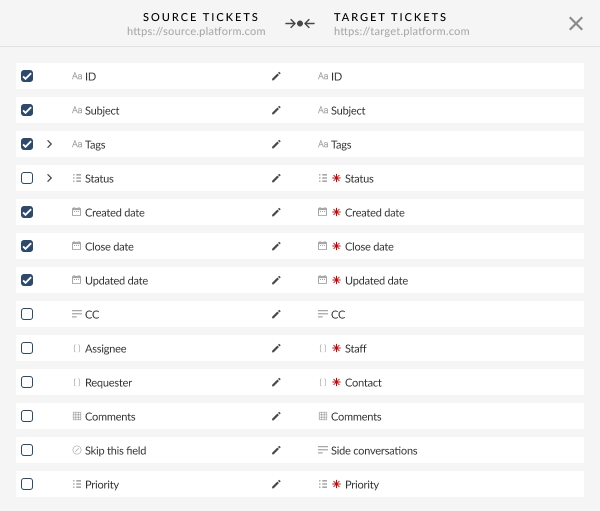
Choose which Atera records to move (tickets, contacts, companies, staff). Help Desk Migration maps standard fields automatically and suggests matches for custom fields where names and types line up. You review and adjust the mapping before anything moves, so ticket statuses and custom field values do not land as blanks.
Run a free demo migration
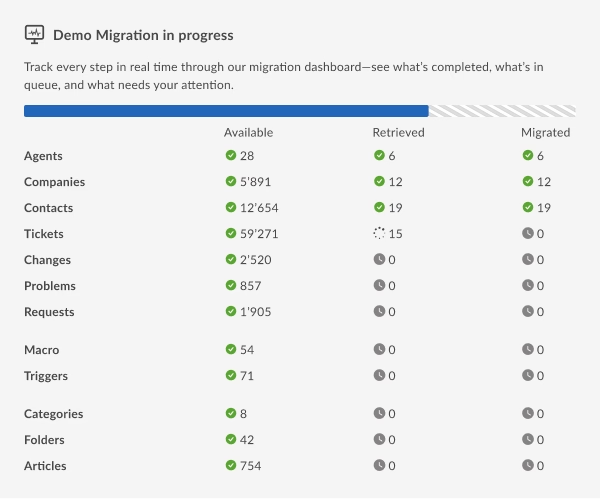
The free demo migration transfers a sample of your real Atera tickets into the new platform. You can let the tool pick the sample or hand-pick up to 20 ticket IDs, and you can switch options such as skipping attachments on or off before the run. The demo shows how mapping behaves on real data and gives you the price of the Full Migration.
Launch the Full Migration
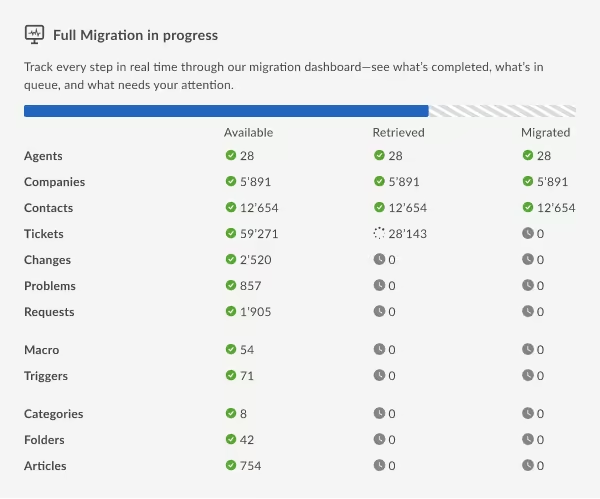
When the demo results look right, start the Full Migration immediately or schedule it. Progress is visible in the Migration Wizard, and both platforms remain usable during the transfer.
Validate the results and go live
Compare record counts between Atera and the new platform, then spot-check a set of tickets, contacts, and companies, focusing on custom fields and attachments. Because Atera is untouched by the migration, you can validate at your own pace, run a Delta Migration for anything created in the meantime, and then move your team over.
What data you can migrate from Atera
Help Desk Migration moves four Atera record types: tickets, contacts, companies, and staff. The scope is set by what Atera's API exposes, so a few attributes and modules stay behind.
Tickets and conversation history
Atera tickets migrate with their full history: requesters, assignees, companies, groups, comments, attachments, and custom fields, along with created, updated, and closed dates. Atera's API does not expose a tags field on tickets, so ticket tags are not part of an Atera export. Teams that rely on tags often recreate them with a custom field or automation rule in the new platform.
Contacts, companies, and staff
Atera contacts and companies migrate at the entity level, and the links between each contact and their company carry over into the new platform. Beyond company domains, Atera's API exposes limited additional detail on these two records. Staff records map to agents in the destination platform, so ticket assignments stay attached to the right people.
Advanced options for larger Atera migrations
Three advanced options cover tickets created during the move, a cutover spread over several days, and data the standard mapping does not handle.
Delta Migration
Atera keeps receiving tickets while the Full Migration runs. Delta Migration is a second, smaller pass that transfers only the records created or updated after the Full Migration started, so tickets from the transition window are not left behind in Atera.
Learn more about Delta MigrationInterval Migration
Interval Migration lets you pause the Full Migration and resume it later, for example pausing during the workweek and resuming over the weekend. The Full Migration can be paused up to five times, each pause lasting no more than five days, and pauses are coordinated with the Help Desk Migration team during operating hours.
How Interval Migration worksCustom migrations
When the standard mapping does not cover part of your Atera setup, the Help Desk Migration team can build a custom migration script for your data structure.
How can I customize my migration?Why teams use Help Desk Migration to move off Atera
Help Desk Migration replaces manual CSV exports and ticket-by-ticket rebuilding with automated field mapping, a free demo on your own data, and support by chat, email, or phone. Help Desk Migration has served 60,000+ customers across 100+ platforms, and each Atera migration can start with a test run, so mapping issues surface on a sample of tickets before the full dataset moves.
Where you can move Atera data
Help Desk Migration supports 100+ platforms, and Atera data can move into help desk and service management tools such as Zendesk, Freshdesk, Freshservice, and Jira Service Management. Because Atera is source-only, each Atera migration is a one-way move into the platform your team picks. The supported platforms list shows all current destinations. If you are still choosing where to go, the comparison of Atera alternatives looks at the main options.
Autotask PSA
ConnectWise
CSV
Deskpro
Dixa
Document360
Dynamics 365
eDesk
FreeScout
Freshchat
Freshdesk
Freshservice
Front
FyneDesk
Gleap
Gorgias
Groove
Halo Service Solutions
Harmony
HelpDesk
HelpDocs
Helpjuice
Help Scout
HelpSpot
HubSpot Service Hub
Intercom
Ivanti
Jira Service Management
Jitbit HelpDesk
Kayako
KnowledgeOwl
Kustomer
Live Agent
Missive
Odoo Helpdesk
osTicket
Pylon
Reamaze
Salesforce Service Cloud
ServiceDesk Plus
ServiceNow
SherpaDesk
SolarWinds Service Desk
SparrowDesk
Spiceworks Cloud
SQLite
SuperOps
SupportPal
Syncro
SysAid (Cloud)
TeamSupport
TeamworkDesk
Trengo
Vivantio
Zammad
Zendesk
Zoho Desk
Check the name for typos or leave us a message.
No credit card required Fast setup

Security during an Atera migration
Help Desk Migration protects Atera data with audited controls, GDPR compliance, and encryption.
SOC 2 Type II and SOC 3 certified
Help Desk Migration's security practices are independently audited under SOC 2 Type II and SOC 3, which cover how customer data is stored, processed, and accessed.
GDPR-compliant
Help Desk Migration follows GDPR requirements and is ready to sign a data processing agreement, so an Atera export can meet European data protection obligations.
Encryption in transit and at rest
Atera data is encrypted from the moment it leaves Atera until it reaches the new platform, covering databases, storage, and transmission channels. The full controls are listed in the Help Desk Migration security policy.
Atera migration FAQs
Atera is an IT management platform that combines remote monitoring and management (RMM) with a help desk, used mainly by managed service providers (MSPs) and internal IT teams. Its help desk side stores tickets, contacts, companies, and staff, which are the records Help Desk Migration can move when a team switches to another help desk or service management platform.
No. Atera is supported as a source platform only, so Help Desk Migration can move data out of Atera but cannot import data into Atera. If you are migrating toward an MSP-focused tool, the overview of ITSM software for MSPs covers destinations that accept imported tickets.
The data transfer usually takes from a few hours to a few days, depending on how many tickets you have, how many attachments they carry, and how many custom fields need mapping. Most teams plan the whole project, including preparation, the demo, and validation, at around 1-2 weeks. The free demo migration gives a more precise estimate for your account.
The price of an Atera data migration depends on the number of records you move, how complex the mapping is, and which options or customizations you add. Running the free demo migration shows the exact price for your data. The Help Desk Migration pricing page explains how per-record pricing and support plans work.
Yes. Atera stays fully usable during the migration because Help Desk Migration only copies records out of it. Agents can keep answering tickets in Atera until you are ready to switch, and a Delta Migration then brings over anything created in the meantime.
No. Help Desk Migration covers the help desk side of Atera: tickets, contacts, companies, and staff. Device inventories, monitoring agents, alerts, patch policies, and scripts are outside the supported record set, so plan to set these up again in your new RMM or endpoint management tool. The guide on switching MSP tools walks through that wider transition.
No. The Migration Wizard is a no-code, self-service tool: you connect both platforms, pick the records, review the field mapping, and launch the demo from a guided interface. A developer is only involved when your Atera data needs a custom migration script, and in that case the Help Desk Migration team writes it.
Yes. Besides moving data into another help desk, Help Desk Migration can export Atera tickets, contacts, and companies to CSV files. A CSV export works as an archive before you close the Atera account, or for a destination that only accepts file imports.

Ready to move your data out of Atera?
Run a free Demo migration to move up to 20 real tickets from your live Atera account to your new help desk. Inspect the results and see exactly how your data maps before running the full transfer.
Schedule a migration consultation
No credit card required SOC 2 certified 60,000+ migrations completed