Harmony.io Migration: Secure ITSM Data Transfer
Harmony ITSM made its name on native AI. Some teams are moving away from it — outgrowing it, hitting a pricing ceiling, or wanting their support data somewhere else. Other teams are moving toward it, leaving a legacy ITSM tool behind for Harmony's AI-first approach. Either direction, the migration doesn't have to eat your week. Help Desk Migration moves your tickets, members, and people in hours. Not weeks. No manual exports. No CSV cleanup. No lost ticket history.
Maybe you're ready for a full switch away from Harmony.io. Maybe you've just picked Harmony.io as your new home and need your old data in it. Either way, Help Desk Migration handles the whole transfer. You just pick your source and your destination.
Help Desk Migration gives support teams a proven, secure way to move to or from Harmony.io on their own schedule. No developer required. No downtime for your agents.
No credit card required Fast setup
Interactive Migration Calculator
Adjust sliders to estimate your migration time and cost savings
Estimates based on 60,000+ successful migrations. Actual results may vary.
What Is Harmony.io?
Before you migrate from Harmony.io, it helps to know exactly what you're leaving behind. And why so many teams landed there in the first place.
Harmony.io as an AI native ITSM platform
Harmony.io calls itself an autonomous IT management platform. It packs service desk, asset management, software management, and workflow automation into one system. It earns strong ratings on Capterra and G2. Its AI agent builder lets your team spin up custom workflows from a simple prompt. No manual rule configuring required. Reviewers say connecting a full tech stack takes about 30 to 60 minutes.
Who typically uses Harmony.io
Harmony.io tends to attract growing IT teams. They want an AI agent handling routine tickets, like password resets and access requests, without a heavy administrative lift. Many Harmony.io customers come from more established ITSM platforms, like ServiceNow, Jira Service Management, and Freshdesk. They're drawn by the promise of a support experience built around AI from day one.
How to Migrate to or from Harmony.io: Step by Step
A Harmony.io migration through Help Desk Migration follows the same six steps, no matter your destination help desk.
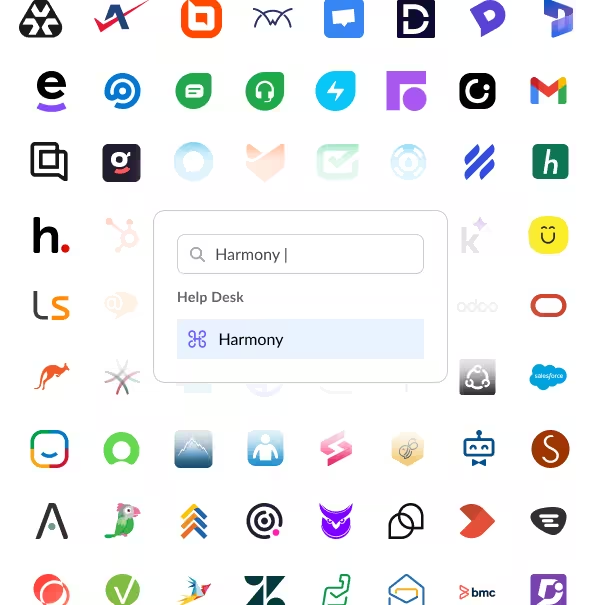
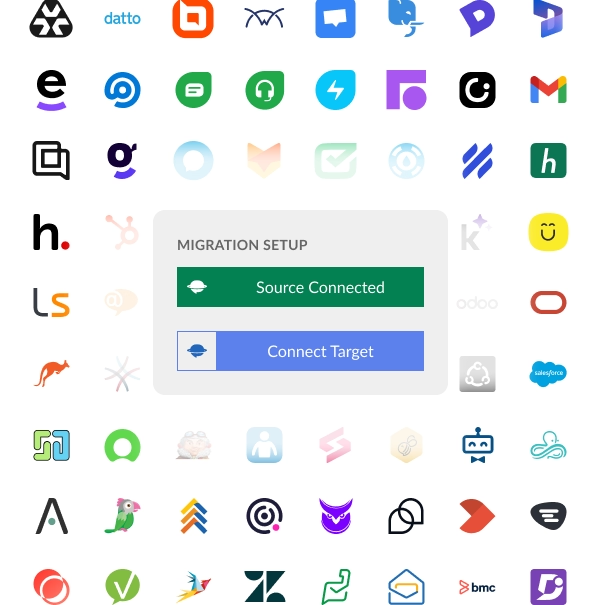
Connect Harmony.io as your source — or destination — platform
Choose your destination help desk
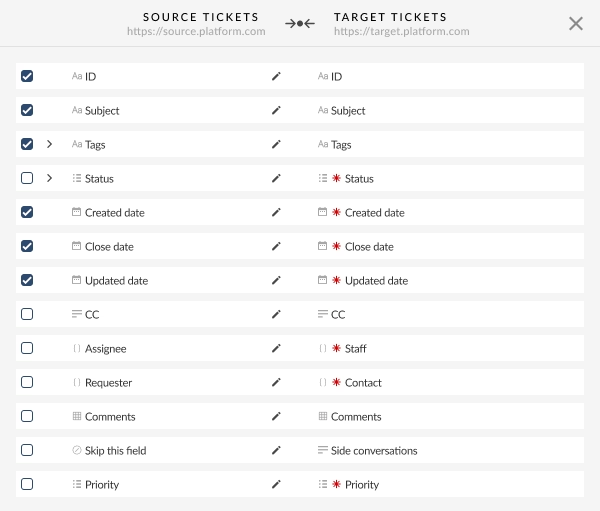
Map your data fields
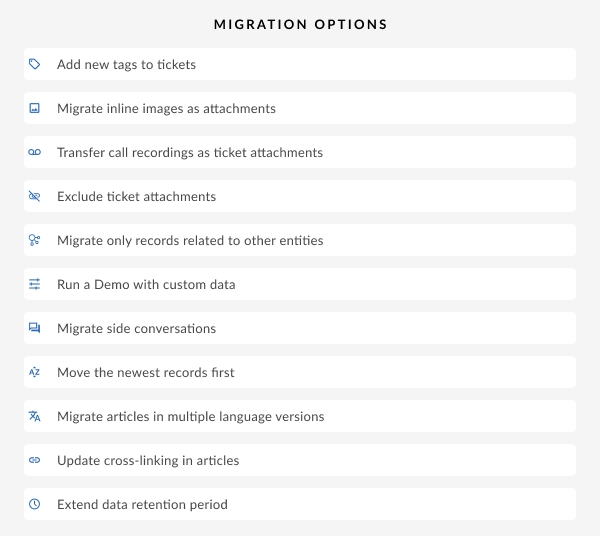
Configure additional options
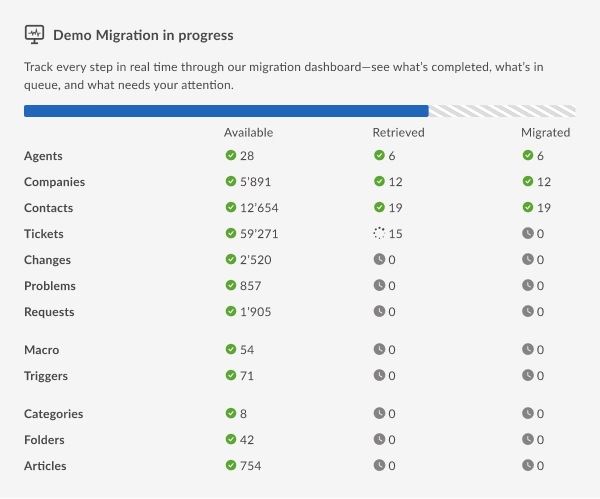
Run a Demo migration
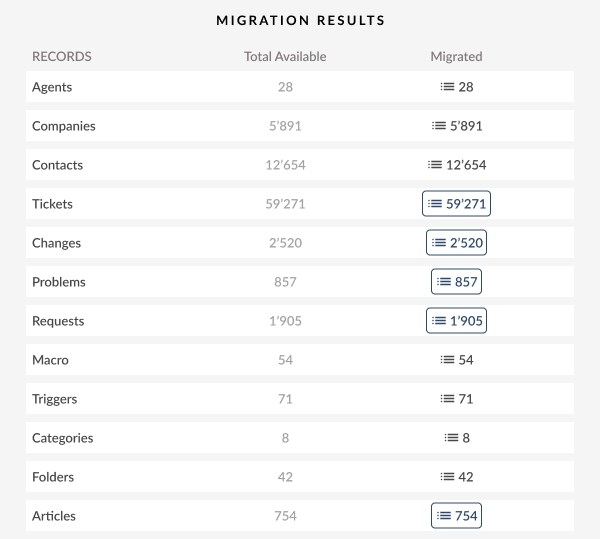
Launch the full migration and verify
Once the demo checks out, launch the complete migration. Help Desk Migration verifies record counts against your Harmony.io source. So you know the transfer is complete before you shut off access to the old platform.
Ready to see it in action? and walk through your own data before committing to anything.
Why Organizations Migrate from Harmony.io
Harmony.io earns loyal users. But no platform fits every team forever.
Here's what comes up again and again when organizations start planning their exit.
Harmony.io's AI agent needs time. Time to learn your environment, your documentation, your workflows, before it resolves tickets reliably. Reviewers call this adjustment period one of the platform's biggest early hurdles. Teams that expected the AI to perform well from day one sometimes find that the ramp-up takes longer than planned.
As support volume grows, so does the cost of most ITSM platforms. Harmony.io is no exception. Teams that started small often hit a point where the cost per agent, or the cost of the modules they added on, no longer fits the budget they had in mind.
Harmony.io is still a young platform. Some capabilities, like deep reporting or certain compliance controls, haven't caught up to more established competitors yet. Teams with specific ITIL requirements or complex approval chains sometimes hit a wall Harmony.io hasn't built a door through.
Plenty of migrations have nothing to do with dissatisfaction. Maybe your team already runs Zendesk for customer support, or ServiceNow for the rest of the enterprise. You just want one system of record instead of two. Consolidation cuts license costs. And it gives leadership a single view for reporting.
What Help Desk Migration Migrates from Harmony.io
Help Desk Migration exports three core record types from Harmony.io — and maps the same three types into Harmony.io when it's your destination. Each one maps to your platform's schema.
Tickets
Your tickets carry over as full records. Subject, description, status, priority, custom fields, tags, and the complete comment thread all come along. Timestamps stay intact too, so your reporting still reflects when a ticket actually opened and closed. Not when the migration happened.
Members
Members are your Harmony.io agent and staff accounts. Help Desk Migration exports agent profiles, roles, and group assignments. Your team structure transfers right along with the ticket data.
People
People are your Harmony.io end users, customers, and contacts. Help Desk Migration exports contact details and organization associations. So every ticket still links to the right requester at the destination.
What Help Desk Migration migrate and doesn't migrate
Harmony.io's automations, AI agent configurations, and SLA rules live inside Harmony.io's own workflow engine. These don't transfer during a data migration. You'll need to rebuild them at your destination, using that platform's own automation tools.
| Record Type | What Transfers | Notes |
|---|---|---|
| Tickets | Subject, description, comments, status, priority, tags, custom fields, timestamps | Full history preserved |
| Members | Agent profiles, roles, group assignments | Staff accounts only |
| People | Contact profiles, organization data | End user records |
| Not migrated | Automations, AI agent configurations, SLA rules | Rebuild manually at the destination |
Ready to see your own data mapped out? and check the field mapping before you commit to anything.
Why Companies Migrate to Harmony.io from other ITSMs
Plenty of migrations run the other direction.
Teams leave legacy ITSM tools for Harmony.io specifically because of what it's built to do.
Harmony's AI Service Desk agent is built to resolve the majority of routine requests — password resets, access requests — without a human touching them. Teams moving from admin-heavy legacy tools cite this as the main draw.
Harmony's own customers describe the switch from legacy ITSM as quick, with a full tech stack connected in under an hour, according to reviewer reports.
Harmony's multi-desk agents span IT, HR, Legal, and Finance. Teams consolidating from a patchwork of departmental tools land here to get one system of record instead of four.
Harmony's proactive agents are triggered by signals in your environment, not just incoming tickets — a different operating model than most legacy help desks, and one some teams switch specifically to get.
Where Can You Migrate Harmony.io Data To?
Leaving Harmony.io doesn't mean giving up a support experience built around AI. Most teams evaluating Harmony.io alternatives land on one of the platforms below.
Zendesk brings a big app marketplace and a polished agent interface. It's a common pick for teams that want an established, widely adopted help desk. Zendesk sells its automation and AI features (Advanced AI, Quality Assurance, Workforce Management) as extras on top of the base seat price. So a fully loaded Zendesk seat costs meaningfully more than the sticker price suggests.
Zendesk fits teams that face customers directly and want a mature ecosystem. Just don't mind a bill that grows as you add capabilities.
Starting price: around $55 per agent per month for the Suite Team plan, billed annually.
Freshdesk offers a free tier for very small teams, and a straightforward paid structure above that. It prices its Freddy AI features separately from the base plan. Teams that need live chat, SMS, or social channels typically move to the pricier Freshdesk Omni line, rather than standard Freshdesk.
Freshdesk fits smaller support teams that want to start cheap and add capability as they grow.
Starting price: free for a couple of agents on a limited term, with paid plans starting around $19 per agent per month billed annually.
Freshservice is built for ITSM, with incident, change, and problem management baked in alongside asset tracking. It's often positioned as a lower cost alternative to ServiceNow for midsize IT teams. Deeper automation, analytics, and reporting sit behind the higher tiers, so budget accordingly if your team needs ITIL grade process depth.
Freshservice fits IT teams that want structured service management without an enterprise price tag.
Starting price: around $19 per agent per month billed annually.
Jira Service Management is the natural landing spot for teams already living inside Atlassian's ecosystem. It offers a genuinely usable free plan for up to three agents, and pricing per agent drops as your team grows. Jira Service Management reserves asset management and AI features for the Premium tier. And the platform carries more setup complexity than a pure help desk.
Jira Service Management fits organizations built around engineering that want ITSM tied tightly to their existing Atlassian tools.
Starting price: free for up to three agents, with the Standard plan starting around $20 per agent per month.
ServiceNow is the platform teams choose when they need service management at enterprise scale, across IT, HR, and beyond. Not just a help desk. It doesn't publish list pricing, and implementation typically runs three to five times the annual license cost, with a learning curve to match.
ServiceNow fits large enterprises with a dedicated ITSM team, and the budget for a longer rollout.
Starting price: not published. Industry estimates put entry level tiers around $70 to $100 per user per month before implementation costs.
SysAid bundles help desk, ITSM, and asset management into one contract. Some editions include unlimited end users regardless of agent count. Pricing isn't public, and AI features sit behind a separate Copilot add-on priced per admin.
SysAid fits IT teams that want ITSM depth without ServiceNow's price tag, especially organizations with a large user base relative to their admin headcount.
Starting price: not published. Third party estimates put the entry Help Desk plan around $79 per agent per month.
Atera charges per technician rather than per device. That makes it popular with managed service providers and internal IT departments managing large device fleets. Atera sells AI Copilot and network discovery as add ons on top of the base subscription.
Atera fits teams with a high ratio of devices to technicians, where unlimited device management under one technician license delivers real savings.
Starting price: around $129 per technician per month billed annually.
TeamDynamix is a no code platform built to extend past IT, into HR, facilities, and other departments, all on a single system. It's especially common in higher education and government. Pricing isn't published anywhere, and the platform carries a real learning curve for admins configuring workflows and forms.
TeamDynamix fits organizations that want one enterprise service management platform shared across multiple departments.
Starting price: custom; contact TeamDynamix sales for a quote.
| Platform | Best Fit | Starting Price |
|---|---|---|
| Zendesk | Customer-facing teams wanting a large app ecosystem | ~$55/agent/month |
| Freshdesk | Smaller teams wanting an affordable entry point | Free tier, paid from ~$19/agent/month |
| Freshservice | IT teams wanting ITSM depth below ServiceNow's price | ~$19/agent/month |
| Jira Service Management | Atlassian native engineering organizations | Free for 3 agents, then ~$20/agent/month |
| ServiceNow | Large enterprises needing service management across departments | Custom quote, ~$70 to $100+/user/month |
| SysAid | IT teams with a large user base relative to admin headcount | Custom quote, ~$79/agent/month (estimate) |
| Atera | MSPs and IT departments with large device fleets | ~$129/technician/month |
| TeamDynamix | Universities, government, and multi department service management | Custom quote |
How Long Does a Harmony.io Migration Take?
Migration time depends on your data volume, the options you pick, and your destination platform. Here's what to expect.
Demo migration:
Usually done within an hour. Use it to confirm your field mapping looks right, before you commit to anything bigger.
Small support teams (under 5,000 tickets):
Often finish within a few hours, start to finish.
Mid-sized teams (5,000 to 50,000 tickets):
Typically one to two days, depending on attachment volume and whether you migrate inline images.
Large or enterprise datasets (50,000+ tickets across tickets, members, and people):
Can take several days, especially if you don't skip attachments and inline images.
Compare that to a manual export and import. Industry estimates put that at $10,000 to $75,000 in labor and tooling costs, and it can stretch across several weeks, depending on data volume and how many custom fields need manual mapping.

Pricing for Harmony.io Migration
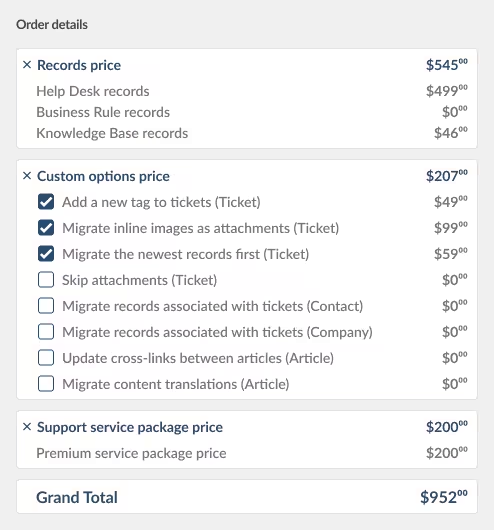
Help Desk Migration prices a Harmony.io migration by the number of records you move, not by agent seats or a recurring subscription. There's no ongoing license to buy. A migration is a one-time project, not a tool you use every day.
Run a free Demo migration first, at no cost. See your own Tickets, Members, and People mapped correctly before you commit to anything. Once you're ready for the full transfer, Help Desk Migration's wizard gives you an instant quote based on your actual record counts. Or request a custom quote from the team for larger or more complex datasets.
No credit card required Fast setup

Security Block: Safe, Encrypted, and Fully Documented Data Migrations
Moving support data between platforms means handling sensitive customer and employee information. Help Desk Migration takes that responsibility seriously.
SOC 2 Type II certified
Independent auditors check Help Desk Migration's controls around security, availability, and confidentiality every year.
Encryption in transit and at rest
Your Harmony.io data stays encrypted the entire time, from the moment it's read to the moment it lands at your destination.
Read-only source access
Help Desk Migration never writes to your Harmony.io account. Your live data stays untouched while the migration runs.
Temporary credentials
Help Desk Migration deletes migration access tokens once your project finishes. No lingering connection stays open between the two platforms.
Trusted at scale
More than 3,000 companies rely on Help Desk Migration to move their support data, backed by more than 60,000 completed migrations.
Harmony.io Migration Checklist
Use this checklist before you start moving data out of Harmony.io.
- Export a list of your active Harmony.io agents and confirm their roles (Members).
- Confirm which contact and organization fields you need carried over (People).
- Review the custom fields and tags currently used on your Harmony.io tickets.
- Decide whether to skip attachments or migrate them in full.
- Decide whether inline images should convert to standalone attachments.
- Choose your destination help desk and confirm your license count before migration day.
- Run a Demo migration and check the field mapping against your live account.
- Add a migration tag to make post-migration auditing easier.
- Schedule the full migration during a low-traffic window for your support team.
- Notify agents and stakeholders of the cutover date in advance.
Harmony.io Migration FAQs

Ready to run your Harmony.io migration?
If existing ITSM AI learning curve, its pricing, or a tool consolidation plan has you eyeing the exit, Help Desk Migration moves your tickets, members, and people automatically. Your ticket history stays intact. And your team gets back to work the same day.
Schedule a Migration Consultation →
No credit card required SOC 2 certified 60,000+ migrations completed