Zero Downtime Znuny Migration: No Lost History
Znuny is a free, open-source ticketing system for customer service, help desk, and IT service management, maintained by Znuny GmbH as the continuation of ((OTRS)) Community Edition.
Help Desk Migration moves all necessary data from an on-premise Znuny over the API to other platforms — no database dumps, no downtime, no rebuilding your ticket history by hand.
No credit card required Fast setup
Interactive Migration Calculator
Adjust sliders to estimate your migration time and cost savings
Estimates based on 60,000+ successful migrations. Actual results may vary.
What Data Can You Migrate from Znuny?
Every piece of your support history matters, and none of it should be left behind just because you're switching platforms. Here's exactly what transfers from Znuny.
Companies
Migrate company records while preserving key customer and organization details, so your existing company structure remains intact in the new platform.
Contacts
Transfer contacts with their names, email addresses, phone numbers, and other available customer information, keeping your customer records connected to the right organizations.
Tickets
Move your ticket history with essential details such as messages, timestamps, statuses, priorities, assignments, and other supported ticket data, so your team can continue working with the full context of past conversations.
How Znuny Migration Works
The migration process follows four stages: connect, map, run a demo, migrate, and verify. The Migration Wizard handles the transfer in the background, so your team can continue working while you monitor migration progress in real time.
1. Connect Your Source & Target Platforms
To get started, go to the Help Desk Migration Wizard and enter the required connection details:
- Encrypted authorization for all credentials: your credentials are securely encrypted.
- API-based connection: no scripts, SQL dumps, or manual exports required.
- Quick Znuny setup: the API user and web service are already in place, so setup takes just a few minutes.
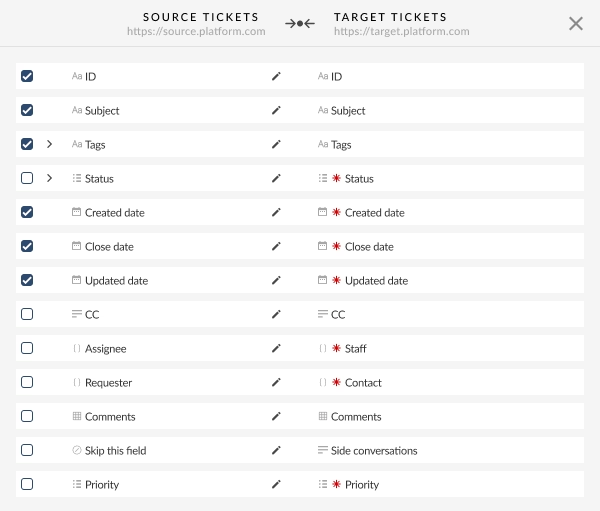
2. Choose the Records & Map the Data
Mapping is where you decide how records translate between Znuny's structure and the other platform's. Roughly 95% of standard fields are mapped automatically in the Migration Wizard.
- Select your entities. Contacts, companies, tickets.
- Map dynamic fields ↔ custom fields. Create the target's fields first — the Wizard can only map to fields that already exist there.
- Select out-of-the-box options. Select records for your Demo, skip attachments, prioritize your newest records first, and filter unlinked contacts.
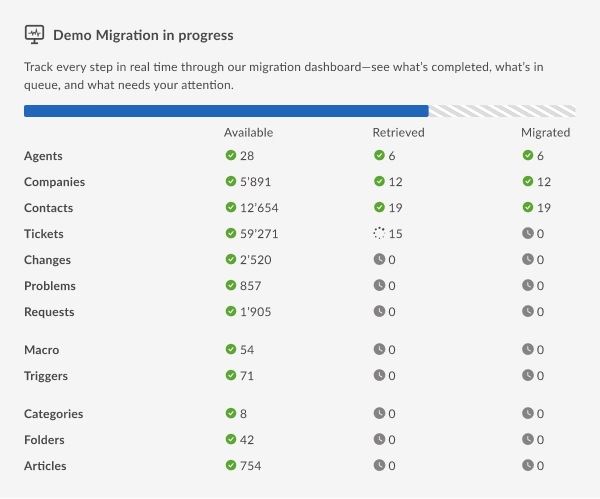
3. Run a Free Demo Migration
Move a sample of your real data and review exactly how it will appear in the destination system. Test contacts, companies, tickets, and field values before running the full migration.
Why it matters: It’s much easier to adjust field mapping and ticket states with 20 real sample records than after thousands of records have been migrated.
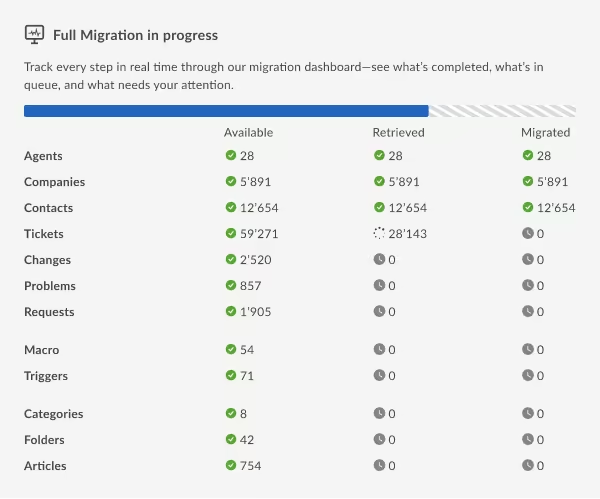
4. Full Migration and Verification
Launch the full migration after reviewing your Demo results:
- Progress is monitored in real time
- Your team keeps working in the source platform throughout — nothing is locked or made read-only for end users
Then verify on the destination:
- Review migrated tickets
- Confirm field mapping
- Resolve any inconsistencies before go-live
Automated Migration vs. Database Dump vs. Engineer-Led
On-premise Znuny gives you one option that cloud platforms typically don't: direct database access. While a SQL-level migration may seem faster, it only works reliably when the source and destination databases use closely related schemas, such as Znuny and OTRS. For other platforms, increasing the risk of broken relationships and missing data.
| Feature / Metric | SQL Dump / CSV |
Help Desk Migration
|
Bespoke Engineer-Led |
|---|---|---|---|
| Timestamps | Often overwritten with import-time dates |
Original creation/update dates preserved
|
Original dates preserved |
| Cross-links & relational IDs | High risk of broken agent/ticket/contact links |
Maintained via ID-based mapping
|
Maintained via custom logic |
| Risk to live Znuny instance | Direct DB access can affect production |
API-only; no direct database access
|
Depends on approach |
| Cross-platform schema | Only viable Znuny ↔ OTRS |
Works across 100+ platforms
|
Works, at engineering cost |
| Self-serve transparency | Direct, but manual and error-prone |
High: direct field mapping, clear visibility
|
Low: managed behind the scenes |
| Pre-migration testing | Manual trial and error on staging copy |
Free demo migration with real sample data
|
Requires custom staging runs |
| Time to launch | Immediate start, slow cleanup |
Rapid self-serve rollout
|
High: lengthy planning & build phases |
| Total cost | Low upfront, high hidden manual effort |
$0 for up to 20 records
|
High: dedicated engineering hours |
Where automated tools with expert support fit best
Migration Paths for Znuny
Help Desk Migration support moves from Znuny to 100+ other help desk, ITSM, and customer service platforms. Usually teams outgrowing self-hosted infrastructure or consolidating after an acquisition.
Accelo
Atera
Atlas
Autotask PSA
BMCHelixITSM
BoldDesk
Chatwoot
ConnectWise
Crisp
CSV
Custify
Deskpro
DevRev
Dixa
Document360
Drift
Dynamics 365
eDesk
eGain
Enchant
Forumbee
FreeScout
Freshchat
Freshdesk
Freshservice
Front
Gladly
Glassix
Gleap
GLPI
Gmail
Google Docs
Gorgias
Groove
Halo Service Solutions
HappyFox
Harmony
HelpCrunch
HelpDesk
HelpDocs
Helpjuice
Help Scout
HelpShift
HelpSpot
HubSpot Service Hub
InstantDocs
Intercom
Ivanti
Jira Service Management
Jitbit HelpDesk
Kayako
Kayako Classic
KnowledgeOwl
Kundo
Kustomer
Lansweeper
Live Agent
LiveChat
Manage Engine
Mayday
Missive
NinjaOne
Odoo Helpdesk
Oracle Service Cloud (RightNow)
osTicket
((OTRS)) Community Edition
Outlook
Paligo
Plain
Planhat
Pylon
Reamaze
Request Tracker
Respond.io
Richpanel
Salesforce Service Cloud
ServiceDesk Plus
ServiceNow
SherpaDesk
Siit
SmarterTrack
SolarWinds Service Desk
SolarWinds Web Help Desk
SparrowDesk
Spiceworks
Spiceworks Cloud
SQLite
SuperOps
SupportBee
SupportPal
Syncro
SysAid
SysAid (Cloud)
Tawk.to
TeamSupport
TeamworkDesk
Thena
Thulium
Tidio
TOPdesk
Trengo
Unthread
Vitally
Vivantio
Zammad
Zendesk
Zoho Desk
Zoho Mail
Check the name for typos or leave us a message.
No credit card required Fast setup
How Much Does Znuny Migration Cost?
Pricing is by record volume, not a flat fee, and not linear — larger migrations cost less per record, in either direction.
Volume-Based Pricing
Only substantial records count: tickets, contacts/customer users, and companies.
As an example, a basic migration with no customizations on an Essential support package runs about $100 for 1,000 records, while 10,000 records under the same conditions cost around $514.
Flexible Options & Support
Customization — tagging, side conversations, cross-link updates — adjusts the final price.
Support tiers scale from Standard up to white-glove setup, depending on complexity.
Before you pay anything:
The Free Demo Migration moves a small sample (typically 20 tickets) so you can test mapping and check accuracy — always free, no commitment.
After the Demo, you get a total record count and an estimated Full Migration price broken down by data type.

Is My Data Safe During Migration?
API-only access to Znuny
No direct database connection, no filesystem access, no shell — and when Znuny is the source, nothing is ever written back to it.
Scoped and revocable credentials
The API user only sees or creates what you permit, and you delete the account once the migration is verified.
GDPR compliance
Relevant either way, but especially if data residency is part of why you're running Znuny on-premise at all.
SOC 2 Type II
Security controls are independently and regularly evaluated against established standards.
Why Teams Choose Znuny Migration
Teams often move from Znuny when the operational overhead of self-hosting no longer fits their needs. Teams may want managed infrastructure, built-in AI, a modern customer portal, or a single platform across a growing organization.
Managed operations
Less infrastructure to own
Znuny's self-hosted model gives teams control, but it also means managing upgrades, backups, and scaling. Moving to a managed platform can reduce the operational work your team has to handle.
Built-in AI
AI without building it yourself
Teams may migrate when they want AI capabilities available out of the box rather than taking on the work of evaluating, integrating, and maintaining separate AI tools around their help desk.
A modern customer portal
A smoother customer experience
A migration can also be driven by the need for a more polished customer portal and a support experience that better matches how customers expect to interact with modern service teams.
One platform instead of several
Bring teams onto one system
As organizations grow or merge, separate tools can create unnecessary complexity. Moving from Znuny can help consolidate support operations onto a shared platform instead of maintaining multiple systems.
FAQ
Help Desk Migration needs network reachability to connect to your Znuny instance. For on-premise setups, teams typically allowlist the migration service IPs or create a temporary firewall rule. Access is read-only and API-only, through a dedicated Znuny agent account that you can revoke once the migration is verified. No VPN access, database credentials, or server access is required, and your production instance is never written to.
Most self-service migrations out of Znuny can complete within hours once your mapping is confirmed. The timeline depends on data volume, customizations, and your on-premise server's available throughput. For larger datasets, Interval Migration lets you pause and resume the process around business hours, reducing the need for a single long export window.
Znuny dynamic fields — including text, dropdown, date, and multiselect fields — can map to equivalent custom fields on the destination platform. Create the required custom fields on the destination first, as the Migration Wizard can map data only to fields that already exist there.
A database dump can work when the destination is a closely related system, such as OTRS. For any other platform, database schemas differ significantly, making a direct dump risky. API-based migration reads tickets, relationships, and timestamps through Znuny's supported interface, avoiding direct queries against your production database and reducing the risk of broken relationships on export.
Yes. A Free Demo Migration lets you export a small sample of your actual Znuny data before running the full migration. Typically this includes around 20 tickets and articles, giving you the chance to verify field mapping, relationships, formatting, and overall results before moving the complete dataset.
No. You can connect Znuny and your target platform, configure the migration, and map fields directly in the Migration Wizard. The main technical requirement on the Znuny side is setting up a dedicated API user and importing the required web service configuration. Step-by-step documentation is available, and migration experts can assist with more complex scenarios.
No. Your team can keep working in Znuny while the migration runs in the background, reading data without disrupting live use.
Help Desk Migration supports migrating from Znuny to 100+ help desk and ITSM platforms, including Zendesk, Freshdesk, Zoho Desk, Jira Service Management, ServiceNow, and HubSpot Service Hub. Supported destinations vary by connector. If your target platform isn't listed, check with Help Desk Migration for current availability.

Zero Downtime Znuny Migration: No Lost History
Help Desk Migration moves all necessary data from an on-premise Znuny over the API to other platforms — no database dumps, no downtime, no rebuilding your ticket history by hand.
No credit card required SOC 2 certified 60,000+ migrations completed