Migrate to Helply. AI-First Data Migration. Zero Downtime
Helply is the AI-native support platform that replaces Groove. Help Desk Migration moves your entire ticket history, contacts, agents, and knowledge base to Helply automatically — with no code, no disruption, and a free Demo so you can see results before you commit.
No credit card required Fast setup
Interactive Migration Calculator
Adjust sliders to estimate your migration time and cost savings
Estimates based on 60,000+ successful migrations. Actual results may vary.
Trusted by SMBs, SMEs, and rapidly growing teams worldwide



Helply Is the AI-Native Evolution of Groove
Groove has rebranded as Helply — a fully rebuilt, AI-first B2B support platform.
More than a name change, Helply ships with an AI agent that resolves 30–65% of tickets automatically, outcome-based pricing (you pay only when AI delivers), and built-in revenue signals that route churn risk and upsell opportunities directly to your CS and sales teams.
If your team is evaluating Helply or has already signed up, you need your historical ticket data, customer contacts, and knowledge base to come with you. That's where Help Desk Migration comes in.
What Data Can You Migrate to Helply?
Tickets
Requester, Assignee, Group, Attachments, Comments, Comment Created date, Comment Author, Tags, Custom fields, Created date, Updated date, Closed date.
Customers
Custom fields, Phone, Notes.
Users
Map agents from your source platform to Helply users. Reassign tickets from deleted or inactive agents to active ones.
Knowledge Base
Article, Inline images, tags, categories.
AI-First Migration to Helply: 95% Auto-Mapped, Ready in Minutes
Most migration tools make you map every field by hand. Help Desk Migration's AI-powered wizard automatically matches 95% of your source fields to Helply's structure from the first connection — no spreadsheets, no guesswork, no engineers required. You review, tweak the 5%, and run.
Connect your platforms
Link your current help desk (Zendesk, Freshdesk, Intercom, Groove, or 70+ others) and your Helply account. Enter credentials, select your data scope, and the wizard does the rest.
95% auto data mapping
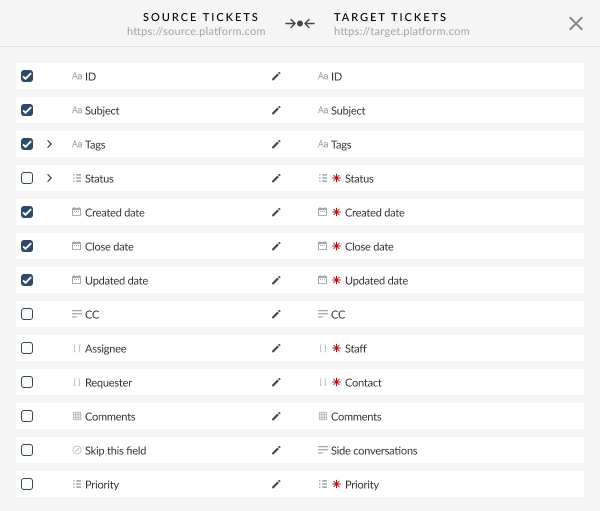
The Migration Wizard analyzes both platforms' field structures and auto-maps the vast majority of data instantly. Tickets go to tickets, contacts to contacts, custom fields to their closest Helply equivalents. You see exactly what maps where before anything moves.
Free Demo Migration with real data
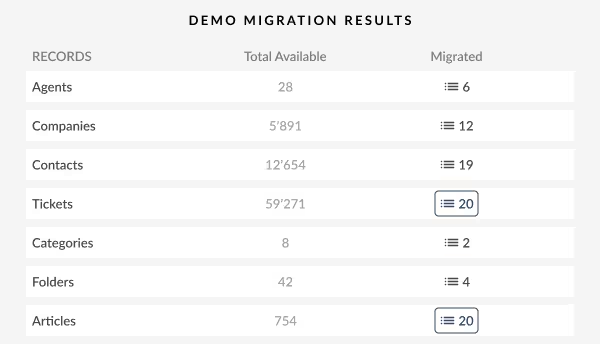
Before committing to a full migration, run a free Demo with your own records — up to 20 tickets and 20 knowledge base articles. Preview exactly how your data will appear inside Helply. Adjust mappings, re-run as many times as you need.
Review and confirm
Check your Demo results. Everything looks right? Move on. Something needs tweaking? Update the mapping in seconds. No risk, no pressure.
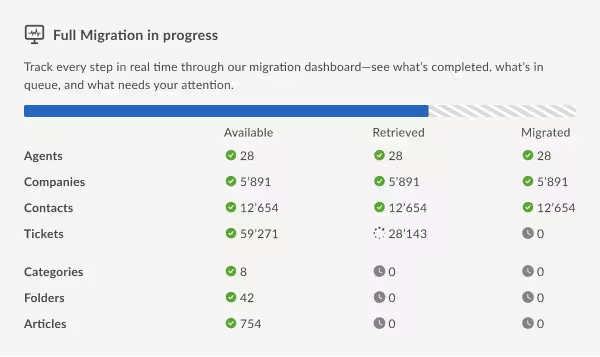
Full Migration runs in the background
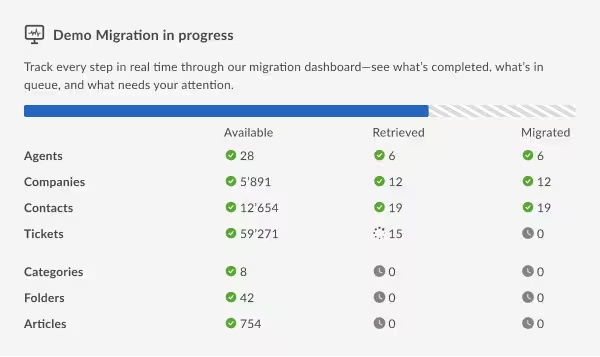
Kick off the full transfer at a time that suits your team. Data moves automatically while your agents keep working. Zero downtime. When it's done, your complete support history is live in Helply — ready to train Helply's AI from day one.
No credit card required
Your Team Never Stops. Neither Does Your Data
Migrating to a new platform doesn't mean your support queue goes dark. Help Desk Migration runs entirely in the background — your agents stay active in your current tool while data moves in parallel.
Delta Migration — No Ticket Left Behind
Tickets and conversations created during your migration aren't missed. After the main transfer, Delta Migration automatically re-syncs any new or updated records, so your Helply account is always up to date when you go live.
Interval Migration — Migrate on Your Schedule
Split the migration into up to five timed segments and run each one during off-peak hours. Ideal for large datasets or teams that need uninterrupted daytime operations.
Why Teams Are Moving to Helply
Helply isn't just a rebranded Groove. It's a fundamentally different approach to customer support — one built for the AI era from the ground up.
Migrate to Helply From Any Platform
Help Desk Migration supports transfers from 100+ help desks, service desks, and CRM platforms. Popular paths include:
Accelo
Atera
Atlas
Autotask PSA
BMCHelixITSM
BoldDesk
Chatwoot
ConnectWise
Crisp
CSV
Custify
Deskpro
DevRev
Dixa
Document360
Drift
Dynamics 365
eDesk
eGain
Enchant
Forumbee
FreeScout
Freshdesk
Freshservice
Front
Gladly
Glassix
Gleap
GLPI
Gmail
Google Docs
Gorgias
Groove
Halo Service Solutions
HappyFox
Harmony
HelpCrunch
HelpDesk
HelpDocs
Helpjuice
Help Scout
HelpShift
HelpSpot
HubSpot Service Hub
InstantDocs
Intercom
Ivanti
Jira Service Management
Jitbit HelpDesk
Kayako
Kayako Classic
KnowledgeOwl
Kundo
Kustomer
Lansweeper
Live Agent
LiveChat
Manage Engine
Mayday
Missive
NinjaOne
Odoo Helpdesk
Oracle Service Cloud (RightNow)
osTicket
((OTRS)) Community Edition
Outlook
Paligo
Plain
Planhat
Pylon
Reamaze
Request Tracker
Respond.io
Richpanel
Salesforce Service Cloud
ServiceDesk Plus
ServiceNow
SherpaDesk
Siit
SmarterTrack
SolarWinds Service Desk
SolarWinds Web Help Desk
SparrowDesk
Spiceworks
Spiceworks Cloud
SQLite
SuperOps
SupportBee
SupportPal
Syncro
SysAid
Tawk.to
TeamSupport
TeamworkDesk
Thena
Thulium
Tidio
TOPdesk
Trengo
Unthread
Vitally
Vivantio
Zammad
Zendesk
Zoho Desk
Zoho Mail
Check the name for typos or leave us a message.
Not on the list? Connect any platform via CSV or database import.
No credit card required

Enterprise-Grade Security Across Every Helply Migration
GDPR-compliant
Every migration follows GDPR standards. Your data is processed only for the purpose of migration and deleted from our systems once complete.
SOC 2 Type II certified
Independent annual audits verify our security controls, availability, and confidentiality practices. You get documented evidence of our data protection standards.
End-to-end encryption
All data is encrypted in transit (TLS) and at rest. From the moment you connect your source platform to the moment your data lands in Helply — fully protected.
No third-party access
Your data passes only between your source platform, Help Desk Migration's migration engine, and your Helply account. No subprocessors, no third-party exposure.
Transparent Pricing for Every Helply Migration
No subscriptions. No monthly fees. No surprises.
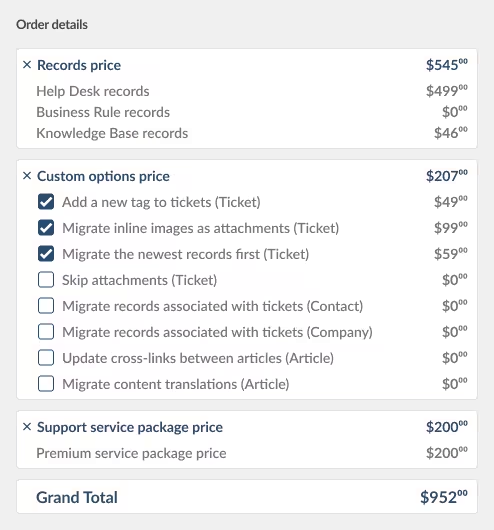
You pay a one-time fee based on the volume of records you migrate. The more records you move, the lower your per-record rate. Optional features — Delta Migration, Interval Migration, customizations — are priced transparently and shown upfront.
How to get your exact cost
Run a Free Demo Migration. Once complete, you'll see your personalized migration estimate — exact record count, exact price — before you commit to anything.
Success Story
How Manyvik Moved From Groove to Help Scout Without Losing a Single Ticket
Freshdesk, Zendesk®, Desk.com, Groove → Help Scout | Software Services
Challenge:
Mayvik Inc. needed to move support data across multiple platforms — including Groove — without writing custom code for each client migration. Help Desk Migration's automated solution handled the customization, field mapping, and data filtering automatically.
Solution:
Customized and automated migrations.
Result:
Help Desk Migration service provided customized migrations (data filtering, fields mapping). Several data transfers were made in an automated way as the outcome of the was suitable for the client.
"For us, it was about simplicity and good support. We found both of those things when using Help Desk Migration!"
We are a tier one technical support services provider. Companies hire us so they can focus on building software, not customer support. Most of them use Help Scout, so naturally, we started receiving requests to help our clients migrate to HelpScout.
About me, I have been in the Enterprise Operations for twenty years with Verizon.
We have done migrations in the past by writing custom code for the HelpScout API. Your product saved a significant amount of time.
As a service for the clients that use our support services.
Can’t say what someone else's objective is but for us it was about simplicity and good support. We found both of those things when using Help Desk Migration!
FAQ About Helply Migration

Move Your Support History to Helply. Today.
Your team has chosen Helply. Your ticket history, customer context, and knowledge base should come with you — accurately, automatically, and without disrupting a single support conversation.
With our migration team — we'll walk through your setup and scope your migration for free.
No credit card required Real data Real results