
Zendesk Migration: Move Your Data To, From, or Within Zendesk
Help Desk Migration automates ticket, contact, and knowledge base migration to Zendesk from 100+ platforms, between Zendesk instances, and out to your next platform — with zero downtime and a Free Demo before you pay.
No credit card required Fast setup

A simulation software company moved to Zendesk.
DATA MIGRATION
PRESERVED

Enterprise migration of 37,000 employees to Salesforce Agentforce.
DATA MIGRATION
PRESERVED

Migration from a regional instance into a central global one.
DATA MIGRATION
PRESERVED
Trusted by 40,000+ companies


How does Zendesk migration work?
Connect · Map · Run demo · Review · Go live
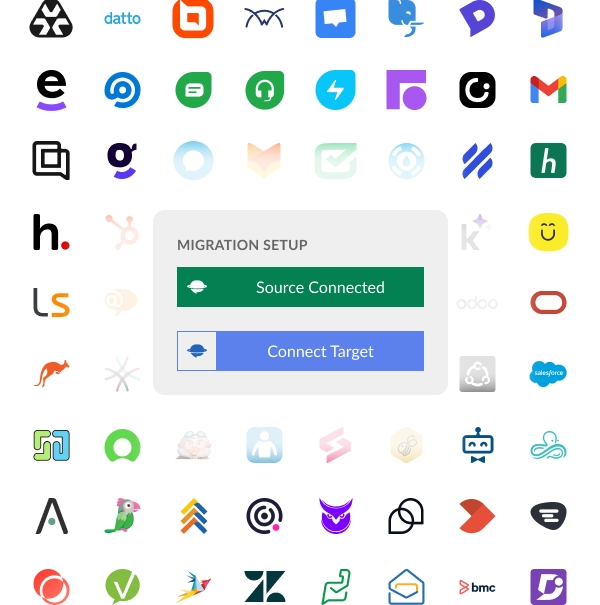
Connect your help desk platforms
Enter credentials for the source platform and the Zendesk account. Access is encrypted and read-only, so nothing in the source data is altered during setup. The connection runs through each platform's API, no plugins, downloads, or engineering work required.
Choose data to migrate
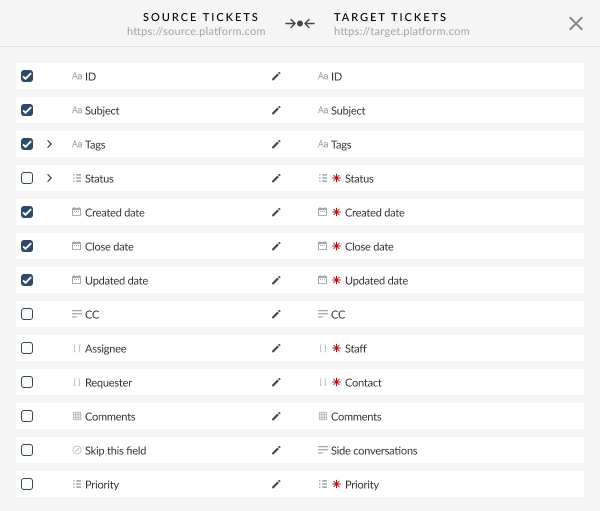
Map fields, statuses, priorities, and match agents in the Migration Wizard. Custom field mapping can be created right from the Wizard, and specific data types can be selected or excluded: tickets, contacts, companies, knowledge base articles, and business rules. Filters let the scope match exactly what the new Zendesk account needs.
Run demo
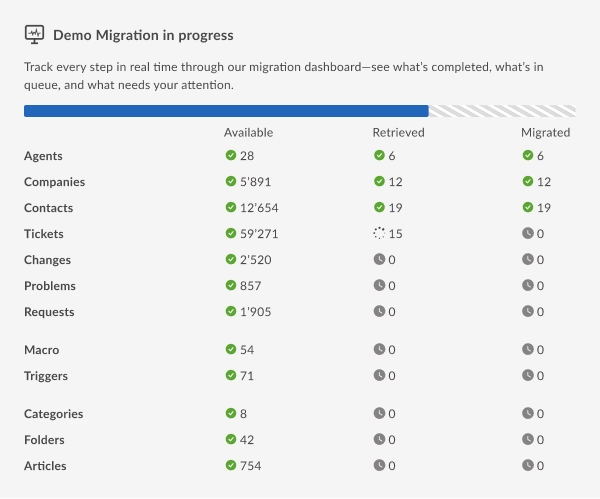
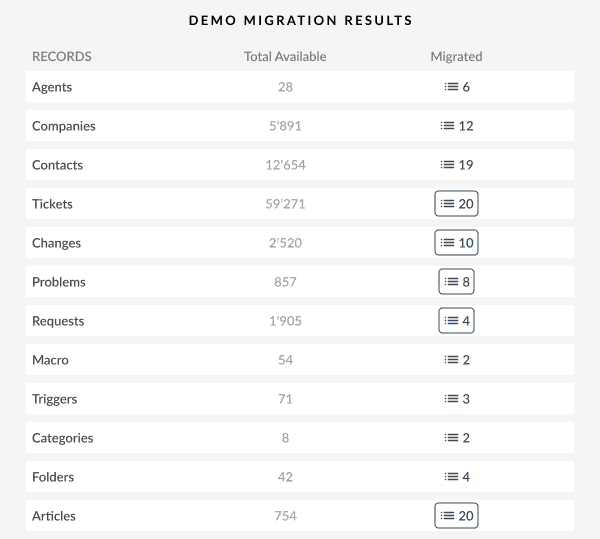
A Free Demo Migration moves a small sample of records into Zendesk at no cost and with no credit card, so results can be verified before any commitment. For a closer look, the Custom Demo option migrates a specific set of 20 tickets and 20 knowledge base articles chosen in advance — a personalized preview of the full result.
Review
Inspect the migrated sample directly in Zendesk: confirm that fields, attachments, and record relationships transferred correctly and mapped where expected. If anything needs to change, adjustments can be verified with the next Demo Migration and remapped before the full run.
Go live
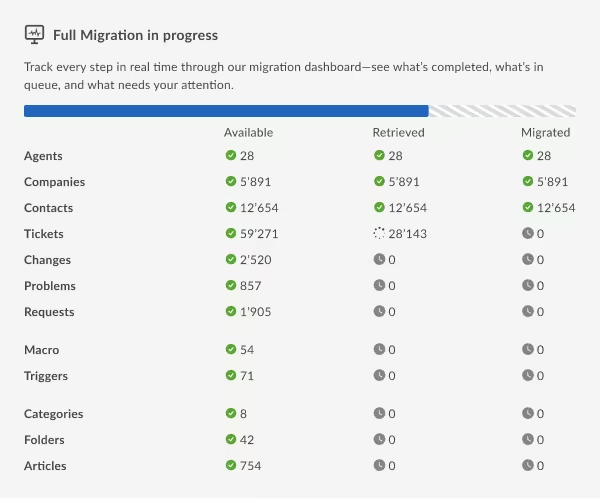
Start the Full Migration once the sample is approved. The support team keeps working throughout, meaning zero downtime. After the main run, Delta migration captures any tickets created or updated in the source system while the transfer was underway, so nothing is missed.
Customer Story
How a simulation-game software provider migrated full support history to Zendesk
A leading gaming software company needed to migrate their entire support archive — spanning 70,000+ tickets — from Freshdesk to Zendesk without disrupting ongoing support operations.
On deciding to migrate
"We needed a new platform that could scale with us. The only thing holding us back was the fear of losing 12 years of support history. Help Desk Migration made that a non-issue."
On the migration experience
"The demo migration was the convincing factor. Seeing our actual tickets appear in Zendesk, with all the attachments and thread order intact — that was the moment we knew this would work."
Recommendation to others
“Plan ahead, ask lots of questions, and be sure you have everything you need before you start the process.”
Migrate data the way Zendesk AI actually works
Teams that bulk-import every ticket see Zendesk AI accuracy drop immediately. Old, low-rated, and unresolved records dilute the signal. Our AI-First Migration approach fixes that — bringing the right data first, so intelligent triage and AI agents work from day one.
Standard bulk migration
Migrating everything at once floods Zendesk AI with 3–5 years of outdated tickets, unresolved threads, and low-rated interactions. Intelligent Triage accuracy can stay below 40% until the noise is manually cleaned — weeks of wasted effort after go-live.
AI-First Migration (two-step)
Step 1 brings only your best-outcome, most-recent, highest-rated data — giving Zendesk AI a clean foundation. Step 2 brings the full historical archive once AI accuracy is validated. The result: working AI from week one, complete data by end of month.
Two targeted migrations. AI that works from week one.
Zendesk Intelligent Triage, AI agents, and intent detection are powered by your Knowledge Base and your best resolved tickets — not your full unfiltered archive. We let you migrate exactly the right data, in the right order, so Zendesk AI hits the ground running.
Goal: Zendesk AI working accurately from day one.
- Resolved & closed tickets only — confirmed outcomes AI can learn from
- CSAT ≥ 4 stars — your team's best-practice resolutions, not the exceptions
- All KB articles, all languages — the primary source for Zendesk AI responses
- Topic-tagged tickets — structured categorization gives Intelligent Triage a head start
Goal: complete institutional memory, compliance, and agent context.
- All remaining tickets — closed archive, older records, unresolved history
- Full contact & company database — complete customer context for your agents
- Attachments — if required for compliance or agent workflows

Monitor AI accuracy between steps
Zendesk Advanced AI (Intelligent Triage)
Triage relies on help center freshness. Enabling AI before KB cleanup keeps baseline accuracy below 40%. With AI-First Migration, you can audit and load KB before tickets — so Intelligent Triage works on switch-over day.
Zendesk AI Agents
AI agents read help center content + recent resolved conversations to generate answers. Step 1's filtered dataset — clean KB, high-CSAT tickets, current date range — matches exactly what AI agents need to hit the published 65%+ resolution rate benchmark.
Zendesk AI Agents
AI agents read KB content + recent resolved conversations to generate answers. Step 1's filtered dataset — clean KB, high-CSAT tickets, current date range — matches exactly what AI agents need to hit the published 65%+ resolution rate benchmark.
Professional services option
For migrations with >100k records, strict AI launch SLAs, or complex custom-field dependencies — our team can plan and execute both steps, including accuracy validation and migration scenarios, on your behalf.
What data can you migrate to Zendesk with Help Desk Migration
Move all key support records to Zendesk with full data integrity. Every ticket, user, field, and attachment arrives complete, connected, and ready to use. Here’s a full list.
HELP DESK
Agents Migration
With Help Desk Migration, you can map agents from your source platform to agents in Zendesk and vice versa to control how tickets are assigned after migration. You can map multiple agents to a single one.
Missing agents
No problem — you can automatically create Zendesk agents during the setup process.
Deleted and inactive agents
You can reassign tickets from deleted or inactive agents to an active agent on the target platform.
Customer Fields:
- ID
- Name
- Phone
- Company
- Details
- Language
- Time zone
-
- String custom fields
- Boolean custom fields
- Dates custom fields
- Number custom fields
Organization Fields:
- ID
- Name
- Description
- Domains
-
- String custom fields
- Boolean custom fields
- Dates custom fields
- Number custom fields
Ticket Fields:
- ID
- Subject
- Tags
- Company
- External ID
- Group
- Source
- Status
- CC
- Staff
- Contact
-
- Comment author
- Comment privacy
- Comment publicity
- Comment body
- Comment attachments
- Comment recording
- Comment created date
-
- Conversation subject
- Conversation external IDs
- Conversation status
- Conversation created date
- Conversation updated date
- Created date
- Updated date
- Closed date
- Brand
- Form
- Custom status
- Type
- Priority
- Due date
-
- String custom fields
- Boolean custom fields
- Dates custom fields
- Number custom fields
BUSINESS RULES
Macros Fields:
-
- Name
- Status
- Dynamic action fields
-
- Name
- Status
- Dynamic action fields
-
- Name
- Status
- Dynamic action fields
-
- Name
- Status
- Dynamic action fields
Trigger Fields:
-
- Name
- Status
- Dynamic action fields
-
- Name
- Status
- Dynamic action fields
-
- Name
- Status
- Dynamic action fields
-
- Name
- Status
- Dynamic action fields
KNOWLEDGE BASE
Category Fields:
- Name
- Description
- Position
- Translations
Section Fields:
- Name
- Description
- Position
- Category
- Translations
Article Fields:
- Title
- Body
- Position
- Author
- Folder
- Status
- Tags
- Redirects
- Translations
- Attachments
- User segments
- Permission groups
- Content tags
Why choose Help Desk Migration over alternatives or manual migration
Automated migration to Zendesk from 100+ platforms, between Zendesk instances, or out to another tool, moving tickets, contacts, organizations, attachments, and knowledge base with a free Demo Migration available before payment.
| Feature |
Help Desk Migration
|
Manual / Native Importers |
|---|---|---|
| Ease of Use |
Guided Migration Wizard handles all steps, no technical expertise required.
|
Often complex, requires manual CSV preparation and system knowledge. |
| Data Accuracy |
Automatic mapping with validation ensures records, fields, attachments, and relationships transfer correctly.
|
High risk of errors; manual mapping can result in lost or misassigned data. |
| Speed |
Fast, automated migration even for large datasets; supports Delta and Interval migrations.
|
Slow and labor-intensive, especially for large volumes; often requires multiple attempts. |
| Downtime Reduction |
Delta and Interval migrations let you continue using your system during the transfer.
|
Usually requires pausing operations; no built-in support for ongoing updates. |
| Customization |
Customize field mappings, tags, translations, and filters before migration.
|
Limited or no customization; manual adjustments often required post-import |
| Security |
End-to-end encryption, secure API connections, and isolated migration environments.
|
Varies by platform; manual imports may expose sensitive data. |
| Support |
Expert guidance available for all migration steps; Essential or Advanced support plans.
|
Limited support; usually, only basic documentation is available. |
| Transparency |
Real-time logs and progress tracking ensure full visibility of every record transferred.
|
Minimal tracking; errors may go unnoticed until after import. |
Zendesk Professional Services by Help Desk Migration
Get expert help to set up, configure, and optimize Zendesk or your business. From workflows and automations to AI support and analytics, we ensure your team can manage tickets, communicate with customers, and track performance efficiently.
Implementation & Configuration
Custom workflows, ticketing, automations, SLAs, and more.
Audit & Consulting
Improve efficiency and align Zendesk with your support strategy.
Custom Integrations
Connect Zendesk with CRM, ERP, or other tools.
Training & Enablement
Role-based sessions for admins, agents, and AI bot management.
Zendesk AI-Ready Migration
Get your new Zendesk AI features working accurately from day one with a comprehensive migration scenario.
Zendesk AI Support
Automate tasks, personalize interactions, and enable self-service.
We migrate from the following platforms to Zendesk and vice versa
Accelo
Atera
Atlas
Autotask PSA
BMCHelixITSM
BoldDesk
Chatwoot
ConnectWise
Crisp
CSV
Custify
Deskpro
DevRev
Dixa
Document360
Drift
Dynamics 365
eDesk
eGain
Enchant
Forumbee
FreeScout
Freshdesk
Freshservice
Front
Gladly
Glassix
Gleap
GLPI
Gmail
Google Docs
Gorgias
Groove
Halo Service Solutions
HappyFox
Harmony
HelpCrunch
HelpDesk
HelpDocs
Helpjuice
Help Scout
HelpShift
HelpSpot
HubSpot Service Hub
InstantDocs
Intercom
Ivanti
Jira Service Management
Jitbit HelpDesk
Kayako
Kayako Classic
KnowledgeOwl
Kundo
Kustomer
Lansweeper
Live Agent
LiveChat
Manage Engine
Mayday
Missive
NinjaOne
Odoo Helpdesk
Oracle Service Cloud (RightNow)
osTicket
((OTRS)) Community Edition
Outlook
Paligo
Plain
Planhat
Pylon
Reamaze
Request Tracker
Respond.io
Richpanel
Salesforce Service Cloud
ServiceDesk Plus
ServiceNow
SherpaDesk
Siit
SmarterTrack
SolarWinds Service Desk
SolarWinds Web Help Desk
SparrowDesk
Spiceworks
Spiceworks Cloud
SQLite
SuperOps
SupportBee
SupportPal
Syncro
SysAid
Tawk.to
TeamSupport
TeamworkDesk
Thena
Thulium
Tidio
TOPdesk
Trengo
Unthread
Vitally
Vivantio
Zammad
Zendesk
Zoho Desk
Zoho Mail
Check the name for typos or leave us a message.
No credit card required Fast setup

Consolidating instances after an acquisition, or splitting by brand or region?
What are the most popular migration routes to Zendesk?
How Can You Make Your Data Transfer Flawless And With No Business Downtime?
Delta migration
Planning to use your existing platform during migration? After the main migration, Delta migration captures any new or updated tickets created in your old system while the migration was running. This way, your new platform is always up to date, without any duplicates or gaps.
What is Delta Migration?Interval migration
Interval migration allows you to schedule migration around your business needs. You can pause and then resume the data transfer during periods that work for your team — like after business hours or on weekends.
What is Interval Migration?Customizations
If your migration involves importing specific records, deduplicating data, or handling unique requirements our automated tool can’t manage, just schedule a call. We’ll take care of all prep work, ensuring a smooth, tailored migration experience.
Request Migration CustomizationZendesk News & Help Desk Migration Updates
Latest Zendesk News
Stay informed about the newest Zendesk features that may impact your data migration projects.
Regex Field Validation
Zendesk now supports Regex validation for custom fields — and Help Desk Migration fully supports transferring these rules during migration.
AI Ticket Summaries
Zendesk Copilot now auto-generates ticket summaries stored in a new API field, and these can be migrated seamlessly.
Intelligent Voice Triage
Voice now detects caller intent, sentiment, and language for smarter routing.
Improved Side Conversations
Signatures, refined auto-complete rules, and dynamic subdomain detection enhance agent collaboration.
Updated Role Permissions
Admins can grant create/edit rights to end users without delete access.
New Ticket Settings UI
A cleaner Admin Center layout improves ticket configuration visibility.
Help Desk Migration Updates
Flexible Data Retention
Retention extended up to 365 days + clearer field mapping visibility.
Tag Migration
Tags now transfer fully between Zendesk instances to preserve workflows and reporting.
Article Redirects
Knowledge base migrations now include article redirects to protect SEO and avoid broken links.
Reply Time SLA Metrics
The reply_time_in_minutes SLA metric now migrates too, keeping performance reports intact.
Zendesk AI-Ready Migration
Get your new Zendesk AI features working accurately from day one with a comprehensive migration scenario.
Zendesk® is a registered trademark of Zendesk, Inc. Help Desk Migration is not affiliated with, sponsored by, or endorsed by Zendesk, Inc. We provide data migration services that work with Zendesk's platform.