ServiceDesk Plus to Jira Service Management data migration made automatedly
Encoded conversations, secure servers, newest authorization approaches
Automated method, no downtime, no workflow drops
Fair charging to ensure a function + rate balance
We’ve developed the trust of clients across sectors


Data migration timeline: 1-2 weeks
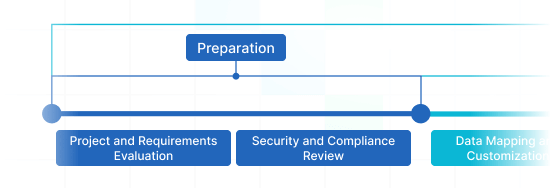
Preparation
Project and Requirements Evaluation
Initiate your transfer by assessing Source records, modus operandi, and applications. Evaluate data filtering and field matching to the Target. Develop a transition tactic, involving the timeline and employee training.
Security and Compliance Review
Make sure data adheres to security standards. Set permissions and access settings to safeguard the transition.
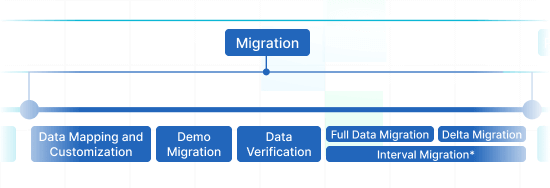
Migration
Data Mapping and Customization
Match records fields between your Source and Target. Settle on in-built custom features from the list or discuss distinct tailoring for the record replication.
Demo Migration
Do a test Demo to see how the transfer app works. Examine outcomes and tweak settings as you wish.
Data Verification
Verify all migrated data in the Target is accurate, fully captured, and adequately structured.
Full Data Migration
Replicate all chosen data, containing tickets, contacts, attachments, and correlated records.
Delta Migration
Catch any fresh or updated data that altered for the time of the Full data transmit.
Interval Migration*
Data transition can be halted and resumed to match your outline, with no service disruption. You can stop up to five instances for a duration of five days each, adjusted by our sales crew during operating hours.
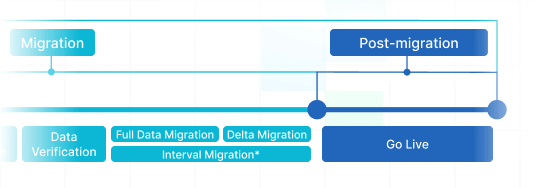
Post-Migration Phase
Go Live
Present the Target for all agents. Decommission the Source if necessary and ensure data backups.
What Types of Records Can You Migrate from ServiceDesk Plus to Jira Service Management ?
With Help Desk Migration service, you can easily import or export massive volumes of diverse records types to or from ServiceDesk Plus to Jira Service Management. Here’s the set of data types you can import or export implementing automation by yourself from tech pros.
Do you need certain ServiceDesk Plus to Jira Service Management migration needs?
Let's discuss your requirements for a unique data migration.
| Servicedesk Plus entities | Jira Service Management entities | |
|---|---|---|
| Help desk | ||
| Technicians | Users | |
| Departments | Organizations | |
| Requesters | Customers | |
| Requests | Requests | |
Why transfer with Help Desk Migration?
-
No downtime
Transfer records seamlessly - keep workflows efficient and help customers without hassle. -
Increased efficiency
Quickly transfer data and map standard and tailored fields with the secure Migration Wizard. -
Seamless ticket transfer
The Migration Wizard moves tickets and all associated records, keeping the data structure consistent on the Target. -
Expert support
Our support crew is prepared to assist you via chat, email, or phone. -
Effective transfer planning
Managers will develop a clear plan for data import, ensuring a hassle-free process and secure records. -
Custom options available
Select automated options or request personalization, and we'll make sure your data is precise.
How Does ServiceDesk Plus to Jira Service Management Data Migration Perform?
Our automated migration app allows you export and import data in a few simple moves. However, if you have specific requirements or a distinct data structure, feel free to select a custom approach.
Connect platforms
Connect your source and target platforms
Map and match data
Specify how your data should be transferred
Test-drive
Start a Demo to access the replication tool and its results
Full Data Migration
Start or plan your data transition
Improve Your ServiceDesk Plus to Jira Service Management Migrate
with These
Functions
Acquire a seamless data replication experience that matches your business requirements. The Help Desk Migration service delivers features to help you to succeed your support service records import in the automated and secure approach.
-
Leave behind attachments
Does your targeted help desk platform deliver limited data storage? Skip attachments, specially if your current support data loses none of its value without them. The data import and export time will scale down remarkably.
-
Apply a additional tag to the migrated tickets
Apply more tags to the migrated tickets — in such a way, you won’t misinterpret them with those existing. You may further sort the tickets by qualifying tags like ‘lost,’ ‘closed,’ or ‘stop replying.’
-
Migrate inline images as attachments
Don’t want to lose images inserted into the tickets? You can import them to the targeted customer service tool as attachments.
-
Check out our Demo with custom records by moving 20 entities
If you need to look at how particular entities settle in the targeted platform, go for this free custom Demo and hand-pick 20 entities for a export.
-
Move newest data first
Choose this feature to move your newest records in a chronological flow, from most recent to oldest. This out-of-the-box capability is exclusive to Full Migrations.
Don’t greenlight data migration to distract you from your work
Whether you’re migrating from ServiceDesk Plus to Jira Service Management, use our automated migration service. It will help you to migrate all your records to a selected help desk system in just a few clicks. Thus, you can have your import done in a timely manner without putting crucial projects on the back burner.

Data import with security standards
Help Desk Migration Wizard takes care of your business data is safe throughout the import or export process. We present utmost business data protection incorporating valid modes, containing regulatory compliance, proper server safeguarding, and frequent security checks.

Use the migration tool that customers praise
With a plenty of efficient data migrations under our belt, Help Desk migration service has obtained lots of service-associated awards and inspiring commentaries. And our aim for quality does not cease there. Going back to Help Desk Migration's goal is to encompass nearly all of your data migration requirements, we keep improving our tool and oftentimes enhance it with fresh capacity.







Benefit from intuitive mapping to cover your most complex needs
Help Desk Migration solution will free your up from copy-pasting business data or creating absent fields along ServiceDesk Plus to Jira Service Management migration. So now you can map regular and custom fields, or else modify your data migration right away our migration app. This will retain the original structure of your data effortlessly on your part.

Select a suitable time for data migration
Get going by the help desk migration anytime it fits into your schedule. On top of that, Help Desk Migration Delta opportunity will greenlight you to import the most recently updated data entities after the historical records was moved. Then, relax and greenlight our importing tool take care of the rest.

Contact to our tech-savvy support team
Don't fret about dealing with tasks whilst performing your Supported Platform data import and export. Empower Help Desk Migration customer service team study your task. With plenty of well-done data export/import experience, they can settle any issue linked with your customer support migration or even provide assistance throughout the complete migration.

Your Help Desk Data Import or Export is Secured at Each Step
Help Desk Migration tool delivers every migration features without damaging on safety. We regularly examine all facilities and make advancements, so that your data is shielded based on the fresh standards.
We employ a strict 2FA authentication policy
Help Desk Migration Wizard applies 2FA authentication. Besides, your business reps can only migrate ServiceDesk Plus data if they have admin access. With these safety functions in place, you won’t have to worry about data leak.
We apply Three-layer
Help Desk Migration delivers 3 layers of data security. At the physical level, we safeguard our hosting facilities from logical and physical breach. At the app layer, we cease any unlawful entry to your records on our platform. And, finally, on the network level, we secure our networks from cyber attacks.
Compliance with safety regulations
We protect your business records based on all key security fundamentals. Our Help Desk Migration service possesses an comprehensive portfolio of compliance, and we continue growing it. Currently, we correspond to GDPR, CCPA, HIPAA, PCI (Level 1), and other data protection principles.
What is the cost of your ServiceDesk Plus to Jira Service Management data migration?
And now to the burning question. How much will it cost to switch from ServiceDesk Plus to Jira Service Management? The cost will largely build upon the business data volume you require to move, the complexity of your requirements, and the features you’ll use or customizations you’ll inquire. Set a Free Demo to check the Migration Wizard work and figure out how much your data transfer will cost.
ServiceDesk Plus to Jira Service Management migration in one payment
Help Desk Migration is an independent service, not part of ManageEngine or Atlassian. The fee covers moving your ServiceDesk Plus data. It doesn't change your ServiceDesk Plus or Jira Service Management licenses.
ServiceDesk Plus to Jira Service Management migration costs
Base prices by record count
| Records | Price* |
|---|---|
| Up to 1,000 records | $100 |
| Up to 10,000 records | $514 |
| Up to 100,000 records | $1,602 |
| Up to 500,000 records | $3,585 |
* Starting prices for a ServiceDesk Plus to Jira Service Management migration at the record volumes shown. Migration options, professional services, and your service package are added on top. Run a Free Demo Migration to see your exact, itemized price.
One-time payment. Your final price depends on:
Optional
- ✓ Migration options — skip attachments, ticket tags, custom demo records, and others
- ✓ Service package — Essential costs nothing; higher tiers add advanced options
- ✓ Professional services — request type mapping, custom fields, site or group filters
What we count as a record
ServiceDesk Plus technicians map to Jira Service Management users, so ownership stays intact.
Check your ServiceDesk Plus to Jira Service Management cost
Run a Free Demo Migration — we count your ServiceDesk Plus records and break the price down.
Prices are for Help Desk Migration's data migration service only. Jira Service Management subscription fees are billed separately by Atlassian. ServiceDesk Plus and Jira Service Management are trademarks of their respective owners.
Reviews encourages us advance our solution: Several thoughts from Help Desk Migration clients
The transition was made easy. The service was excellent, during all the steps of the transition we felt taken care of and monitored perfectly.
 Gauthier Escorbiac
Supervisor of Customer Service at Thule Group
Use Help Desk Migration. This tool took the “painful” and “time-consuming” factors out of the data migration.
 Chantelle Viani
Associate Publisher at Cosmos Magazine
Overall, I found the process to be very fast and effortless. I enjoyed working with the support team. The customer service reps I talked to were very helpful during the entire process.
 Nicola Mustone
Woo Happiness Engineer at Automattic Inc.

The overall experience was excellent. I appreciated the constant follow-up that I received from the Account Managers at Help Desk Migration.
 Ionut Birzu
Operations Manager at Lenovo
Before spending time on in-house options take a look at Help Desk Migration first. They can more than likely save you time and money in the long run.
 Steve Milligan
Associate Director OIS - Networked Systems at Arkansas Tech University

Honestly, I was really pleasantly surprised by how responsive the company is. I was left to wonder, do you guys even sleep? I was able to get responses to virtually every question each time I was asking within a few hours, even considering the time zones.
 Paul McCabe
The Vice President of Global Customer Experience in Roland corporation

It was a great experience using HDM. They were very prompt and thorough throughout the entire process, very willing to help ensure that the migration is done correctly, and answered all questions I had in a very timely manner.
 Andrew Cassano
Customer Service Manager at J Skis and 4frnt Skis

Help Desk Migration was great with us. Being my first time dealing with a migration, they were very patient with me as I guided myself through the process of migrating data.
 Tom Doulos
Director of Customer Experience at Endy

Migrating our Zendesk data with Help Desk Migration was an absolutely seamless experience. We had a very complex case because we had over 200 000 tickets, and HDM just made it much easier.
 Noga Edelstein
Co-founder of UrbanYou
The transition was made easy. The service was excellent, during all the steps of the transition we felt taken care of and monitored perfectly.
Gauthier Escorbiac Supervisor of Customer Service at Thule Group
Use Help Desk Migration. This tool took the “painful” and “time-consuming” factors out of the data migration.
Chantelle Viani Associate Publisher at Cosmos Magazine
Overall, I found the process to be very fast and effortless. I enjoyed working with the support team. The customer service reps I talked to were very helpful during the entire process.
Nicola Mustone Woo Happiness Engineer at Automattic Inc.
The overall experience was excellent. I appreciated the constant follow-up that I received from the Account Managers at Help Desk Migration.
Ionut Birzu Operations Manager at Lenovo
Before spending time on in-house options take a look at Help Desk Migration first. They can more than likely save you time and money in the long run.
Steve Milligan Associate Director OIS - Networked Systems at Arkansas Tech University
Honestly, I was really pleasantly surprised by how responsive the company is. I was left to wonder, do you guys even sleep? I was able to get responses to virtually every question each time I was asking within a few hours, even considering the time zones.
Paul McCabe The Vice President of Global Customer Experience in Roland corporation
It was a great experience using HDM. They were very prompt and thorough throughout the entire process, very willing to help ensure that the migration is done correctly, and answered all questions I had in a very timely manner.
Andrew Cassano Customer Service Manager at J Skis and 4frnt Skis
Help Desk Migration was great with us. Being my first time dealing with a migration, they were very patient with me as I guided myself through the process of migrating data.
Tom Doulos Director of Customer Experience at Endy
Migrating our Zendesk data with Help Desk Migration was an absolutely seamless experience. We had a very complex case because we had over 200 000 tickets, and HDM just made it much easier.
Noga Edelstein Co-founder of UrbanYou
Packed ServiceDesk Plus to Jira Service Management Import in a Few Clicks
Migrate your data from ServiceDesk Plus to Jira Service Management without trouble and without disordering your highest purpose of dealing with your clients’ requests.
Find out more helpful insights about data migration
Willing to learn more about help desk business data import and export and support service advancement? Surf our knowledge base.

ServiceNow Alternative: Choosing ITSM Help Desk That’s Right for You
ServiceNow is a popular help desk solution that has been on the market ...

The 6 Great Help Desk Systems for Shopify
Can you recall the last time you received outstanding customer service? Can you ...

Here are 8 Desk Software Solutions Made for Educational Institutions
There is a common misconception that help desk software is mainly used in ...