
A migration can appear successful on the surface and still leave problems behind. Tickets, users, attachments, and knowledge base articles may all seem to be in place, only for someone to discover weeks later that a custom field lost its values, attachments are missing, or relationships between records have changed. Sometimes the issue surfaces when an agent searches for an old conversation. Or perhaps a customer notices missing information. In regulated industries, it may be an auditor who finds the discrepancy.
That’s why finishing the data transfer itself is only half the job. Equally important is data migration testing — the set of checks that confirms information has moved from the source system to the target completely, accurately, and without corruption. And at the center of that process is the Reconciliation Report: the document that compares both environments and provides evidence that the migration preserved data integrity.
In this guide, you’ll learn how to test a migration end to end, how to interpret a Reconciliation Report and a Migration Score, and why a score below 100% is often expected rather than a sign of failure.
What Is Data Migration Testing?
Data migration testing is the process of verifying that the data has moved correctly. It answers one question: Did everything arrive in the new system exactly as intended?
Migration testing isn't a single check you perform after the go-live. It runs throughout the project — before, during, and after the migration — and involves more than just data.
The goal is not just to confirm that the data exists in the new platform. It's to make sure that years of support history remain complete, accurate, and usable.
The term migration testing is related to (and sometimes confused with) validation and reconciliation.
Testing vs. validation vs. reconciliation — the terms untangled
Testing is a broad discipline. It involves a range of activities, including validation and reconciliation.
What is data migration validation?
Data migration validation focuses on checking whether data meets requirements. For example:
What is a Data Reconciliation report in migration?
Reconciliation is another part of testing. It compares data in the source and target systems to confirm that records and values were transferred correctly and that nothing was lost, duplicated, or unintentionally changed. For example:
- How can I verify that the migration was completed successfully? Compare the record counts in the migration scope between the source and target systems. The numbers should match. For example, if 100 tickets were migrated from the source, you should see 100 tickets in the target. Perform this check for each migrated data type (such as tickets, contacts, organizations, or articles) to confirm that all selected records were transferred successfully.
- How do I verify that attachments, inline images, or call recordings were migrated correctly? Check several migrated tickets and compare them with the source. If inline images or call recordings were migrated as attachments, confirm that they are present in the target. Also, verify that the attachment count matches. For example, if a ticket had three attachments in the source, it should have the same three attachments in the target — no more and no fewer.
Put simply, testing is the overall process, validation checks whether the data follows the rules, and reconciliation proves that it corresponds to field mapping and transfers the data to the target accordingly.
Why Data Migration Testing Matters
Migration failures can easily become silent killers of your reputation.
Customers may be unable to submit requests because a form field was migrated incorrectly.
Agents may have to ask for information that customers provided years ago because call recordings or attachments are linked to the wrong tickets.
AI agents may generate incorrect responses because parts of the knowledge base have failed to migrate correctly.
ISO certification can be put at risk if records are incomplete or no longer traceable.
That's why data migration testing — along with validation and reconciliation — is as important as the migration itself. It turns a migration from "it seems to work" into "we know it worked.”
In the next sections, you'll learn how to perform data migration testing so that “we know it worked” becomes a reality.
The Three Phases of Data Migration Testing
As mentioned above, effective testing happens in three phases — before, during, and after the migration — and each phase answers a different question:
Are we ready to migrate?
Is the transfer working correctly?
Did everything arrive and work as expected?
Pre-migration testing
Before moving any data, you need to verify that the migration plan is sound and that you are ready to migrate.
Typical checks include:
Data profiling to identify duplicates, missing data, and inconsistent formats.
Example: Verify that tickets remain linked to the correct customers and agents. If a record did not migrate, check whether unsupported date or phone number formats may have caused it to be skipped. With the Help Desk Migration tool, you can filter the affected records before migration or request a custom migration to handle unsupported formats.
Scope checks to ensure all required data is included in the migration.
Example: The migration scope includes only legitimate tickets created between January 2020 and December 2025, while older records, test tickets, and spam requests are intentionally left behind.
Mapping validation
to confirm that entities, fields, and field values in the source platform correspond to those in the target one.
Example: Tickets with the status Resolved in the old system are mapped to Closed in the new one.
Backup verification to ensure historical records can be recovered if necessary.
Example: A recent backup of tickets, contacts, attachments, and knowledge base articles has been saved to secure cloud storage.
Risk assessment to identify potential issues.
Example: Unsupported custom fields might jeopardize data integrity or oversized attachments might slow the process down.
A key part of pre-migration testing is running a test migration on a sample dataset. This allows you to validate the migration setup, identify issues early on, and adjust settings until the data lands in the target system as intended.
Testing during migration
Once the migration begins, testing focuses on making sure the transfer is proceeding as expected and identifying issues at the process, data, and system levels. It typically involves
Sampling and spot checks of records that have already been transferred.
Example: All tickets in a sample retain attachments, internal notes, and original timestamps.
Automation and notification testing to validate key support workflows before go-live.
Example: Submit a test ticket and confirm automatic assignment, SLA application, and customer notification all occur as expected.
These checks help catch mapping issues, failed records, or synchronization problems promptly, allowing teams to address them before they affect the overall migration.
Post-migration testing
After the transfer is complete, the focus shifts from moving data to making sure your team can actually use it.
Typical activities include:
Functional testing to confirm that records behave as expected.
Example: Support agents can search for tickets, update statuses, and open attachments without issues.
Performance testing to ensure the new environment handles everyday workloads without slowdowns.
Example: The new platform works without a glitch even during peak hours.
User acceptance testing (UAT), where users within your business verify that the migrated data supports their normal work.
Example: Support teams can continue handling customer requests, while finance teams can generate the reports they rely on.
The final step is reconciliation, which examines the data at two levels.
The Two Levels of Data Reconciliation Report
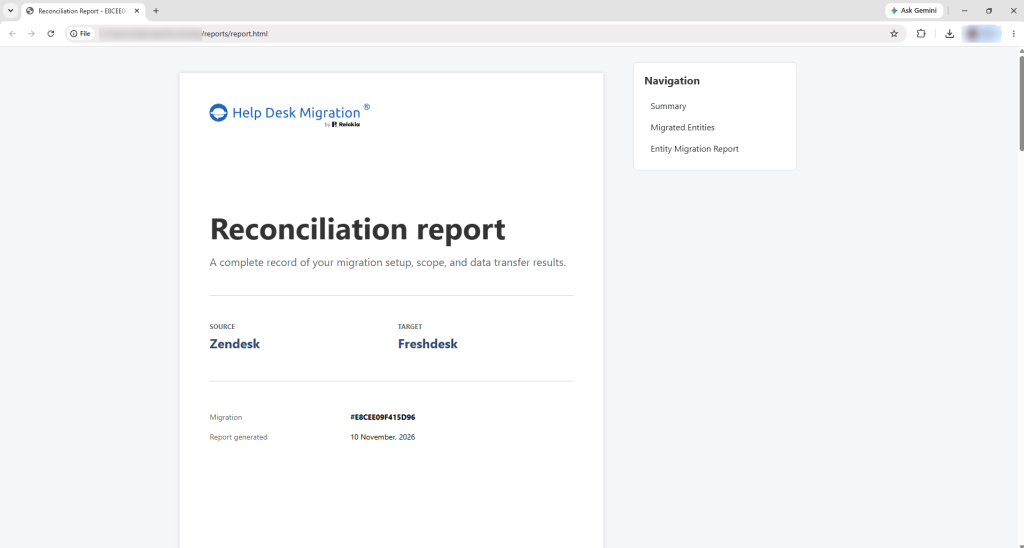
As stated earlier, reconciliation is the post-migration comparison of source and target data. It provides hard evidence that all records were transferred successfully and that their values match.
This process happens at two levels.
Record-level reconciliation
The first level of reconciliation compares the number of records in each system. If the source help desk contains 250,000 tickets and the target contains 249,300, reconciliation immediately reveals that something is missing (which is not always a problem, though, we’ll address that later).
This type of comparison catches large-scale issues, such as records that failed to migrate or entire entities that were accidentally excluded.
Field-level / value-level reconciliation
Matching record counts alone does not guarantee that the migration was successful. The number of records can match while values drift.
Field-level reconciliation compares the contents of records. It checks values such as ticket subjects, statuses, timestamps, tags, custom fields, and relationships to ensure they match between the source and target systems. For example, both systems may contain 10,000 tickets, but some tickets in the target system may be assigned to the wrong agent, have incorrect customer email addresses, or be missing tags used for routing and reporting.
Help Desk Data Migration’s Reconciliation Report
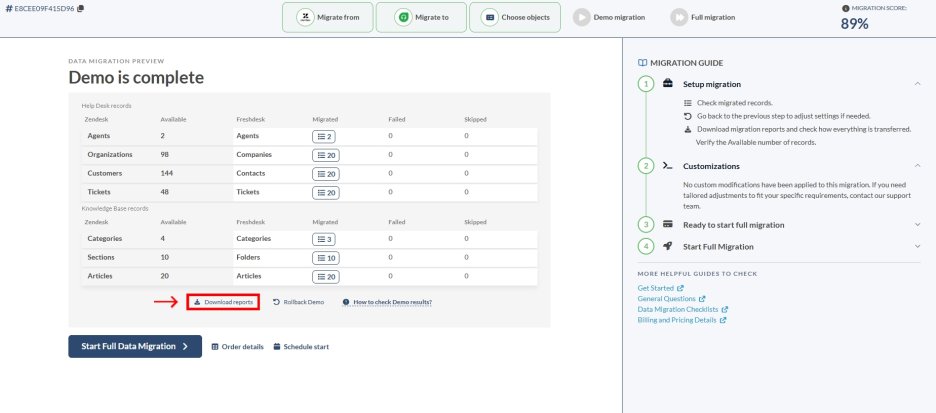
Once the migration is complete, Help Desk Migration provides a Reconciliation Report, which turns testing into proof. The document provides a structured view of what migrated, what didn't, and why — entity by entity and field by field.
What the Reconciliation Report contains
The Reconciliation Report summarizes the migration results at both levels of the reconciliation process.
It provides record counts for each migrated entity, showing how many records were migrated, skipped, or failed.
It also includes a field mapping summary, showing which fields were successfully mapped, which were intentionally skipped, and which could not be migrated because the target platform does not support them.
The migration results are provided in a single archive containing a PDF reconciliation report and separate CSV reports for failed and skipped records.
How to read the Migration Score in the report
The Reconciliation Report also includes a Migration Score — a percentage that reflects how much the migration data on the Target mirrors its configuration on the Source. The score is based on two factors: a share of entity types and a share of migration options. Thus, the Migration Scope shows how precisely the Source mapping and setting are reflected in the Target.
A perfect, 100% score is uncommon and not always necessary.
Some fields may not exist in the target platform or the platforms are simply structured differently. Certain records or attachments may have been intentionally excluded. Deprecated fields, obsolete entities, and poor source data quality can also lower the score.
What's important is transparency. A documented 93% score, with clear explanations for the remaining 7%, provides far more confidence than an unverified claim of 100%. The goal of the Migration Score is not to chase a perfect number, but to understand exactly what happened to your data and ensure that any differences are expected and acceptable.
Without such an overview, data migration validation often comes down to spot checks and assumptions.
Using Your Reconciliation Report for Audits and Compliance
A Reconciliation Report is audit evidence — it documents exactly what moved and what changed, which is precisely what a data, security, or compliance review asks for.
ISO and SOC audits, where auditors may ask for evidence that changes affecting customer records are controlled and documented.
For example, if your company migrated from Zendesk to Freshdesk, the report can show that 250,000 tickets and 15,000 contacts were transferred successfully, while a handful of deprecated custom fields were intentionally excluded and documented.
Internal data governance reviews, allowing teams to verify what was migrated and understand any documented exceptions.
For example, six months after a migration, management might question why certain ticket categories no longer appear in reports. The Reconciliation Report can show that those categories came from legacy custom fields that were intentionally retired during the migration, rather than being accidentally lost.
Customer due diligence, when clients or partners want assurance that historical records were preserved during a platform change.
For example, a B2B software company serving enterprise customers may be asked by a client's security and procurement teams how support history was handled after moving from ServiceNow to Zendesk. The Reconciliation Report provides evidence that tickets, attachments, and knowledge base articles were transferred and documents any intentional exclusions.
Project handover and sign-off, giving stakeholders confidence that the migration was completed successfully.
For example, before formally closing a Zendesk-to-Freshdesk migration project, the IT team, support managers, and business owners can review the Reconciliation Report together to confirm that ticket counts match, key fields were mapped correctly, and any discrepancies have been documented and approved.
The Reconciliation Report can be referenced months or even years later if questions arise. That's why it's a good idea to keep this document on file.
Common Migration Challenges That Cause Testing Failures
Most data migration testing failures can be traced to four factors: complex data relationships, differences between the source and target systems, poor data quality, and the sheer volume of data being moved.
Data complexity
Datasets often make sense in relationships. Tickets contain fields and are linked to contacts, organizations,. Knowledge base articles can have translations, images, internal links, and category structures. If these relationships are not preserved during the migration, records may appear in the target system but lose important context. Testing must verify not only individual records, but also the connections between them.
Source and target incompatibility
Help desk platforms rarely store information in exactly the same way. Interfaces, features, and data structures differ. Multi-select fields are a common example: a source platform may allow several values in one field, while the target supports only one value or stores selections in a different format. Workflows, ticket statuses, and knowledge base structures can vary as well. Thorough testing before data migration helps uncover these differences early enough to adjust mappings and settings before the full transfer begins.
Poor source data quality
Many migration issues originate in the source system rather than in the migration itself. Duplicate contacts, inconsistent formatting, missing values, and broken relationships all surface during validation and reconciliation. In many cases, testing reveals long-standing data quality problems that existed years before the migration project began. Fixing those issues before the final migration often leads to better results than simply rerunning the transfer.
Large data volumes
Large migrations introduce their own challenges. Moving hundreds of records can require millions of API requests. Help desk providers impose API rate limits — restrictions on how many requests an application can make within a certain time period — to prevent their infrastructure from becoming overloaded. This constraint can usually be identified during the platform requirements and migration planning stage. In some cases, providers can temporarily increase API limits upon request, which helps accelerate the migration.
Fortunately, many of these issues can be prevented through more thorough testing and by addressing the problems uncovered along the way. Let's revisit the key data migration testing best practices.
Best Testing Practices for a Successful Data Migration
Most migration issues are preventable. The following data migration testing practices help catch problems before they affect production data:
Migration mistakes can cost you clients and partners. So, it's also important to double-check everything before closing the data transfer project. Download the post-migration testing checklist below and use it after your migration.
How to Validate Data After Migration: A Step-by-Step Checklist
Post-migration validation follows a repeatable sequence.
Compare record counts
Verify that the number of tickets, contacts, companies, agents, attachments, and knowledge base articles are the same as those in the migration scope.
Spot-check record values
Review a sample of records and confirm that important fields, such as subjects, statuses, timestamps, tags, and custom fields, contain the expected values.
Test relationships between records
Make sure tickets are linked to the correct customers and agents, and attachments are accessible.
Validate integrations and automations
Confirm that CRM connections, notifications, workflows, and other integrations continue working correctly in the new environment.
Perform functional testing
Verify that users can search for records, update them, generate reports, and complete their other normal tasks without issues.
Conduct user acceptance testing
Confirm that users aren't encountering any issues related to the migration.
Review the Reconciliation Report
Compare migrated, failed, and skipped records, examine any discrepancies and the reasons behind them.
Archive the report and sign off on the migration
Keep the Reconciliation Report on file as the migration's system of record and use it for compliance audits, vendor reviews, or project handover.
FAQ About Data Reconciliation
Testing happens in three phases. Before migration, you profile data, validate scope, and run trial transfers. During migration, you perform sampling, spot checks, and integration testing. After the migration, you conduct functional, performance, and user acceptance testing. The final step is reconciliation, comparing source and target systems at both the record level and field level to confirm everything transferred accurately.
Testing is the overall process of verifying a migration, covering activities before, during, and after the transfer. Validation checks whether data meets specific rules, like correct status values or valid email formats. Reconciliation compares source and target systems directly, confirming nothing was lost, duplicated, or altered. Validation asks "is the data correct?" while reconciliation asks "did everything arrive as it left?"
A reconciliation report is a document comparing source and target systems after migration, providing proof that data was transferred correctly. It includes record counts per entity, a field mapping summary, and per-record details on failures or skips. It typically arrives as an archive with a PDF summary plus CSV files listing failed and skipped records, supporting audits and project sign-off.
A perfect score is uncommon and often unnecessary. Some fields may not exist in the target platform, certain records or attachments may be intentionally excluded, and deprecated fields or poor source data quality can lower the result. What matters isn't a perfect number but transparency — a documented 93% with clear explanations is more trustworthy than an unverified 100% claim.
Yes. A reconciliation report serves as audit evidence, documenting exactly what moved and what changed. It supports ISO and SOC audits, internal governance reviews, customer due diligence, and project handover and sign-off. Because questions can surface months or years later, it's recommended to keep the report on file as a lasting record of what happened during migration.
Duration depends on data volume, complexity, and system compatibility. Large migrations can require millions of API requests, and providers often impose rate limits that slow the process. Multi-select fields, custom data relationships, and source data quality issues can also extend timelines. Running a trial migration first and addressing issues early typically shortens the overall project compared to migrating everything at once.