
A help desk migration naturally raises concerns.
What happens to years of customer communication records during the transfer? Will your team still be able to handle requests as usual? Will all your data appear in the new platform correctly, with the same structure and relationships intact?
In this guide, we’ll explain what API-based help desk migration actually means, how it works behind the scenes, and why it helps reduce the risks commonly associated with data transfer projects.
What Is API-Based Migration of Help Desk Data — and Why Does It Matter?
An API is a secure communication channel that platforms like Freshdesk, Zеndesk, HubSpot, and others expose specifically for controlled access to their data. It’s the intended way applications connect, exchange information, and perform actions programmatically.
What does API-based help desk migration mean in practice? Let’s take the Migration Wizard (our no-code migration interface) as an example.
The tool connects to both your source and target platforms through their APIs, reads records from the source help desk, and transfers them into the target system in the correct structure. No one accesses your database directly, and no raw export files need to be manually moved around or reassembled. The process is automated, traceable, and repeatable.
You can think of it like a direct bank-to-bank transfer. Both banks communicate through official, secure channels. No one physically carries cash between branches. Every transaction is logged, verified, and processed according to established rules. If something needs to be checked or repeated, there’s a clear record of what happened at each step.
Let's unpack this and other outcomes of API-based help desk migration in more detail.
The Benefits of Automated Help Desk Data Transfer Through APIs
An API-based help desk migration approach isn’t just about how the transfer happens behind the scenes. It directly affects whether your support operations stay online, whether your historical records remain reliable, and how much manual work and risk the migration creates for your team.
Here are some of the biggest advantages API-based migration makes possible.
Zero business downtime
Traditional database migrations require the source platform to go offline temporarily: if the data keeps changing while being copied directly from the database, the migration can capture incomplete or inconsistent records.
Once the Full Migration is complete, Delta Migration synchronizes the records created or updated after the initial migration started. This helps bring the target platform fully up to date before the final switch.
As a result, your support operations don’t need to pause while the migration runs invisibly in the background.
Complete data — nothing left behind
API connections provide access to the full data structure of a help desk platform: contacts, agents, organizations, tickets, conversations, internal notes, attachments, inline images, tags, default and custom fields, knowledge base articles, and — just as importantly — the relationships between all those records.
Manual exports usually work differently. In many platforms, data must be exported category by category — tickets separately, users separately, attachments separately, and so on — because the platform limits what can be extracted outside of API access. Rebuilding those relationships manually afterward can take significant time and increase the risk of missing context or incomplete records.
Security by design
There’s no need to share direct database credentials, provide SSH access, or move raw data dumps between servers. Instead, like other trusted integrations and business applications, Help Desk Migration connects to your platforms through scope-limited API tokens — temporary secure access keys created specifically for the migration — or OAuth authorization, where you approve access directly through your help desk platform by means of your login and password.
Whichever method your migration pair relies on, the migration system only gets access to the information and actions needed to complete the transfer, and nothing beyond the permissions you allow.
One more advantage of API-based help desk migration is that it is easy. That is, with the right migration tool in place.
How Does API-Based Migration Work, Step by Step?
While a lot happens behind the scenes during an API-based migration, the process itself stays straightforward through Help Desk Migration.
Here’s how our API-based help desk migration works step by step:
Step 1: Connect your platforms
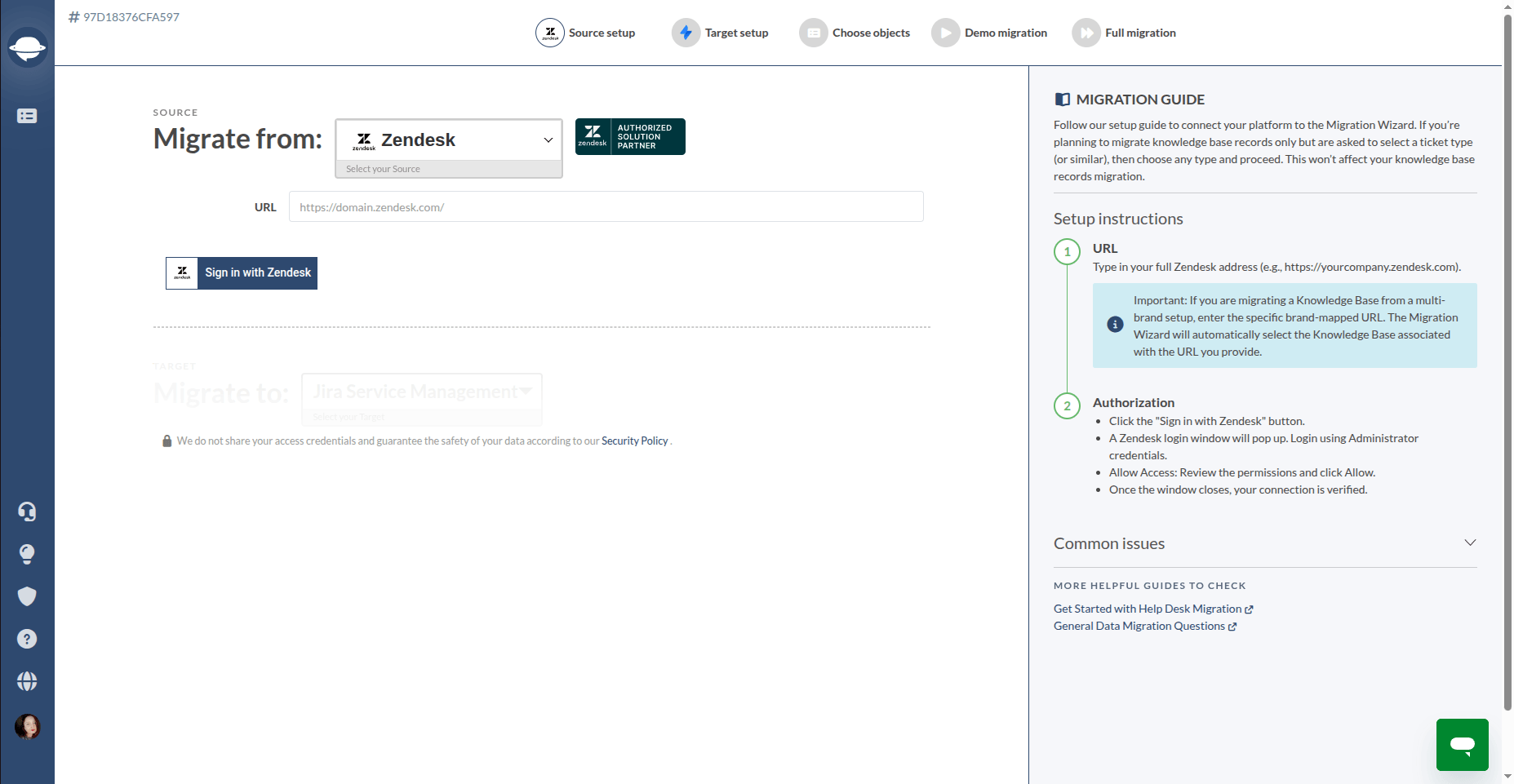
You start by connecting your source and target help desk platforms in the Migration Wizard. Depending on the system, this usually involves an API token or OAuth.
Once connected, the Wizard reads the structure of both platforms and automatically pre-maps compatible fields and entities. The entire connection happens through the platforms’ official APIs and permission layers.
Step 2: Review mapping and configure the migration
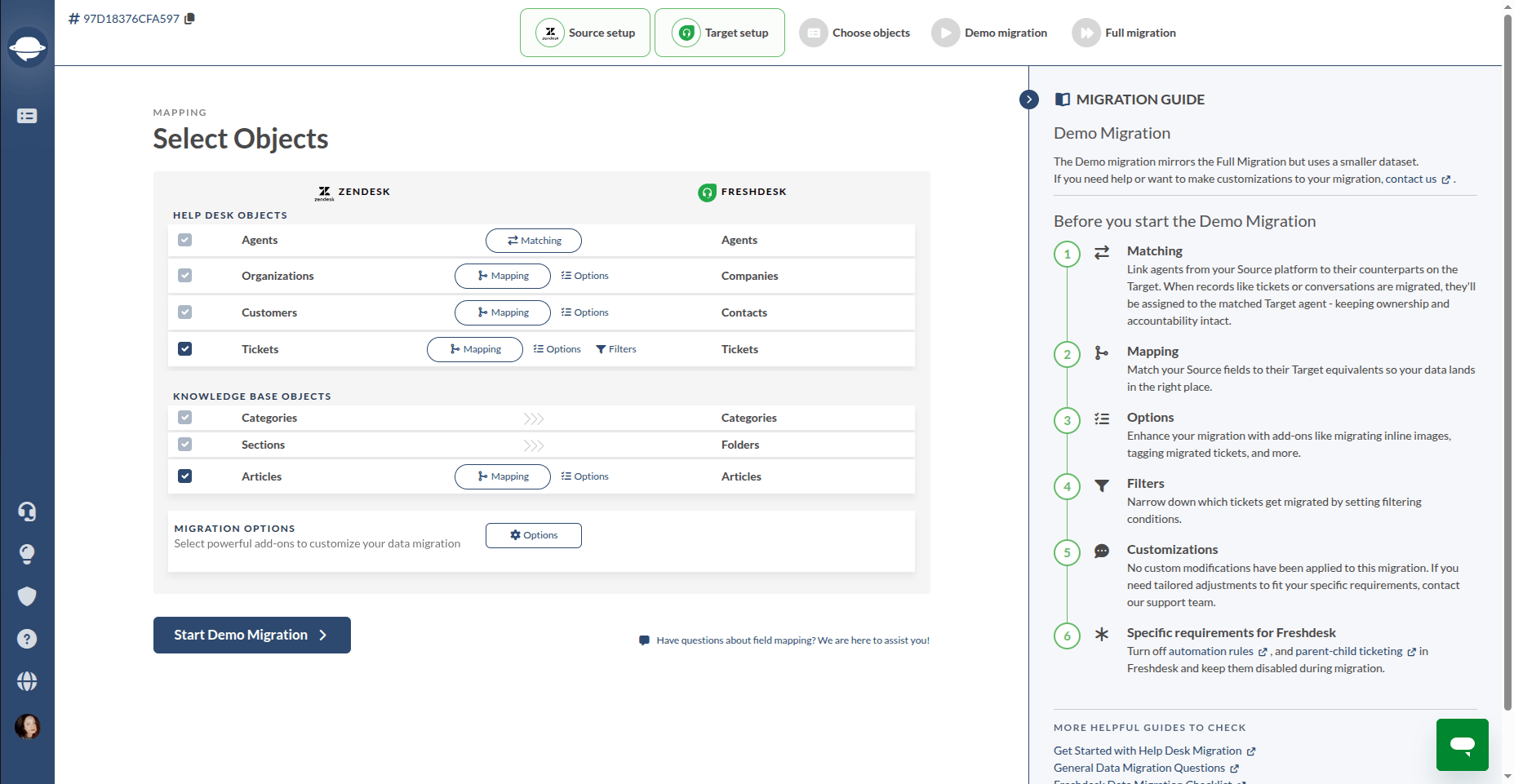
Next, you review the automatically mapped fields and adjust anything that requires customization. For example, you may map a custom ticket status from the source platform to the closest matching status in the target system.
At this stage, you can also activate additional migration features (known as “migration options”) — such as adding tags to migrated tickets, migrating inline images, filtering out attachments by date, migrating knowledge base translations, and so on.
Before launching the full transfer, you can run a Free Demo Migration to preview how your records, fields, and relationships will appear in the target platform.
Step 3: Run the Full Migration
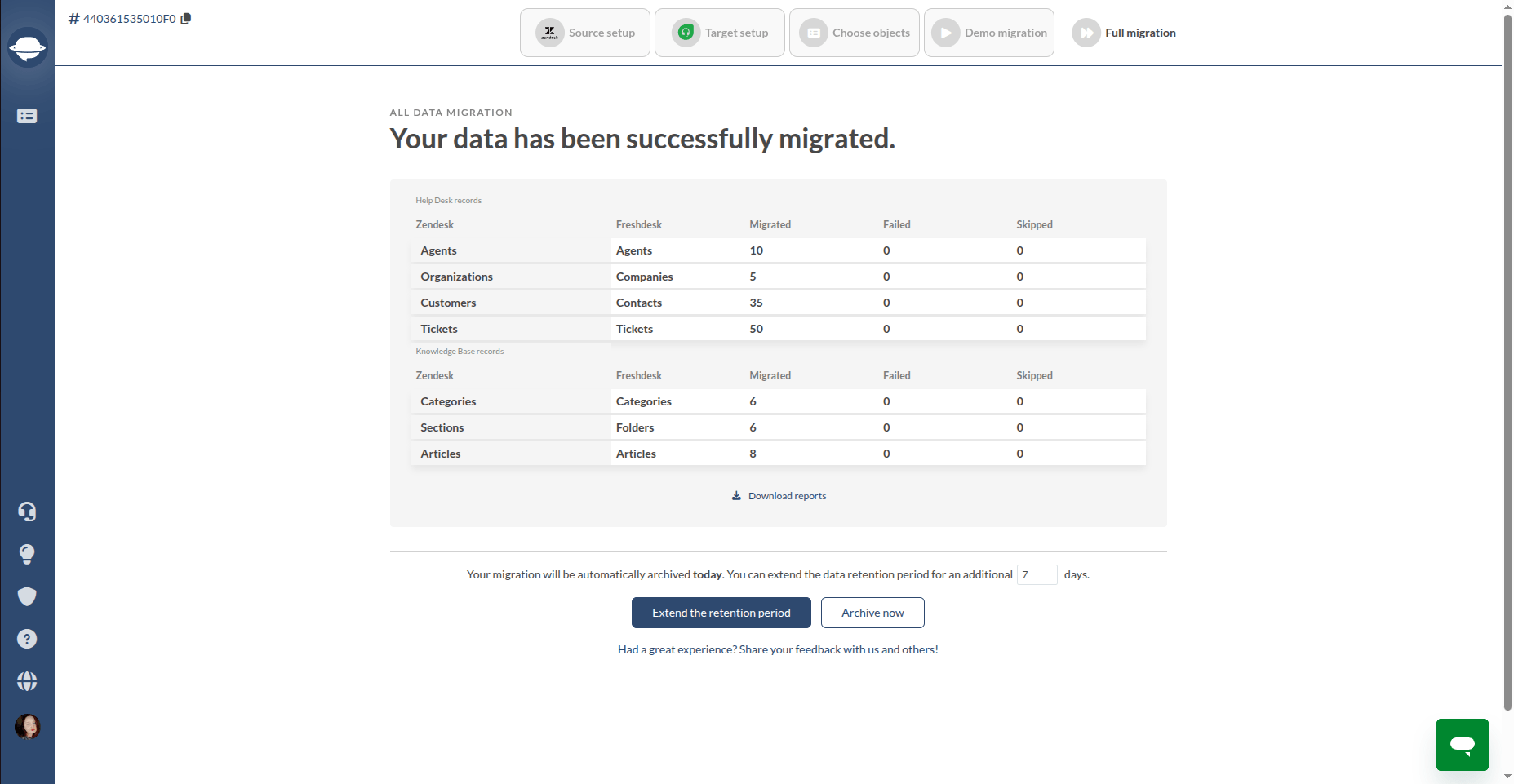
When the Full Migration starts, the Migration Wizard extracts records from the source platform in batches through its API and transfers them into the target platform through its API.
Each transaction is processed and logged individually, with automatic retry handling if an issue occurs during transfer. You can track the progress for each data entity through the dashboard in real time.
Meanwhile, your source platform continues operating as usual. Your agents can keep responding to tickets and updating records while the migration runs in the background.
Step 4: Sync the latest changes with Delta Migration
After the Full Migration is completed, Delta Migration synchronizes the records created or updated during the migration window.
By the time your team switches fully to the new platform, both systems are aligned and up to date, which helps avoid rushed manual updates or missing records during the final transition.
API Rate Limits in Help Desk Migration — What They Are and How API-Based Migration Tools Handle Them
When you hear that help desk migration works through APIs, one concern may immediately come to mind: Will API limits slow down the process?
It’s a reasonable question, especially if you choose to continue working during migration.
In practice, since API rate limits are a standard part of how modern SaaS platforms operate, Help Desk Migration is designed to work within those limits automatically.
What is an API rate limit?
An API rate limit is the number of API requests an application can make within a certain time frame — for example, per minute or per hour. Once that limit is reached, the platform temporarily slows down additional requests or pauses them until the next time window begins, affecting performance across the service.
Help desk platforms like Zendesk, Freshdesk, and ServiceNow are no exception. However, the Migration Wizard counters this, making the process practically unnoticeable for end users and support teams.
How does the Migration Wizard handle rate limits?
The Migration Wizard manages API rate limits automatically in the background throughout the migration process.
It continuously tracks how many API requests can be sent to each platform and adjusts the transfer speed accordingly, staying within the allowed request range without requiring manual configuration.
The system also processes large attachments separately from ticket records, which helps prevent heavier files from slowing down the entire migration flow.
For large-scale migrations, it’s also possible to request a temporary API limit increase from the platform provider. In many cases, this helps reduce the overall migration time significantly.
What does this mean in practice?
API rate limits mainly affect migration speed, not whether the migration can be completed. A migration involving 200,000 records from ServiceNow to Freshservice will naturally take longer than transferring 5,000 tickets between smaller systems — but the Migration Wizard continues adapting throughout the process to transfer the data fully and accurately.
Security — What Happens to Your Data During API-Based Help Desk Migration?
Security questions usually appear early in the migration process — and understandably so.
Here’s how Help Desk Migration handles that process and protects your data throughout the migration lifecycle.
What Help Desk Migration does NOT do:
- Access your help desk database directly. The Migration Wizard works only through the official API endpoints exposed by your platform.
- Keep your support data after the migration is completed. Migrated records are removed from the Help Desk Migration infrastructure after the transfer process finishes.
- Retain API credentials beyond the active migration session.
- Access or modify data outside the permission scope granted through your API token or OAuth authorization.
What Help Desk Migration does do:
- Encrypts all data in transit using TLS/HTTPS — from the source platform to the migration infrastructure and then to the target platform.
- Encrypts data at rest during the active migration window.
- Operates in alignment with SOC 2 Type II, GDPR, HIPAA, and PCI-DSS security practices and compliance standards.
- Maintains official partnerships with platforms like Zendesk, Freshdesk, HubSpot Service Hub, Intercom, and Jira Service Management, with security and integration practices reviewed as part of those partnerships.
- Provides role-based access control, allowing only authorized users to initiate, monitor, or manage migrations.
- Generates migration reports and per-record logs that can be used for validation, troubleshooting, and audit purposes.
- Supports enterprise security workflows, including NDAs, vendor security reviews, and additional security measures available through advanced support plans.
With security and transfer mechanics covered, the next question is usually practical: what exactly can an API-based help desk migration move between platforms?
The answer goes far beyond tickets alone.
What Help Desk Data Can Be Moved Through API-Based Migration?
As mentioned earlier, API-based help desk migration gives access to much more than a simple ticket export.
Depending on platform compatibility, the Migration Wizard can transfer:
- Agents and users — including roles, permissions, and team assignments
- Contacts and companies — with ticket relationships preserved
- Tickets and incidents — including full history, statuses, and original timestamps such as created, updated, and closed dates
- Ticket conversations — complete threads with replies, internal notes, and original author attribution
- Side conversations — transferred and linked back to the correct tickets as private notes
- Attachments — migrated together with their related tickets and comments
- Inline images — preserved and linked correctly within ticket conversations
- Call recordings — transferred and attached to the appropriate tickets as MP3 files
- Data fields — including default and custom fields, with automatic mapping and the option to create missing fields directly within the Migration Wizard
- Knowledge base — including articles, categories, sections, authors, and publication dates.
The platform supports migrations across 100+ help desk and ITSM systems, including Zendesk, Freshdesk, Freshservice, Jira Service Management, ServiceNow, HubSpot Service Hub, Salesforce Service Cloud, Intercom Fin, Help Scout, Gorgias, Front, SysAid, and others.
As you can see, API-based help desk migration transfers records together with their relationships, meaning you don’t have to move data category by category and reconnect everything manually afterward. Plus, before launching the Full Migration, the Free Demo helps you verify that your data appears correctly in the target platform. Let’s take a closer look at how that works.
Verifying the API Connection Before You Commit — The Free Demo
One of the key advantages of our migration platform is the Free Demo Migration, which lets you see how your actual data transfers through our API-based connection before committing to (and paying for) the Full Data Migration.
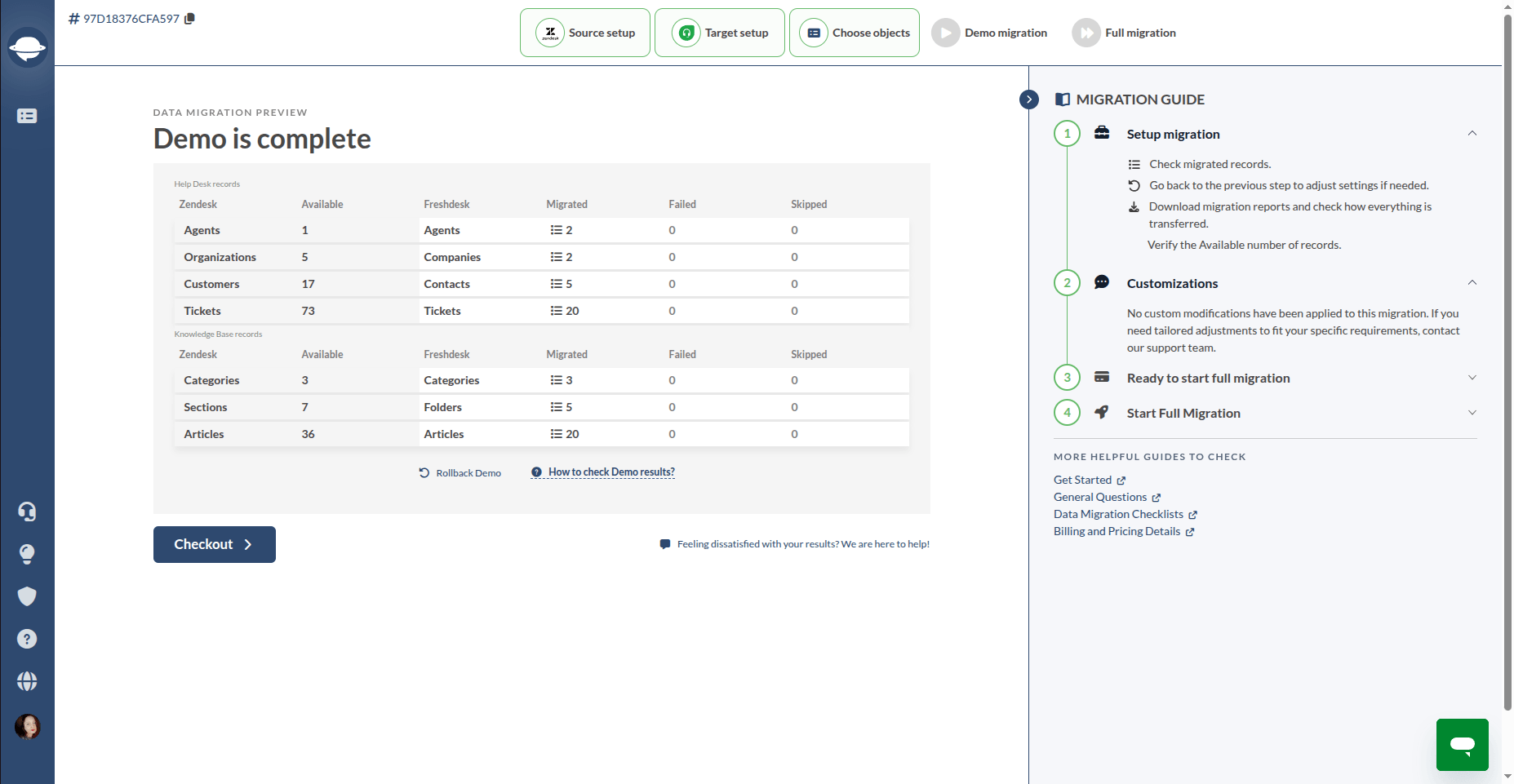
Here’s how it works:
1. Connect your source and target platforms through the Migration Wizard as usual.
2. As you complete mapping configurations, transfer up to 20 tickets and knowledge base articles (as well as the related data) through the live API.
3. Check the Free Demo report, which lists record IDs and how they moved. You can also look at how the migrated data appears in the target platform.
4. Run the Free Demo multiple times with different configurations until your mapping and migration setup look exactly the way you want.
5. Use the Custom Demo option to migrate up to 20 specific ticket IDs, which is especially useful for validating more complex data relationships.
6. After the Demo Migration is completed, check the migration cost upfront based on your record volume and selected options.
The Demo is not a simulation or simplified preview. It uses the same API infrastructure, migration logic, retry handling, and field mapping process as the Full Migration itself.
This means the Demo reflects how your data will behave during the actual transfer at scale.
API-Based Connection Is the Foundation of Secure Help Desk Migration
When you start planning a help desk migration, the biggest concern is usually the same: what happens to your data while it’s being transferred, and how will operations be affected?
With API-based help desk migration, the answer becomes much clearer.
Your data moves through the official communication channels your help desk platform was designed to support. Records are transferred progressively through controlled API connections, logged throughout the process, retried automatically if an issue occurs, and validated before the final switch to the new platform.
At the same time, your support operations continue running in parallel. Your agents keep working, customers keep receiving replies, and the migration happens in the background instead of disrupting day-to-day support activity.
Understanding how API-based help desk migration works is the first step. Seeing how your own tickets, fields, attachments, and workflows transfer in practice is the next one.
See how your data migrates — start a .
FAQ About API-Based Help Desk Migration
API-based help desk migration is a method of transferring support data using the official APIs provided by help desk platforms. Instead of relying on manual exports or direct database access, the migration tool securely reads and transfers records through approved channels. This approach helps preserve data relationships, improve accuracy, and reduce migration risks.
No. API-based migration allows your support team to continue working in the source platform while data is transferred in the background. Once the Full Migration is complete, Delta Migration synchronizes any new or updated records. This ensures your target platform is up to date without requiring service interruptions.
If an API rate limit is reached during migration, the Migration Wizard automatically adjusts. It pauses the affected requests, waits for the platform’s required cooldown period, and retries them when allowed. Records remain safely queued until they are transferred successfully. While rate limits may extend the migration timeline, they do not compromise data integrity or prevent the migration from completing.
Yes. API-based migration uses encrypted connections, API tokens, or OAuth authorization to transfer data through official platform channels. Manual CSV migrations often involve exporting, storing, and importing files across multiple systems, which increases the risk of data exposure, version mismatches, and human error. API-based migration minimizes these risks while maintaining data relationships and transfer logs.
Migration time depends on several factors, including data volume, attachment sizes, platform performance, and API rate limits. A migration involving a few thousand records may finish within hours, while larger projects with hundreds of thousands of tickets can take several days. The Migration Wizard continuously optimizes transfer speed and provides real-time progress tracking throughout the migration process.
Depending on platform compatibility, API-based migration can transfer tickets, contacts, companies, agents, attachments, internal notes, inline images, custom fields, call recordings, and knowledge base content. It also preserves relationships between records, helping maintain historical context and ensuring data remains organized and usable in the target platform.
Yes. Help Desk Migration offers a Free Demo Migration that transfers a sample of your actual records through the same API-based process used for the Full Migration. This allows you to review mappings, validate data accuracy, and confirm that records appear correctly in the target platform before committing to the complete transfer.