
Automated ConnectWise to HaloPSA Migration Service
Built for MSPs running ConnectWise Manage today who need every ticket, agreement, and client contact to land intact in HaloPSA, whether you support 2K tickets or 200K.
No credit card required Fast setup
Interactive Migration Calculator
Adjust sliders to estimate your migration time and cost savings
Estimates based on 60,000+ successful migrations. Actual results may vary.
The Decision
Nobody wakes up excited about a PSA migration. But if you're staring down a ConnectWise Manage to Halo migration, you're not doing it for fun. You're doing it because ConnectWise stopped working for your team, and HaloPSA looks like the platform that actually will.
The Challenge
Here's the real question: how do you move years of tickets, contracts, and client history without breaking something along the way? That's the part nobody talks about. ConnectWise made exporting your own data messier back in 2024, so the smart move is handing this job to people who do it every day.
The Solution
That's Help Desk Migration. We built an automated Migration Wizard specifically for moves like this ConnectWise PSA migration. You map your data, test everything with a free demo, then run the full transfer with zero downtime and zero drama.
What Data You Can Migrate from ConnectWise to HaloPSA
Every ConnectWise to HaloPSA migration comes down to four record types: members, companies, contacts, and tickets. Help Desk Migration maps each one directly into its HaloPSA equivalent, carrying over the fields and relationships your team actually depends on. Here's exactly what makes the trip.
| ConnectWise (Source) | HaloPSA (Target) | What Moves With It |
|---|---|---|
| Members | Agents | Assignment history and role data. Map several ConnectWise members to one HaloPSA agent, and reassign tickets from deleted or inactive members straight to active agents. |
| Companies | Clients | Company names plus every custom field tied to the account. |
| Contacts | Users | Names, emails, phone numbers, and ConnectWise's many contact fields (direct lines, cell, fax, distribution lists) mapped into HaloPSA's user fields. |
| Tickets | Incidents | Subject lines, statuses, priorities, agents, contacts, comments (with authors and attachments), created, updated, and closed dates, plus custom fields. |
What Won't Migrate, and Why
Not everything crosses over, and you should know that going in. SLA rules, automation and workflow rules, and login history stay behind. They aren't records sitting in a database somewhere waiting to be exported. They live inside each platform's own rules engine, so once your data lands, you rebuild them directly in HaloPSA.
Agreements work the same way. ConnectWise organizes billing around agreements: additions, exclusions, board coverage rules. HaloPSA organizes billing around contracts, billing templates, and recurring invoices. Different systems, different logic. Help Desk Migration moves the ticket and company data your agreements reference, and you rebuild the agreement and contract structure natively inside HaloPSA to fit how it actually works.
One more thing worth planning around now instead of finding out later: HaloPSA makes you create matching custom fields before the migration starts, because you can't change a custom field's type after you've created it. Help Desk Migration flags this early, before it costs you records.
Your ConnectWise to Halo PSA Migration, Step by Step
Before you touch the Migration Wizard for your ConnectWise migration, gather admin access on both ends. ConnectWise needs an API key and admin rights on your account. HaloPSA needs an Authorization Server, Client ID, and Client Secret from your Halo account settings.
Connect ConnectWise and HaloPSA
Link your source and target accounts. Help Desk Migration holds ConnectWise Invent Partner status and a listing in the ConnectWise Marketplace, so this connection runs through the same standards ConnectWise applies to its own certified integrations.
Map Fields and Configure What to Migrate
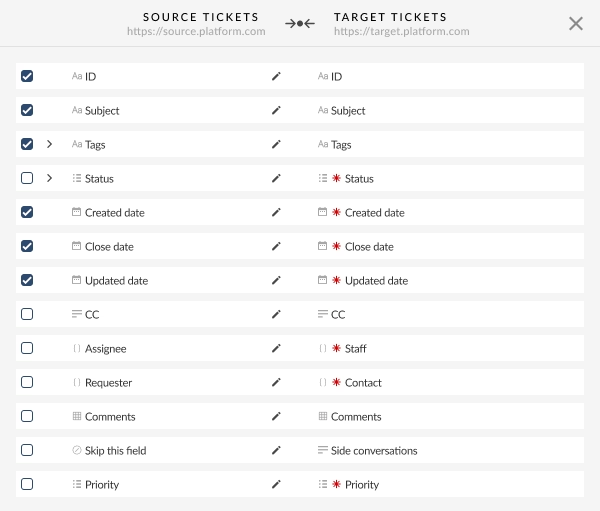
Use the visual mapping interface to line up every field, from ticket status and priority down to custom fields.
Filter What You Migrate
Narrow things by created date, updated date, tags, groups, or custom fields. This matters most for MSPs who want to leave five-year-old dead tickets in ConnectWise and bring only active accounts and recent history into Halo PSA.
Run a free demo Migration
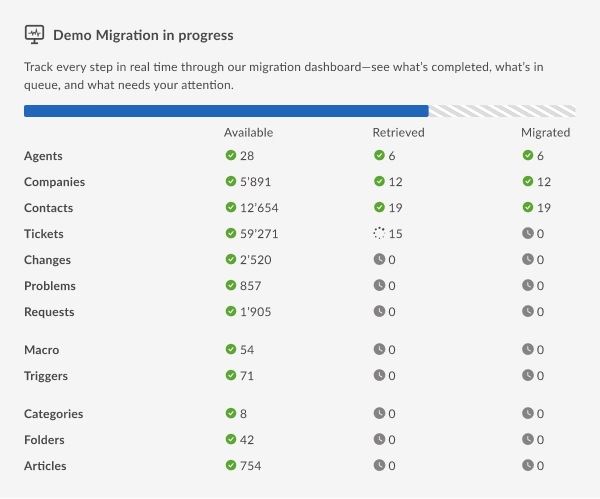
Test the setup with 20 sample records before you spend a dollar. See exactly how tickets, contacts, and comments land in HaloPSA. Adjust your mapping if something looks off. Run it again. And again, if you need to. It costs nothing.
Launch the Full Migration and Validate
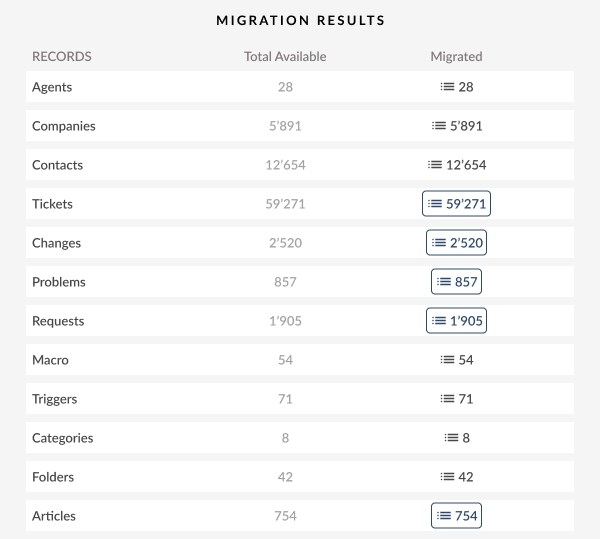
Once the demo looks clean, start the full ConnectWise to HaloPSA migration right away or schedule it for off hours. After it finishes, run a Delta migration to catch anything your team created or updated in ConnectWise while the transfer was running, so nothing slips through the gap.
How Long the Full Project Takes
The transfer itself, once you hit launch, usually wraps up in a few hours to a couple of days. That's mostly a function of your record count and ConnectWise's API rate limits, not how hard anyone's working. But the full project runs longer than that, and you should budget for the whole thing, not just the transfer.
Here's the real sequence: gather admin access and create your matching custom fields in Halo PSA, then a testing window where you run demos until the mapping looks right, then the Full Migration, then a short validation stretch where your team checks tickets and contacts in HaloPSA against ConnectWise before you fully cut over. Most MSPs move through the entire thing in 1 to 3 weeks. And the heaviest lift isn't the transfer. It's the testing and validation on either side of it.
ConnectWise to HaloPSA Migration Pricing
ConnectWise to HaloPSA migration pricing is not a flat number. Help Desk Migration counts only core records, meaning agents, contacts, companies, and tickets, and never charges you extra for attachments, comments, or notes riding along with them.
Pricing runs on a sliding scale, so cost per record drops as your migration grows. A basic migration with no customization and Standard support runs $100 for 1,000 records, while the same setup for 10,000 records costs $514 total. If you're weighing Halo PSA vs ConnectWise migration cost against other vendors' flat quotes, that drop per record is the detail worth comparing.
You choose from four service packages. Standard costs nothing and covers a single switch, with SLA response within 24 hours. Premium adds weekend support and a faster SLA within 8 hours, for migrations up to 50,000 records. Signature removes downtime entirely with Delta and Interval migration built in, plus SLA response within 4 hours. Enterprise adds a dedicated account manager, custom SLAs, and a fully managed migration for the largest, most complex ConnectWise Manage to Halo PSA migration projects.
Run the free demo first. Once it finishes, the Migration Wizard counts your exact records and hands you a precise quote, no estimating required. Found a lower quote elsewhere for the same scope? Help Desk Migration matches it, or beats it.
See your exact migration cost. Run a free demo and get a precise quote based on your real record count.
Why MSPs Are Moving from ConnectWise to HaloPSA
Two things are driving the ConnectWise to Halo migration shift. A policy change on the ConnectWise side, and a genuinely different product on the Halo side are pushing MSPs toward HaloPSA migration.
The 2024 ConnectWise API Export Restriction, Plain and Simple
ConnectWise's terms of service draw a hard line here. Its developer agreement bars partners from using the ConnectWise API to build any conversion utility that would help a customer migrate to an alternative product, and separately prohibits using ConnectWise's tools to facilitate migration away from ConnectWise at all. That means homegrown scripts or unofficial integrations built specifically for migration/export could be blocked by the terms, depending on what they do.
Help Desk Migration’s ConnectWise Marketplace listing shows a supported migration service for moving data from other platforms or CSVs, and it describes automated migration features such as CSV import/export and delta migration. That matters because of the ConnectWise API restrictions export data 2024/2025 hasn't loosened, and there's no sign it will. Waiting does not make a ConnectWise to Halo PSA migration easier. It just delays the point where you stop dealing with it.
What HaloPSA Offers That's Driving the Switch
ConnectWise gates its best features behind higher tiers and separate paid modules. HaloPSA doesn't play that game.
| Feature / Characteristic | ConnectWise | HaloPSA |
|---|---|---|
| Pricing model | Tiered, plus paid add-on modules | Single price, every feature included |
| Ownership | Private equity | Privately owned, no outside investors |
| Billing structure | Agreements with additions, exclusions, and board coverage rules | Contracts with billing templates and recurring invoices |
| API access for migrating out | Restricted for competing PSA platforms since 2024 | Open |
That table right there is the whole HaloPSA vs ConnectWise debate for most MSPs evaluating a switch. Add a modern API and a UI that MSPs consistently say is easier to actually work in day-to-day, and the growing pile of ConnectWise to HaloPSA migration requests starts to make a lot more sense.

Security and Compliance During the Transfer
Here's something worth sitting with for a second: you're not just moving your own data during a ConnectWise to HaloPSA migration. You are moving every client company, every contact, every ticket that documents work you did for someone else's business, sometimes someone else's healthcare, financial, or government client. That's a higher bar than your average software switch, and it should be treated like one.
Help Desk Migration builds the transfer around a few core protections:
Encryption everywhere
Your ConnectWise and HaloPSA data stays encrypted in transit and at rest, moving only over mandatory HTTPS connections.
Segregated infrastructure
Each migration runs in its own isolated environment on AWS infrastructure meeting ISO 27001, ISO 27017, ISO 27018, and SOC 2 standards, with a Cloudflare WAF filtering traffic and AWS GuardDuty watching for threats around the clock.
Certified compliance
SOC 2 Type II and Type III certification, GDPR compliance with Data Processing Agreements on request, and a HIPAA Business Associate Agreement for MSPs whose clients fall under HIPAA. That last one matters if any of your ConnectWise contacts or companies touch protected health information, because your compliance obligations don't take a break just because you're switching platforms.
Controlled access
OAuth 2.0 authentication limits what the migration tool can see. Role-based access limits which employees can touch your data. Every account offers login through Google or Microsoft, plus an optional extra verification step.
Short retention
Your data sits on Help Desk Migration's servers for three to ten days after the migration completes, depending on your service package, then it's deleted automatically. Ask for a data deletion certificate, and you get documented proof: storage location, backup status, destruction method, all of it.
Why Help Desk Migration for ConnectWise to HaloPSA
MSPs choose Help Desk Migration when they migrate from ConnectWise to HaloPSA because it replaces months of manual export, cleanup, and reimport work with a tool built specifically to preserve the structure your team already relies on.
No downtime
Delta and Interval migration keep your team working in ConnectWise while records move, then sync anything created during the transfer.
Automated accuracy
A visual mapping wizard, no code required, replaces custom scripts, so members, companies, contacts, and tickets land in the right Halo PSA fields without a developer on the project.
Preserved relationships
Tickets keep their comments, attachments, agents, and contacts intact, so a ticket reads the same way in Halo PSA as it did in ConnectWise.
Risk-free demo migration
Unlimited free demos let you test and retest your mapping until every record transfers cleanly, before you pay for anything.
ConnectWise Invent Partner status
An official Marketplace listing means your ConnectWise PSA migration runs through a channel ConnectWise itself recognizes.
Expert support
A team that's handled MSP migrations of every size, reachable by chat, phone, or email, with SLA response as fast as 4 hours on top service packages.
Supports 100+ platforms
Consolidating from more than one instance into HaloPSA, or planning another switch down the road? Same tool, both times.
Manual Export, Custom Scripts, or Help Desk Migration?
If you're weighing whether to just build this yourself, here's the honest comparison.
| Criteria | Manual CSV Export/Import | Custom Script |
Help Desk Migration
|
|---|---|---|---|
| Setup time | Days of spreadsheet work | Weeks of developer time |
Hours, guided by the wizard
|
| Ticket relationships | Often broken in the move | Depends entirely on the script |
Preserved automatically
|
| Delta sync for new records | Not available | Requires custom logic you build and maintain |
Built in
|
| Compliance documentation | None | None, unless you build it yourself |
SOC 2, GDPR, and HIPAA documentation available on request
|
| Risk over time | High, manual errors compound at scale | High, one developer holds all the knowledge |
Low, you test the exact result with a free demo first
|
Still deciding between doing this yourself and letting Help Desk Migration handle it? Run a free demo first and see the result with your own eyes.
Schedule a Migration Consultation →FAQs: ConnectWise to HaloPSA Migration
Yes. ConnectWise's 2024 API changes block exports to competing platforms through unofficial integrations, but Help Desk Migration holds ConnectWise Invent Partner status and a Marketplace listing, so the direct API path stays open. Self-hosted or restricted accounts fall back to a secure database dump or CSV import instead.
Most ConnectWise to HaloPSA migrations finish in a few hours to a couple of days. Timing depends on your total record count and ConnectWise's own API rate limits, not on manual effort from your team.
Pricing scales with your record count and drops per record as your migration grows. A small migration around 1,000 records runs roughly $100, while 10,000 records costs about $514 under a basic Standard package. Run the free demo to get your exact number.
Not one to one. ConnectWise agreements and HaloPSA contracts use different billing models, so Help Desk Migration moves the company and ticket data your agreements reference, and you rebuild the contract and billing logic natively in HaloPSA to match its structure.
Help Desk Migration moves members, companies, contacts, and tickets, along with comments, attachments, inline images, and custom fields. Agreements and billing configurations need native setup in HaloPSA instead, since they don't transfer as records.
Ticket history moves in full, closed and archived tickets included, with created, updated, and closed dates intact. SLA rules themselves don't transfer as data, since they live in each platform's rules engine, so you configure SLA policies directly in Halo PSA once your tickets land.
Yes, keep it active until your HaloPSA migration is fully validated. Help Desk Migration reads your ConnectWise data without disrupting live operations, and Delta migration catches anything your team creates or updates in ConnectWise while the transfer runs.
HaloPSA requires you to create matching custom fields before the migration starts, since it doesn't let you change a custom field's type after creation. Help Desk Migration flags any unmapped custom fields early so records don't get skipped over a mismatch.
Yes. Every ConnectWise to HaloPSA migration includes unlimited free demo migrations of 20 sample records, plus the option to hand-pick specific ticket IDs for a custom demo. Retest as many times as you need, at no cost.
A ConnectWise to ConnectWise migration via Help Desk Migration typically takes between a few hours and two weeks. Datasets under 20,000 tickets wrap up in 2 to 8 hours, medium loads take 1 to 3 days, and enterprise accounts over 100,000 tickets require 4 to 10+ days.
Migrating ConnectWise to ConnectWise via Help Desk Migration uses a usage-based, one-time payment model determined by your total record volume. Small projects with around 1,000 records start at roughly $39 to $100, while mid-sized and large enterprise migrations scale into several hundred or thousands of dollars. Final pricing depends on record count, custom field mappings, and selected support package. There are no subscription fees, and running a free demo migration provides an exact automated quote.
No. Standard automated migration tools cannot directly move ConnectWise agreements and billing data. They only support core entities like tickets, companies, contacts, and members. Moving complex billing structures and active agreements requires custom API scripts, database imports, or manual setup.

Ready to Start Your ConnectWise to HaloPSA Migration?
The only way to know if this ConnectWise to HaloPSA migration works for your team is to see your own data move. Run the free demo, watch your real tickets and contacts show up in HaloPSA, and decide from there. Nothing to lose, nothing to sign.
Schedule a Migration Consultation →
No credit card required SOC 2 certified 60,000+ migrations completed