
When companies scale, moving to a more advanced platform often becomes inevitable. Many teams choose Zendesk for its powerful automation, in-depth analytics, and extensive app marketplace. During this migration, Zendesk import becomes a key step, allowing businesses to transfer historical tickets, contacts, and knowledge base content without losing valuable context.
Some teams rely on Zendesk CSV import as an option for structured datasets, while others prefer automated tools that reduce manual effort. A well-prepared CSV import can simplify the migration process, but choosing the right approach is crucial to avoid data gaps, formatting issues, or workflow disruptions.
Below, we explain the main ways to import data into Zendesk and how to ensure a smoother, more reliable transition.
What You Can Import to Zendesk
Importing your data into Zendesk is more than a technical step — it’s a strategic move that can transform your customer service operations. Zendesk migration involves a flawless transition from other help desk platforms, centralizes all customer interactions, preserves historical data, and enables advanced reporting and analytics. It supports regulatory compliance, integrates with essential tools, and provides a scalable, customizable foundation. Your support team has all the information they need in one place, simplifying workflows and helping your business deliver faster, more efficient customer service.
- Seamless Transition: Moving from another help desk platform? Importing your existing data into Zendesk ensures that all your customer information, support tickets, and interactions make the journey with you. This way, your team can hit the ground running without missing a beat.
- Centralized Support Operations: Zendesk allows you to bring all your customer data into one place. By importing data from various sources, you create a centralized hub for managing all your customer interactions. This leads to faster resolutions, more personalized support, and a more cohesive customer experience.
- Historical Data Preservation: Your past interactions with customers are invaluable. By importing historical data into Zendesk, you ensure that your agents have the full context they need to provide informed and personalized support. No customer is ever starting from scratch.
- Enhanced Reporting and Insights: With all your data in Zendesk, you can leverage powerful reporting and analytics tools to gain deeper insights into your support operations. Track trends, measure performance, and use data-driven insights to make informed decisions that enhance customer satisfaction.
- Regulatory Compliance: If your industry requires you to retain customer records, importing data into Zendesk helps you stay compliant. All your records are securely stored and easily accessible, ensuring you meet legal requirements and maintain transparency.
- Integrated Ecosystem: Zendesk’s rich integration capabilities allow you to connect with other essential tools and platforms. Importing your data into Zendesk ensures that your customer service ecosystem is fully synchronized, creating a seamless experience for both your team and your customers.
- Scalable and Customizable: Whether your business is growing or adapting to new challenges, having your data in Zendesk allows you to scale and customize your support operations with ease. Importing data means you’re not starting from scratch—you’re building on a solid foundation.

Ready to switch to Zendesk?
Don’t have Zendesk account?
Take it for a spin for free with 14 days trial
How to Move Data to Zendesk Without Downtime
Most people immediately think of a CSV file for importing data into Zendesk.
Zendesk does offer a CSV import, but its capabilities are limited — you can only import essential user data, assign roles, organizations, and brands, and handle small files (up to 2,000 rows). For tickets, help center articles, or large datasets, the CSV method isn’t enough.
Use an automated migration tool or API. Tools like Help Desk Migration move your data directly from your current system, whether another help desk or an email client, without the limitations of CSV files. This approach preserves your full support history, efficiently handles large volumes of data, and reduces the risk of errors.
Zendesk CSV import
So, rather than adding users and creating organizations in Zendesk manually, you can do it in bulk. As things stand, you can only import essential user data. But as a bonus, you can assign roles to users, assign organizations, and a brand. The complete list of records you can import from CSV to Zendesk looks like this:
- Name, email, phone, and shared phone number;
- External ID (ID that’s other than the email address);
- Details and notes;
- Role (note that it’s case sensitive, and if you don’t assign a role, the user is set to End-user);
- Restriction (allows setting agent’s privileges and is required for new users);
- Organization, tags, and brand;
- Custom fields.
If you want to use Zendesk Guide and import help center articles, tough luck; you will need to use the API. And if you’re going to import tickets to Zendesk from CSV, you will also need to use the API.
Furthermore, you need to make sure your file(s) is(are) meet the requirements. For instance, Zendesk importer allows files with up to 2000 rows. If you have more than that, you’ll have to split your data into multiple files. The requirements don’t end there. However, having to split your data is probably the most time-consuming and frustrating.
Automated Migration Tool
Typically, an automated migration tool uses an API to move data between systems. In our case, this means that you can migrate data directly from an email client (like Gmail or Outlook) or another help desk. API also has more capabilities when it comes to the data you can migrate. It doesn’t have the limitations of a CSV file to retain all customer support history.
The process of moving your data is also much more straightforward and fast. When you follow an established migration script, it takes less time to set up your import. You also face a lot fewer challenges because the common ones have already been taken care of.
To recap, going for an automated solution requires less human effort and resources, saves time, and allows switching to Zendesk as soon as you wish.
| Help desk records | Knowledge base records | Business rules |
|---|---|---|
| Tickets | Articles | Marcos |
| Agents | Categories | Triggers |
| Contacts | Folders | |
| Groups | Attachments | |
| Organizations | Tags | |
| Custom fields | Content translations | |
| Tags | Cross-linking of KB articles | |
| Attachments | ||
| Replies | ||
| Side conversation |
Help Desk Professional Services
Sometimes, migrations go beyond tools and automation—they need expert guidance. Help Desk Professional Services provide hands-on support to make your Zendesk import smooth, accurate, and tailored to your business.
Our experts help you:
- Implement your Zendesk instance – Configure workflows, SLAs, roles, and automations tailored to your business needs.
- Customize for your operations – Align tickets, users, and business rules so your system reflects how your team actually works.
- Train your team – Provide hands-on guidance for admins and agents so everyone understands the platform and can deliver exceptional support.
- Ensure adoption – Help your team embrace Zendesk fully, minimizing errors and maximizing efficiency.
With Professional Services, you don’t just migrate data. You launch a Zendesk instance that works for your business from day one.
What Are the Benefits of Automated Tool for Zendesk Import
Let’s show the benefits of the Help Desk Migration service.
- Efficiency and Speed. Help Desk Migration makes your transition to Zendesk secure, swift, and seamless. Our automated migration tool efficiently handles large volumes of data, ensuring you’re up and running quickly without the manual effort.
- Accuracy and Consistency. When it comes to data migration, accuracy is key. Help Desk Migration’s automated tool delivers comprehensive data mapping so you can match data the way you need it. This ensures that your customer interactions, ticket histories, and case details are transferred with precision. You can trust that your data will arrive intact and consistent.
- Minimized Downtime. You can continue working on your Source while the migration to Zendesk is in progress, with no downtime. After the Full Migration has started, any new or updated records that appear on the Source can be moved to the Target. Once the Full Migration is completed, a Delta Migration can be performed to ensure that all remaining data is accurately transferred. This process allows your support team to keep delivering exceptional service without interruption, ensuring a smooth and complete import to Zendesk.
- Customization and Flexibility. Every business is unique, and so is every migration. Help Desk Migration provides flexible customization options to meet your specific needs. Whether you need to map data fields differently, exclude certain records, filter data, or modify field types, our tech team can tailor the standard workflow to suit your requirements.
- Enhanced Security. We know how important security is during a data migration. Help Desk Migration provides a robust security compliance portfolio, including encryption and secure access controls, to protect your data throughout the entire process. Your information remains safe and confidential from start to finish.
- Cost-Effectiveness. Migrating data manually can be costly and time-consuming. Help Desk Migration offers a cost-effective alternative by automating the process, reducing the need for manual work, and freeing up your team to focus on more strategic tasks.
- Expert Support. You’re not alone in the Zendesk migration process. Help Desk Migration comes with a dedicated support team ready to assist you every step of the way. Our experts are here to ensure your migration is smooth, addressing any challenges and answering your questions as they arise.
Why consider Help Desk Migration?
First of all, you get all of the benefits mentioned above. Secondly, by choosing Help Desk Migration, you choose quality and responsive customer support. We know for a fact that when you’re doing something like data migration, it’s best to have a reliable partner (an Authorized Zendesk Developer). We also know that testing is crucial. Therefore, our service offers a free test that you can run multiple times.
Similarly, Zendek delivers Professional Services to help you manage customer experience operations that may slip through the cracks. Whether you're implementing a new Zendesk instance, optimizing available features, or migrating your customer data, the CX experts have you covered.
While the Professional Services reduce time and effort, its Starter package costs over $8K for one channel. Then again, it’s rather costly if your business requires an automated migration service. So, what other options do you have?
Whether you want to move your customer data to Zendesk or consolidate two help desk instances, Help Desk Migration can do both. Besides, the data migration price is based on the number of records.
For businesses looking to consolidate their Zendesk help desk instances, the prospect of migrating macros and triggers can be daunting. However, with Help Desk Migration's Business Rules Migration feature, the process becomes streamlined and hassle-free.
This new feature allows businesses to import their Zendesk macros and triggers seamlessly during the consolidation of their Zendesk help desk instances.
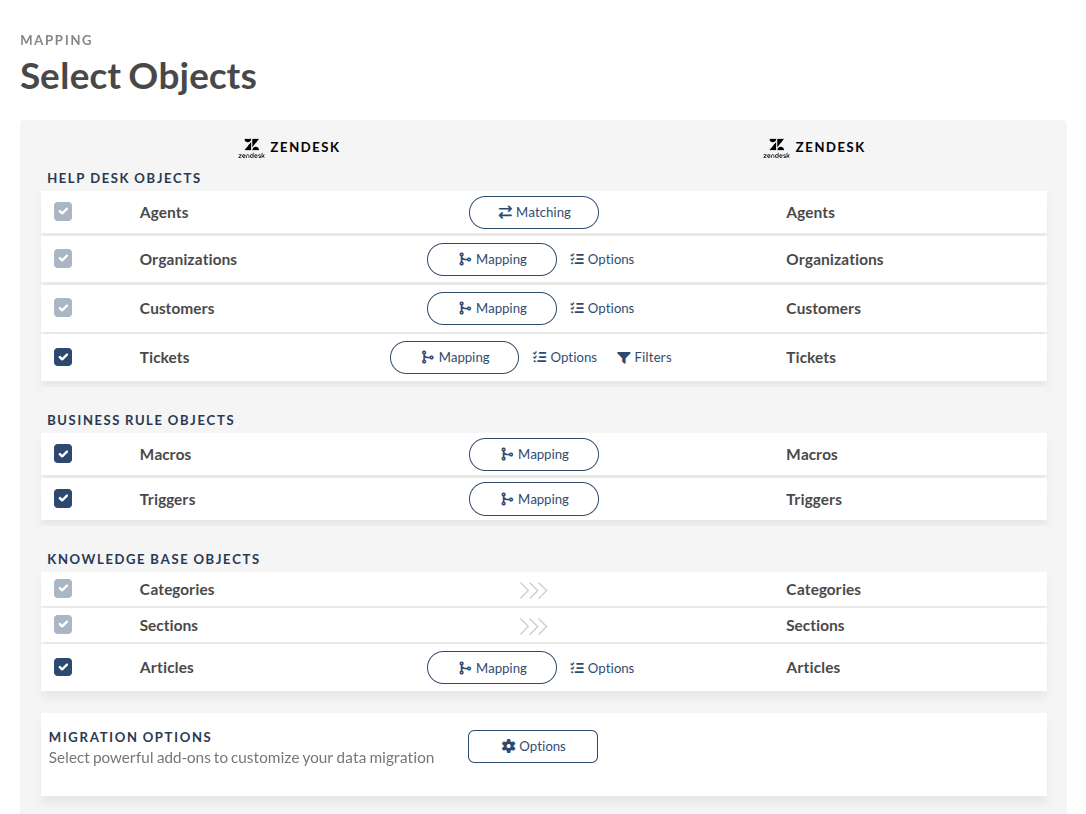
Lastly, with Help Desk Migration, you can personalize your Zendesk import. Indeed, one-size-fits-all solutions don’t work for everybody. So, if you need a custom migration, we got you covered.
Recap of Zendesk import process
Whether you are moving from an email client or another help desk, Zendesk is the right choice. With its robust feature line, excellent customization options, and the ability to hook third-party apps, it is a no-brainer.
The only thing we would like to add is that there’s nothing wrong with using a CSV file, but remember that it can be a challenging process. Instead, use an automated migration service to handle the process for you. It is safer, it is faster, and it’s a worthy investment. , and we’ll join you on a Zendesk import journey.
FAQs about the Zendesk import process
- CSV File: Prepare your user data in separate files, then go to Zendesk Admin Center > People > Import, upload the file, map the fields, and start the import.
- Automated Tool: Use an automated migration tool to handle the bulk import, which can streamline the process and handle larger volumes of data efficiently.