
Raise your hand if you’ve thought about Zendesk pricing recently? Are you looking for an alternative? We feel you and come to the rescue with an executive’s guide on help desk software prices.
Customer service software is an essential tool in delivering personalized service. But it can be expensive. Companies can spend up to a third of their whole budget on service teams, including the software.
This is why we’ve decided to come up with help desk software pricing comparison for 7 top players in customer service. In this post you will find out:
- Who offers the best value to money;
- Which industries each vendor serves best;
- How much the software costs, in the end.
Before fully going though, we'd like to mention that SaaS pricing is volatile and can change very quickly, so it's always best to make a final check directly on the vendor's pricing page.
Let’s get it started, shall we?
Zendesk
What Companies Use Zendesk?
Zendesk has the largest share of the customer service market. It is greatly popular among Computer Software and IT companies. However, Zendesk is also used in retail, education management, and financial services.
Although Zendesk is considered quite pricey, most of its customers are small businesses (up to 50 employees) based in North America, UK, and Australia.
Zendesk Pricing
Currently, Zendesk offers 2 kinds of plans: Foundational and Suite. Foundational is only represented by one plan: Support Team at $19/agent/month. Suite plans go as follows: Team at $55/agent/month, Growth at $89/agent/month, Professional at $115/agent/month, and Enterprise (the cost to be clarified with the sales team).
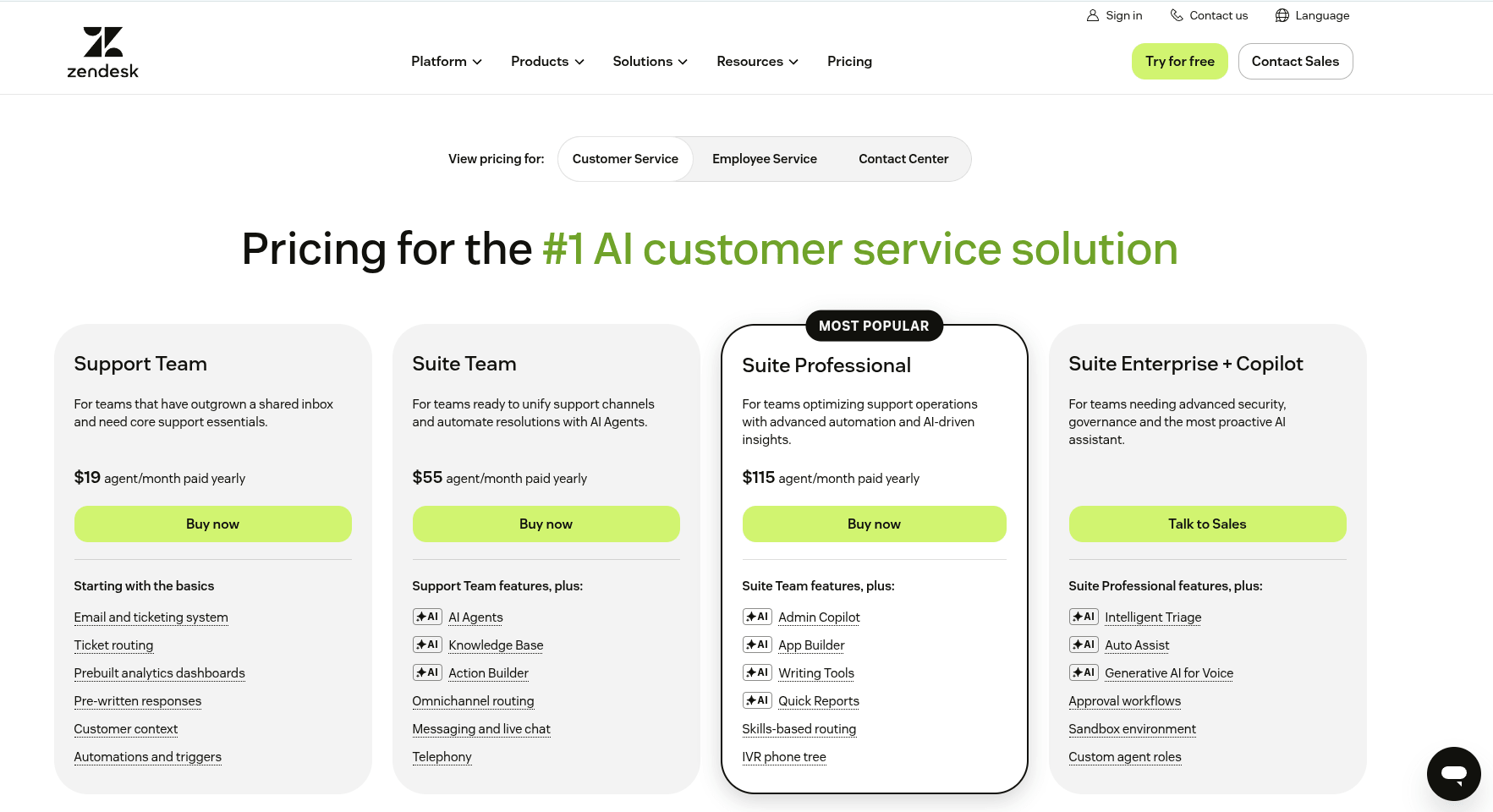
The Support Team plan provides you with a basic email inbox. If you want a help center and live chat, Zendesk offers you their 4 Zendesk Suite plans.
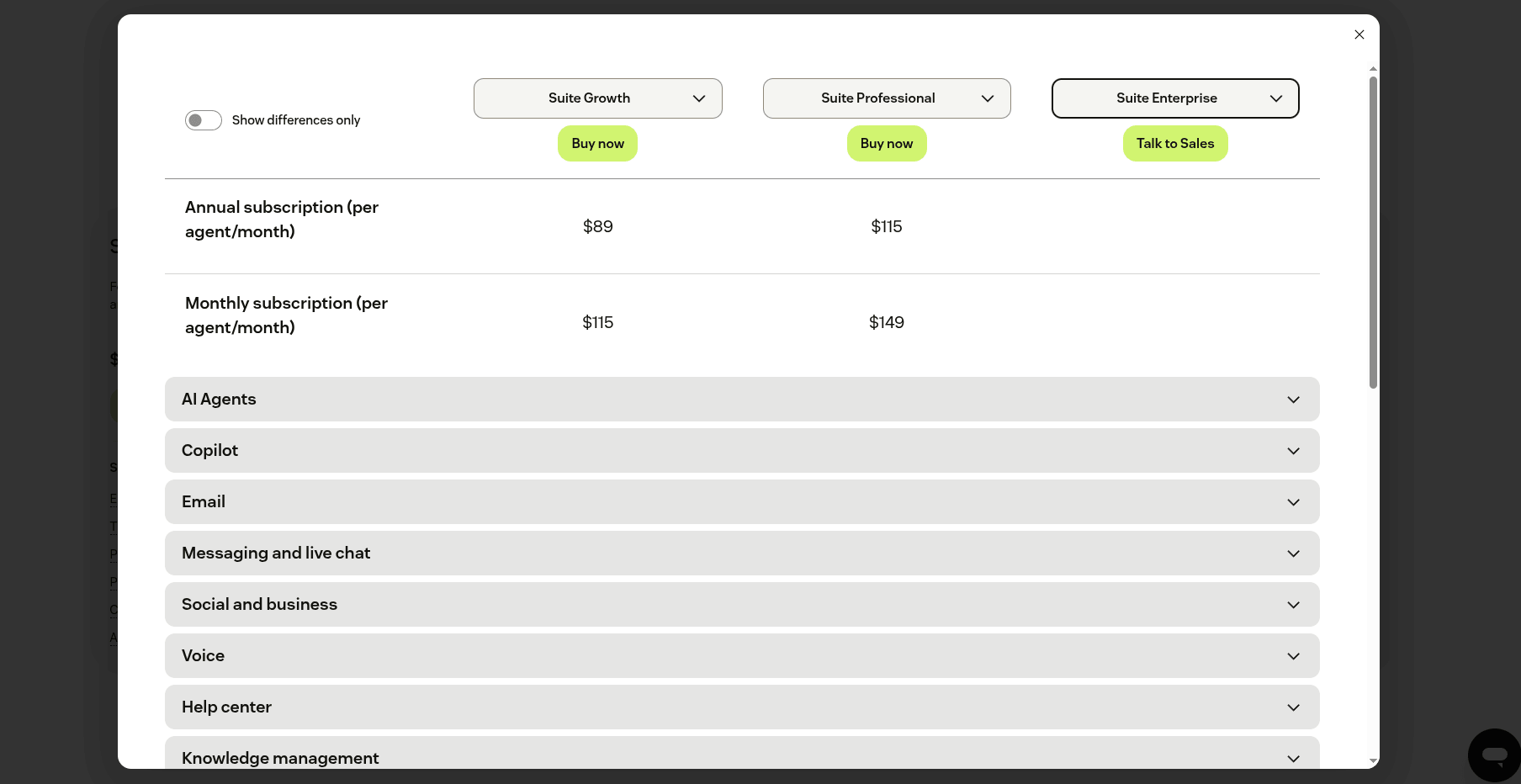
Each tier offers email, live chat, social, and help center functionality. They are pretty jam-packed, so it’s safe to say that whatever you choose, you get a good offer.
How Much Can Zendesk Cost Eventually?
Let’s meet Bill. He works at a real estate agency, and they want to start using Zendesk. The agency wants a branded help center, live chat, and integration with their other tools.
To customize your help center, you need to get the Suite Growth plan, which costs $89 per month/agent billed annually.
Considering that the agency employs 5 customer service agents, including Bill, Zendesk would cost them $445 per month. Per year, you would have to pay $5,340.
On top of that, the agency will have to spend some more on a custom theme. Pre-built custom themes retail anywhere from $99 to $950.
What makes Zendesk the champion of customer support is its Professional Services. Regardless of the complexity of your operations or how many changes you need to make, the team of CX experts is ready to help you find the right approach. That includes launching, customizing, onboarding, and even moving customer data from any help desk to Zendesk.
Generally, onboarding budgets scale with overall operational complexity—covering data cleanup, workflow rebuilding, and team training—with standard professional implementation packages typically starting around $5,000 to $10,000 for mid-sized operations.
But if your business needs are limited to transferring data to Zendesk from another solution, consider Help Desks Migration. This automated migration service charges you for the number of migrated records, going from $39. Not only can you import the customer database to Zendesk, but you can also consolidate any help desk or service desk instances.
Freshdesk
What Companies Use Freshdesk?
Next in line for our help desk software pricing comparison is Freshdesk, the most popular among Computer Software and IT companies. The company does have clients in other industries like retail, education management, and healthcare.
Freshdesk has a significant customer base of smaller companies (10-50). However, it also has a fair share of medium-sized companies (50-200 and 200-500 employees).
Freshdesk Pricing 2026
Freshdesk has completely restructured its pricing model over the last few years.
First, it offers a Free Program for up to 2 agents that lasts for 6 months.
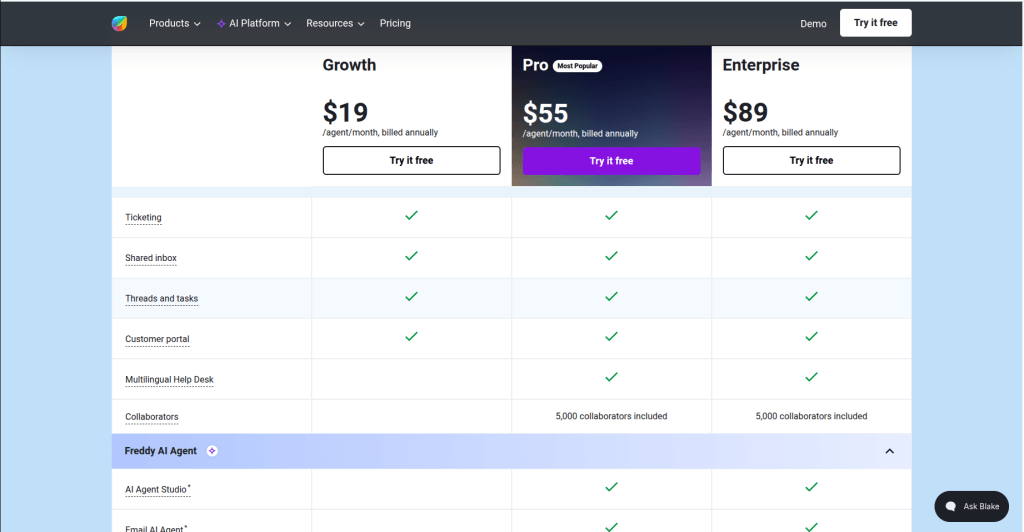
For larger long-term teams, there are three main paid plans: Growth at $19/agent/month, Pro $55/agent/month, and Enterprise at $89/agent/month. The cheapest option is Growth. It handles core ticketing and email support but requires a monthly per-agent fee.
The most expensive plan is Enterprise. It’s available as a classic email-and-ticketing solution or upgraded to Freshdesk Omni that integrates with email, phone, and more.
How much would Freshdesk cost in the end?
Here’s Stacey. She wants to start using Freshdesk to run customer service at her company. Stacey decided to get the Pro plan since it includes custom roles, full portal customization, and multiple SLA routing options. She has 12 reps on her team, including herself. On an annual contract, the Pro plan costs $55 per agent per month. Thus, the baseline cost for Freshdesk would be $660 per month.
It is worth mentioning that Freshdesk also has hidden usage fees to watch out for. If Stacey wants to use their automated Freddy AI Copilot assistant, it costs an extra $29/agent/month. Furthermore, if her automated AI bot resolves customer tickets, she will be charged an overage fee of $49 for every 100 conversational sessions after using her initial free allowance.
Intercom
What Companies Use Intercom?
Aside from software development and IT companies, Intercom is vastly used in marketing and financial services. With most of their customer base based in the United States, UK, and Canada. If you look at the company size, Intercom is mainly used by smaller companies, with 1-10 or 10-50 employees.
Intercom Pricing (or Fin's)
In June 2026 Intercom, now Fin, made a deal to be acquired by Salesforce by the end of their 2027 fiscal year. So below we present Fin’s prices as for today accompanied by a disclaimer that the info can change after the sale’s finalization.
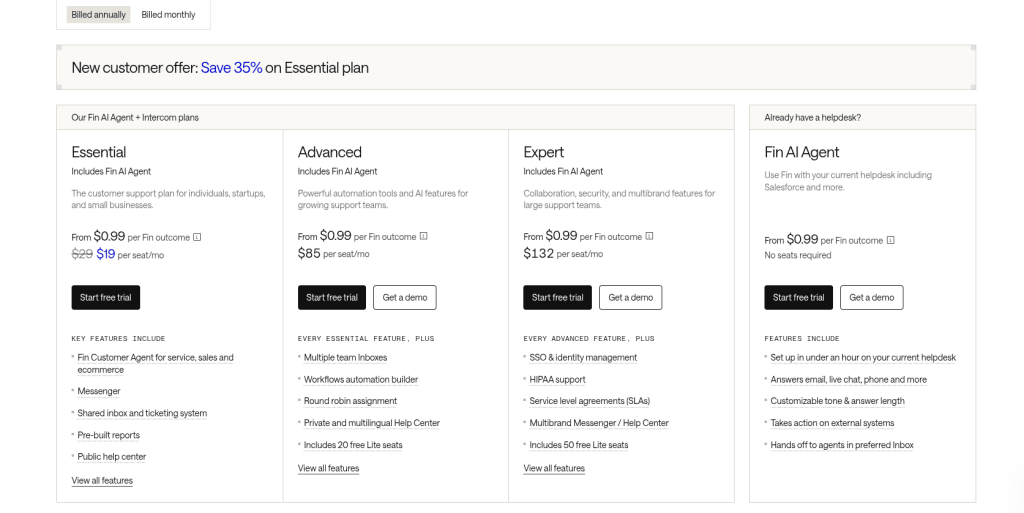
Intercom completely overhauled its plans to focus on per-seat base tiers and an outcome-based AI pricing layer. Their pricing remains notoriously unpredictable, but it has transitioned into a tiered, seat-based model coupled with usage fees.
There are three main plans: Essential ($19/agent/month), Advanced ($85 agent/month), and Expert ($132/agent/month).
If you’re a startup, you can also apply for Intercom’s Early Stage Program. Instead of flat seat rates, eligible startups get a massive 93% discount in their first year + 1 year of Fin AI Agent for free (up to 300 free resolutions/month), which drops the starting price of the fully featured helpdesk to just $33 per month. The discount decreases to 50% off in year two, and 25% off in year three.
Besides, you no longer have to talk to a representative to get advanced tiers. You can buy their Advanced ($99/seat/mo) and Expert ($139/seat/mo) plans directly from the website.
How Much Can Intercom Cost?
Let’s say you want to get the baseline Essential plan just to get a taste of Intercom. Instead of a complicated sliding scale, you pay a flat rate of $39 per seat/month (or $29 per seat/month if you commit to annual billing).
So, if you have 10 customer service reps, Intercom will cost you $390 per month on a flexible monthly pay-as-you-go track. If you choose to prepay for the year, that price drops to $290 per month (billed as $3,480 upfront).
While you no longer have to worry about old contact limits, the new hidden variable to watch out for is Intercom’s AI agent - Fin. If you turn on Fin, every successful customer resolution it handles without human intervention will cost you an additional $0.99 per outcome, which can quickly scale up your monthly bill.
Salesforce Service Cloud
What Companies Use Salesforce Service Cloud?
Service Cloud is vastly popular with software development companies and a little less used by IT companies. Service Cloud is also used in finances and hospital care, with 69% of their customers based in the US.
Being a more advanced system, it is no surprise that Service Cloud is used more by mid-sized and larger companies. However, they also have a fair amount of smaller companies with 10-50 employees.
Service Cloud Pricing
Salesforce structures its support platform across five distinct editions: Starter Suite at $25 agent/month, Pro Suite at $100 agent/month, Enterprise at $175 agent/month, Unlimited at $350 agent/month, and Agentforce 1 Service at $550 agent/month.
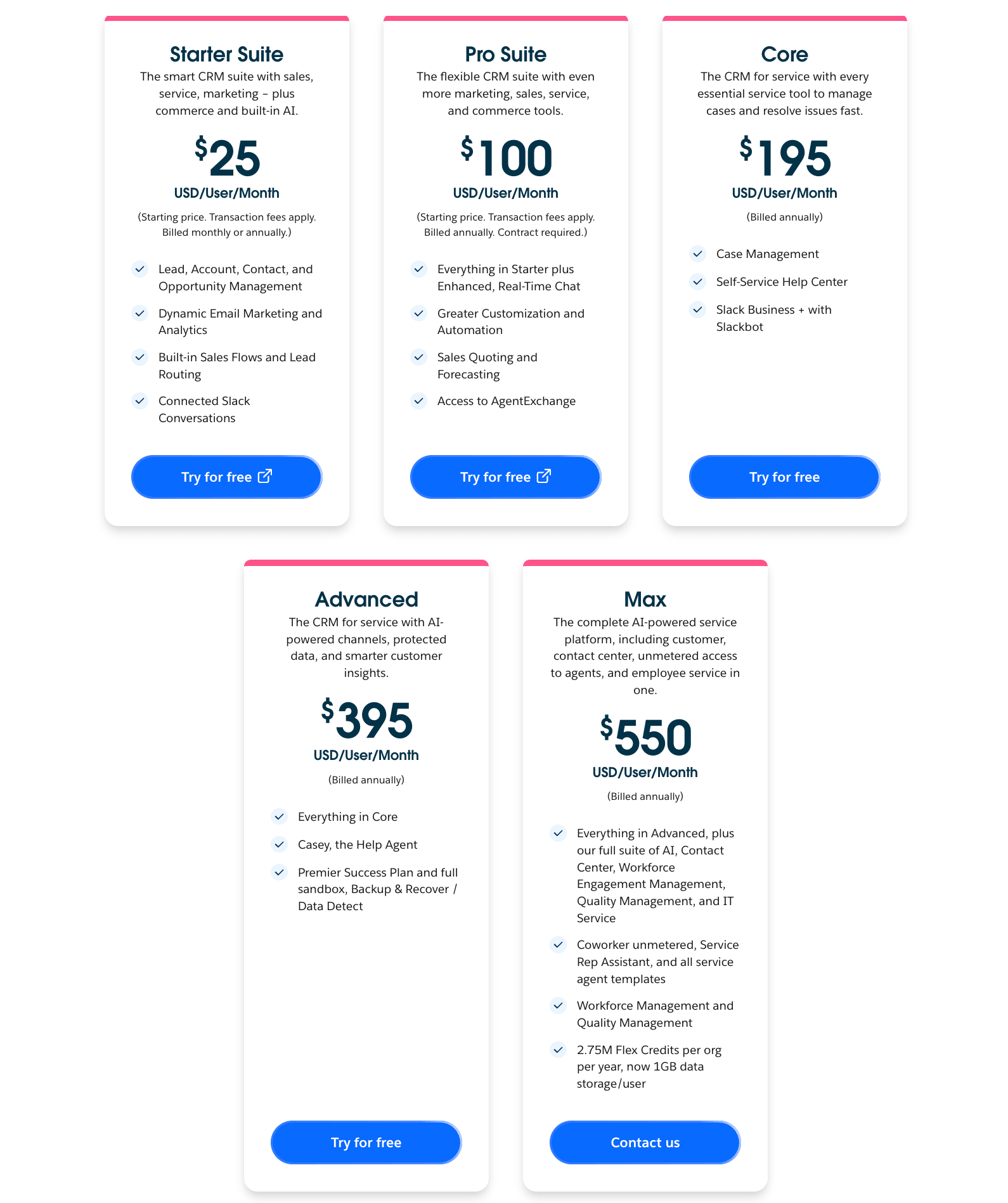
The Starter Suite gives you the basics, allowing your team to manage cases, build a simple knowledge base, etc. Moving up to the Pro Suite unlocks standard contract and agreement management alongside basic custom fields.
However, if you need to connect Salesforce to the rest of your tech stack, you will have to jump to the much more expensive Enterprise or Unlimited plans.
How much will Service Cloud cost eventually?
Peter works at a retail company and manages a team of 20 customer service agents. The company is already using Salesforce CRM, and now they want to implement Service Cloud. Having explored the pricing, Peter decided that the Pro Suite edition will get the job done.
This means that the company will have to pay $100 per user/month. For his 20 agents, that is $2,000 per month on an annual contract, totaling $24,000 per year.
However, Peter also needs to get the Quip Advanced add-on to enable real-time document collaboration directly inside their customer cases. Retailed at $100 per user/month billed annually, equipping 5 of his senior agents with this add-on will add an extra $500 per month (or $6,000 per year) to the bill.
Eventually, the company will spend $2,500 every month to use Service Cloud with their required add-ons, bringing their total annual software commitment to $30,000.
Kayako
What Companies Use Kayako?
Kayako is used mainly by software and IT companies. However, it is also used in telecommunications, higher education, and Healthcare. The software is used by small (10-50) and mid-sized companies (50-200).
Kayako Pricing
With Kayako, you get to choose from just three pricing options: Inbox, Growth, and Scale.
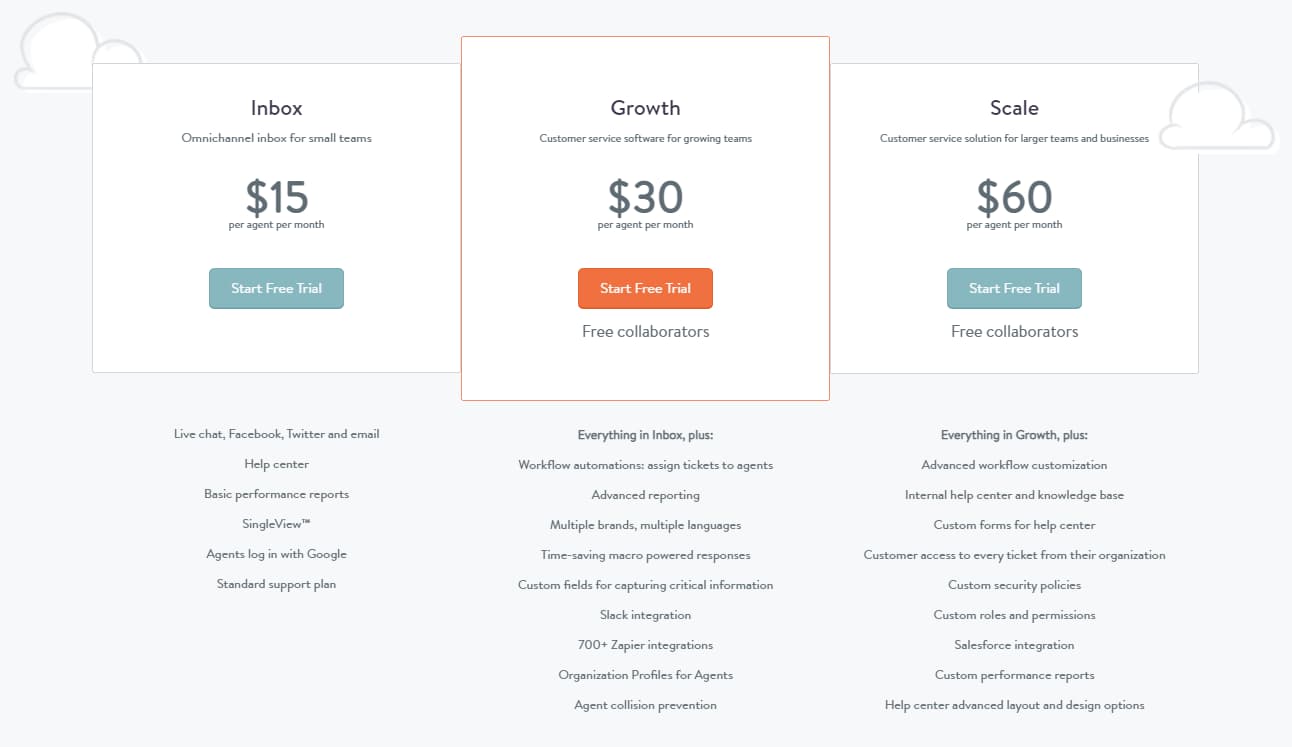
The Inbox plan offers all essential support channels and some basic performance reports. The Growth plan gives you tools to automate the workflow and allows managing multiple brands. Finally, the Scale plan provides more customization options. For instance, you can create custom roles and permissions, security policies, and forms.
How Much Can Kayako Cost Eventually?
Let’s meet Molly. She runs customer service at a telecommunications company. Molly has 9 customer service agents on her team.
She decided to get the Growth subscription which retails for $30 per agent/month billed annually. Thus, Kayako will cost Molly $300 per month, including herself.
However, Molly realized that she would need to pay extra to integrate Kayko with other tools they’re using. Kayako does not offer out-of-the-box integrations. Thus, Molly will have to pay an additional $39 for Zapier.
Help Scout
What Companies Use Help Scout?
Help Scout is used by Computer software and Internet companies, and IT companies. Help Scout is also popular in marketing and retail. And because Help Scout is HIIPPA compliant, it is also used in healthcare.
Help Scout pricing
Help Scout has very straightforward pricing. You can choose from 4 tiers: Free, Standard at $25 agent/month, Plus at $45 agent/month, and Pro $75 agent/month.
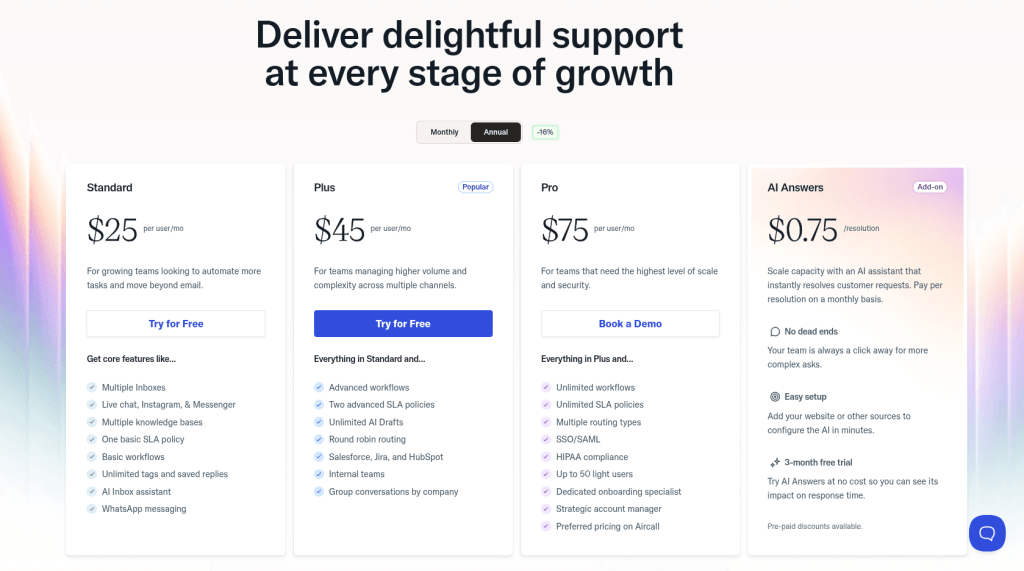
The Standard plan serves as a starting point for small teams, offering core features like shared inboxes, basic automation, and a self-service help center. If you need more advanced power-ups, the Plus plan is your go-to choice, unlocking robust automated workflows, custom fields, and native integrations with platforms like Jira, HubSpot, and Salesforce.
If you operate in the healthcare space, however, you will need to step up to the Pro plan to access HIPAA compliance, custom security controls (like SSO/SAML), and enterprise-level support. Unlike other platforms, Help Scout does not offer discounted bulk seat pricing on their highest tier. Instead, the Pro plan has a baseline cost designed for larger teams requiring strict data security.
If you want to get a taste of Help Scout to see which tier fits your workflows, you can sign up for a 15-day free trial with no credit card required.
How Much Will Help Scout Cost Eventually?
Greg is the owner of a small marketing agency. He has 4 customer service representatives and wants to use Help Scout to improve their workflow.
Because Greg needs custom fields and a native integration with HubSpot, he has to choose the Plus plan. Securing access for his 4 reps plus himself means Greg will pay $250 per month if he commits to annual billing (or $300 per month on the flexible monthly track).
Unlike older versions of the software, Greg needs to keep an eye on usage-based add-ons. If his agency decides to use Help Scout's automated AI Answers bot to handle client queries, he will be billed an extra $0.75 for every successful customer resolution on top of his monthly seat costs.
Beyond that, his only extra costs will come from adding more team members or buying extra shared inboxes.
Zoho Desk
What Companies Use Zoho Desk?
Zoho Desk is primarily used in IT services and software development. However, Zoho Desk is also popular among retail, computer hardware, education, and wholesale. The help desk is used equally by small (10-50 employees) and mid-sized (50-200 employees) companies.
Zoho Desk Pricing
Zoho Desk offers five pricing tiers tailored to different team sizes: Free, Express ($7 agent/month), Standard ($14 agent/month), Professional ($23 agent/month), and Enterprise ($40 agent/month). You can take any of the paid plans for a spin with a 15-day free trial — no credit card required — to test out the platform before committing.
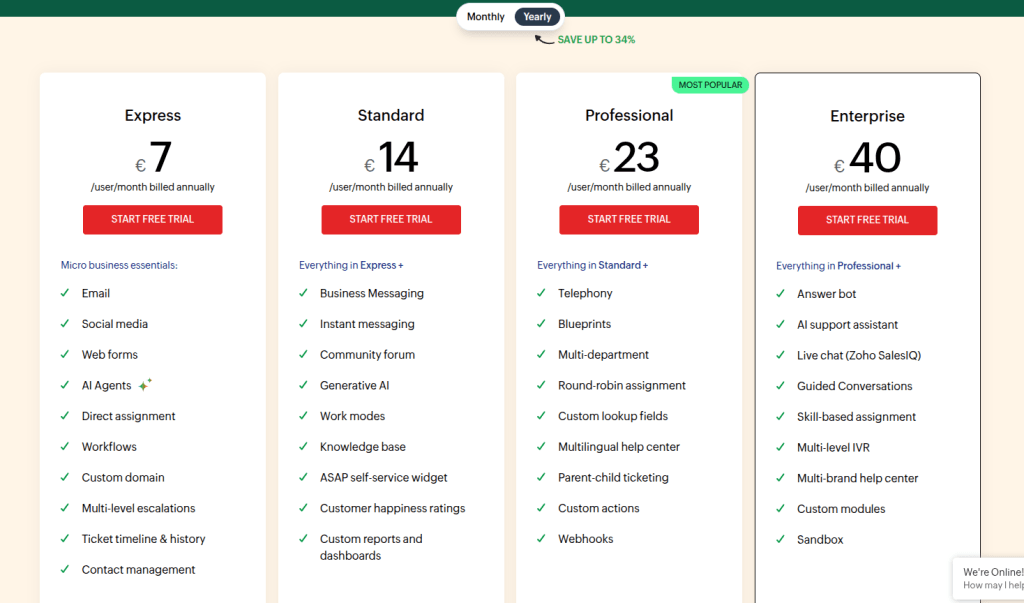
The Free plan is only available for up to three agents. Plus, the span of functionalities is rather modest at this stage.
As you move through the plans of Zoho Desk pricing, each new level adds more features to those already offered by the previous one, and by the time you get to the Enterprise plan, more than 200 features are included.
How Much Can Zoho Desk Cost Eventually?
Stephanie is an operations manager at a software development company. They decided to use Zoho Desk because they already use Zoho Invoice and some other Zoho products.
Stephanie decided to go with a Professional plan. Thus, the company will have to pay 161 euros for 7 seats billed annually. This equals about $192.
Stephanie is an operations manager at a software development company. Because her team already relies on Zoho Invoice, they decided to add Zoho Desk to keep everything in the same ecosystem.
Stephanie opted for the Professional plan. Securing 7 seats on an annual contract costs €23 per user/month. This brings the company's total to €161 per month, resulting in a highly predictable annual bill of €1,932.
How to Migrate Your Data to a New Help Desk Platform?
Back in the day, you had to use XML, CSV, or other types of files to migrate your help desk data. And if you had the resources, you could use the API. However, migrating manually can be a lengthy and costly process for the company. We know from our experience that migrating on your own can take up to a month. But it can take only a few days, sometimes even a few hours, if you use an automated migration tool.
With Help Desk Migration, it will take you a few clicks to set up your migration. Sign up, connect your systems, choose the data you want to migrate, and run the free test. Then, when you’re ready, migrate all of your data. As simple as that!
Conclusions
As you can see, this help desk software pricing comparison showed that Zendesk, Salesforce Service Cloud, and Intercom are the top-3 most expensive customer service tools from the list. If you’re looking for something more simple, then you might want to consider other options. But remember, but cheap, buy twice: a lower-cost pricing plan can eventually cost you more because of poor functionality. Sometimes, it makes sense to pay more for better software.
If you decide to switch to another help desk to get a better price, Help Desk Migration is here to help you effortlessly migrate your data to a new system.