Reliable Freshdesk to Jira Service Management data migration services
Encoded chats, safe servers, newest authorization approaches
Automated process, zero time-out, avoiding any workflow drops
Bargain charging to deliver a feature + rate balance
We’ve gained the trust of brands across verticals


Success Story
How Totalmobile Switched from Freshdesk to Jira Service Management with Ease
Freshdesk → Jira ServiceManagement | Software Development
Challenge:
The field service management developer needed to migrate tickets from one Freshdesk account to five separate projects in a single Jira Service Management account, with source-side filtering.
Solution:
Automated migration with customization: migrating KB articles into specific spaces in Jira Service Management, inline images as attachments, and Signature support plan.
Result:
Totalmobile successfully split their data into several project in Jira Service Management.
"The data migration went well and the support was top notch. Help Desk Migration greatly decreases the amount of time it takes to migrate between systems. It also helps reduce the amount of time technicians or help desk employees have to work on reconciling migrated data."
The team is always quick to respond to email and resolve questions and issues promptly. The migration tool is well designed. A nice enhancement in the future would be an estimated time to completion timer! I like the fact that we can choose to pay to customise the migration to our specific needs and data requirements.
We needed to migrate to an acquired business to a our ticketing platform (JSM) so all Customer Support continued to be managed through a single system.
For customer experience, we wanted to allow customers to be able to still see their historical data in the support portal, but also it allowed us to report on historical data and trends still.
If you need to move to a new system seamlessly and retain historical information for audit and tracking purposes, this is the only viable option. Being able to test the migration first and get out of hours supporting during the production run was also key to success.
We found them through Googling; they seemed to be well rated.
A bespoke paid for custom migration as part of a wider engagement with a professional services systems integrator.
If you need to migrate data for an operational system out of hours, take care to consider that lots of tickets can take a long time if you need to include images as attachments, so you need to ensure you can complete all tasks within the outage window you have. Take care to fully test the migration through test migration runs, so you are comfortable all data is coming across in the different scenarios you have.
Finally if the system you are migrating to is already live and in use, spend time thinking about how to avoid disruption – using the migration labels feature can be helpful to quickly separate/identify new data coming into the system via the migration.
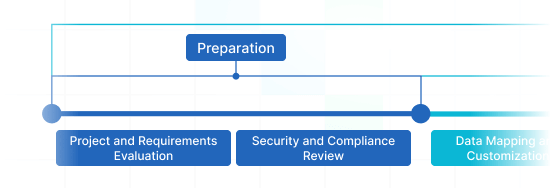
Data migration timeline: 1-2 weeks
Preparation
Project and Requirements Evaluation
Start your migration by evaluating Source data, modus operandi, and apps. Review data filtering and field alignment to the Target. Develop a transmit approach, that covers the framework and customer service reps coaching.
Security and Compliance Review
Verify data adheres to security protocols. Grant permissions and access settings to secure the migration.
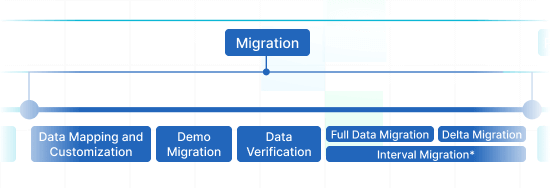
Migration
Data Mapping and Customization
Align records fields amid the Source and Target. Settle on pre-built custom options from the list or ask for certain tailoring for the data movement.
Demo Migration
Do a free test Demo to check how the movement app performs. Review outcomes and modify settings as you wish.
Data Verification
Review all transferred records in the Target is genuine, fully captured, and appropriately formatted.
Full Data Migration
Transfer all selected records, covering tickets, contacts, attachments, and associated information.
Delta Migration
Capture any new or updated records that changed for the time of the Full data transition.
Interval Migration*
Data movement can be paused and restarted to suit your outline, with zero interruption. You can pause up to five instances for five days per pause, managed by our sales squad during operating hours.
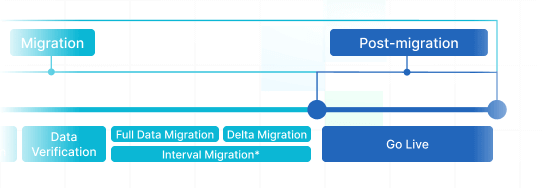
Post-Migration Phase
Go Live
Deploy the Target for all users. Disable the Source if needed and store data backups.
Professional Services for a Seamless Migration
Need a fully guided migration from Freshdesk to Jira Service Management? Our Professional Services team ensures every record moves accurately and securely. We handle complex data structures, custom field mappings, and non-standard workflows. With our experts, you get:
- A tailored migration plan matching your business needs.
- Hands-on support from start to finish.
- Minimized downtime and zero data loss.
- Assistance with testing, validation, and post-migration setup.
Whether you have a large-scale migration or special requirements, our team makes the process effortless and stress-free.
Book a call with our Professional Services team



 Gauthier Escorbiac
  Chantelle Viani
  Nicola Mustone
 Ionut Birzu
  Steve Milligan
 Paul McCabe
 Andrew Cassano
 Tom Doulos
 Noga Edelstein