

Customer service managers, support leads, and CX teams often compare Jira vs. Zoho when they need clearer processes and tools that scale with growing workloads.
This guide breaks down the practical differences between Jira and Zoho so you can see which system fits your team best.
Overview: Zoho vs. Jira
Both platforms cover project work, support operations, and collaboration, but they create different experiences for the people using them.
Zoho is a large suite of business applications covering CRM, customer support, finance, HR, marketing, project management, and more. Jira, on the other hand, is focused mainly on project tracking for software development and IT teams.
What is Zoho?
Zoho is a large suite of cloud apps that helps teams manage projects, support requests, files, and daily communication, making it a practical project management software option for teams that want everything in one ecosystem. It has operated for nearly 30 years and serves more than 130 million users, with a reputation for long-term development and a strong privacy stance.
Zia, Zoho’s AI layer, works across the entire suite and uses your data to surface suggestions, create summaries, and automate routine steps in a way that feels native to each product.
In this article, we’ll specifically focus on Zoho Projects, Zoho Sprints, Zoho Desk, and the collaboration features in WorkDrive and Cliq.
What is Jira?
Jira is Atlassian’s platform for managing work across teams, covering project planning, service delivery, documentation, and async communication. Because Jira Software, Jira Service Management, Confluence, and Loom share the same cloud platform, teams can easily move between planning, support, and documentation.
Rovo, Atlassian’s AI layer, helps by breaking down work, drafting descriptions, summarizing updates, and automating routine steps. It can also pull context from Confluence and connected apps.
Jira is used by more than 300,000 companies and supports a wide range of teams, from software and product to marketing, IT, and operations.
Zoho: Key Capabilities
Let’s look at how Zoho handles project work, support operations, and everyday collaboration.
Project and Task Management
As part of its broader project management software toolkit, Zoho gives teams two tools for running projects:
- Zoho Projects for structured plans, where teams outline schedules, set dependencies, and monitor progress over time. It supports longer-range planning through timelines, Gantt views, effort tracking, and workflow automation.
- Zoho Sprints for iterative delivery, maintaining backlogs and sprint boards, and release tracking when work comes in cycles. It helps teams move faster, offering visibility into what’s in progress and what’s coming next.
You can use both these tools for:
- Building project timelines and mapping dependencies
- Managing backlogs, epics, and sprint boards
- Tracking effort, time, and resource availability
- Monitoring progress with burndown charts or flow diagrams
Plus, teams love the flexibility: fields, templates, and workflows can easily be adapted.
Help Desk and Ticketing
Zoho Desk is Zoho’s help desk software for support teams that want an organized ticketing system without a steep onboarding curve. It brings together requests from email, chat, phone, social channels, and web forms, which helps agents maintain a more consistent customer experience across channels.
Zoho Desk’s key capabilities include:
- A unified inbox for all customer interactions
- Customizable help centers and self-service widgets
- Built-in SLAs, ticket categorization, and automated escalations
- A personalizable interface and intuitive user experience
Zia can:
- Suggest knowledge base articles and reply drafts
- Summarize long ticket threads
- Highlight unusual activity or sudden increases in ticket volume
- Help agents rewrite or refine responses without leaving the ticket
And managers can see what the team is up to thanks to dashboards that track response and resolution times, scorecards, reports, and mobile analytics through the Radar app.
Collaboration and Knowledge Sharing
Zoho supports everyday teamwork with tools designed for communication, file sharing, and internal updates.
- Zoho Cliq is the platform’s real-time chat tool. You can message people or groups, jump into quick calls, and bring project updates directly into channels. Plus, simple bots and reminders help cut down on follow-ups.
- Zoho WorkDrive handles shared content. Files live in team folders with version history, comments, and flexible permissions. And because WorkDrive connects to Cliq, teammates can share and discuss documents in the built-in chat.
- Zoho Connect works as an internal hub for announcements, knowledge, and discussions. Departments can create dedicated spaces for updates, shared documents, and lightweight workflows, which is great for information that doesn’t belong in chat.
All three tools integrate with Projects, Sprints, and Desk, so conversations and documents stay connected.
Integrations and Ecosystem
Thanks to Zoho’s dozens of native apps, most teams can manage projects, support, communication, and documents without relying on external tools. Additionally, Zoho supports more than 200 third-party integrations through the marketplace. These include:
- CRM, finance, and human resources apps within Zoho
- GitHub, GitLab, Bitbucket, and Jenkins for development work
- Google Workspace, Microsoft 365, Slack, and Teams
- Popular marketing, chat, and storage tools
And if your team needs deeper customization, Zoho offers APIs, webhooks, and low-code tools to build custom logic or connect internal systems.
Pricing
Zoho keeps pricing straightforward. Each product has its own subscription, but many teams choose from Zoho’s organization-level plans.
Key pricing options:
- Standard: $29 per organization/month
- Premium: $69 per organization/month (includes subscription billing, advanced analytics, and custom functions)
- Custom/Enterprise: tailored pricing for larger or more complex needs
Add-ons are available when teams need extra capacity:
- Additional users: $9/user/month
- Timesheet users: $3/user/month
Zoho One, the all-in-one suite, is also an option for organizations that want access to most Zoho apps under a single license.

Source: Zoho Desk
Jira: Key Capabilities
Here’s how the core Jira tools work together to help teams structure their work and keep information connected.
Project and Task Management
Jira gives teams a shared place to plan work, follow progress, and keep tasks connected, serving as project management software that can scale across departments. With Jira Software and Jira Work Management now unified, everyone works in the same interface, which makes the platform easier to pick up across product, IT, operations, and support teams.
They rely on Jira to:
- Create tasks from Slack, email, Figma, or Confluence
- Track progress through boards, calendars, or timelines
- Map dependencies across departments
- Keep work tied to organizational goals
Rovo can speed up the setup with draft descriptions and context pulled from connected tools. Plus, the AI can generate workflow rules, update fields as work moves forward, or flag items that need attention.
Help Desk and IT Service Management
Jira Service Management (JSM) gives teams a structured way to handle incoming requests and operational work. It works as help desk software for organizations that need support operations connected to development or IT workflows. And because it runs on the same platform as Jira Software and Confluence, support teams see past interactions, linked issues, and relevant documentation right inside the ticket. Teams that handle more specialized processes can also build custom workflows that mirror how their internal approvals or escalations work.
They use JSM for:
- Routing customer and internal requests through customizable forms and queues
- Managing IT workflows such as incidents, changes, and problems
- Sharing self-service articles through a built-in help center
- Coordinating escalations with development or operations when issues require deeper work
Some organizations also use JSM for legal management tasks, such as tracking approvals, managing intake requests, or routing documents for review. It’s also common to see it used for facility management cases like maintenance requests or equipment tracking.
Rovo supports the flow by summarizing threads, surfacing useful articles, or suggesting next steps during complex cases. At the same time, automation takes care of assignments, updates, and notifications.
Collaboration and Knowledge Sharing
Confluence is Jira’s workspace for documentation, communication, and shared knowledge. Most teams use it for project docs, internal guides, meeting notes, onboarding content, and more.
Confluence is great for:
- Documenting requirements and internal processes
- Creating team spaces for updates, plans, and knowledge sharing
- Embedding boards and files from other tools
Rovo adds AI support by summarizing long pages, drafting new content, pulling definitions into view, and answering questions based on existing documentation. And because it draws from both Jira and Confluence, teams can move from planning to execution without losing information along the way.
Integrations and Ecosystem
Jira is a part of a large ecosystem of Atlassian tools and thousands of marketplace integrations. So, teams can keep project work, documentation, communication, code activity, and more in a single platform. Plus, it links naturally with:
- Design tools like Figma and Miro
- Chat platforms such as Slack and Microsoft Teams
- Code repositories and CI tools, including GitHub, GitLab, Bitbucket, and Jenkins
- Storage and productivity tools like Google Drive and Microsoft 365
For companies with custom systems, the platform offers APIs, webhooks, and app frameworks through the Atlassian Marketplace to connect internal tools or extend Jira around existing processes.
Pricing
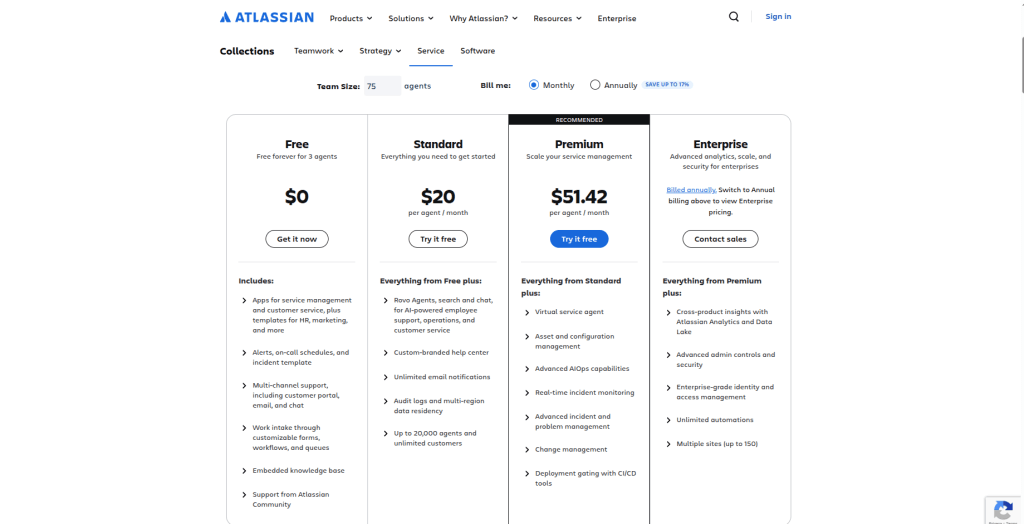
Jira uses a per-user pricing model, with clear tiers that scale from small teams to large organizations. This is what Jira’s pricing looks like for teams of around 300 users:
- Free: $0 (available for up to 10 users)
- Standard: $7.91 per user/month
- Premium: $14.54 per user/month
- Enterprise: billed annually, with pricing provided through Atlassian sales
All plans include the core work views (boards, lists, calendars, timelines) and built-in reporting. Standard and above add Rovo AI, external collaboration, permissions, regional data residency, and higher automation capacity.
Premium and Enterprise introduce features for organizations that need broader planning, stronger governance, and higher uptime protections.
Source: Jira Service Management
Jira and Zoho Desk: Reviews
Nothing speaks about a service louder than real-life feedback of actual customers. That is why we have selected a few review-pieces about both JSM and Zoho.
Zoho Reviews
What do you like best about Zoho Desk?
One of the biggest advantages is the multichannel ticketing feature. With emails, chat messages, web forms, and even social media messages all funneled into a single, centralized dashboard, our team never misses a customer query. I also value the automation rules, as they help eliminate much of the repetitive work.
Shaisa D.
Software Engineer
Computer Software
Small-Business (50 or fewer emp.)
What do you dislike about Zoho Desk?
I would like to see improved HTML controls on the knowledge base side of the system. At times, it can be a bit quirky when I'm trying to set up more complex or detailed articles.
Michael R.
I am a chair of the Tech Committee
Small-Business (50 or fewer emp.)
12/4/2025
Jira Reviews
What do you like best about Jira Service Management?
I really enjoy using Jira Service Management as it is an extremely comprehensive and easy-to-use tool. The ability to easily clone tickets allows me to work on the same project with different cases effectively. Additionally, I highlight that the platform is extremely fast, which is a great differentiator compared to other ticket management platforms that tend to be slow.
Stephan M.
Tier 3 Support Engineer
What do you dislike about Jira Service Management?
1.Complex setup and configuration - The initial setup can be intimidating particularly for teams with no prior Jira expertise.
2.The UI and features may be more difficult for non-technical users to understand.
Yeswanth raj P.
Business Intelligence Analyst
Mid-Market (51-1000 emp.)
Zoho vs. Jira: Pros and Cons
Here’s a brief comparison to help you see the advantages and disadvantages of each platform.
| Zoho | Jira | |
| Pros |
|
|
| Cons |
|
|
Final Verdict: Jira or Zoho?
So, who won? That depends on the use cases:
Zoho Projects vs. Jira
Winner: Jira
It handles larger, more structured projects with stronger automation and cross-team visibility, while Zoho Projects is better suited to smaller teams that want familiar scheduling and time-tracking tools.
Zoho Desk vs. Jira
Winner: Zoho Desk
It’s easier to set up for customer-facing teams and it keeps everyday ticketing simple. Jira only takes the lead when support needs to be closely connected to development work.
Zoho Desk vs. Jira Service Management
Winner: Jira Service Management
It covers full ITSM workflows (incidents, changes, assets), while Zoho Desk focuses on streamlined customer support and remains a lighter option for non-technical teams.
Once you decide what works best for your team, the only thing left is getting your data to the right place. Help Desk Migration handles that securely, so you can focus on the rollout instead of worrying about what might get lost along the way.
Frequently Asked Questions
There are several platforms all of which can equally be named as decent candidates competing with Jira for the title of top of the mountain.
- ServiceNow: best suits for large organisations with ITIL complexity.
- Zendesk: fits external customer service teams.
- Freshservice: best for small–mid companies.
Zoho Desk is best suited for SaaS companies, e-commerce and retail, telecommunications and utilities, and EdTech.
Jira Service Management (JSM) is built for strong IT operations and compliance needs, such as technology and software development, financial services and banking, healthcare, and manufacturing and logistics.
Although Zoho Desk is a great service, it is not the best in every scenario. It is a strong mid-market help desk, however, several tools are considered better in specific areas such as scalability, usability, automation, or enterprise readiness. Among those tools are Zendesk, Freshdesk (Freshworks), Jira Service Management, ServiceNow, Intercom.
Yes — it is absolutely possible to migrate data between Zoho Desk and Jira Service Management, in both directions using Help Desk Migration tool.
Zoho Desk is partially suitable for ITIL / ITSM practices. Zoho works well for basic IT service workflows, such as incident handling, service requests, SLAs, ticket categorization, and knowledge management. For small IT teams or internal help desks, it can support light ITIL practices, especially regarding incident and request management.
Zoho Desk excels in self-service portals. It allows you to create customized portals for customers where they can: submit and track tickets, access a knowledge base, browse FAQs and articles, interact with community forums, receive automated responses and ticket updates.
Jira is the clear winner for development and DevOps collaboration. It integrates with Jira Software to connect support tickets with development issues — a key advantage for DevOps teams.
You can map Zoho Desk departments to Jira projects so support tickets become Jira issues. There is also an opportunity to integrate Zoho and Jira through a marketplace. You can carry out the integration by opening the Zoho Marketplace, searching for the Jira extension, and installing it.
Jira is widely recognized for its deep customization and highly structured workflows. It allows teams to design complex, multi-step workflows with custom statuses, transitions, conditions, validators, and post-functions.
Zoho’s workflow customization is generally more intuitive and accessible, enabling non-technical users to create rules, approvals, and automations with minimal configuration.