Freshdesk Migration Without Breaking Freddy AI
Move your tickets, contacts, and knowledge base to or from Freshdesk with zero downtime. Clean, structured data means Freddy AI has what it needs to perform well from day one — not months of cleanup later.
No credit card required Fast setup
Agentic AI Platform for Enterprise.
DATA MIGRATION
PRESERVED
How Freshdesk Migration Works — 5 Steps
Help Desk Migration runs entirely on API-based data transfer — no screen scraping, no manual CSV exports, no retyping. It means that your data moves faster and more accurately than any other way. Ticket-to-contact relationships, permissions, and record links stay active from source to target. And because data travels directly between platforms over encrypted API connections, nothing sits in exportable files along the way. Here’s an instruction on how to run a migration to Freshdesk with Help Desk Migration.
Connect Your Source and Freshdesk
Your first step of Freshdesk data import or export is signing up for Help Desk Migration and opening the Migration Wizard. Connect your source platform by entering its credentials, then authenticate your Freshdesk account with an API key. Every connection runs through an encrypted environment, so your credentials and data stay protected throughout the migration. Setup takes minutes — no coding or developer help required.
Choose required records and go through field mapping
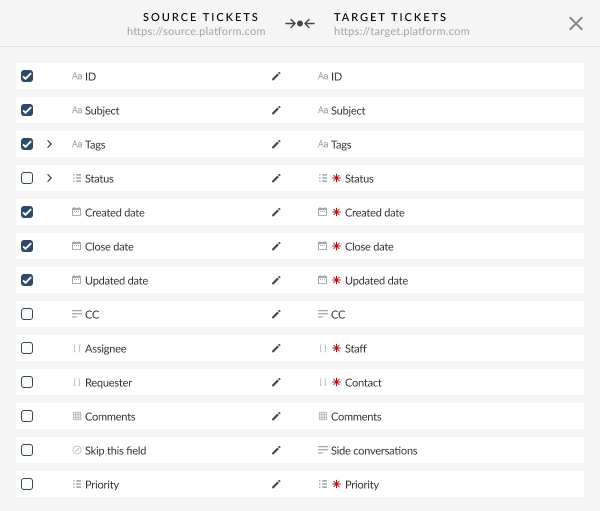
Pick which records to move — agents, tickets, contacts, companies, knowledge base articles — then map fields between the two platforms. Most fields match automatically; anything unmapped gets highlighted so you decide before data moves, not after. Got custom fields on your source platform? Create their Freshdesk counterparts right in the Migration Wizard — no need to leave the setup or open Freshdesk admin.
Choose additional options and run a Free Demo Migration
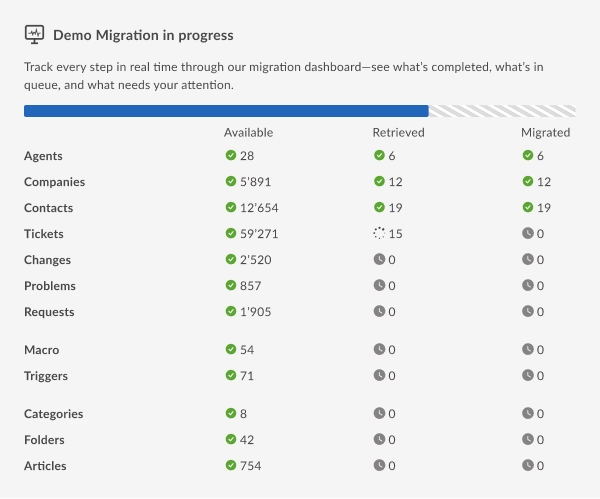
Turn on whatever extras fit your setup — tagging newly migrated tickets, skipping attachments to speed things up, migrating call recordings (from Zendesk) — then run a Free Demo Migration on a real sample of your data. This gives you an honest preview of how records will actually look in Freshdesk, so you can catch and fix anything off before the full migration starts.
Launch Your Full Migration
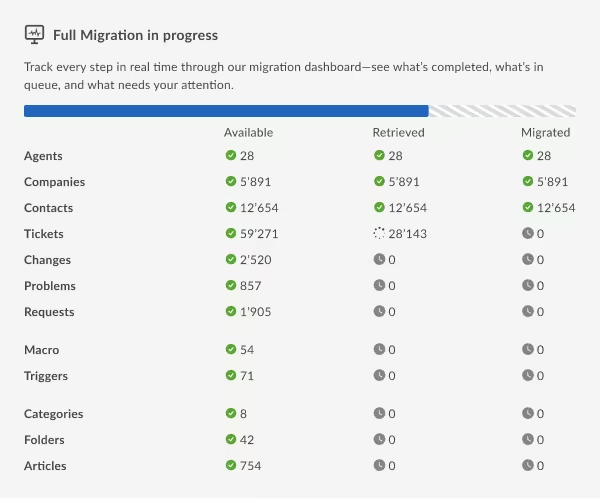
Not happy with something in your Demo results? Adjust your field mapping or record selection and rerun the Demo as many times as you need — it's free every time. Once everything checks out, launch the Full Migration. Your current help desk keeps running the entire time: your team keeps handling tickets, customers never see a "please hold" message, and data moves in the background with zero scheduled downtime.
Validate results and go live
Check the migrated records against your source data line by line — confirm ticket history, custom fields, and attachments all landed exactly where expected, with nothing missing or duplicated. Once everything checks out, switch your team over to Freshdesk for good. Our support team stays reachable well after go-live, so if anything needs a second look, you're not on your own.
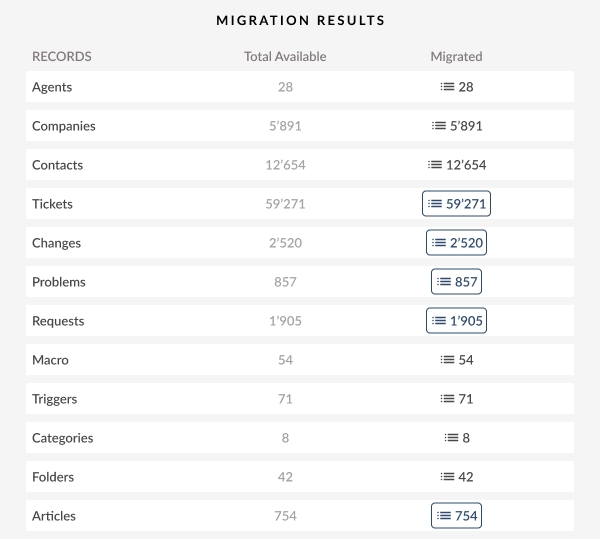
What Data You Can Migrate to or from Freshdesk
Help Desk Data
Tickets, contacts, companies, and agents migrate with their full history — comments, conversations, CC lists, tags, custom fields, and attachments included. Closed and resolved tickets move the same way open ones do, so nothing gets left behind just because a case is old.
Knowledge Base Articles and Categories
Your help center doesn't stay behind on the old platform. Categories, folders, and articles migrate with structure, translations, and attachments intact, so customers keep finding the same answers in the same place.
Business Rules and Automation Settings
Canned responses and scenario automations move over too, mapped to their Freshdesk equivalents, so agents aren't rebuilding macros from memory on launch day.
Custom Objects and Fields
Assets, warranties, subscription records — whatever non-standard data your business runs on can be migrated through our tool or handled by our professional services team, with relationships to tickets and contacts kept intact.
None of these are mandatory — mix and match whichever fit your setup, skip the rest. Not sure which apply to your migration? Tell us about your data, and we'll map out the right scenario before anything actually moves.
No credit card required
Freshdesk AI-Ready Migration Scenario
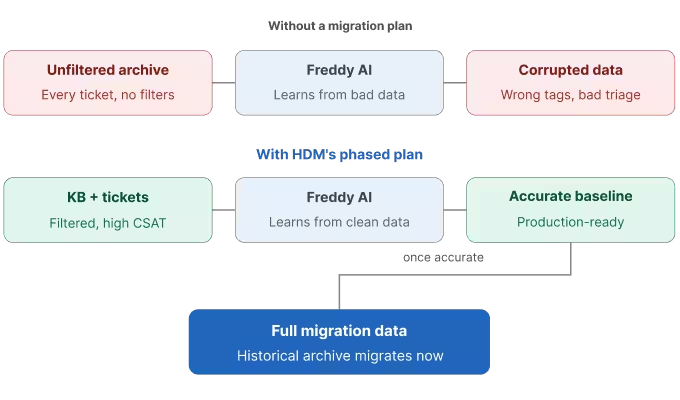
Freddy AI learns from two things: your knowledge base and your resolved tickets. Feed it a messy, unfiltered archive and you get corrupted tags, irrelevant macro suggestions, and auto-triage that guesses wrong from day one.
We migrate in the order Freddy actually needs — knowledge base first, every language and category, then resolved tickets from the last 12–18 months with strong CSAT scores. Your full historical archive still comes over, just after Freddy's baseline is already accurate, not before. One thing worth flagging: Freddy AI requires at least Freshdesk's Growth plan, so confirm your tier before we configure anything.
Advanced Freshdesk Migration Options
Complex scenario? Non-standard timeline? Help Desk Migration goes beyond the standard flow with Delta Migration, Interval Migration, and Customizations — advanced options built around your data, not the other way around.
Delta Migration
Once your main migration wraps, Delta Migration picks up anything created or updated afterward — new tickets, edited contacts, updated custom fields — without touching what's already moved. Run it as many times as you need until Freshdesk is fully caught up with your live system.
What is Delta Migration?Interval Migration
Can't move everything in one sitting? Interval Migration runs your transfer in scheduled chunks over days or weeks, so it fits around your support team's workload instead of forcing one high-risk cutover weekend.
What is Interval Migration?Customizations
Want to tailor your Freshdesk import just the way you need it? From filtering your source data to mapping custom fields, adding extra tags, or handling CC emails your way, Help Desk Migration’s support team is here to help. Reach out anytime to customize your migration for a smooth, hassle-free move!
Request Migration Customization
Private Cloud Migration for Enterprise Teams
Some organizations can't run a migration through shared, multi-tenant infrastructure — strict data-residency rules, an internal security review, or IT policy that says so. For those cases, Help Desk Migration runs your migration in a private cloud environment set up specifically for your account and reviewed against your security team's requirements before a single record moves.
Popular Freshdesk Migration Routes
Freshdesk shows up on both ends of a lot of migrations — teams moving in to consolidate support, and teams moving on as their needs change. These are the routes we run most often.
The migration we run most often. Tickets, contacts, organizations, groups, and your knowledge base move over, with agents mapped up front so ticket assignment doesn't break on day one.
Outgrown Freshdesk, or need Zendesk's specific workflow tools? Tickets, contacts, and knowledge base content move the other direction with the same field mapping and QA checks.
Consolidating multiple Freshdesk accounts after an acquisition, or splitting one account into several? Data moves account-to-account without losing custom fields or ticket history.
When IT and customer support need to standardize on Jira Service Management, tickets, custom fields, and attachments carry over so nothing gets re-typed by hand.

Is Your Freshdesk Migration Secure?
GDPR-compliant
Your data privacy matters. Help Desk Migration fully follows GDPR guidelines, so every step of your Freshdesk import meets rigorous European data protection standards, giving you and your customers peace of mind.
SOC 2 Type II, SOC 3 certified
You can be confident that your Freshdesk migration is in safe hands. Help Desk Migration’s SOC 2 Type II, SOC 3 certification means that their security practices are independently audited and meet top industry standards for handling sensitive information.
Encrypted during transit and storage
Your data is protected by strong encryption from the moment it leaves your old help desk until it safely arrives in Freshdesk. This keeps your information secure both in transit and at rest.
No third-party access
Your data stays private throughout the migration. No third parties ever see or handle your information — only trusted Help Desk Migration professionals manage your transfer.
Plan your move before you migrate a single ticket
Follow the step-by-step guides, then prep every stage with the free checklist.
Freshdesk Migration Guides
Step-by-step export and import instructions — API keys, field mapping, and data filtering.
Freshdesk Migration Checklist (free pdf)
A printable checklist covering all five stages, from setup to go-live.
Here’s a list of all supported platforms you want to migrate data from or to Freshdesk
Accelo
Atera
Atlas
Autotask PSA
BMCHelixITSM
BoldDesk
Chatwoot
ConnectWise
Crisp
CSV
Custify
Deskpro
DevRev
Dixa
Document360
Drift
Dynamics 365
eDesk
eGain
Enchant
Forumbee
FreeScout
Freshdesk
Freshservice
Front
Gladly
Glassix
Gleap
GLPI
Gmail
Google Docs
Gorgias
Groove
Halo Service Solutions
HappyFox
Harmony
HelpCrunch
HelpDesk
HelpDocs
Helpjuice
Help Scout
HelpShift
HelpSpot
HubSpot Service Hub
InstantDocs
Intercom
Ivanti
Jira Service Management
Jitbit HelpDesk
Kayako
Kayako Classic
Kundo
Kustomer
Lansweeper
Live Agent
LiveChat
Manage Engine
Mayday
Missive
NinjaOne
Odoo Helpdesk
Oracle Service Cloud (RightNow)
osTicket
((OTRS)) Community Edition
Outlook
Paligo
Plain
Planhat
Pylon
Reamaze
Request Tracker
Respond.io
Richpanel
Salesforce Service Cloud
ServiceDesk Plus
ServiceNow
SherpaDesk
Siit
SmarterTrack
SolarWinds Service Desk
SolarWinds Web Help Desk
SparrowDesk
Spiceworks
Spiceworks Cloud
SQLite
SuperOps
SupportBee
SupportPal
Syncro
SysAid
Tawk.to
TeamSupport
TeamworkDesk
Thena
Thulium
Tidio
TOPdesk
Trengo
Unthread
Vitally
Vivantio
Zammad
Zendesk
Zoho Desk
Zoho Mail
Check the name for typos or leave us a message.
No credit card required Fast setup
Professional Services for Complex Freshdesk Migrations
Not every Freshdesk migration is a straightforward tickets-and-contacts move. Custom logic, six-figure datasets, and enterprise-scale complexity all need more than a tool running on default settings — that's where our professional services team steps in directly.
Custom logic
Non-standard objects, dependencies between tickets, contacts, and custom records, and business rules that don't map cleanly by default. We build the logic by hand instead of forcing your data into a template.
Large datasets
Six- and seven-figure ticket volumes need sequencing and load planning, not just field mapping. We plan the run around your data, not the other way around.
Enterprise
Multi-brand consolidation, several Freshdesk accounts merging into one, security review requirements, private cloud deployment — migrations that need more than one team's sign-off.
Why Companies Choose Help Desk Migration for Freshdesk
Help Desk Migration moves tickets, full conversation histories, contacts, companies, agents, knowledge base articles, attachments, and custom fields into Freshdesk automatically — while Freshdesk's native importer handles only contacts and companies, a DIY API build requires developers, and other migration services vary in what they cover.
| Capability |
Help Desk Migration
|
Native import tools | DIY / custom API | Other migration services |
|---|---|---|---|---|
| Setup effort |
Guided, no code
|
Manual CSV prep | Requires developers | Usually self-serve |
| Data types |
Tickets, conversations, contacts, companies, agents, knowledge base, attachments, and custom fields
|
Contacts and companies only | Whatever you script | Tickets and contacts; knowledge base varies |
| Field mapping |
90% of automated mapped fields
|
Manual column matching | Hand-coded | Often limited customization |
| Test before you commit |
Free Demo Migration on real data
|
None | Build your own sandbox | Some offer a trial run |
| Downtime |
Zero downtime
|
Manual gaps and duplicates | Depends on your script | Varies |
| Supported platforms |
90+ platforms
|
Single platform | Whatever you build | Fewer platforms |
| Security |
SOC 2 Type II certified
|
Your own file handling | Your responsibility | Varies |
| Support |
Migration experts through go-live
|
Self-serve | None | Varies |
Freshdesk Migration FAQ
Log into your Freshdesk account, click your profile icon in the top-right corner, and select "Profile Settings." Your API key is displayed on the right side of the page — click "View API Key" and enter your password if prompted. Copy this key to authenticate migration tools like Help Desk Migration when connecting to your account for export or import.
After running a Demo Migration, log into your target Freshdesk account and review the sample records transferred — tickets, contacts, agents, and knowledge base articles. Check field mapping, attachments, formatting, and relationships against the source data. Confirming accuracy at this stage helps you catch issues early, before committing to the Full Data Migration.
Automations, Workflows, and Scenario Rules can trigger unintended actions — like sending notification emails, reassigning agents, or changing ticket statuses — as records are created during migration. Disabling these rules beforehand prevents them from firing on imported data, keeping the process clean, avoiding agent confusion, and stopping customers from receiving irrelevant automated emails.
Go to Admin > Helpdesk Productivity (or Ticket Fields, depending on your plan) and find the Parent-Child Tickets setting. Toggle it off before starting migration. Disabling this feature temporarily prevents conflicts with linked ticket structures during import, since Parent-Child relationships can complicate accurate ticket mapping and slow down the transfer process.
Freshdesk lets you export tickets, contacts, and knowledge base articles to CSV straight from your account — handy if you just need a record count before scoping a migration, or want a local backup either way. The exact steps differ by data type and by how much history you're pulling, and Freshdesk's own export tool has some limits worth knowing about before you rely on it. See our full walkthrough on exporting Freshdesk tickets, contacts, and KB articles to CSV for the step-by-step process.
Go to Analytics > Reports and select "Create Custom Report." Choose the module (tickets, contacts, etc.), then add filters for date range, status, priority, group, or custom fields. Select the metrics and grouping you want, save the report, and export it to analyze your data before or after migration.
Freshdesk's API restricts attachment access for unpublished (draft) knowledge base articles, since they aren't intended for public visibility yet. Migration tools that rely on the API can't retrieve these attachments as a result. Publishing the article — even temporarily — typically resolves the issue and allows attachments to transfer correctly.
End-users keep using their existing login credentials and portal URL after migration, so there's no disruption to self-service access. Agents should verify contact records transferred correctly, confirm authentication settings, and check that ticket history and knowledge base content display properly to ensure a seamless customer experience post-migration.
Set filtering criteria such as status, creation date, priority, group, or tags when configuring your migration tool. Solutions like Help Desk Migration let you define date ranges or specific field values to export only the relevant tickets, reducing transfer time and keeping outdated or irrelevant data out of your target helpdesk.
Success Story
From Jira Service Management to Freshdesk: Visor.ai's Migration Story
Jira Service Management → Freshdesk | Software Development
Challenge:
Visor.ai faced a critical deadline to migrate from Jira Service Management to Freshdesk, while ensuring all custom fields were meticulously preserved.
Solution:
Automated migration tailored to Visor.ai’s needs: integrating Jira issue URLs into a custom text field within Freshdesk. To support this, we provided a Standard support plan.
Result:
Visor.ai successfully migrated their data to Freshdesk, meeting their deadline with all custom fields intact.
"For our main goal of migrating some information and custom fields, your team was perfect in assistance and very quick."
Gianluca Pereyra: At Visor aI, we help our customers—mainly organizations—automate their services using artificial intelligence. We primarily operate in a business-to-business model, working with banks, insurance companies, and other businesses. Our software includes features like virtual assistants, such as chatbots, for live chat or process automation within companies.
We provide our own software as a service. Our clients subscribe to it, and when they have questions, they can reach out to our customer success team.
Gianluca Pereyra: Joana and I were trying to gather all the information from the different parties. We migrated from other software to Freshsales for our sales team and from Jira Service Management to Freshdesk for our customer success team.
Initially, we engaged with the team of Freshworks, who sold both solutions. We required a partner to help us with managing all these teams. They recommended a partner to assist with the early configurations of all the solutions. And then mostly it was Joanna and I trying to put all the pieces together, managing the communication between Freshworks, the partner, our sales teams, and our customer success team, and coordinating all configurations to ensure a successful implementation.
Gianluca Pereyra: To this extent? Probably no. But we’ve already done other migrations between software, either from sales or CRM systems, though not with the volume of data we are dealing with now.
Gianluca Pereyra: Honestly, no. The drivers for our previous migrations were different. This time, we had a very concrete deadline due to our annual contract renewal with Jira. So, we had to beat this deadline and move a lot of information between systems. Although we’re still using Jira software, we needed to transition away from Jira Service Management.
The previous migrations were more about trying new software—finding alternatives, putting some information from place A to place B, and assessing whether the new software would meet our needs.
Gianluca Pereyra: Honestly, there was a little bit of concern about not being able to either meet the deadline or if the new software would not live up to our needs. So, we’ve chosen new software to migrate to, and while putting in a lot of effort, there’s a fear that it might not work well or meet our expectations and needs.
To compare, you asked if we’ve done other migrations before—although they weren’t as large, we did try to implement other software or solutions. These processes were very time-consuming and took a lot of effort from different people in our teams. And even though we had a partner, it didn't go well.
We spent a lot of time trying to implement a new analytics dashboard with a specific partner and technology, but it didn’t go well. So that was also one of our concerns during these migrations: What if we don’t meet the deadline? What if the partner doesn’t deliver what we need? What if the new software can’t accommodate the data we’ve gathered over the years? Will it be suitable for our needs? These were some of the concerns we had.
Joana Rocha: I believe the tool is amazing. One of our main concerns was exporting all the fields, especially since we have many fields in Jira Service Management that are crucial for our customer support team. In this case, we can move all the information during the initial test. This is the most important aspect for us.
Gianluca Pereyra: If I can add to that, I’d say it was nearly perfect—not just the tool, but also the support we got from your customer success team. And in this case, I'm talking about Elvira and Yaroslav.
We came across your solution at a time when things were starting to look not so good. The other tools we were using for the migration weren’t meeting our expectations, and we were beginning to lose a little bit of trust in them. That’s when Joane and I decided to explore other options, and we came across your solution.
It was meaningful for us because Freshworks had your solution in their marketplace. So they managed to leverage the relationship between you as a provider and us as their client. And when we got to your solution, I’d rate it a solid nine for meeting our needs at that time. However, there was one part that didn’t go as planned—our attempt to migrate Confluence, which didn’t work out.
But for our main goal of migrating some information and custom fields, your team was perfect in assisting and very quick. After we signed up and tried the first demo, we immediately began receiving relevant information on how things were going. So that actually made us move forward.
Gianluca Pereyra: When setting up and configuring a migration, we can choose the specific project we want to migrate from Jira Service Management. We can go actually into a lot of detail with custom fields, assignees, and so on, and data mapping works quite well. We needed to pay a lot of attention to details to make sure that we didn’t mess up the fields.
However, when it came to Confluence, where we wanted to add the knowledge base, things were different. The Jira Service Management migration was perfect since it was our main priority, but when we tried the Confluence migration, it didn’t go as well.
When we migrated Confluence, it pulled almost all the articles from the original Confluence, including internal manuals we use for our sales reps and so on. Unfortunately, these were automatically made public in the Freshdesk solution, which was an issue for us. We struggled to match all the data because the process wasn’t as easy as it was with the Jira Service Management migration, which led to some challenges.
Gianluca Pereyra: There were a few details I really enjoyed. For example, when setting up the URL for Jira Service Management, you have a little tooltip with a link that took us directly to Jira Software to generate the API key. Given that Jira Software is a large and complex platform, you’ve made it quite easy to go and fetch that information. Overall, the migration went very well. While the platform’s design is more functional than visually appealing, it served its purpose effectively. However, there was an issue when matching some elements during configuration. Joana, would you like to share the parts that we had for that migration when configuring?
Joana Rocha: I don’t recall the exact page, but I remember when we started the migration, we encountered an issue with closing a page. When we clicked to close the page, it didn’t disappear, and we were unsure how to skip or close it properly. We were concerned about losing all the fields and data we had entered. So I believe this is one of the things that we have concerns about when we didn’t see the close page and how to skip.
Gianluca Pereyra: The issue was with the wizard modal during field configuration; it didn’t have a close button in the top right corner. This raised concerns that we might lose our progress if we needed to go back. Although it was a minor detail, it was something we were worried about. On a positive note, being able to test with 20 different custom data points was very helpful. It allowed us to quickly identify any missing elements.
I also liked that you had your team help us migrate the custom field into a custom field and did so very quickly.
I also liked that you had your team help us migrate the custom field into a custom field and did so very quickly. That was a very nice thing as well. In general, everything went pretty well, except for the confluence part.
Gianluca Pereyra: I think it's very important to have an owner of the project or someone responsible for taking care of the migration. And I think in these migrations you need to set your priorities right.
Be aware that the person working with Freshdesk should already have their client management workflow defined. Consider how this may differ from the original setup. Additionally, check if other teams are involved. We gathered a lot of information, and our customer success team had specific requirements they wanted to keep checking. So, try to get these requirements beforehand. Also, make sure the person in charge of the migration has the necessary permissions to generate API tokens and change group permissions.
One of things Joana and I encountered during the migration, especially from Jira, was dealing with a lot of different security groups, access levels, and people subscribed to various products. There could be things that I might see in Jira and those I don’t have access to. Some colleagues might not have the permissions to see certain data, leading to confusion about whether the data was missing when it was actually there all along. Understanding these aspects thoroughly is crucial. Therefore, having a checklist that includes permissions, desired outcomes, and platform differences is very important.
-
 "The main wins for us as I say were the data history allowing us to quickly search on the calls to date. With next to no training the team has taken to it very quickly, something that is a testament to its good design."
View more testimonials -
 "For our main goal of migrating some information and custom fields, your team was perfect in assistance and very quick. After we signed up and tried the first demo, we immediately began receiving relevant information on how things were going. So that actually made us move forward."
View more testimonials -
 "Thanks for the proactive live chat support throughout the entire data migration process. I felt that I was in good hands, which made the overall experience pleasant and virtually stress-free."
View more testimonials
What’s New in Freshdesk?
Freshdesk Platforms Updates
Faster WhatsApp Onboarding
Admins can now set up the WhatsApp channel instantly by connecting their accounts — no more onboarding delays or manual configuration.
Easier Management of Email AI Agents
Freshdesk now lets you preview AI-generated email responses before sending. This removes the guesswork and ensures every automated reply is accurate and helpful.
Copilot “Thank You” Detector
Prevent unnecessary ticket reopens caused by messages like “thank you” or “out of office.” Agents stay focused, workflows stay clean.
Freshdesk Migration Updates from Help Desk Migration
Subfolder Migration Support
You can now migrate full Freshdesk folder structures, including nested subfoldersm ensuring 1:1 Knowledge Base organization after the move.
Canned Responses & Scenario Automations Added
We now fully support migrating Freshdesk Canned Responses (macros) and Scenario Automations, making your service workflows transferable and consistent.
Expanded Freshdesk Connection Options
Freshdesk Administrators can now connect their accounts directly to the migration wizard, streamlining the setup and verification process.

Ready for a smooth, secure, hassle-free Freshdesk data migration?
Let Help Desk Migration do the heavy lifting. Don’t risk downtime or data loss — get started today! Fill out the contact form, and our team will guide you every step of the way.