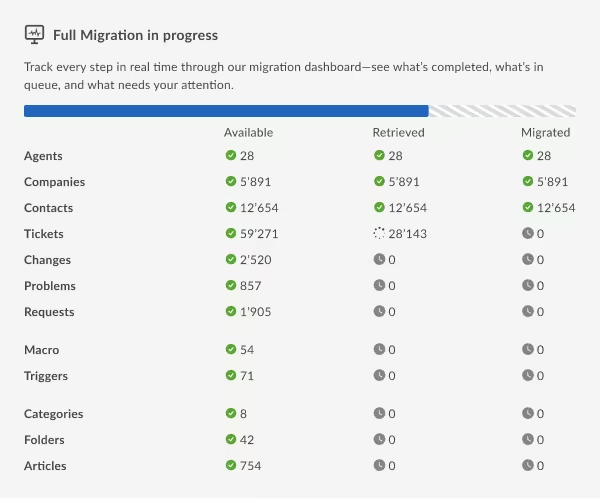
Syncro import done without downtime
Your Syncro data transfer begins with our refined support service data migration tool. The automated data transfer can’t be simpler—either you want to import, export or merge your Syncro data without downtime. Experience the data migration steps in a no charge Demo.

Lead the way in industry security
The data transfer tool offers encoded dialogues, secured servers, and leading authorization approaches across all levels
Built to bring value and save time
The automated data migration tool excludes workflow drops or inconveniences for your customers and agents
Transparent and scalable pricing
The trusted data replication tool delivers a balanced mix of feature + cost balance through its reasonable pricing policy
Success Story
Effortless Migration: Garnes’ Switch from Syncro to SuperOps
Syncro → SuperOps | IT Services and IT Consulting
Challenge:
Garnes wanted to move to a helpdesk hosted in Europe. Some tickets lacked assigned contacts.
Solution:
Automated data migration tool.
Result:
The company successfully and accurately moved tickets, contacts, and users to SuperOps.
"The migration went perfectly. The process is so easy, and the support we got from the team was amazing."
We needed to move to a helpdesk hosted in Europe.
During the migration, we’ve discovered that some tickets were missing assigned contacts. To ensure a smooth transfer, we’ve improved the process by assigning those tickets to a default contact.
We didn’t carry out detailed planning before the migration. Instead, we simply reviewed all customer records and transferred the assets, as the platform also functions as an RMM system.
Help Desk Migration expert notes that tickets without associated contacts (requesters) can be skipped or fail to migrate. To prevent this, we recommend assigning a default contact to any unassigned tickets to ensure they transfer successfully. Run a Demo (test) migration before proceeding with the Full Migration. This step allows users to confirm that all key data relationships—such as assets linked to customers associated with tickets—are preserved accurately. It’s crucial when migrating data from systems that include RMM integrations or custom objects.
Most important was Tickets and Contacts, the Customers were already moved over.
Since the Customers had already been moved over earlier, the main focus was on preserving the full communication history and associated contact details for maintaining service quality.
The migration went perfectly. The process is so easy, and the support we got from the team was amazing.
The client had a relatively straightforward setup, but the migration went smoothly thanks to clear communication and timely support. Any potential custom requirements were anticipated and would have been easy to accommodate if needed.
Simple and fast.
Help Desk Migration tool is fast, accurate, and reliable. An automated tool ensures your data is transferred with all relationships intact, including custom fields, attachments, and users. It reduces manual errors, supports test runs, and scales easily for any size migration. You get a smooth, efficient transition with minimal disruption to your support operations.
Tips for a smooth migration recommended by Help Desk Migration Experts:
- Disable SuperOps event triggers, notification rules, and Priority Matrix to prevent data conflicts during import Help Desk Migration Service.
- Use custom mapping (source ticket IDs into custom text fields) to keep records traceable and prevent duplicates.
- Remove duplicates, backup existing assets, clients, tickets; standardize field names and values.
Test and remigrate if needed: If an issue does occur, don’t panic. After fixing the problem—like assigning contacts or deleting duplicates—you can remigrate the affected data successfully.
Learn Syncro data movement software functions and capabilities
Automated data transfer tool
Data migration tool assists you in shift data no coding, causing downtime, or disruption to your team.
Enterprise-level defense
Help Desk Migration addresses security compliance and regulatory standards.
Data mapping to fine-tuned
Shift the standard and custom fields during the Syncro migration to preserve the data configuration unmodified.
Overcome delay in during Syncro migration
Keep your processes flowing with ease as data shifts, thanks to our Delta option.
Professional support service unit
Seeking help in Syncro data import? Our support team is in a single click.
Custom demo with cherry-picked data
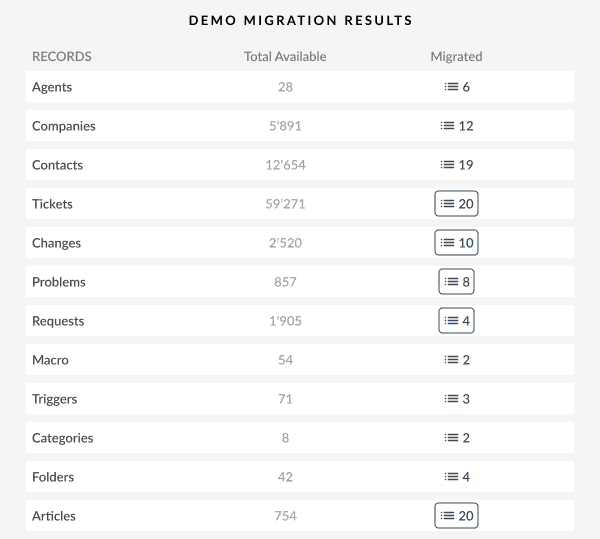
Transfer up to 20 chosen record IDs (20 tickets and 20 KB articles) for free.
Get transfer planning done
Our experts create careful import planning to streamline the help desk data shift.
Embrace your Syncro transfer with a Concierge Migration
Relinquish the planning, mapping, and preparing Full transfer to our team—we’ll take care of it perfectly for you!
Exclusive data shift
Let’s converse about platform you intent to transfer data from and any other business needs you would like to discuss.
Data migration timeline: 1-2 weeks
Preparation
Project and Requirements Evaluation
Begin your migration by reviewing Source data, operations, and applications. Review data filtering and field matching to the Target. Set up a replication scenario, featuring the schedule and reps coaching.
Security and Compliance Review
Make sure data complies with safety regulations. Establish permissions and access controls to safeguard the movement.

Migration
Data Mapping and Customization
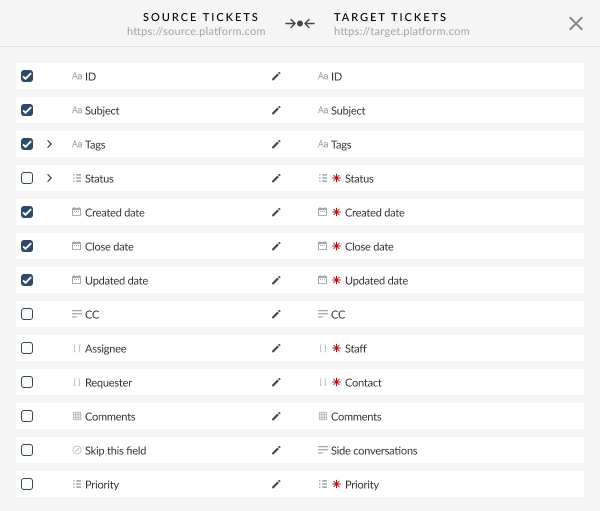
Match data fields amongst the Source and Target. Choose in-built custom capabilities from the list or discuss distinct customization for the record transition.
Demo Migration
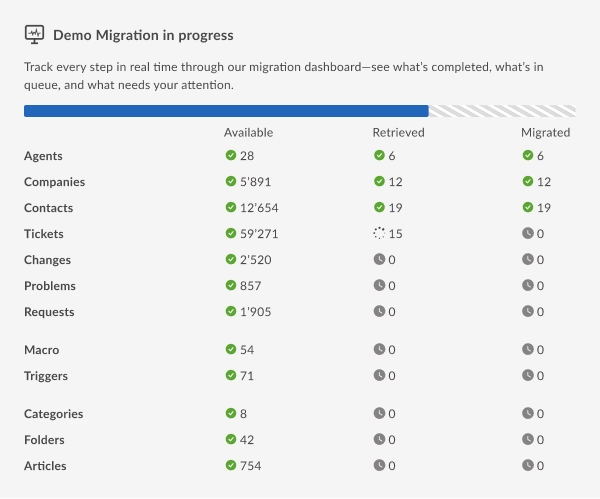
Run a free trial Demo to view how the transition service performs. Verify outcomes and adapt settings as needed.
Data Verification
Verify all transferred data in the Target is correct, complete, and adequately formatted.
Full Data Migration
Shift all required data, covering tickets, contacts, attachments, and correlated records.
Delta Migration
Net any newest or updated data that altered during the Full data replication.
Interval Migration*
Data replication can be interrupted and continued to accommodate your schedule, with no service disruption. You can pause up to five instances for a duration of five days each, adjusted by our sales crew during business hours.

Post-Migration Phase
Go Live
Present the Target for all users. Deactivate the Source if necessary and ensure data backups.

-
Having a smooth transition from Oracle Cloud to Zendesk. Amazing support and technical advice. Delivery was made according to the original project schedule. No extra charges than what was quoted. -
The customer support team were kind, professional, and efficient throughout the entire process. We changed dates of our migration on them twice, and they rolled with the punches. Great customer service. -
Did exactly what they advertised. They imported over 160,000 tickets for us from Desk.com to Zendesk. Quick support, good value and fairly priced.
Why transmit with Help Desk Migration?
-
Without downtime
Transfer data without interruption - maintain workflows efficient and assist customers effectively. -
Increased efficiency
Quickly shift data and set up standard and custom fields with the intelligent Migration Wizard. -
Seamless ticket retrieval
The Migration Wizard shifts tickets and all connected records, maintaining the data structure consistent on the Target. -
Expert support
Our support crew is ready to support you through chat, email, or phone. -
Effective migration strategy
Our migration experts will establish a comprehensive plan for data import, guaranteeing a smooth process and reliable records. -
Flexible customizations
Select pre-designed options or seek personalization, and we'll make sure your data is correct.
Syncro import
Leverage the efficiency of secure and rich options to simplify Syncro data movement journey.
| Zendesk objects | Syncro objects | |
|---|---|---|
| Help desk | ||
| Agents | Users | |
| Organizations | Customers | |
| Customers | Contacts | |
| Tickets | Tickets | |
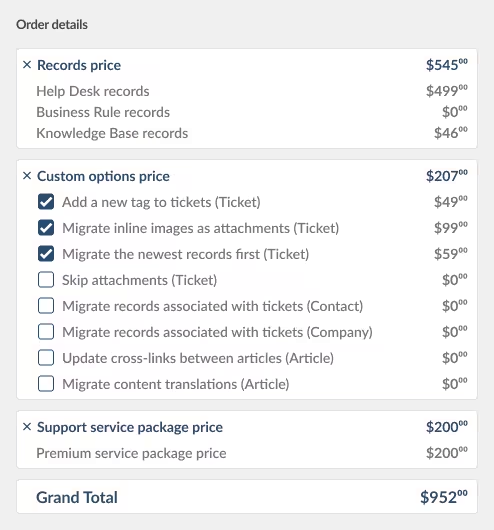
Make use of our Help Desk Migration service for smooth data extraction to Syncro using our automated data extraction tool. The cost of exporting to Syncro hinges on aspects such as record volume, export process complexity, and chosen migration options or customizations. Our comprehensive data extraction tool ensures flawless data replication and integration. Find out your Syncro export price by initiating a test Demo through our Migration Wizard.
Syncro data export tool
Well-structured customer support operations refer to an effective Syncro data export. Our team has created comprehensive Syncro extraction tool to make easier this crucial transfer process.
Our Syncro data exporter helps to handle the complexities shifting data to Syncro securely. You can execute a Syncro CSV export or shift from any other help desk, service desk, ITSM in several clicks. Forget about the copy/paste and hello to an improved data export workflow.
Employ built-in customizations in a click
Upgrade your exported tickets with tags, transfer inline images, accelerate data extraction by excluding attachments, smoothly shift content translations, call-recordings, and more.
Demo prior to acquisition
Test-drive Help Desk Migration for Syncro extractions in a free Demo. This data extraction process goes as the Full migration, enabling you to tune everything accordingly.
Dedicated customer service
Help Desk Migration's support squad is ever-ready to help you in Syncro extraction setup, and find the perfect solution. Explore our support service packages for more personalized data movement experience.
Learn how Syncro data import works
Help Desk Migration manages data transfer within a few hours or days, depending on the record load. With our Migration Wizard and a step-by-step on-screen guide to transferring data from helpdesks, databases, or shared inboxes and replicating it into CSV files or other help desk systems automatically.
Connect platforms
Connect your source and target solution
Map and match data
Specify how your Syncro data should be moved
Test-drive
Start a free Demo to inspect the import tool and outcomes
Full Data Migration
Begin or timetable your Syncro import
Consolidate Syncro accounts
Get better results in productivity with our comprehensive Syncro data merging app—without coding
| Syncro objects | Syncro objects | |
|---|---|---|
| Help desk | ||
| Users | Users | |
| Customers | Customers | |
| Contacts | Contacts | |
| Tickets | Tickets | |
Refine your Syncro accounts consolidation effortlessly with our Help Desk Migration app. Seamlessly consolidate Syncro data using our automated consolidation tool. The price of merging Syncro accounts depends on factors such as data quantity, the complexity of the consolidation process, and your chosen customizations. Our intuitive data consolidator solution delivers a outstanding and secure consolidation and integration of your help desk data. Find out your Syncro replication price by initiating a test Demo through our Migration Wizard.
Consolidate Syncro instances tool
Efficient Syncro instances data replication is critical for facilitating your customer service processes. Our team created a comprehensive Syncro consolidator app, simplifying the data replication process for you.
Our Syncro data consolidator helps to handle the complexities integrating multiple Syncro instances automatedly. You can execute a Syncro replication across any help desk, service desk, ITSM in several clicks. Forget about the manual copying customer service data and hello to a more efficient accounts consolidation workflow.
Employ built-in customizations in a click
Upgrade your consolidated tickets with tags, shift inline images, accelerate data consolidating by excluding attachments, smoothly move content translations, call-recordings, and more.
Test-drive before purchase
Test-drive Help Desk Migration for Syncro transfer in a free Demo. This data consolidating process goes as the Full migration, enabling you to tune everything correctly.
Dedicated customer support service
Help Desk Migration's support squad is ever-ready to help you in setup your Syncro consolidation, and find the perfect solution. Explore our support service packages for additional support options.
Automate your Syncro data migration
Transfer your Syncro data without trouble from what really matters—resolving your customers’ inquiries.