
Automated Intercom to
Zendesk Migration
Helpdesk replatforming should not be hard. When you migrate Intercom to Zendesk, our automated migration ensures your team stays productive. We move tickets, contacts, agents, knowledge base articles, and custom fields with zero downtime. This secure Zendesk migration from Intercom helps you scale without any stress. With our Intercom to Zendesk migration, you get a perfect switch and no data loss, ensuring your customer service operations keep running smoothly today.
No credit card required Fast setup
Trusted by 40,000+ companies


Biggest takeaways
Automatic Data Transfer
Intercom to Zendesk migration transfers tickets, contacts, agents, companies, KB articles, attachments, tags, and custom fields automatically.
Fast & Seamless Migration
Most customer support migrations complete in 24–48 hours. Large datasets (500K+ tickets) may take longer. The tool runs in the background while your queue stays open.
Free Demo Migration
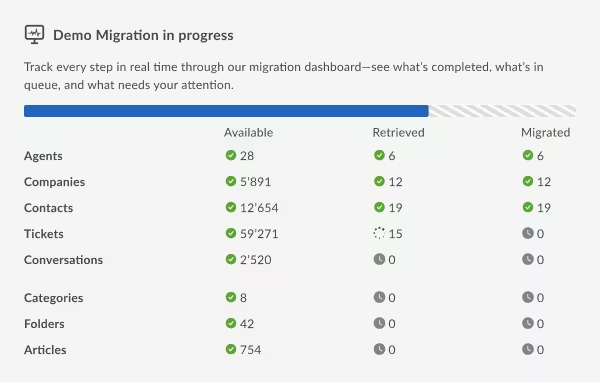
A Free Demo migration moves 20 real records to your Zendesk so you can verify the results before paying anything.
Delta Migration
Delta migration captures any tickets created or updated during the switch and syncs them in Zendesk before the cutover. Nothing is lost between the start of the migration and the moment you switch your team over.
Scheduled Migration
Interval migration lets you schedule the import in defined windows: evenings, weekends, or off-peak hours. This ensures the migration runs around your team rather than through the middle of their day.
Custom Migration
Custom migration handles non-standard requirements: unusual data structures, deduplication rules, or specific business logic for how records should land in Zendesk. The migration team configures it, so no engineering hours from your side.
Enterprise-Grade Security
Help Desk Migration is SOC 2 Type II certified, GDPR and HIPAA-compliant. Data is encrypted with AES-256 at rest, TLS 1.2+ in transit.
What data can you migrate from Intercom to Zendesk
Intercom to Zendesk data migration involves moving your tickets, contacts, knowledge base articles, conversation history, agents, companies, attachments to Zendesk.
Zendesk data import covers your full support history. Help Desk Migration maps and moves the record types listed below automatically, no manual re-entry required.
Tickets and conversations
Full message threads, conversation ID, subject, statuses, timestamps.
User and leads
Customer names, emails, phone numbers, and profile notes.
Companies
Organization profiles and records with all linked contacts preserved.
KB articles
Intercom Articles map to Zendesk Help Center, including categories, sections, and internal hyperlinks.
Admins
Agent profiles, roles, and group assignments, and historical ticket ownership.
Attachments
Every file and inline image attached to conversations.
Tags
Conversation and contact labels carry over as Zendesk tags.
Custom fields
User-defined attributes, dropdown selections, and metadata tags.
Side conversations & Private notes
Internal notes and side conversation threads included.
Why Companies Move from Intercom to Zendesk
Teams turn to Zendesk migration services when Intercom's pricing model no longer aligns with their budget or operational scale. They also switched to Zendesk to access customer support tools that Intercom simply is not delivering.

That does not criticize Intercom. Developers built this product for proactive messaging and customer engagement. Zendesk's engineers designed their platform for ticket resolution at scale. Different jobs. You can review the full Intercom vs Zendesk comparison if you are still weighing the decision, or check Intercom alternatives if Zendesk is not the only option you are considering.
If you have already decided to make the Intercom to Zendesk migration, skip to the Free Demo.
Intercom charges per seat, plus a resolution fee for AI-handled conversations. At low volume, that is manageable. Past roughly 25 agents or when AI resolution rates vary month to month, the bill gets hard to forecast. Zendesk's per-agent pricing is a flat number you can put in a budget. For most support organizations above that size, the difference is meaningful.
Considering other targets? See Intercom vs HubSpot Service Hub.
See your Intercom tickets inside Zendesk in under 10 minutes.
No credit card required
How the Intercom to Zendesk migration works
The Intercom migration runs in five steps. You configure it; the tool does the transfer. Read the help desk migration planning guide before you start. Spending fifteen minutes on prep saves you hours of cleanup later. Here is the technical breakdown of how to migrate from Intercom to Zendesk.
Connect Intercom and Zendesk
Authorize both accounts. Intercom needs an admin-level access token. Zendesk needs agent and ticket read/write permissions. Both connect via OAuth or API key directly in the migration Wizard.
Map fields and choose what to import from Intercom to Zendesk
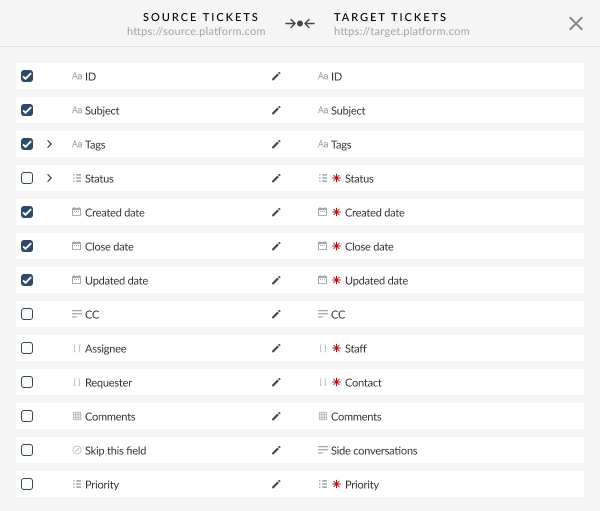
Standard and custom fields (i.e., subject, email, ticket status, assigned agent, created date) are mapped automatically on 95%. Take full control of your Intercom to Zendesk migration with advanced filtering options, you can migrate tickets based on: Subject, Group, Type, Status, Created or updated date, Custom fields.
This step is worth taking slowly. A field mapping decision made in two minutes is harder to reverse than one made in ten.
Run a Free Demo
Run a test Intercom to Zendesk migration using 20 real tickets and 20 articles from your live Intercom. So you can verify that timestamps, threads, and metadata land exactly as expected. If anything looks off, simply adjust your mapping and run another demo. There's no limit on how many times you can test.
Launch the Full Migration
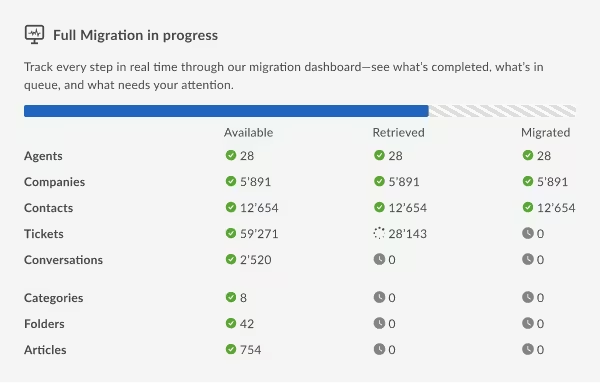
Once the demo results look right, start the Full Intercom data migration. The tool runs in the background, so there are no lockouts or interruptions. Your support team can keep handling tickets in Intercom while it runs. You will see a time estimate before you confirm, based on your record count. Most migrations finish between 24 and 48 hours.
Validate results, then run Delta migration
After the main migration, run a Delta migration to capture any Intercom tickets created or updated during the switch window. Delta syncs only the changed records, excluding any duplicates or gaps. Once the Delta sync finishes, your Zendesk data is fully up to date.
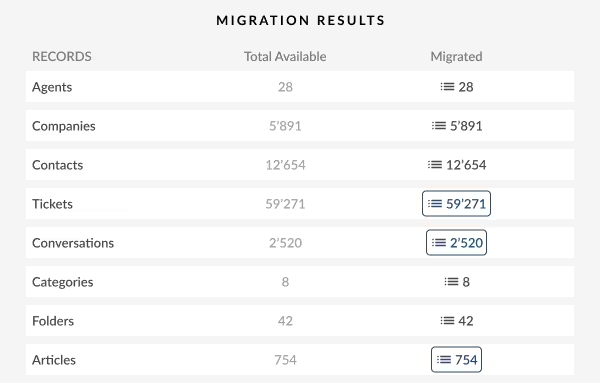
Most teams spend 8 minutes on the demo and the rest of the day planning cutover.
No credit card required
Go live clean with Delta, Interval, and Custom migration
Three options that handle the situations a standard Intercom to Zendesk migration run does not cover on its own.
Delta migration
Your support queue does not pause for a migration. New tickets continue arriving in Intercom while your main data transfer runs. Delta migration handles exactly that window. The tool finds every new or updated conversation and syncs them to Zendesk. No manual tracking, no copy-paste, no gap in your ticket history. Run it once after the main migration, then cut over with confidence.
Interval migration
Use interval migration to move data during off-peak hours, like evenings or weekends. The tool imports data in scheduled batches rather than one continuous run, keeping your agents' workflow unaffected. You gain full control over the system load, pausing and resuming the Zendesk import. Since you define the exact timing, the migration aligns with your time zones. The tool resumes exactly where it stopped without duplicating any records.
Custom migration
Some Intercom accounts have data structures that do not fit the standard configuration. For instance, unusual custom field setups, deduplication requirements, or business rules about how certain record types should land in Zendesk. The Help Desk Migration team handles these cases directly. You describe what you need; they configure it. No engineering time required from your side.
Pricing for Intercom to Zendesk migration
We base migration pricing on your total record volume. You pay a single fee for the entire move.
Costs per record drop as your volume increases. Help desk migration starts at $100 for 1,000 records.
We count records by type:
Tickets, conversations, contacts, companies, agents, KB articles, categories, and folders. Attachments, comments, and notes do not count as separate records and do not add to your total.
The final price depends on three things:
Your total record count, any one-click options you add during setup, and the service package you choose. The Migration Wizard calculates the exact figure automatically after your demo runs. You see a precise itemized price before you decide whether to launch the Full Migration. No estimate, no invoice after the fact.
The Free Demo is genuinely free.
It moves 20 real tickets and 20 real KB articles from your live Intercom account into Zendesk. No credit card. No commitment. No limit on how many times you run it. The exact price for your Full Migration appears in the migration wizard once the demo completes.
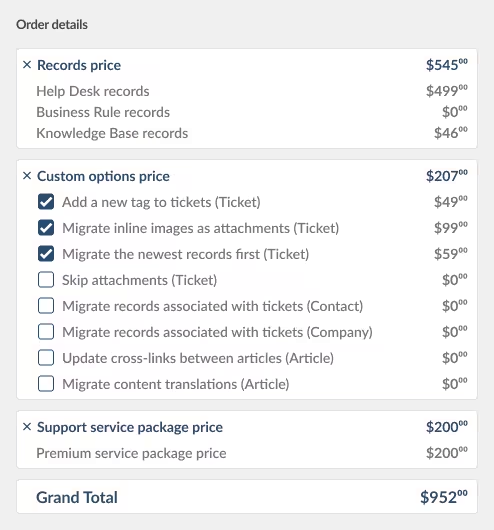
Run a Free Demo to see your exact migration price.
No credit card required

Security and compliance for your support data migration
Compliance & Encryption
We maintain SOC 2 Type II and GDPR compliance to ensure your data remains secure. The platform uses AES-256 encryption for stored data and TLS 1.2+ protocols for all data transfers.
Data Processing & Control
The platform processes your information strictly within certified, high-security data centers. We then scrub all records from our system the moment your migration wraps up. You authorize only the specific records that the API migration tool can access. You can revoke these permissions through your admin panel whenever you choose.
HIPAA, ISO & Documentation
HIPAA-compliant migration is available on request. ISO 27001 certification covers information security management across the platform. Our security documentation outlines the technical controls for your vendor review.
What customers say about migrating from Intercom to Zendesk
"Saves time and keeps customers happy."
"I needed to migrate our data from Intercom to Zendesk, and Help Desk Migration made it effortless. Ensuring that our customers could access their previous chats in the new system was crucial, and this service delivered exactly what we needed. I explored a few other options, but your site made it look easy. Ultimately, it was Elvira Azymova's outstanding support that convinced me to move forward. An automated data migration tool like this saves time and keeps customers happy — highly recommended!"
"We had custom Intercom attributes that I was worried would not survive the transfer. The field mapping interface made it straightforward — I could see exactly where each attribute was going before anything moved. The delta run at the end meant our ticket history in Zendesk was complete from day one."
"80,000 tickets, around 500 KB articles. Migration finished in 34 hours. We ran the free demo first on a Friday, confirmed everything looked right, launched the full migration Saturday morning, and cut the team over Monday. Zero downtime on the other side."
Join Wodobo and 60,000+ other teams.
No credit card required
FAQs: Intercom to Zendesk migration

Ready to move from Intercom to Zendesk for good?
Run a Free Demo on your real tickets in under 10 minutes. See exactly how your conversations, contacts, and knowledge base articles land in Zendesk before you pay anything.
Schedule a migration consultation
No credit card required SOC 2 certified 60,000+ migrations completed

Olha Butenets
Olha is a distinguished help desk migration expert and an esteemed lead for our Sales and Support team. With over 4 years of experience and a track record of 2000+ successful migrations, she specializes in masterminding high-stakes enterprise data migrations while focusing on total data integrity and operational continuity.
Zendesk® is a registered trademark of Zendesk, Inc. Help Desk Migration is not affiliated with, sponsored by, or endorsed by Zendesk, Inc.
We provide data migration services that work with Zendesk's platform.