Help Desk Migration partner of SuperOps
SuperOps data import, export and merging

Professional SuperOps data import services

Your SuperOps data transfer begins with our advanced help desk data migration service. The automated data shift can’t be simpler—either you want to import, export or consolidate your SuperOps data without disruption. Test the data migration process in a zero-cost Demo.

OR
Security compliance

Lead the way in industry security

The data transfer tool offers encoded dialogues, secured servers, and leading authorization approaches across all levels

Built to bring value and save time

The automated data migration tool excludes workflow drops or inconveniences for your customers and agents

Transparent and scalable pricing

The trusted data replication tool delivers a balanced mix of feature + cost balance through its reasonable pricing policy

Companies across different areas lean on our data integration software
Automattic Arkansas tech university Cosmos Thule Petplan

Success Story

Effortless Migration: Garnes’ Switch from Syncro to SuperOps

Syncro → SuperOps | IT Services and IT Consulting

garnes.is
Iceland
Location
2019
Founded
11-50
Employees

Data Migrated
Tickets
Contacts
Users
Migration Summary

Challenge:
Garnes wanted to move to a helpdesk hosted in Europe. Some tickets lacked assigned contacts.

Solution:
Automated data migration tool.

Result:
The company successfully and accurately moved tickets, contacts, and users to SuperOps.

"The migration went perfectly. The process is so easy, and the support we got from the team was amazing."

EB
Elias Bjornsson CTO

We needed to move to a helpdesk hosted in Europe.

During the migration, we’ve discovered that some tickets were missing assigned contacts. To ensure a smooth transfer, we’ve improved the process by assigning those tickets to a default contact.

We didn’t carry out detailed planning before the migration. Instead, we simply reviewed all customer records and transferred the assets, as the platform also functions as an RMM system.

Help Desk Migration expert notes that tickets without associated contacts (requesters) can be skipped or fail to migrate. To prevent this, we recommend assigning a default contact to any unassigned tickets to ensure they transfer successfully. Run a Demo (test) migration before proceeding with the Full Migration. This step allows users to confirm that all key data relationships—such as assets linked to customers associated with tickets—are preserved accurately. It’s crucial when migrating data from systems that include RMM integrations or custom objects.

Most important was Tickets and Contacts, the Customers were already moved over.

Since the Customers had already been moved over earlier, the main focus was on preserving the full communication history and associated contact details for maintaining service quality.

The migration went perfectly. The process is so easy, and the support we got from the team was amazing.

The client had a relatively straightforward setup, but the migration went smoothly thanks to clear communication and timely support. Any potential custom requirements were anticipated and would have been easy to accommodate if needed.

Simple and fast.

Help Desk Migration tool is fast, accurate, and reliable. An automated tool ensures your data is transferred with all relationships intact, including custom fields, attachments, and users. It reduces manual errors, supports test runs, and scales easily for any size migration. You get a smooth, efficient transition with minimal disruption to your support operations.

Tips for a smooth migration recommended by Help Desk Migration Experts:

  1. Disable SuperOps event triggers, notification rules, and Priority Matrix to prevent data conflicts during import Help Desk Migration Service.
  2. Use custom mapping (source ticket IDs into custom text fields) to keep records traceable and prevent duplicates.
  3. Remove duplicates, backup existing assets, clients, tickets; standardize field names and values.

Test and remigrate if needed: If an issue does occur, don’t panic. After fixing the problem—like assigning contacts or deleting duplicates—you can remigrate the affected data successfully.

Learn SuperOps data export software features and options

Automated data transfer tool

Data migration tool helps you in import data no coding, causing downtime, or disruption to your team.

Data mapping to fine-tuned

Migrate the standard and custom fields during the SuperOps migration to maintain the data arrangement unaltered.

Workaround time-out during SuperOps integration

Keep your service flowing with ease as data shifts, thanks to our Delta option.

Devoted support service team

Require assistance in SuperOps data movement? Our support team is in a single click.

Custom demo with cherry-picked data

Move up to 20 hand-picked record IDs (both tickets and KB articles) free of charge.

Get transfer planning done

Our reps create step-by-step migration planning to optimize the help desk data shift.

Concierge migration for effortless SuperOps import

Relinquish the planning, mapping, and preparing Full Migration to our team—we’ll handle it seamlessly for you!

Tailored data shift

Let’s discuss what platform you want to move data from and additional business specifications you would like to discuss.

Data migration timeline: 1-2 weeks

Preparation

Project and Requirements Evaluation

Begin your transition by assessing Source records, modus operandi, and applications. Review data cleaning and field alignment to the Target. Produce a transition scenario, involving the outline and employee coaching.

Security and Compliance Review

Verify data complies with security standards. Configure permissions and access settings to safeguard the movement.

Preparation

Migration

Data Mapping and Customization

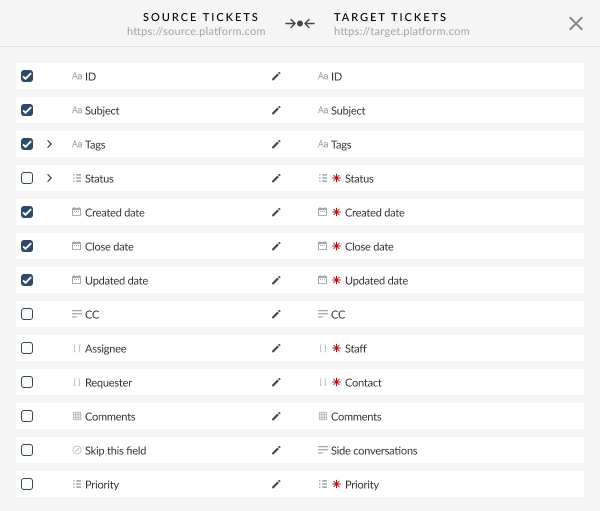
Align data fields between your Source and Target. Decide on in-built custom capabilities from the set or ask for specific personalization for the data replication.

Demo Migration

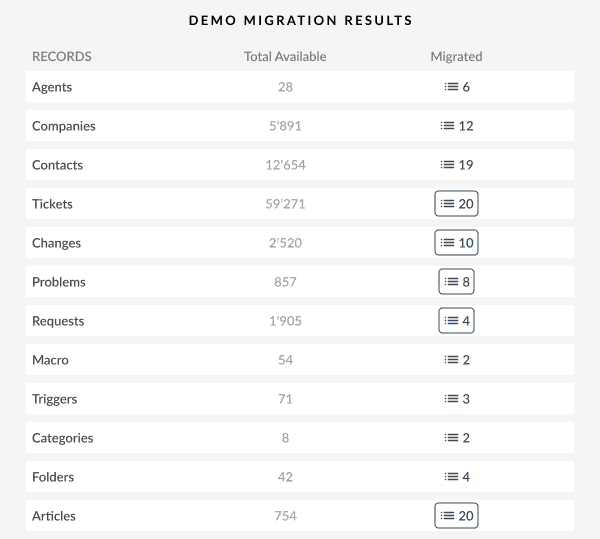
Initiate a free trial Demo to view how the migration app functions. Verify outcomes and alter mapping as required.

Data Verification

Confirm all transmitted data in the Target is precise, fully captured, and adequately formatted.

Full Data Migration

Shift all selected data, containing tickets, contacts, attachments, and associated records.

Delta Migration

Net any new or updated data that changed for the time of the Full data replication.

Interval Migration*

Data replication can be paused and continued to fit your timeline, with no service disruption. You can pause up to five instances for five days per pause, coordinated by our sales crew during operating hours.

Migration

Post-Migration Phase

Go Live

Deploy the Target for all customer service agents. Decommission the Source if needed and preserve data backups.

Post-Migration Phase

Why transmit with Help Desk Migration?

  • Without downtime
    Move data seamlessly - ensure workflows operational and help customers seamlessly.
  • Increased efficiency
    Easily shift data and map default and personalized fields with the secure Migration Wizard.
  • Organized ticket migration
    The Migration Wizard transmits tickets and all connected records, preserving the data structure unchanged on the Target.
  • Personalized support
    Our support reps is equipped to assist you by means of chat, email, or phone.
  • Thorough movement strategy
    Our migration experts will establish a clear plan for data import, securing a hassle-free process and protected records.
  • Flexible customizations
    Opt for pre-built options or request customization, and we'll guarantee your data is precise.
Import data

SuperOps import

Use the efficiency of secure and rich features to simplify SuperOps data movement journey.

SuperOps
Records available for smooth importing from Zendesk to SuperOps
Zendesk objects SuperOps objects
Help desk
Agents Technicians
Organizations Clients
Customers Requesters
Tickets Tickets
Knowledge Base
Categories Collections
Sections Sub-collections
Articles Articles

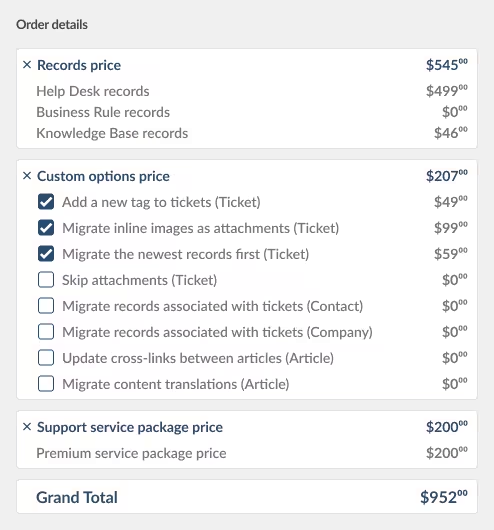
Employ our Help Desk Migration service for smooth data extraction to SuperOps using our automated data migration app. The cost of exporting to SuperOps relies on variables such as record quantity, replication process intricacy, and chosen migration options or custom work. Our intuitive data extraction solution ensures easy and secure data shift and integration. Find out your SuperOps export price by starting a test Demo via our Migration Wizard.

Discover SuperOps export benefits

SuperOps data export tool

Forward-looking customer support operations refer to an efficient SuperOps data extraction. Our team has built comprehensive SuperOps extraction solution to simplify this crucial movement process.

Our SuperOps data exporter helps to handle the complexities shifting data to SuperOps automatedly. You can go for a SuperOps CSV export or replicate from any other help desk, service desk, ITSM in several clicks. Forget about the copy/paste and hello to a more efficient data extraction workflow.

Employ built-in customizations in a click

Augment your exported tickets with tags, export inline images, speed up data extraction by excluding attachments, smoothly transfer content translations, call-recordings, and other features.

Demo prior to acquisition

Test-drive Help Desk Migration for SuperOps extractions in a free Demo. This data export process goes as the Full migration, allowing you to fine-tune everything accordingly.

Dedicated customer service

Help Desk Migration's support squad is ever-ready to help you in SuperOps shift setup, and find the suitable solution. Explore our support service packages for more personalized data transfer experience.

Learn how SuperOps data shift works

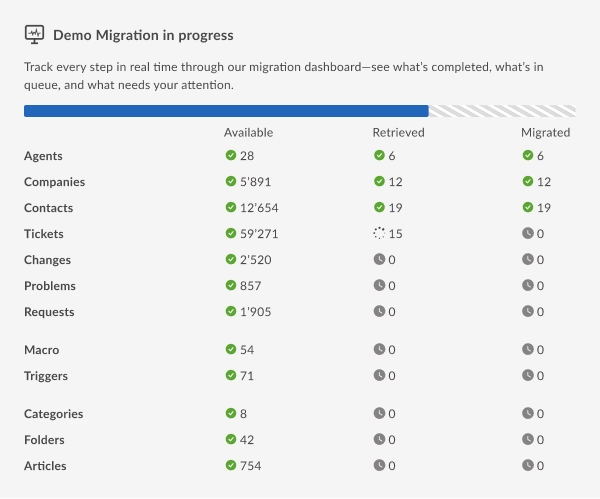
Help Desk Migration manages data migration within mere hours or days, contingent on the volume of records. With our Migration Wizard and a step-by-step guide on-screen to migrating data from helpdesks, databases, or shared inboxes automating the replication into CSV files or alternative helpdesks.

Connect platforms

Connect your source and target platform

Map and match data

Specify how your SuperOps data should be migrated

Test-drive

Go for a free Demo to check the migration tool and results

Full Data Migration

Initiate or schedule your SuperOps migration

Merge accounts

Consolidate SuperOps accounts

Facilitate your SuperOps merging experience

SuperOps
SuperOps
Records available for smooth merging from SuperOps to SuperOps
SuperOps objects SuperOps objects
Help desk
Technicians Technicians
Clients Clients
Requesters Requesters
Tickets Tickets
Knowledge Base
Collections Collections
Sub-collections Sub-collections
Articles Articles

Optimize your SuperOps instances merging effortlessly with our Help Desk Migration app. Seamlessly merge SuperOps data using our automated migration tool. The price of merging SuperOps accounts is influenced by aspects such as data quantity, the complexity of the merging process, and your chosen customizations. Our comprehensive data consolidation tool ensures a easy and secure merging and integration of your support service data. Get your SuperOps merging cost by running a test Demo via our Migration Wizard.

Discover merge SuperOps instances benefits

Consolidate SuperOps instances tool

Efficient SuperOps instances data merging is crucial for enhancing your support service processes. Our team developed a full-featured SuperOps consolidator tool, simplifying the data movement process for you.

Our SuperOps data consolidator helps to handle the complexities integrating multiple SuperOps accounts automatedly. You can go for a SuperOps replication across any help desk, service desk, ITSM in several clicks. Forget about the manual import support service data and hello to an improved instances replication workflow.

Employ built-in customizations in a click

Augment your merged tickets with tags, migrate inline images, speed up data integrating by excluding attachments, smoothly transfer content translations, call-recordings, and other features.

Test before you buy

Test-drive Help Desk Migration for SuperOps consolidation in a free Demo. This data copying process goes as the Full migration, allowing you to fine-tune everything accordingly.

Dedicated customer support service

Help Desk Migration's support squad is ever-ready to help you in setup your SuperOps merging, and find the suitable solution. Explore our support service packages for extended support options.

All-Packed SuperOps data import in a few clicks

Migrate your SuperOps data without trouble from what really matters—serving your customers’ requests.