

Help desk data integrity is essential for a business to thrive. Tickets, conversations, attachments, and customer profiles must remain consistent and properly connected inside the help desk system.
When data becomes inconsistent or incomplete, problems quickly follow. Agents may lose conversation context, reports may become misleading, and customers may be asked to repeat information. In a world where nearly one-third of customers stop doing business with companies after one poor experience, these issues can quickly translate into lost revenue and customers.
In this article, we’ll explain what data integrity in help desk systems is, why it matters for support teams, and how to protect it—especially during high-risk processes such as help desk migration.
What Is Data Integrity?
For example, if a ticket includes a requester, priority level, status, and conversation history, those elements should remain correctly linked and unaltered when the ticket is viewed, edited, exported, or transferred. Nothing disappears, shifts, duplicates, or breaks without a valid reason.
In the context of help desk systems, there are a few levels (or types) of data integrity.
Types of Data Integrity in Help Desk Systems
Data integrity is maintained through several underlying principles that control how information is stored and connected inside a system. Each record must:
- Have a unique identifier
- Be properly connected to related records
- Follow a defined format and contain only permitted values
- Be protected from physical damage
These principles are reflected in four types of data integrity.
Entity Integrity
Entity integrity ensures that each record is uniquely identifiable. In help desk systems, every ticket, user, or organization must have a distinct identifier so records do not overlap or get confused.
For example, two different customers should never share the same user ID, even if they have similar names.
Referential Integrity
Referential integrity preserves relationships between records. Help desk data is interconnected—tickets link to requesters, conversations belong to tickets, and attachments relate to specific messages.
If these connections break, information becomes incomplete. For instance, a ticket without its requester or message history loses important context.
Domain Integrity
Domain integrity ensures that data follows defined formats and allowed values. Fields accept only the type of information they were designed for.
For example, a priority field should not contain an email address, and a date field cannot store text notes. This prevents inconsistent and unusable records.
Physical Integrity
Physical integrity protects data from damage caused by hardware failures, power outages, or storage corruption. It ensures information remains intact at the infrastructure level.
For instance, system backups help restore ticket data if a server failure occurs.
Now that we’ve defined data integrity and its types, it’s helpful to clarify how it differs from data quality—a term that is often confused with it.
Data Integrity vs. Data Quality: What Is the Difference?
Data integrity and data quality are related but not the same. Data integrity focuses on whether information remains accurate, consistent, and properly connected within a system. It answers the question: Was the data preserved correctly?
For example, a ticket may keep its original structure and relationships (integrity), but still contain outdated contact details or vague descriptions (quality). Integrity protects data from corruption, while quality determines how valuable that data is in practice.
Both are critical for smooth support operations.
Why Help Desk Data Integrity Matters for Support Teams
Impact on Customer Experience
Incomplete or inconsistent ticket data makes it harder for agents to assist customers efficiently. Missing conversation history, incorrect contact details, or broken ticket links often force customers to repeat information and wait longer for help.
For example, if earlier interactions disappear after a system update, an agent may treat a recurring issue as a new request. Preserved data helps ensure faster responses and smoother customer interactions.
Impact on Reporting and Analytics
Support managers rely on reports to evaluate performance and plan resources. If records are duplicated, missing, or incorrectly connected, metrics become unreliable and decisions lose accuracy.
For instance, duplicated tickets may inflate workload numbers, while missing updates can distort resolution time reports. Consistent data ensures reports reflect real performance and support informed decision-making.
Impact on AI and Automation
Automation—especially AI-powered automation—relies on help desk data. Workflows, routing rules, chatbots, and AI assistants all depend on accurate ticket history, categories, and customer information to work properly.
With poor data, automation may behave unpredictably. Tickets may be routed incorrectly, AI suggestions may become irrelevant, and automated responses may miss the real issue.
Researchers warn that even small amounts of inaccurate or inconsistent data can affect how AI systems perform.
Impact on Compliance and Security
Help desks often store sensitive customer and operational data subject to regulatory requirements. If records are lost, altered, or stored inconsistently, organizations may face compliance and security risks.
For example, incomplete audit trails can make it difficult to confirm how customer data was handled. Reliable records support transparency, internal audits, and regulatory compliance.
Impact on Integrated Systems
When help desk data lacks integrity, integrated tools may start producing incorrect results. Customer records may fail to sync with the CRM, analytics dashboards may show misleading metrics, or notifications may be triggered at the wrong time. Maintaining data integrity helps ensure that all connected systems work together smoothly and rely on the same accurate information.
As you can see, ensuring data integrity in help desk systems is the key to smooth and efficient support operations. To protect this integrity, it’s important to know first what can weaken it.
Common Threats to Help Desk Data Integrity
Human Error
People work with help desk data constantly, so mistakes are inevitable. An agent may accidentally overwrite ticket details, delete important notes, assign a request to the wrong customer, or change a status incorrectly. Even small actions—like editing the wrong custom field—can create confusion later.
Software Bugs and Integration Failures
Help desks rarely operate alone. They connect with CRM systems, analytics tools, chat platforms, and other services. When integrations fail or software behaves unexpectedly, data can be duplicated, lost, or synced incorrectly.
For instance, a faulty integration may create multiple copies of the same ticket or fail to transfer attachments between systems.
Unauthorized Access
Data integrity can also suffer when access to the system is poorly controlled. Users without proper permissions may edit, delete, or export sensitive records, intentionally or accidentally.
For example, unrestricted access rights might allow temporary staff to modify workflows or remove historical ticket data. Strong permission management and activity tracking reduce the risk of unwanted changes and help preserve trustworthy records.
Data Migration Integrity Issues
Moving data between platforms is one of the most sensitive moments for data integrity. Differences in field structures, formats, and system logic can lead to missing records, broken relationships, or misplaced information.
For example, if a source system uses multi-level custom fields but the target platform does not support them, parts of the data structure may flatten or disappear. Without careful validation, migrated data may look complete but contain hidden inconsistencies.
Let's explore data integrity issues that might arise during help desk migration in more detail.
Data Integrity Challenges During Help Desk Migration
In practice, migration-related data integrity problems usually fall into several common categories.
Field Mapping Errors
Field mapping determines how data from the source system fits into the structure of the target platform. If fields are matched incorrectly, information may appear in the wrong place or lose its meaning.
For example, mapping a “Customer Type” dropdown to a free-text field can break reporting logic, while mismatched priority levels may disrupt automations and SLAs.
Broken Ticket Relationships
Help desk records are closely connected. Tickets link to requesters, conversations, attachments, internal notes, and related tasks. During migration, these links can break if relationships are not transferred properly.
For instance, a ticket may move without its message history or lose connection to the original requester, leaving agents without important context.
Duplicate or Missing Records
Migration processes can sometimes create duplicate entries or fail to transfer certain records altogether. Duplicates clutter the system and distort reports, while missing records create gaps in customer history.
For example, repeated ticket imports may create multiple copies of the same request, while improperly filtered datasets may leave entire conversation threads behind.
Time Zone and Metadata Issues
Different systems store time, dates, and technical metadata in different formats. If these differences are not aligned, records may appear out of order or contain inaccurate activity logs.
For example, a ticket created at 9:00 a.m. in one system may appear as 6:00 a.m. after migration due to time zone mismatches, confusing agents and affecting SLA tracking.
The good news is that most of these issues can be avoided with the right approach.
Best Practices for Maintaining Data Integrity
Enforce Data Validation Rules
Validation rules ensure that information entered into the system follows defined formats and acceptable values. They prevent incomplete, inconsistent, or illogical records from being saved.
For example, requiring specific formats for phone numbers, limiting dropdown options, or preventing tickets from closing without resolution notes helps maintain structured and meaningful data.
Implement Role-Based Access Control
Not every user needs the same level of access. Role-based permissions limit who can view, edit, export, or delete certain types of information. For instance, support agents may update ticket details, while only administrators can modify workflows or system settings.
Clear access boundaries reduce the risk of accidental or unauthorized data changes.
Maintain Backups and Versioning
Versioning and regular backups protect help desk data from accidental loss, system failures, or cyber incidents.
For example, if ticket data is mistakenly deleted during a system update, backups help recover lost information without disrupting support operations.
Monitor Data Pipelines
Help desk systems constantly exchange information with other platforms such as CRMs, analytics tools, and communication services. Monitoring these data flows helps detect syncing issues and inconsistencies early.
For instance, integration alerts can notify teams when ticket updates fail to sync, preventing unnoticed data gaps.
Perform Regular Data Audits
Periodic audits help identify inconsistencies, duplicates, and outdated records before they affect reporting and workflows. Reviewing system logs and data samples ensures records remain accurate and properly connected.
These practices create a strong foundation, but migration requires a more focused approach.
How to Ensure Data Integrity During Help Desk Migration
Migration does not have to put your data at risk. When the process is supported by specialized tools and a structured workflow, the chances of data loss, corruption, or broken records become much lower.
Solutions like Help Desk Migration are built specifically for this purpose—to preserve record structure, relationships, and field values while information moves between systems.
Automated Data Mapping
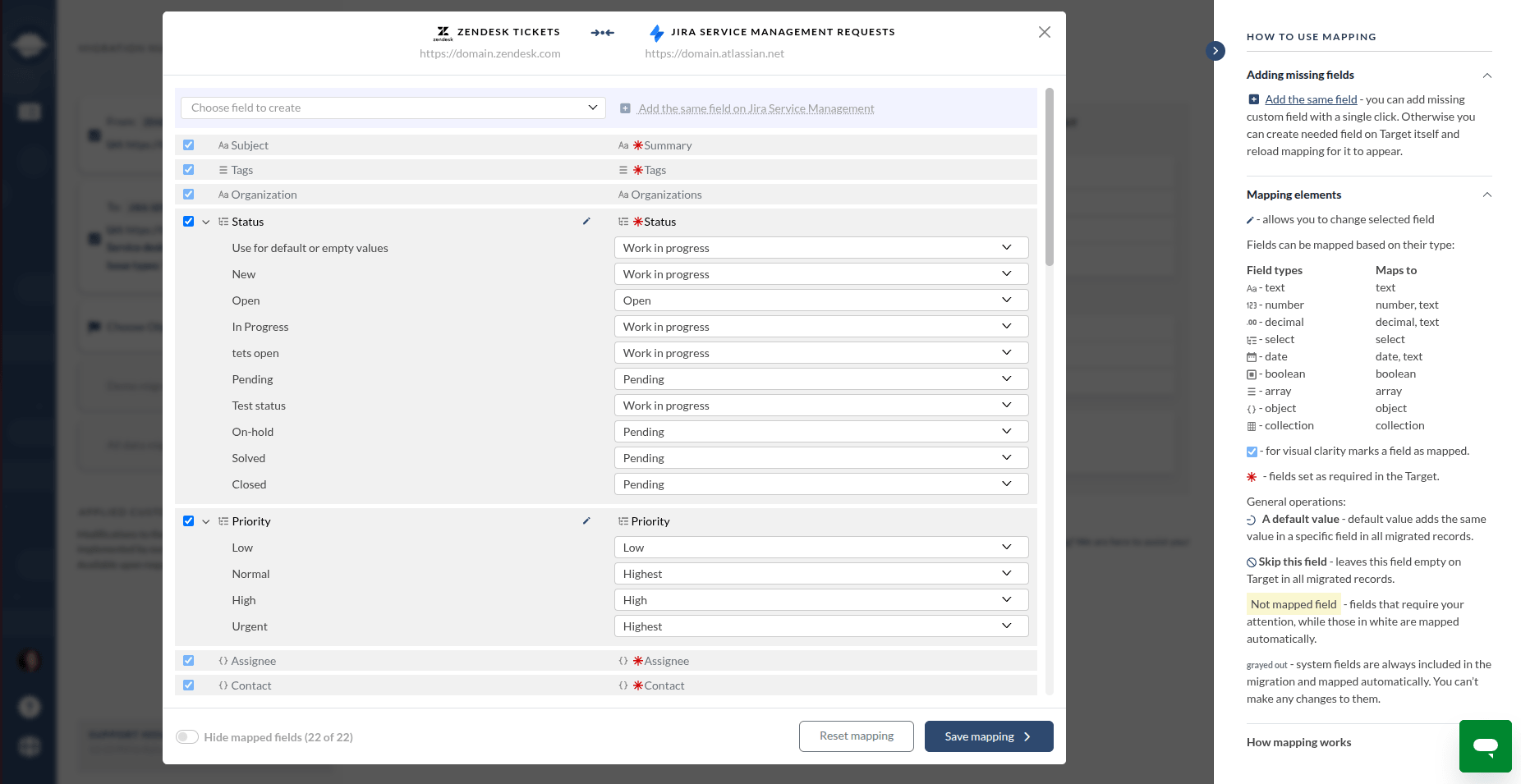
The tool also offers automated options, such as skipping attachments or adding tags to migrated records. These features reduce manual work and lower the risk of mistakes that often occur during complex migrations.
Test Migration and Validation
Before launching a full migration, teams can run a Free Demo to see how their data will transfer. This helps verify field mapping, record structure, and connections between records in advance.
The demo can be repeated multiple times to fine-tune the setup. There is also a one-time demo option that allows selecting specific records for testing, which makes validation more controlled and predictable.
Risk Assessment Beforehand
In addition to , our Migration Score feature is underway. During the migration setup, the system will automatically analyze the configuration—including field mapping completeness, selected migration options, and potential risks to data integrity in your help desk. Based on this analysis, the platform will generate a Migration Score that helps you quickly understand whether your setup is ready for a safe and reliable data transfer.
Secure API-Based Data Transfer
Data security during migration affects not only compliance but also company reputation and customer trust. Help Desk Migration connects to source and target systems through secure APIs instead of manual data handling.
This direct system-to-system transfer reduces the risk of unauthorized access, prevents data leaks, and ensures information moves safely without being exposed to unnecessary intermediaries.
Post-Migration Verification
Before fully switching to a new help desk, it is important to confirm that everything has transferred correctly. Careful verification helps avoid the data gaps and inconsistencies that often surface after migration.
Help Desk Migration will roll out the Reconciliation Report soon. The feature will provide detailed confirmation of migrated records. Companies will be able to use this report during internal audits, compliance checks, and IT reviews as clear proof of migration accuracy.
Final Thoughts
Maintaining data integrity is essential for organizations that rely on help desk systems. When records remain accurate and properly connected, teams can work with confidence and avoid unnecessary confusion.
Data migration, however, introduces additional risks. Large volumes of interconnected records move between platforms that store information differently, which may lead to mapping errors, broken relationships, or missing data.
Still, these risks should not keep businesses locked into outdated or inefficient help desk solutions. With a reliable migration tool like Help Desk Migration, you can transfer data safely and move to a system that better supports your growth.
FAQs About Help Desk Data Integrity
Data integrity in help desk systems means that all support data—tickets, messages, attachments, and customer profiles — remains accurate, consistent, and properly connected. It ensures that information keeps its structure and relationships as it is stored, updated, or migrated between platforms.
Data integrity helps support teams deliver consistent and efficient service. When records remain complete and reliable, agents can access full conversation history, make informed decisions, and resolve issues faster without asking customers to repeat information.
Help desk data integrity includes four main types:
- Entity integrity: ensures each record has a unique identifier
- Referential integrity: preserves relationships between records
- Domain integrity: ensures values follow correct formats
- Physical integrity: protects data from system or hardware failures
Data integrity ensures that information remains accurate and properly connected within a system, while data quality measures how useful that data is for business operations. Integrity protects structure and consistency, while quality focuses on completeness, relevance, and usability.
Common risks include human error, software bugs, integration failures, unauthorized access, and migration issues. These factors can cause duplicate records, missing information, broken ticket relationships, or incorrect reporting data.
When help desk data becomes inconsistent or incomplete, agents may lose context about previous interactions. This can lead to longer response times, repeated questions, and frustration for customers, ultimately reducing satisfaction and trust.
Help desk migration involves transferring large volumes of interconnected data between systems with different structures. Without careful planning and validation, migration can cause missing records, broken relationships, duplicate tickets, or incorrect field values.
Typical migration-related issues include incorrect field mapping, lost attachments, duplicate tickets, broken links between records, and time zone mismatches that affect reporting and SLA tracking.
Organizations can protect data integrity by using migration tools with automated field mapping, running test migrations, validating results before full transfer, and verifying records after migration. Secure API-based transfers also reduce the risk of data corruption or loss.
Help Desk Migration preserves relationships between tickets, contacts, and attachments through automated mapping and validation tools. Features like Demo Migration, secure API connections, and upcoming reconciliation reports help ensure data remains complete, accurate, and properly structured throughout the migration process.