Import your history to ServiceDesk Plus with ease!
Your ServiceDesk Plus data transfer starts with our refined help desk data migration platform. The automated data replication can’t be easier—either you want to import, extract or consolidate your ServiceDesk Plus data without disruption. Test the data migration process in a no charge Demo.

Lead the way in industry security
The data transfer tool offers encoded dialogues, secured servers, and leading authorization approaches across all levels
Built to bring value and save time
The automated data migration tool excludes workflow drops or inconveniences for your customers and agents
Transparent and scalable pricing
The trusted data replication tool delivers a balanced mix of feature + cost balance through its reasonable pricing policy


Learn ServiceDesk Plus data extract service functions and capabilities
Automated data transfer tool
Data migration tool helps you in moving data without coding, downtime, or dragging you from work.
Industry-grade security
Help Desk Migration fulfills security compliance and regulatory requirements.
Data mapping to fine-tuned all aspects
Move the standard and custom fields during the ServiceDesk Plus migration to preserve the data structure unaffected.
Tackle customer service delay during ServiceDesk Plus movement
Keep running your processes normally during the data migration with our Delta option.
Committed support service unit
Require help in ServiceDesk Plus data transfer? Our support team is just a click away.
Custom demo with chosen data
Shift up to 20 chosen record IDs (20 tickets and 20 KB articles) free of charge.
Get transfer planning done
Our account managers develop step-by-step migration planning to simplify the help desk data shift.
Enjoy your ServiceDesk Plus movement with a Concierge Migration
Relinquish the planning, mapping, and preparing Full transfer to our team—we’ll handle it skillfully for you!
Customized data transfer
Let’s delve into platform you intent to transfer data from and any other business criteria you may have.
Data migration timeline: 1-2 weeks
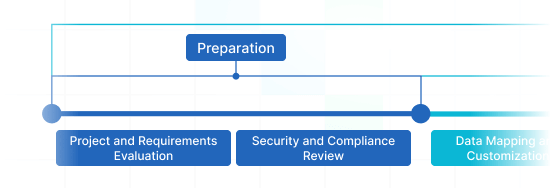
Preparation
Project and Requirements Evaluation
Begin your replication by reviewing Source data, procedures, and applications. Review data filtering and field mapping to the Target. Make a transmit plan, featuring the schedule and agent coaching.
Security and Compliance Review
Confirm data complies with safety regulations. Establish permissions and access controls to safeguard the migration.
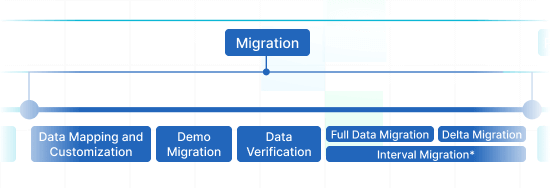
Migration
Data Mapping and Customization
Connect data fields amongst the Source and Target. Handpick in-built custom settings from the list or request specific personalization for the data transition.
Demo Migration
Run a trial Demo to figure out how the movement solution operates. Review results and adjust mapping as required.
Data Verification
Check all replicated data in the Target is correct, complete, and adequately formatted.
Full Data Migration
Transmit all chosen data, covering tickets, contacts, attachments, and closely connected records.
Delta Migration
Net any fresh or updated data that changed for the duration of the Full data transmit.
Interval Migration*
Data transmit can be halted and restarted to suit your timeline, with no service disruption. You can pause up to five times for five days each, coordinated by our sales squad during work hours.
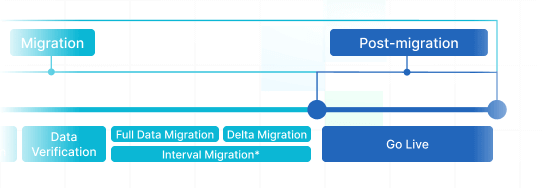
Post-Migration Phase
Go Live
Roll out the Target for all support reps. Deactivate the Source if needed and secure data backups.
-
 Having a smooth transition from Oracle Cloud to Zendesk. Amazing support and technical advice. Delivery was made according to the original project schedule. No extra charges than what was quoted.
 -
 The customer support team were kind, professional, and efficient throughout the entire process. We changed dates of our migration on them twice, and they rolled with the punches. Great customer service.
 -
 Did exactly what they advertised. They imported over 160,000 tickets for us from Desk.com to Zendesk. Quick support, good value and fairly priced.


Why transmit with Help Desk Migration?
-
Without downtime
Import data seamlessly - maintain workflows intact and help customers without delays. -
Enhanced efficiency
Seamlessly migrate data and set up default and personalized fields with the secure Migration Wizard. -
Easy ticket movement
The Migration Wizard shifts tickets and all related records, maintaining the data structure unalterred on the Target. -
Always here for you
Our support agents is set to assist you through chat, email, or phone. -
Detailed replication framework
Our migration experts will create a comprehensive plan for data import, guaranteeing a efficient process and safe data. -
Flexible customizations
Decide on automated options or seek customization, and we'll verify your data is precise.
ServiceDesk Plus import
Get better results in less time with our automated ServiceDesk Plus data import tool without coding.
| Zendesk objects | ServiceDesk Plus objects | |
|---|---|---|
| Help desk | ||
| Agents | Technicians | |
| Organizations | Departments | |
| Customers | Requesters | |
| Tickets | Requests | |
Leverage our Help Desk Migration service for effortless data transfer to ServiceDesk Plus using our automated data replication app. The pricing for importing to ServiceDesk Plus hinges on variables such as record number, migration process complexity, and selected options or customizations. Our easy-to-use data integration tool ensures outstanding data migration and integration. Find out your ServiceDesk Plus import price by running a test Demo migration through our Migration Wizard.
Manage your ServiceDesk Plus import smoothly using our structured data transfer checklist
ServiceDesk Plus Data Import Solutions
When it comes to enhancing your customer support operations, efficient ServiceDesk Plus data import is critical. Our team has built full-featured ServiceDesk Plus import solutions to simplify the migration process.
Our ServiceDesk Plus data importer helps to handle the complexities importing data into ServiceDesk Plus automatedly. You can execute a ServiceDesk Plus CSV import or migrate from any other help desk, service desk, ITSM in a few clicks. Say goodbye to copy/paste and hello to a more efficient workflow.
At Help Desk Migration, we comprehend that every company has unique needs. That's why our ServiceDesk Plus import apps are highly adaptable.
Even if you're importing numerous of tickets, contacts, or custom fields, our service can smoothly replicate data. You can efficiently move records across systems, ensuring coherence and efficiency. Our data migration app guarantees that no help desk records is lost.
Employ built-in customizations in a click
Enhance your imported tickets with tags, export inline images, speed up data migration by bypassing attachments, seamlessly move content translations, call-recordings, and more.
Test-drive before purchase
Test-drive Help Desk Migration for ServiceDesk Plus imports in a free Demo. This data shift process mirrors the Full migration, allowing you to fine-tune everything properly.
Dedicated customer service
Help Desk Migration's support team is ever-ready to help you in setup, and find the perfect workaround. Discover our support service plans.
Find the ideal adjustment suite for ServiceDesk Plus data migration
-
Tailored data integration
Refine your migration process by personalizing how data objects are moved
-
Advanced data filtering Bestseller
Filter your data with advanced options leveraging criteria-based selection to reap maximum benefits
-
Efficient integration data migration
Effortlessly move integration information by migrating linked record IDs, URLs and beyond
-
Enriching data
Enhance migrated data by integrating additional elements such as ticket tags, legacy IDs, and more
What is the ServiceDesk Plus data transfer price?
The cost breakdown for your ServiceDesk Plus importing depends on several crucial factors: the volume of records you want to import, the intricacy of transfer specifications, and any modifications or options in play. Engage a Free Demo migration to test-drive the Migration Wizard's workflow and find out the pricing for your ServiceDesk Plus data movement.
ServiceDesk Plus Export
Optimize your ServiceDesk Plus data extraction with our automated transfer tool, achieving outstanding results seamlessly – no coding necessary. Use secure, robust features to simplify your ServiceDesk Plus data extraction process painlessly.
| ServiceDesk Plus objects | Zendesk objects | |
|---|---|---|
| Help desk | ||
| Technicians | Agents | |
| Departments | Organizations | |
| Requesters | Customers | |
| Requests | Tickets | |
Leverage our Help Desk Migration service for effortless data export to ServiceDesk Plus using our automated data extraction app. The cost of exporting to ServiceDesk Plus hinges on variables such as record number, replication process intricacy, and chosen migration options or custom work. Our comprehensive data extraction solution ensures easy and secure data replication and integration. Find out your ServiceDesk Plus export price by running a test Demo using our Migration Wizard.
ServiceDesk Plus data export tool
Well-managed customer support operations turn to an efficient ServiceDesk Plus data export. Our team has built full-featured ServiceDesk Plus export app to unravel this essential extraction process.
Our ServiceDesk Plus data exporter helps to handle the complexities moving data to ServiceDesk Plus automatedly. You can setup a ServiceDesk Plus CSV export or move from any other help desk, service desk, ITSM in a few clicks. Say goodbye to copy/paste and hello to a more efficient data extraction workflow.
Employ built-in customizations in a click
Enhance your exported tickets with tags, shift inline images, accelerate data export by bypassing attachments, seamlessly move content translations, call-recordings, and other features.
Test-drive before purchase
Test-drive Help Desk Migration for ServiceDesk Plus exports in a free Demo. This data movement process mimics the Full migration, enabling you to tune everything properly.
Dedicated customer service
Help Desk Migration's support team is ever-ready to help you in ServiceDesk Plus extraction setup, and find the suitable workaround. Explore our support service plans for more personalized data replication experience.
Learn how ServiceDesk Plus data replication works
Help Desk Migration handles data replication within mere hours or days, contingent on the volume of records. With our Migration Wizard and a step-by-step guide on-screen to importing data from helpdesks, databases, or shared inboxes automating the export into CSV files or alternative help desk platforms.
Connect platforms
Configure your source and target system
Map and match data
Define how your ServiceDesk Plus data should be replicated
Test-drive
Begin a free Demo to assess the import tool and outcomes
Full Data Migration
Launch or plan your ServiceDesk Plus import
Merge ServiceDesk Plus accounts
Effortlessly consolidate and integrate accounts for a smooth and efficient experience
| ServiceDesk Plus objects | ServiceDesk Plus objects | |
|---|---|---|
| Help desk | ||
| Technicians | Technicians | |
| Departments | Departments | |
| Requesters | Requesters | |
| Requests | Requests | |
Refine your ServiceDesk Plus accounts consolidation effortlessly with our Help Desk Migration service. Seamlessly consolidate ServiceDesk Plus data using our automated migration app. The cost of merging ServiceDesk Plus accounts is influenced by aspects such as record quantity, the intricacy of the merging process, and your chosen customizations. Our easy-to-use data consolidation app delivers a easy and secure merging and integration of your support service data. Learn your ServiceDesk Plus replication price by running a test Demo using our Migration Wizard.
Merge ServiceDesk Plus instances app
Efficient ServiceDesk Plus accounts data consolidation is critical for facilitating your customer service operations. Our team engineered a comprehensive ServiceDesk Plus consolidator solution, simplifying the data movement process for you.
Our ServiceDesk Plus data consolidator helps to handle the complexities consolidating multiple ServiceDesk Plus instances automatedly. You can setup a ServiceDesk Plus replication across any help desk, service desk, ITSM in a few clicks. Say goodbye to copy/pasting support service data and hello to an improved instances consolidation workflow.
Employ built-in customizations in a click
Enhance your consolidated tickets with tags, shift inline images, accelerate data integrating by bypassing attachments, seamlessly move content translations, call-recordings, and other features.
Try before you buy
Test-drive Help Desk Migration for ServiceDesk Plus replication in a free Demo. This data merging process mimics the Full migration, enabling you to tune everything properly.
Outstanding customer support service
Help Desk Migration's support team is ever-ready to help you in setup your ServiceDesk Plus merging, and find the suitable workaround. Explore our support service plans for extended support options.
Automate your ServiceDesk Plus data migration
Integrate your ServiceDesk Plus data without trouble from what really matters—resolving your customers’ inquiries.