Kundo Data Migration Made Simple and Secure to Your New Help Desk
Migrating from Kundo doesn’t have to mean downtime, lost history, or weeks of manual cleanup. With an automated Kundo data migration tool, you can move tickets, users, and contacts to a new help desk quickly, safely, and with full visibility at every step.
No credit card required Fast setup
Interactive Migration Calculator
Adjust sliders to estimate your migration time and cost savings
Estimates based on 60,000+ successful migrations. Actual results may vary.
How Does Automated Kundo Data Migration Work?
To enable automatic migration to your target platform, set it up in the Help Desk Migration Wizard. The process is structured, predictable, and fully auditable.
Connect
Securely connect Kundo (source) and your target system via API in the Migration Wizard. All credentials are fully encrypted to ensure safe authorization.
Map Data
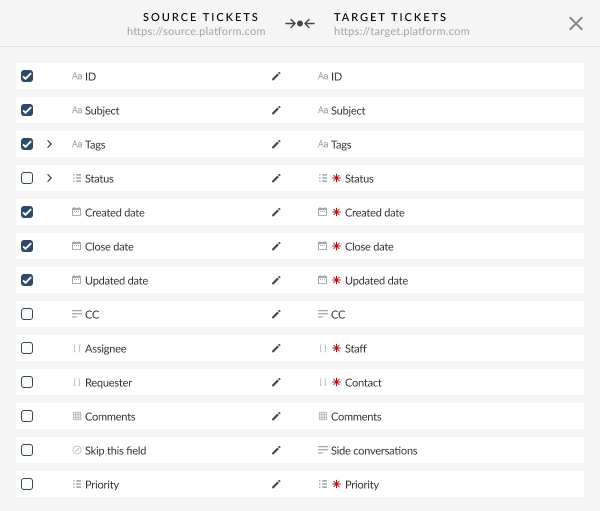
Select exactly what data you want to migrate. Automatic data mapping aligns Kundo fields with your target help desk, including:
- Ticket fields and statuses
- Users
- Contacts
You can also fine-tune field mapping, user assignments, and workflows.
Agents are migrated by matching source agents to agents on the target platform, allowing tickets to be reassigned, including from retired users. Agent matching is required to run a Free Demo Migration. Missing agents can be created in the Migration Wizard or added manually if the API doesn’t support it.
Demo Run
With the Help Desk Migration tool, you can run a Demo Migration to transfer a sample of your Kundo data. This preview allows you to see how your tickets, comments, and custom fields will appear in the target platform.
Why this matters: You can validate data accuracy before committing — no surprises after go-live.
Review the Demo Migration results
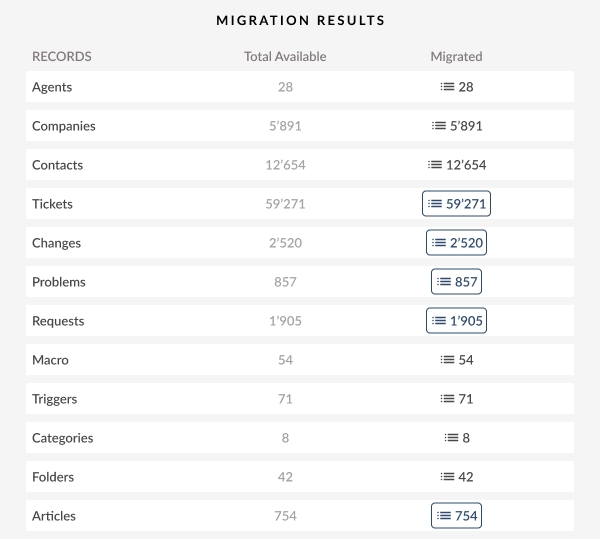
Verify your migrated data using built-in validation tools and detailed logs. You can:
- Review tickets and contacts
- Check field mappings
- Identify and fix edge cases
- Adjust filters or mappings if needed
Benefit: This step ensures full control and transparency over your migration.
Go Live
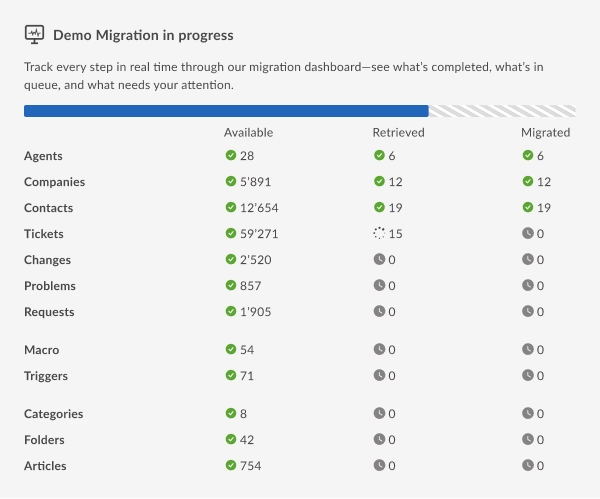
Launch the full Kundo data migration to your destination platform with zero business downtime.
- All selected data is migrated at once
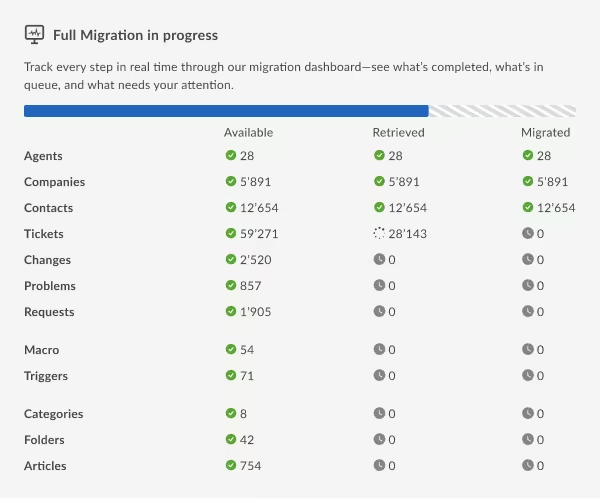
- Progress is monitored in real time
- Your team continues working during the migration
How Does Help Desk Migration Protect Your Customer Support Data During the Migration Process?
Help Desk Migration is purpose-built to protect and securely transfer sensitive data during your Kundo data migration, ensuring enterprise-level security at every stage of the process.

Encryption
All data is encrypted both in transit using SSL/TLS and at rest with AWS KMS key management. This ensures maximum protection for tickets, user data, and attachments throughout the entire Kundo export process.
Infrastructure
Migrations run on secure AWS hosting with continuous system monitoring, regular security patching, and resilient infrastructure controls. This keeps migrations stable, reliable, and safe.
Compliance
Help Desk Migration meets strict compliance standards, including SOC 2 Type II and III, GDPR, and HIPAA-ready frameworks. This provides legal, IT, and compliance teams with confidence that Kundo data is processed in accordance with recognized industry best practices.
Access Control
Role-based access control (RBAC), single sign-on (SSO), and two-factor authentication (2FA) protect your account, ensuring that only authorized users can access migration data and settings.
Data Isolation
Each Kundo migration operates in a fully segregated environment, preventing any cross-contamination between projects or clients and ensuring complete data separation.
User Responsibilities
To maintain end-to-end security, users should protect passwords and API tokens, carefully manage administrative access, and exercise GDPR rights to access, correct, or delete personal data when required.
No credit card required Fast setup
What Data Can You Migrate from Kundo?
When moving from Kundo to a new help desk, you can transfer all the core entities that keep your support operations running smoothly. The migration supports the following key data types:
HELP DESK
Agents Migration
With Help Desk Migration, you can map Users from Kundo to users in your target platform to control how tickets are assigned after migration. You can map multiple Users to a single one.
Deleted and inactive agents
You can reassign tickets from deleted or inactive Users to active agents on the target platform.
User Fields:
- Name
Ticket Fields:
- ID
- Subject
- Channel
- Status
- Staff
- Contact
- Tags
-
- Comment author
- Comment privacy
- Comment publicity
- Comment body
- Comment attachments
- Comment recordings
- Comment created date
- Created date
CUSTOM OBJECTS
Custom objects migration
Move non-standard data—like assets, warranties, and more—into Kundo with full structure and relationships intact.
Migration tool
Rely on our smart, reliable migration tool to handle complex Kundo custom object transfers with ease.
Outsource migration
Let our experts handle the heavy lifting—perfect for complex or large-scale Kundo migrations.
Buy migration
Get one-time, done-for-you Kundo custom object migration—no subscriptions, no recurring fees.
Enterprise-Grade Support
Custom object migration backed by professional services, data validation, and expert consulting.
Most Popular Kundo Migration Routes
No credit card required Fast setup
Additional Migration Options for No Business Downtime
Interval Migration
Migrate your Kundo data in manageable batches on a schedule that works best for your business. You can continue using your platform during business hours while migrations run in the background — or schedule them over nights and weekends. Interval Migration is ideal for large datasets or time-sensitive system adoption. The Kundo migration tool makes this process smooth and seamless, allowing your team to work without disruption.
Why Choose Help Desk Migration Over Manual or Native Importers
| Manual / Native Importers |
Help Desk Migration
|
|---|---|
| High risk of errors – CSV exports and manual uploads often cause missing tickets, broken attachments, or misaligned fields. |
Automated API-based transfer – Data moves directly from Kundo to your new platform with precise mapping and intact ticket history.
|
| Time-consuming – Large volumes of tickets and attachments require hours or days of manual work. |
Fast and scalable – Automates large migrations in hours, even for tens of thousands of tickets.
|
| Limited validation – Hard to preview or verify data before importing, increasing the risk of mistakes. |
Demo migration & detailed logs – Preview a sample of your Kundo data to confirm accuracy before going live.
|
| Weak security controls – Manual handling increases the risk of exposing sensitive customer data. |
Enterprise-grade security – End-to-end encryption, role-based access, and isolated environments protect every record.
|
| Downtime likely – Some native importers require read-only periods or frozen accounts. |
Zero business downtime – Your support team continues working while the migration runs in the background.
|
| No expert support – Troubleshooting errors often falls entirely on your internal team. |
Guided support – Migration experts assist throughout the process, from mapping to go-live.
|