Professional ConnectWise to CSV data migration service
Encrypted conversations, secured servers, leading authorization mechanisms
Automated approach, zero downtime, excluded workflow breaks
Bargain charging to ensure a feature + cost balance
Businesses across many niches select us


Onshore Data Migration for an Australian Managed Service Provider
Project
Recently, we’ve had a chance to work on an interesting case. Help Desk Migration was that company on the other end of the world. Our task was to help a managed service provider based in Queensland (Australia) migrate their data. Our client wants to stay anonymous due to contract requirements, so we’re not going to mention the company’s name. Instead, we focus on sharing their experience migrating data with Help Desk Migration.
Challenges
- Significant Data Variation: Massive record variations accumulated over five years required extensive data cleanup and proved harder than anticipated.
- Volume and Tight Deadlines: The project involved migrating over 1 million records within a strict timeframe that the original software provider could not meet.
- Onshore Compliance Requirements: Strict security policies required the data migration and processing to remain strictly within Australia.
Results
- Localized Infrastructure: Help Desk Migration set up a dedicated server in Australia to ensure the migration was performed onshore.
- Successful High-Volume Transfer: All records were migrated accurately and within the set timeframe, despite the large volume of data.
- Exceptional Ease of Use: The automated tool provided a seamless experience, making complex data migration "extremely easy" for the client.
The reason for the migration was simple: the company got acquired. So they needed to move their data to the other company’s software to keep everything in a single place. So, they started looking into how their business interacts with customers and what sort of data they would need to keep on servicing their customers.
What was the company’s conclusion? They decided to keep all customer data to keep the historic view of the interaction with them as an organization, as well as individual agents.
The client has to work out a plan for the unexpected. They really underestimated the amount of data variation they had.
For instance, knowledge base categories have changed a lot throughout the last five years. Those massive variations in records required data clean-up and turned out much harder than initially anticipated.
A piece of advice to learn from this case: consistency is often a key to efficient data management.
The client had two main reasons:
- a number of records
- a tight timeframe
Initially, the company had looked at whether they could do the migration themselves. They also contacted their software provider to help them with the migration. However, the latter wasn’t able to commit to the client’s timeframe. But that turned out to be a different ball game with its own challenges.
So, the client ended up looking for another supplier with the following demands:
- move the data within the set timeframe
- have control over when and where the data would be migrated
The company has broken down its requirements into two aspects.
- A tool should have resources to handle a large volume of data. Quick pause for a note: They needed to migrate over 1M records.
- A migration provider should migrate the data within Australia. The client had to comply with strict requirements and keep the data onshore whenever possible.
Not to brag, but Help Desk Migration was developed to handle large volumes of data. Among our customers, you can find companies that migrated 12+ million records successfully. The cases helped give real-world proof that our service can migrate such an amount of data, and we matched the first requirement.
This customer journey was looking different from those other businesses had. Having a mission to simplify data migration, we went the extra mile and got a server in Australia to run this client’s migration onshore.
Here’s what the client said: “It was quite easy to use. The things were a little too easy. We were doing the CSV migration. It was just: upload this file, do this for up to five minutes. And then, it uploads some data into your environment, and you can see the data. It was extremely easy. That’s the key takeaway: so easy.”
The time difference between Ukraine and Australia turned out to be a bit challenging to overcome.
The Relokia team did an amazing job at facilitating our requests outside of their normal business hours. That was the most challenging thing around the data migration.
Relokia is based in Europe, and that was another concern the client had.
Those fears were quickly overcome after discussions with the Help Desk Migration team. The professionals on the team were fantastic. They helped us feel at ease with the legitimacy of the organization.
"Take the time to look at your data before you start looking at your migration process. I guess if we’d spent more time really understanding the data we had, we probably would have allowed a greater length of time to do the migration. Because we underestimated the amount of data drifts that we had from five years of data, we probably wasted a lot of time to re-run, re-think and re-process that data before we could actually migrate it."
"The experience was fantastic. I cannot express how much you’ve helped our organization through this process. The service that you offer is absolutely fantastic. It was a life-saver in the situation. The software provider was not helpful when it came to data migration. Dealing with your organization was like a breath of fresh air. You knew what you were talking about when it came to data migration. It really made us feel confident in the service that you offered."
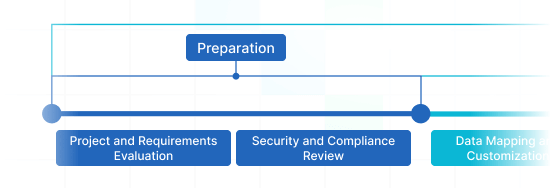
Data migration timeline: 1-2 weeks
Preparation
Project and Requirements Evaluation
Begin your migration by assessing Source records, operations, and apps. Evaluate data filtering and field matching to the Target. Set up a replication tactic, that consists of the timeline and support reps coaching.
Security and Compliance Review
Confirm data adheres to security standards. Configure permissions and access controls to secure the transfer.
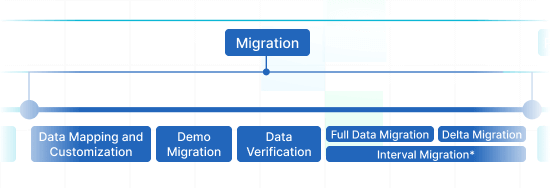
Migration
Data Mapping and Customization
Connect records fields between your Source and Target. Define pre-built custom settings from the list or discuss specific tailored adjustments for the data transfer.
Demo Migration
Carry out a test Demo to view how the migration service functions. Check outcomes and tweak settings as necessary.
Data Verification
Review all transferred data in the Target is precise, complete, and appropriately structured.
Full Data Migration
Transmit all required data, involving tickets, contacts, attachments, and linked information.
Delta Migration
Net any newest or updated data that changed during the Full data transition.
Interval Migration*
Data transmit can be interrupted and continued to fit your schedule, with zero interruption. You can stop up to five instances for a duration of five days each, coordinated by our sales crew during operating hours.
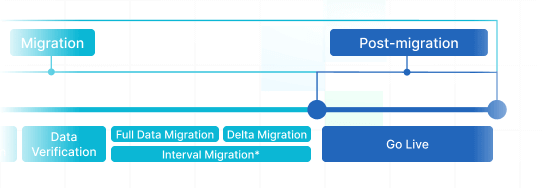
Post-Migration Phase
Go Live
Roll out the Target for all users. Decommission the Source if needed and store data backups.
What Data Can You Migrate from ConnectWise to CSV ?
With our Migration service, you can without difficulty migrate solid portions of varied records types to or from ConnectWise to CSV. Take a look the list of data types you can import implementing automation without extra assistance from tech support agents.
Do you require certain ConnectWise to CSV import or export inquirements?
Drop us a line for a nonstandard data import.
| ConnectWise objects | CSV objects | |
|---|---|---|
| Help desk | ||
| Members | Agents | |
| Companies | Companies | |
| Contacts | Contacts | |
| Tickets | Tickets | |
Why transmit with Help Desk Migration?
-
Without downtime
Shift records without interruption - ensure workflows on track and serve customers effectively. -
Enhanced efficiency
Seamlessly transfer data and map default and custom fields with the out-of-box Migration Wizard. -
Easy ticket retrieval
The Migration Wizard migrates tickets and all associated records, preserving the data structure unaffected on the Target. -
Always here for you
Our support agents is ready to support you by means of chat, email, or phone. -
Detailed migration strategy
Our migration experts will develop a clear plan for data import, securing a smooth process and protected data. -
Flexible customizations
Pick pre-designed options or request customization, and we'll confirm your data is preserved.
How Does ConnectWise to CSV Data Migration Go?
Our automated migration solution allows you export and import data in five simple actions. If you’re trying to organize a complex data structure, feel free to go with our adjusted way. We’re in place to meet your non-standard demands.
Connect platforms
Connect your source and target platforms
Map and match data
Specify how your data should be transferred
Test-drive
Start a Demo to access the replication tool and its results
Full Data Migration
Start or plan your data transition
Advance Your ConnectWise to CSV Migrate
with These Opportunities
Have a seamless data transmition experience that corresponds your company’s needs. The Help Desk Migration service brings features to enhance you to succeed your support service data movement in the automated and secure way.
-
Bypass attachments
Does your desired customer service tool enable compact data storage? Omit attachments, specially if your historical data lose no track of processes without them. The data import and export time will trim considerably.
-
Employ the attachment feature to Migrate inline images
Export the images inserted into tickets as attachments. The data import time might go up, but the images will stay along on a destination help desk system.
-
Demo with custom data: Pick 20 entities for import
Avoid any guessing. Ensure you know absolutely what the entities look like after you’ve migrated them. Our Demo with custom data empowers you choose 20 entities for a test export.
-
Transfer newest data first
Choose this feature to move your newest records in a chronological order, from newest to oldest. The capability is applicable only to Full Migration.
Don’t let data migration to mislead you from your tasks
Whether you’re migrating from ConnectWise to CSV, make use of our automated migration service. It will permit you to import or export all your records to a new help desk in just a couple of clicks. Thus, you can receive your import done quickly without putting important works on the shelf.

Data import and export with security standards
The Migration Wizard will includes measure for ensuring your data security during all phases of the migration process. We support maximum customer service data guard incorporating valid procedures, containing regulatory compliance, established server maintenance, and frequent security checks.

Go with the migration tool that customers love
Myriads of outstanding data migrations and a lot of awards and positive feedback can vouch for the excellence of Help Desk migration service. And our striving towards high standard does not hold there. Help Desk Migration team move ahead to advance our Migration Wizard and present new options to take care of we’re involving most of your data migration inquirements.







Apply comprehensive mapping to handle your most complex needs
Spare yourself the time-consuming chore of adding lacking record types or records during ConnectWise to CSV migration. Our app permits you map entities and modify your data import and export. This will leave unchanged the original structure of your records effortlessly on your part.

Pick a suitable time for data migration
Pick the most suitable time to run the help desk import process. On top of that, our Delta function will greenlight you to import the during migration updated entities after the historical records was migrated. Then, relax and greenlight our migration app take care of the rest.

Work with a support agents you can completely rely on
Are you having challenges with your Supported Platform data import? Help Desk Migration support agents is ready to help you with any obstacles. With lots of well-done data export/import experience, they can settle any hardship joined with your support service data migration or even arrange guidance throughout the complete migration.

Your Help Desk Data Migration is the Whole Way Through
Applying Help Desk Migration app, you’ll never have to worry about security of critical data. We regularly analyse all servers and make improvements, so that your business data is protected based on the latest requirements.
We apply a strict 2FA authentication policy
Our Migration Wizard takes advantage of 2FA authentication. Additionally, only users with admin rights can import your ConnectWise information. With these security features in place, you don't worry about data leak.
3-level data protection
Help Desk Migration offers 3 layers of business records protection. At the physical layer, we cover our hosting facilities from logical and physical breach. At the application level, we cease any unsanctioned entry to your records on our service. And, last but not least, on the network level, we secure our networks against cyber abuse.
We follow security regulations
Help Desk Migration service accomplishes to leading security fundamentals, ensuring utmost greatest security for your records. We correspond to HIPAA, CCPA, PCI DSS Level 1, GDPR, and other crucial data safety fundamentals. And our extensive compliance list is getting extended.
How much does ConnectWise to CSV data migration cost?
How much will you need to invest in the switch from ConnectWise to CSV? The cost will largely depend on the data volume you want to move, the complexity of your requirements, and the features you’ll select or custom work you’ll inquire. Start a Free Demo to test the Migration Wizard work and figure out how much your data switch will cost.
Feedback encourages us level up our service: Some words from our clients
The transition was made easy. The service was excellent, during all the steps of the transition we felt taken care of and monitored perfectly.
 Gauthier Escorbiac
 Supervisor of Customer Service at Thule Group
Use Help Desk Migration. This tool took the “painful” and “time-consuming” factors out of the data migration.
 Chantelle Viani
 Associate Publisher at Cosmos Magazine
Overall, I found the process to be very fast and effortless. I enjoyed working with the support team. The customer service reps I talked to were very helpful during the entire process.
 Nicola Mustone
 Woo Happiness Engineer at Automattic Inc.

The overall experience was excellent. I appreciated the constant follow-up that I received from the Account Managers at Help Desk Migration.
 Ionut Birzu
 Operations Manager at Lenovo
Before spending time on in-house options take a look at Help Desk Migration first. They can more than likely save you time and money in the long run.
 Steve Milligan
 Associate Director OIS - Networked Systems at Arkansas Tech University

Honestly, I was really pleasantly surprised by how responsive the company is. I was left to wonder, do you guys even sleep? I was able to get responses to virtually every question each time I was asking within a few hours, even considering the time zones.
 Paul McCabe
 The Vice President of Global Customer Experience in Roland corporation

It was a great experience using HDM. They were very prompt and thorough throughout the entire process, very willing to help ensure that the migration is done correctly, and answered all questions I had in a very timely manner.
 Andrew Cassano
 Customer Service Manager at J Skis and 4frnt Skis

Help Desk Migration was great with us. Being my first time dealing with a migration, they were very patient with me as I guided myself through the process of migrating data.
 Tom Doulos
 Director of Customer Experience at Endy

Migrating our Zendesk data with Help Desk Migration was an absolutely seamless experience. We had a very complex case because we had over 200 000 tickets, and HDM just made it much easier.
 Noga Edelstein
 Co-founder of UrbanYou
The transition was made easy. The service was excellent, during all the steps of the transition we felt taken care of and monitored perfectly.
Gauthier Escorbiac Supervisor of Customer Service at Thule Group
Use Help Desk Migration. This tool took the “painful” and “time-consuming” factors out of the data migration.
Chantelle Viani Associate Publisher at Cosmos Magazine
Overall, I found the process to be very fast and effortless. I enjoyed working with the support team. The customer service reps I talked to were very helpful during the entire process.
Nicola Mustone Woo Happiness Engineer at Automattic Inc.
The overall experience was excellent. I appreciated the constant follow-up that I received from the Account Managers at Help Desk Migration.
Ionut Birzu Operations Manager at Lenovo
Before spending time on in-house options take a look at Help Desk Migration first. They can more than likely save you time and money in the long run.
Steve Milligan Associate Director OIS - Networked Systems at Arkansas Tech University
Honestly, I was really pleasantly surprised by how responsive the company is. I was left to wonder, do you guys even sleep? I was able to get responses to virtually every question each time I was asking within a few hours, even considering the time zones.
Paul McCabe The Vice President of Global Customer Experience in Roland corporation
It was a great experience using HDM. They were very prompt and thorough throughout the entire process, very willing to help ensure that the migration is done correctly, and answered all questions I had in a very timely manner.
Andrew Cassano Customer Service Manager at J Skis and 4frnt Skis
Help Desk Migration was great with us. Being my first time dealing with a migration, they were very patient with me as I guided myself through the process of migrating data.
Tom Doulos Director of Customer Experience at Endy
Migrating our Zendesk data with Help Desk Migration was an absolutely seamless experience. We had a very complex case because we had over 200 000 tickets, and HDM just made it much easier.
Noga Edelstein Co-founder of UrbanYou
All-packed ConnectWise to CSV Import in Several Clicks
Migrate your business records from ConnectWise to CSV easily and with no disorganizing your ultimate goal of resolving your customers’ requests.
Get more useful guides about data import and export
Learn more about help desk platforms import and export and customer service improvement? Look at our blog.

Top GrooveHQ Alternatives: Best Help Desk Apps to Explore
So you are looking for a decent alternative to GrooveHQ but often find ...

Selecting Zendesk Alternative: How to Shape Your Customer Service
Why should you look for a Zendesk alternative? When working with a help ...

Top 16 Service Desk Software Solutions for Your IT Company Ranked
The internet is full of different tools and platforms to manage your business ...