| Data Entity | Thena Source Equivalent | Target Platform Outcome |
| Agents | Internal team members | Preserved profile history and ticket ownership. |
| Companies | Organization/account data | Linked historical interactions for B2B reporting. |
| Contacts | End-user/customer profiles | Full contact history and recognizable customer journeys. |
| Tickets | Native tickets & multi-channel DMs | Reconstructed records with status, priority, and SLAs. |
| Attachments | Files, logs, and screenshots | Files remain linked to the relevant historical ticket. |
Thena Migration Services
Move from Thena Without Breaking Your Support Operations
Migrate from Thena without risking data fragmentation or losing your conversational history. We re-architect your historical ticket migration to ensure every record is searchable and operationally intact.
G2 Leader
60k+ Migrations
SOC 2 Certified
Fastest migration
See how your real data moves before committing to anything.
No credit card required Fast setup
Interactive Migration Calculator
Adjust sliders to estimate your migration time and cost savings
2,000
1K
500K
10-15 mins
Estimated Migration Time
85%
Time Savings vs Alternatives
$3,777
Savings vs In-house Development
Estimates based on 60,000+ successful migrations. Actual results may vary.
Migrate from Thena to Any Platform
Automated Data Migration from Thena
Historical ticket migration runs entirely in the background. By mapping every note and attachment with precision, we ensure your production environment stays live and uninterrupted during the Thena data migration. Automation is key; the Migration Wizard extracts native Thena tickets, activity logs, and complex metadata without requiring manual oversight.
No Coding Required
Automated migration bypasses the inherent errors of manual scripting to deliver zero-downtime transitions. The Migration Wizard dynamically navigates API rate limit bottlenecks and throttling to maintain a consistent data flow at any volume. This shifts the technical burden away from your engineering team, removing the need for internal, custom-built migration tools.
No Downtime
Maintaining live support operations is critical when managing strict SLAs. By synchronizing data while your team stays active, we ensure that your CX workflows remain entirely undisrupted throughout the historical ticket transfer.
Full Data Transfer
Context is everything. By extracting your entire support ecosystem, including native tickets, user profiles, and attachments, your new help desk maintains a true single source of truth. This transition preserves every customer journey in its entirety, eliminating the risk of fragmented or orphaned records.
Scalable for Enterprise
Scale and security are non-negotiable. Help Desk Migration architecture manages high-volume transfers without risk of system lockout. We operate under SOC 2 Type II compliance, meaning every migration phase is backed by audited security practices. Beyond encryption (TLS 1.2/1.3 in transit and AES-256 at rest), we enforce strict GDPR/CCPA data-purging protocols post-validation. Access is restricted to secure OAuth protocols, eliminating the need to handle sensitive credentials or passwords.
What Data Can Be Migrated from Thena?
Migrating essential records from Thena requires a rigorous entity mapping process to ensure data integrity. By aligning native help desk tickets and multi-channel threads with your new schema, we guarantee that every record translates accurately. This structured approach preserves the relational context of your support history across all platforms.
Agents
By mapping internal agents via email, we ensure every record within the historical ticket transfer is attributed to the correct staff member. This maintains the integrity of your ownership logs and performance history from day one.
Companies
Protect your B2B relationships by maintaining the organizational context essential for account management. We migrate your existing hierarchies to ensure total visibility into client health, preventing data gaps during the Thena migration and keeping your account teams fully informed.
Contacts
Moving entire customer profiles ensures that every agent sees a complete interaction timeline immediately after you migrate from Thena. This proactive approach prevents the loss of historical context and preserves the depth of your existing customer relationships.
Tickets
Every native Thena ticket and multi-channel thread is converted into a structured conversational record, maintaining the original timeline and resolution history. This transition ensures that your status transitions and internal logs remain intact and fully searchable in the new destination platform.
Agents Migration
With Help Desk Migration, you can map users from Thena to agents in your target platform to control how tickets are assigned after migration. You can map multiple agents to a single one.
Deleted and inactive agents
You can reassign tickets from deleted or inactive agents to active staff on the target platform.
Account Fields:
- Name
- Domains
-
- String custom fields
- Boolean custom fields
- Dates custom fields
- Number custom fields
Contact Fields:
- Name
- Company
-
- String custom fields
- Boolean custom fields
- Dates custom fields
- Number custom fields
Ticket Fields:
- ID
- Subject
- Company
- Tags
- Status
- Staff
- Contact
-
- Comment author
- Comment privacy
- Comment publicity
- Comment body
- Comment attachments
- Created date
- Updated date
- Closed date
-
- String custom fields
- Boolean custom fields
- Dates custom fields
- Number custom fields

Verify your mapping logic with a Free Demo before the Full Migration.
Testing a sample of historical tickets, user profiles, and attachments is the only way to ensure total data continuity across your support ecosystem.
Interval migration
Schedule the data transfer to move during weekends or traffic lulls to minimize bandwidth impact.
What is Interval Migration?Customizations
The tech team can implement programmatic transformations, such as merging disparate tags or re-formatting strings during the move.
Request Migration CustomizationHow Thena Data Migration Works
Connect Thena
Link Thena and your target platform via API credentials. The Migration Wizard immediately validates endpoint availability and permissions to ensure a stable data path.
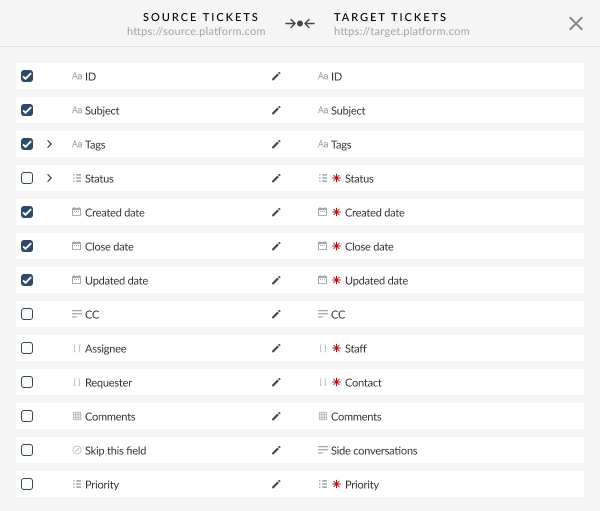
Map Data
Define your data logic by aligning native Thena fields, statuses, and custom tags with your new schema to maintain reporting integrity.
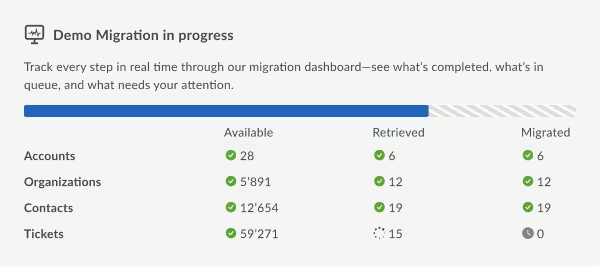
Run Demo Migration
Migrate a 20-ticket sample as a functional proof of concept. This ensures that conversational threads and attachments render correctly in the new environment.
Validate Results
Review the sample results to identify any field misalignments. Refine your mapping logic and re-run the Demo until the output meets your requirements.
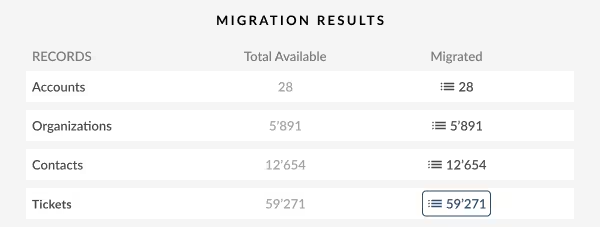
Full Migration
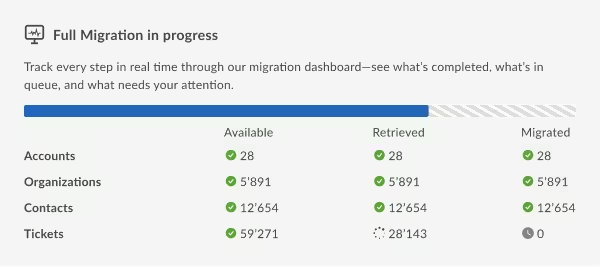
Execute the high-volume transfer with zero disruption to live support. Monitor real-time progress and download a reconciliation report to verify every record upon completion.
What Affects Thena Migration Complexity?
Data Volume
Large datasets require a more optimized migration strategy. Total record counts and the aggregate size of attachments directly determine the migration timeline and API consumption.
Custom Fields
Mapping complexity increases with the use of custom fields. If your environment relies on unique metadata or heavily modified Thena tags, the mapping phase will require a more granular review to maintain relational integrity.
Integrations
Enterprise environments rarely exist in isolation, requiring dedicated time to re-establish and test integrations like project management tools or alert systems. To prevent data conflicts or duplicated triggers, all active integrations must be disabled before the Full Migration begins.
Ensure Data Integrity During Migration
Dynamic API Validation:
We use official API endpoints to ensure all data conforms to the target platform’s specific validation logic.
Relational Integrity Mapping:
To prevent orphaned records, we maintain strict links between user profiles, support tickets, and associated attachments throughout the move.
Rate-Limit Management:
The Migration Wizard actively monitors rate limits, automatically adjusting transfer speeds to preempt "429 Too Many Requests" errors and prevent account lockouts.
Error Logging:
Every record moved is tracked. If an error occurs, it is logged for your review rather than halting the process.
Reconciliation Reports:
Post-migration, we provide a report that allows you to verify that the number of records sent from Thena matches the number received in the target platform.
Why Choose Help Desk Migration for Thena Migration
Help Desk Migration provides the specialized infrastructure and data-neutrality that native vendor import tools lack. When transitioning from Thena, technical accuracy requires an independent partner focused on architectural integrity rather than platform bias.
Start Your Thena Migration Today
Stop leaving your customer history behind in fragmented threads. Transform every Thena ticket into a structured, searchable asset in your new help desk today.
FAQ: Answers to common Thena migration concerns
Yes. By mapping Thena Companies to the corresponding Organization or Account entities in your target platform, we ensure that account managers retain complete visibility into client health and historical ticket volumes without data fragmentation.
Yes. During the mapping phase, you define the precise destination for all custom variables. We route AI-generated summaries, custom tags, and SLA timestamps into dedicated fields within your new architecture to maintain existing reporting structures and routing rules.
No. Your support team can continue resolving tickets throughout the primary transfer. A final Delta synchronization captures any new or updated records created during the move, ensuring zero downtime and preventing data gaps.
Duration is a function of record count, attachment volume, and target platform API constraints. While a standard 100,000-ticket migration typically concludes within 24 to 48 hours, a precise technical estimate is provided following your Demo Migration and endpoint validation.
Yes. Help Desk Migration supports routing data from multiple distinct source accounts into one unified target platform without risk of data collisions or record overwrites.
There are no hard limits; the Migration Wizard is engineered to handle millions of records. However, massive attachment payloads will increase the migration window. For high-volume enterprise projects, we optimize throughput based on your target platform’s specific API capacity.
To maintain a seamless transition, we strongly recommend disabling all outgoing notifications in the target help desk before the move. This prevents the target system from triggering automated "ticket created" emails during the high-volume ingestion phase.