OTRS Migration Guides
How to find database name in OTRS?
To set up a , you need to provide the name of the database where OTRS is stored. There are two ways for finding out the name of the database in OTRS.
Option #1: Go to the Admin tab > System Administration section and find SQL Box.
Run the query SELECT DATABASE()
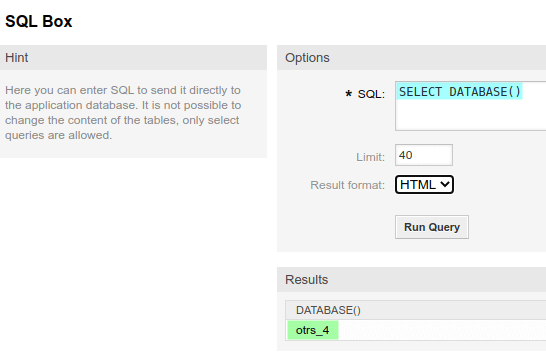
Option #2: In the catalog where OTRS is installed (usually it’s /opt/otrs) find the Kernel subfolder. It contains configuration files. In particular, Config.pm contains the parameters to be used to connect to the database:
  # ---------------------------------------------------- #

# database settings                                    #

# ---------------------------------------------------- #

# The database host

$Self->{'DatabaseHost'} = 'dbs.internal.relokia.com';
# The database name
$Self->{'Database'} = "otrs_5";
# The database user
$Self->{'DatabaseUser'} = "otrs";
# The password of database user. You also can use bin/otrs. Console.pl Maint::Database::PasswordCrypt
# for crypted passwords
$Self->{'DatabasePw'} = '4EngxZVE9LyuUhy3';
# The database DSN for MySQL ==> more: "perldoc DBD::mysql"
$Self->{'DatabaseDSN'} = "DBI:mysql:database=$Self->{Database};host=$Self->{DatabaseHost}";
Looking for more data migration details?