Help Scout Migration Services: Automated, Secure,
and Custom-Tailored
Move to Help Scout without data loss, downtime, or disruption. Whether you’re switching from another help desk, consolidating multiple systems, or just starting fresh, our Help Scout data migration services make the process smooth, secure, and fully transparent.
Available Fields and Records for Help Scout Data Transfer
Migrating to Help Scout means bringing all your important support data with you. Here’s what our Help Scout migration service supports:
HELP DESK
Agents Migration
With Help Desk Migration, you can map agents from your source platform to users in Help Scout and vice versa to control how tickets are assigned after migration. You can map multiple agents to a single one.
Deleted and inactive agents
You can reassign tickets from deleted or inactive agents to active admins on the target platform.
Customer Fields:
- Name
- Phone
- Company
- Job title
- Notes
- Websites
- Phones
-
- String custom fields
- Boolean custom fields
- Dates custom fields
- Number custom fields
Company Fields:
- Name
Conversation Fields:
- Subject
- Tags
- Status
- Type
- Assign
- Contact
-
- Comment author
- Comment privacy
- Comment publicity
- Comment body
- Comment attachments
- Comment created date
- Created date
- Updated date
- Closed date
- Mailbox
- CC
-
- String custom fields
- Boolean custom fields
- Dates custom fields
- Number custom fields
- Select custom fields
- Multi-select custom fields
KNOWLEDGE BASE
Collection Fields:
- Name
- Description
- Position
Category Fields:
- Name
- Position
- Category
Article Fields:
- Title
- Body
- Author
- Folder
- Status
- Attachments
CUSTOM OBJECTS
Custom objects migration
Move non-standard data—like assets, warranties, and more—into Help Scout with full structure and relationships intact.
Migration tool
Rely on our smart, reliable migration tool to handle complex Help Scout custom object transfers with ease.
Outsource migration
Let our experts handle the heavy lifting—perfect for complex or large-scale Help Scout migrations.
Buy migration
Get one-time, done-for-you Help Scout custom object migration—no subscriptions, no recurring fees.
Enterprise-Grade Support
Custom object migration backed by professional services, data validation, and expert consulting.
Success Story
We Helped Rood Fluweel Keep All Historical Data as They Switched to a New Help Desk
Intercom → Help Scout | Computer software
Challenge:
The client was looking for a solution to quickly migrate a significant amount of data from Intercom to Help Scout.
Solution:
Use Help Desk Migration’s automated service to transfer tickets, contacts, and full historical data from Intercom to Help Scout, bypassing the limitations of manual exports.
Result:
The client opted for automated data migration and transferred all the necessary historical data to Help Scout.
"The migration was without any hiccups, which allowed us to switch much faster than anticipated."
The migration was done without hiccups, which allowed us to switch much faster than anticipated. I was also very happy to find out we got all our old conversations as they used the API which allowed them to go back in the past much longer than the front-end export features which were pretty limited.
The existing software was increasing its prices and changing features all the time while they are moving "upmarket". While they grandfathered the existing pricing, I got fewer features over the past few years. We looked at the market for almost 6 months but never started migrating because we could lose all historical data.
As the manual export of Intercom is very limited in its data set and only limited in time (two years) we were happy to learn that we would now be able to retain all old conversations.
I wanted to preserve all old conversations as many of them are "long-running". It would have been a massive work to keep two software active during a few months.
Keep your data and save a massive amount of time.
Plan on where new data will arrive while the migration is in progress. Talk with the awesome helpdesk [customer support at Help Desk Migration]. They seem to be very well informed (from process perspective).

Help Scout Data Migration: Import, Export, CSV, and Database
Looking to move your tickets, contacts, and agents into Help Scout without downtime or information loss? Our automated Help Scout data import service does the heavy lifting. Just connect your source and Help Scout accounts, set up field mappings, and let the migration tool handle the data transfer.
If you’re planning to leave Help Scout or simply want to back up your support data, our Help Scout data export service has you covered—everything is extracted cleanly and accurately. Tickets, contacts, organizations, attachments, and user details are properly linked and formatted for seamless import into other help desk platforms or archival.
Running a self-hosted help desk or working with limited API access? No worries. Upload your SQL database dump, and the Help Desk Migration Wizard will map your data to Help Scout’s structure, preserving relationships, message history, and custom fields.
Working from spreadsheets or your data live in basic CSV exports? Our CSV migration option is ideal for bringing data from unsupported tools, simple help desks, or internal databases into Help Scout. Prepare your CSVs with the sample templates we provide, and the Help Desk Migration Wizard will handle the rest.
Help Scout Import Wrapped Up Neatly
Secure and Accurate Data Import
When it comes to Help Scout import, data security and accuracy are top priorities. It encrypts every piece of data you transfer, ensuring that your sensitive customer information is protected from start to finish. Conversations, customers, attachments, agents, tags — everything else lands where it should.
Flexible Migration Options
We support multiple migration methods to match your setup and scale: direct API connections for real-time migrations, database dump imports for self-hosted or legacy systems, and CSV file transfers for small datasets or unsupported platforms. With flexible options and expert support, you can transfer to Help Scout with confidence.
Success Story
Merging Help Scout Instances for Stacking the Bricks
Help Scout → Help Scout | Computer Software
Challenge:
The client had two separate Help Scout accounts and was frustrated by logging out of one business's Help Scout account to log into another.
Solution:
Customization to assign all Tickets to one User; Automatic data migration.
Result:
The migration process took only three hours. Once the data was imported, the client started working in a single environment.
"...one of the best parts of the Help Desk Migration process is the ability to run a small "sample" migration to see how it works."
My partner Amy and I both come from backgrounds in software. We've both bootstrapped our own businesses separately after transitioning away from full-time employment and consulting. Amy has designed and launched multiple SaaS products (Freckle, Sweep), I started and ran one of the world’s first and longest running coworking spaces called Indy Hall.
Together we run stackingthebricks.com, a website, and podcast where we focus on how to build a business without needing any outside funding. Our flagship course, 30x500, is our battle-tested and completely systematic approach to launching a product that will have customers on day one. We also teach smaller courses and workshops, publish ebooks, and run conferences for our community of bootstrappers.
Having excellent customer support is something we take very seriously in our respective businesses, and the venture we have together is no exception!
Once Help Scout told us that they couldn't move our Stacking the Bricks mailboxes into a different, shared account, I expected us to be totally out of luck. Thankfully, Help Scout support recommended Help Desk Migration!
It took me a couple of minutes to set up the first demo migration. The field mapping was a little confusing at first, but one of the best parts of the Help Desk Migration process is the ability to run a small "sample" migration to see how it works. I did that once (it only took a few minutes) and instantly understood how it worked and trusted that this could be a reliable way to move our entire inbox (over 7000+ tickets).
I realized that there would be a problem in that we were moving between two Help Scout accounts, and the migration service was designed to map agents who have the same email address automatically. Unfortunately, Help Scout forces agents to have unique email addresses even across accounts, so this was impossible. We really wanted to try to preserve as much of our ticket history as possible - a lot of our support happens with students over longer periods of time, so we reference that history a lot.
Thankfully, the team at Help Desk Migration was able to offer simple customization of their migration tool that allowed us to migrate the way we wanted.
Most impressively, it worked as expected on the first try! I've done a lot of data migration, and that almost never happens.
The support team worked quickly, communicated clearly, and within a couple of days, we had our entire account contents moved over.
Hopefully, we don't have to migrate again, but if we do (or know anybody who does) we will absolutely be recommending Help Desk Migration!
HDM will help you seamlessly move your tickets and customer data< (they do knowledge bases too, though we didn't use that part). Leave that part to them. Their migration tools work great!
But I realized that we have various settings, including a bunch of saved responses, that won't get migrated automatically. It's easy enough to set them up in the new account, but don't forget to take screenshots of your settings and other parts of your original source helpdesk software before you close it!
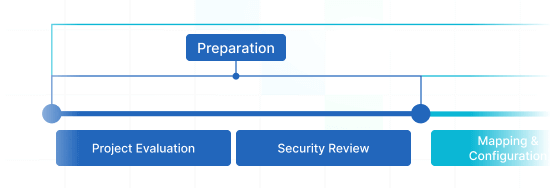
Help Scout Data Migration Timeline: 1–2 Weeks
Preparation
Step 1: Project Evaluation
Access your current system, define migration goals, and figure out your special requirements.
Step 2: Security Review
Ensure the migration process meets GDPR, CCPA, and internal data protection policies.
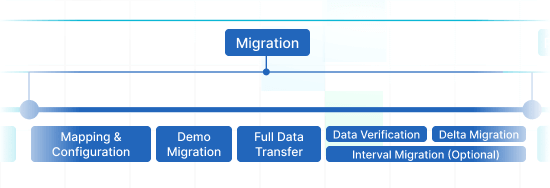
Migration
Step 3: Mapping & Configuration
Customize how your data moves into Help Scout. It includes support for custom mapping and filters.
Step 4: Demo Migration
Run a free preview to see how tickets, contacts, and attachments will appear in Help Scout. Make adjustments before launching the Full Migration.
Step 5: Full Data Transfer
Migrate all selected data with minimal disruption to your ongoing operations.
Step 6: Data Verification
Review and validate the migrated data for integrity and completeness.
Step 7: Delta Migration
Capture and import any changes or new data created after the Full migration.
Interval Migration (Optional)
Pause and resume migration in up to five segments, each lasting up to five business days. A great solution for avoiding peak operational hours.
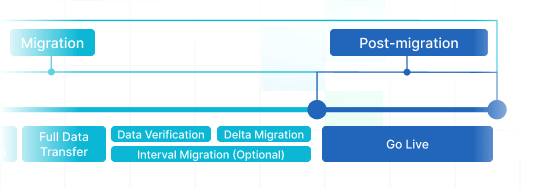
Post-Migration
Step 8: Go Live
Decommission legacy systems and start using Help Scout with your historical data available and searchable.
Help Scout Migration Pricing That Makes Sense
You only pay for what you migrate. No subscriptions or hidden costs — just a one-time fee based on the volume of data and selected features. Plus, the more data you move, the lower the per-record cost.
Scalable pricing makes Help Desk Migration a cost-effective choice for teams of all sizes.
Advanced Migration Options for Help Scout
Add tags to newly migrated tickets
Automatically add custom tags to all imported tickets. This will help your team quickly identify legacy tickets, group data for reporting, or workflow purposes in Help Scout.
Migrate the newest records first
Prioritize importing recent tickets and conversations. Your support agents can start working on the most current requests immediately while older data continues migrating.
Skip attachments
Reduce migration time and storage by excluding attachments. Ideal for test runs or when attachments are stored elsewhere.
Migrate side conversations
If you’re moving from Zendesk, which supports internal-only conversations, we’ll migrate that data so your full support history is preserved.
Migrate call recordings
Transfer all voice call logs and recordings linked to tickets. That’s a must-have for teams relying on phone support or voice ticketing.
Migrate inline images as attachments
Inline images sometimes don’t display well across systems. This option extracts those images and converts them into standard downloadable attachments in Help Scout.
Update cross-links between articles
Every help desk platform has its own unique URL structure. Let Help Desk Migration automatically adjust your internal links to match the new platform’s format—fast, accurate, and without the manual hassle.
Use Custom Demo
Request a tailored demo migration to preview how your actual data will appear in Help Scout. A custom demo helps validate field mappings, formatting, and ticket structure before committing to a Full Migration.
Built-In Features for Seamless Help Scout Migration
Delta Migration
Keep your data in sync by transferring any new or updated records after your Full Migration. Perfect for a seamless, uninterrupted switch.
Interval Migration
Split your migration into chunks with pauses up to 5 times and 5 business days each. Great for managing workload and avoiding downtime.
Customizations
Tailor your migration to fit your unique setup: field mappings, data filters, and more. Complex or legacy system? No problem.
Advanced filtering options
Import only what you need. Filter your Help Scout data by ticket status, date range, tags, or ticket type for a leaner, faster, and more targeted migration.
Why Help Desk Migration for Help Scout?
Migrating your support data can feel a lot like moving to a new home — you want to bring everything with you, from the essentials to the overlooked items, without added stress. Help Desk Migration makes that process smooth and reliable.

Ready to Switch to Help Scout without
Losing a Single Ticket?
Use Help Desk Migration to transfer your entire customer service history quickly, securely, and effortlessly.